Introduction
Thank you for choosing the Sephia A11 Portable Bluetooth Speaker. This manual provides essential information for setting up, operating, and maintaining your speaker to ensure optimal performance and longevity. The Sephia A11 offers versatile connectivity options, including Bluetooth, USB, Micro SD, and AUX input, delivering clear and powerful audio in a compact design.
Qu'y a-t-il dans la boîte
- Sephia A11 Bluetooth Speaker
- Câble de chargement
- Câble Aux
- Manuel de l'utilisateur (ce document)

Image: The Sephia A11 Portable Bluetooth Speaker, showcasing son design noir élégant et sa calandre avant.
Produit terminéview
Familiarize yourself with the buttons and ports on your Sephia A11 speaker.
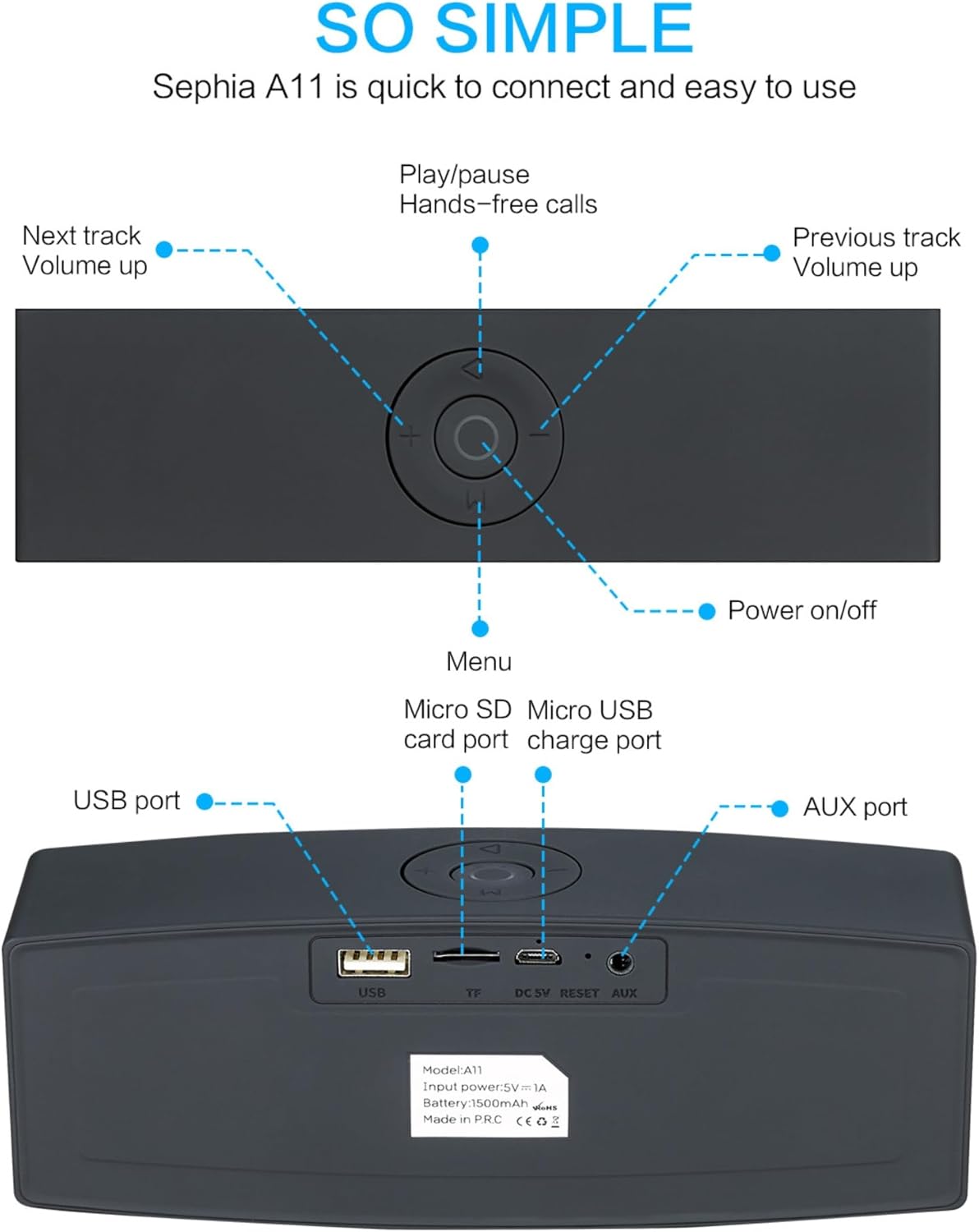
Image: Detailed diagram illustrating the top control panel and rear input/output ports of the Sephia A11 speaker.
Top Controls:
- Bouton marche / arrêt: Appuyez longuement pour allumer ou éteindre le haut-parleur.
- Bouton Lecture/Pause : Press to play or pause audio. Also used for hands-free calls (answer/end).
- Piste précédente / Bouton de diminution du volume (-) : Appuyez brièvement pour revenir au morceau précédent, appuyez longuement pour diminuer le volume.
- Piste suivante / Bouton d'augmentation du volume (+) : Appuyez brièvement pour passer au morceau suivant, appuyez longuement pour augmenter le volume.
- Bouton Menu (M) : Press to switch between input modes (Bluetooth, USB, Micro SD, AUX).
Ports arrière :
- Port USB : Pour lire des fichiers audio depuis une clé USB ou pour charger des appareils externes.
- Emplacement pour carte micro SD (TF) : Pour lire des fichiers audio depuis une carte Micro SD.
- Micro USB Charge Port (DC 5V): Pour charger le haut-parleur.
- Bouton de réinitialisation : Small pinhole for resetting the device if needed.
- Port AUX: Pour une connexion audio filaire à l'aide du câble AUX 3.5 mm fourni.
Installation
1. Chargement du haut-parleur
- Connect the supplied charging cable to the Micro USB Charge Port (DC 5V) on the rear of the speaker.
- Connectez l'autre extrémité du câble de chargement à un adaptateur secteur USB (non inclus) ou au port USB d'un ordinateur.
- The charging indicator light will illuminate. Once fully charged, the light will change or turn off (refer to specific model behavior if indicated by LED). A full charge provides up to 8 hours of playtime.
2. Mise sous/hors tension
- To power on, press and hold the Power On/Off button on the top panel until you hear an audible prompt or see an indicator light.
- To power off, press and hold the Power On/Off button again until the speaker shuts down.
3. Couplage Bluetooth
- Ensure the speaker is powered on and in Bluetooth mode. If not, press the 'M' (Menu) button to switch to Bluetooth mode. The speaker will enter pairing mode, indicated by a flashing LED light and an audible prompt.
- Sur votre appareil mobile (smartphone, tablette, ordinateur portable), activez le Bluetooth et recherchez les appareils disponibles.
- Select "Sephia A11" from the list of found devices.
- Once successfully paired, the speaker will provide an audible confirmation, and the LED indicator will stop flashing.
- L'enceinte a une portée Bluetooth allant jusqu'à 10 mètres (33 pieds).
4. Wired Connections (AUX, USB, Micro SD)
- Entrée AUX: Connect one end of the supplied 3.5mm AUX cable to the AUX port on the speaker and the other end to the audio output of your device (e.g., MP3 player, computer). The speaker will automatically switch to AUX mode or can be selected using the 'M' button.
- Lecture USB: Insérez une clé USB contenant de l'audio files into the USB port. The speaker will automatically detect and play the audio files.
- Lecture de carte micro SD : Insérez une carte Micro SD contenant de l'audio files into the Micro SD (TF) slot. The speaker will automatically detect and play the audio files.
Utilisation du haut-parleur
Lecture audio
- Lecture/Pause : Press the Play/Pause button to toggle between playing and pausing audio.
- Réglage du volume : Appuyez longuement sur le bouton « + » pour augmenter le volume, et appuyez longuement sur le bouton « - » pour diminuer le volume.
- Piste suivante / précédente: Short press the '+' button for the next track, and short press the '-' button for the previous track.

Image: A hand demonstrating how to interact with the top control buttons of the Sephia A11 speaker.
Appels mains libres
- When a call comes in while connected via Bluetooth, press the Play/Pause button to answer the call.
- Appuyez de nouveau sur le bouton Lecture/Pause pour mettre fin à l'appel.
- Le microphone intégré permet une communication claire.
Entretien
- Nettoyage: Utilisez un chiffon doux et sec pour nettoyer la surface du haut-parleur. N'utilisez pas de nettoyants abrasifs, d'alcool ni de solvants chimiques, car ils pourraient endommager la finition.
- Stockage: Rangez l'enceinte dans un endroit frais et sec, à l'abri de la lumière directe du soleil et des températures extrêmes.
- Entretien de la batterie: Pour prolonger la durée de vie de la batterie, évitez de décharger complètement l'enceinte fréquemment. Rechargez-la régulièrement, même si vous ne l'utilisez pas pendant une période prolongée.
- Résistance à l'eau : Cette enceinte n'est pas étanche. Évitez tout contact avec l'eau ou une humidité excessive.
Dépannage
| Problème | Cause possible | Solution |
|---|---|---|
| Le haut-parleur ne s'allume pas. | Batterie faible ; bouton d’alimentation non maintenu enfoncé suffisamment longtemps. | Chargez complètement l'enceinte. Appuyez sur le bouton Marche/Arrêt et maintenez-le enfoncé pendant 3 à 5 secondes. |
| Aucun son provenant du haut-parleur. | Volume trop faible ; mode d’entrée incorrect ; appareil mal connecté. | Increase speaker and device volume. Press 'M' button to select correct input mode. Re-pair Bluetooth or re-connect AUX/USB/SD. |
| L'appairage Bluetooth échoue. | Enceinte non en mode appariement ; appareil trop éloigné ; interférences. | Ensure speaker is in Bluetooth pairing mode (flashing LED). Move speaker closer to device. Turn off other Bluetooth devices. Try forgetting "Sephia A11" on your device and re-pairing. |
| Mauvaise qualité sonore. | Low battery; Device volume too high (distortion); Interference. | Charge the speaker. Adjust volume on both speaker and device. Move away from sources of interference. |
Caractéristiques
| Nom du modèle | A11 |
| Dimensions | 18 x 7 x 5 cm |
| Poids | 426 g |
| Technologie de connectivité | Bluetooth, USB, Micro SD, AUX |
| Puissance de sortie du haut-parleur | 6 watts (2 haut-parleurs de 3 W) |
| Réponse en fréquence | 20 Hz - 20 kHz |
| Type de batterie | Lithium-ion |
| Récréation | Jusqu'à 8 XNUMX heures |
| Portée Bluetooth | Jusqu'à 10 mètres (33 pieds) |
| Caractéristiques spéciales | Bass Boost, Portable, Hi-Res Audio, Built-in Microphone, Shockproof |

Image: Visual representation of the Sephia A11 speaker's dimensions.
Garantie et assistance
The Sephia A11 Portable Bluetooth Speaker comes with a Garantie de 12 mois La garantie couvre les défauts de fabrication à compter de la date d'achat. Veuillez conserver votre preuve d'achat pour toute réclamation au titre de la garantie.
For technical support, warranty inquiries, or further assistance, please refer to the contact information provided with your purchase or visit the official Sephia website.


