1. Introduction
This user manual provides comprehensive instructions for the Comix CS-3302 12-Digit Desktop Calculator. Please read this manual thoroughly before using the calculator to ensure proper operation and to maximize its lifespan. This calculator is designed for general office and school use, featuring a large LCD display, dual power source, and various calculation functions.
2. Consignes de sécurité
- Do not expose the calculator to extreme temperatures, direct sunlight, or high humidity.
- Évitez de faire tomber la calculatrice ou de la soumettre à des chocs violents.
- Do not attempt to disassemble or modify the calculator. This will void the warranty.
- Use a soft, dry cloth for cleaning. Do not use liquid cleaners or abrasive materials.
- Tenir hors de portée des jeunes enfants.
3. Produit terminéview

Figure 3.1 : Devant view of the Comix CS-3302 Desktop Calculator, showing the large LCD display and full keypad.
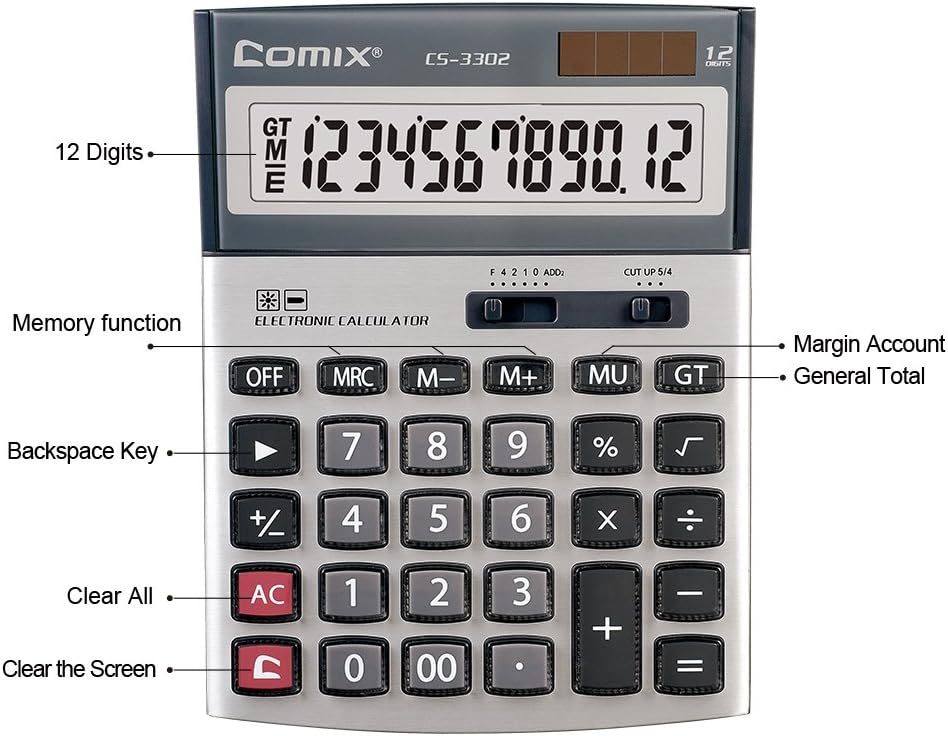
Figure 3.2 : Key functions and display features of the Comix CS-3302 Calculator, including 12 digits display, memory functions, and clear keys.

Figure 3.3 : Dimensions of the Comix CS-3302 Calculator, showing its compact and ergonomic design.

Figure 3.4 : Incliné view of the Comix CS-3302 Calculator, highlighting its sleek profile et la disposition des touches.

Figure 3.5 : Côté profile of the Comix CS-3302 Calculator, showing its slim design.

Figure 3.6 : Retail packaging of the Comix CS-3302 Calculator, highlighting key features like 12 digits, dual power, and acrylic keys.
4. Installation
4.1 Source d'alimentation
The Comix CS-3302 calculator operates on a dual power system: solar and battery. The solar panel provides power in well-lit environments, while a single AA battery (not included) serves as an auxiliary power source for low-light conditions or when solar power is insufficient.
- Installation de la batterie : Locate the battery compartment on the back of the calculator. Open the cover and insert one AA battery, ensuring correct polarity (+/-). Close the battery compartment cover securely.
- Mise sous tension initiale : The calculator should power on automatically when sufficient light is available or with the battery installed. If not, press the MARCHE/CA bouton.
5. Mode d'emploi
5.1 Opérations de base
- Ajout (+): Saisissez le premier chiffre, appuyez sur +, saisissez le deuxième numéro, puis appuyez sur =.
- Soustraction (-): Saisissez le premier chiffre, appuyez sur -, saisissez le deuxième numéro, puis appuyez sur =.
- Multiplication (×) : Saisissez le premier chiffre, appuyez sur ×, saisissez le deuxième numéro, puis appuyez sur =.
- Division (÷) : Saisissez le premier chiffre, appuyez sur ÷, saisissez le deuxième numéro, puis appuyez sur =.
- Pourcentagetage (%) : Saisissez le numéro, appuyez sur × (ou ÷), enter the percentage value, then press %. Par exempleampPour calculer 10 % de 200, entrez 200. × 10 %.
- Racine carrée (√) : Enter the number, then press √.
5.2 Fonctions spéciales
- OFF: Éteint la calculatrice.
- AC (tout est clair) : Efface toutes les données et la mémoire, réinitialisant la calculatrice à son état initial.
- C (Entrée claire) : Clears the last entered number or the current display value without affecting previous calculations or memory.
- Retour arrière (►) : Supprime le dernier chiffre saisi.
- M+ (Mémoire Plus) : Ajoute la valeur affichée à la mémoire.
- M- (Mémoire Moins): Soustrait la valeur affichée de la mémoire.
- MRC (rappel de mémoire/effacement) : Appuyez une fois pour rappeler la valeur en mémoire. Appuyez deux fois pour effacer la mémoire.
- MU (Mark Up / Margin Account): Used for profit margin calculations. Enter cost, press MU, enter selling price, then press = to get the profit margin.
- GT (Grand Total) : Accumulates the results of all calculations. Pressing GT displays the grand total.
- +/- (Changement de signe) : Modifie le signe du nombre affiché (positif en négatif, ou négatif en positif).
5.3 Decimal and Rounding Settings
The calculator features two slide switches at the top for controlling decimal places and rounding:
- Decimal Selector (F 4 2 1 0 ADD2):
- F (Floating Decimal): Displays all available decimal places.
- 4, 2, 1, 0 : Sets the number of decimal places to 4, 2, 1, or 0 respectively.
- ADD2 (Add Mode): Automatically adds two decimal places to all results, useful for currency calculations.
- Rounding Selector (CUT UP 5/4):
- CUT (Cut Off): Truncates the number, discarding all digits beyond the set decimal places.
- UP (Round Up): Rounds up the last digit if there are any non-zero digits beyond the set decimal places.
- 5/4 (Round Half Up): Rounds up if the first discarded digit is 5 or greater, otherwise rounds down.
6. Entretien
- Nettoyage: Wipe the calculator surface with a soft, dry cloth. For stubborn dirt, slightly dampen the cloth with water, but ensure no liquid enters the calculator. Do not use chemical cleaners.
- Stockage: Lorsqu'elle n'est pas utilisée pendant une période prolongée, rangez la calculatrice dans un endroit frais et sec, à l'abri de la lumière directe du soleil et des températures extrêmes.
- Remplacement de la batterie : If the display becomes dim or unresponsive in low light, replace the AA battery. Ensure the calculator is off before replacing the battery.
7. Dépannage
| Problème | Cause possible | Solution |
|---|---|---|
| L'écran est vide ou sombre. | Lumière insuffisante pour l'énergie solaire, ou batterie faible. | Move to a brighter area or replace the AA battery. |
| Résultats de calcul incorrects. | Incorrect input, incorrect decimal/rounding settings, or memory interference. | Presse AC to clear all and restart. Check decimal and rounding switch positions. Ensure correct key presses. |
| Les touches ne répondent pas. | Calculator frozen or physical damage. | Essayez d'appuyer sur DÉSACTIVÉ alors MARCHE/CA. If problem persists, remove and reinsert battery. If still unresponsive, contact support. |
8. Spécifications
| Marque | Bandes dessinées |
| Numéro de modèle | CS-3302 (P/N: 11821063) |
| Afficher | Écran LCD à 12 chiffres |
| Source d'énergie | Dual Power (Solar & 1x AA Battery - not included) |
| Matériel | Acrylique, métal |
| Dimensions (L x l x H) | Environ 23.6 x 15.7 x 4.3 cm (9.3 x 6.2 x 1.7 pouces) |
| Poids | Environ 322 0.71 g (XNUMX lb) |
| Température de fonctionnement | -25 ℃ à +60 ℃ (-13 ℉ à +140 ℉) |
| Code UPC | 842064102524 |
9. Garantie et assistance
Comix products are designed for quality and durability. This product comes with a Garantie de 3 ans à compter de la date d'achat, couvrant les défauts de matériaux et de fabrication dans des conditions normales d'utilisation.
For warranty claims, technical support, or any inquiries regarding your Comix CS-3302 calculator, please contact Comix customer service through their official website or the retailer where the product was purchased. Please have your proof of purchase and the product model number ready when contacting support.
For more information, visit the official Comix website: www.comix.com


