1. Produit terminéview
The Snap-On 18V 1/2" Drive Green MonsterLithium Impact Wrench Kit (Part #CT8850GK2) is a high-performance cordless tool designed for professional use in automotive, industrial, and general maintenance applications. This kit provides powerful fastening and loosening capabilities for various bolts and nuts, offering portability and efficiency with its MonsterLithium battery technology.
The kit includes the impact wrench, two 5 Ah MonsterLithium batteries, a dual-charger, and this instruction manual, ensuring you have everything needed for immediate operation.
2. Consignes de sécurité
Respectez toujours les consignes de sécurité de base lorsque vous utilisez des outils électriques afin de réduire les risques d'incendie, d'électrocution et de blessures.
- Lisez toutes les instructions: Familiarisez-vous avec le fonctionnement de l'outil et les consignes de sécurité avant utilisation.
- Portez une protection pour les yeux : Portez toujours des lunettes de sécurité ou des lunettes de protection homologuées ANSI avec protections latérales.
- Portez des protections auditives : Une exposition prolongée au bruit des outils électriques peut endommager l'ouïe.
- Gardez la zone de travail propre et bien éclairée : Les zones encombrées ou sombres favorisent les accidents.
- Ne pas utiliser en atmosphère explosive : N’utilisez pas d’outils électriques en présence de liquides, de gaz ou de poussières inflammables.
- Fixer la pièce à usiner : Toujours clamp ou fixer la pièce d'une autre manière afin d'éviter tout mouvement pendant l'opération.
- Use correct tool for the job: N’essayez pas de faire le travail d’un outil robuste avec un petit outil ou un accessoire.
- Entretenir les outils avec soin : Pour une performance optimale et une sécurité accrue, veillez à ce que vos outils de coupe soient affûtés et propres. Suivez les instructions pour la lubrification et le changement des accessoires.
- Sécurité des batteries : Use only specified chargers and batteries. Do not short-circuit, incinerate, or expose batteries to high temperatures.
3. Contenu du colis
Your Snap-On 18V 1/2" Drive Green MonsterLithium Impact Wrench Kit (Part #CT8850GK2) should include the following items:
- 1 x Snap-On 18V 1/2" Drive MonsterLithium Impact Wrench
- 2 x Snap-On 5 Ah MonsterLithium Batteries
- 1 x Snap-On Dual-Charger
- 1 x Manuel d'instructions
- 1 x sac de transport
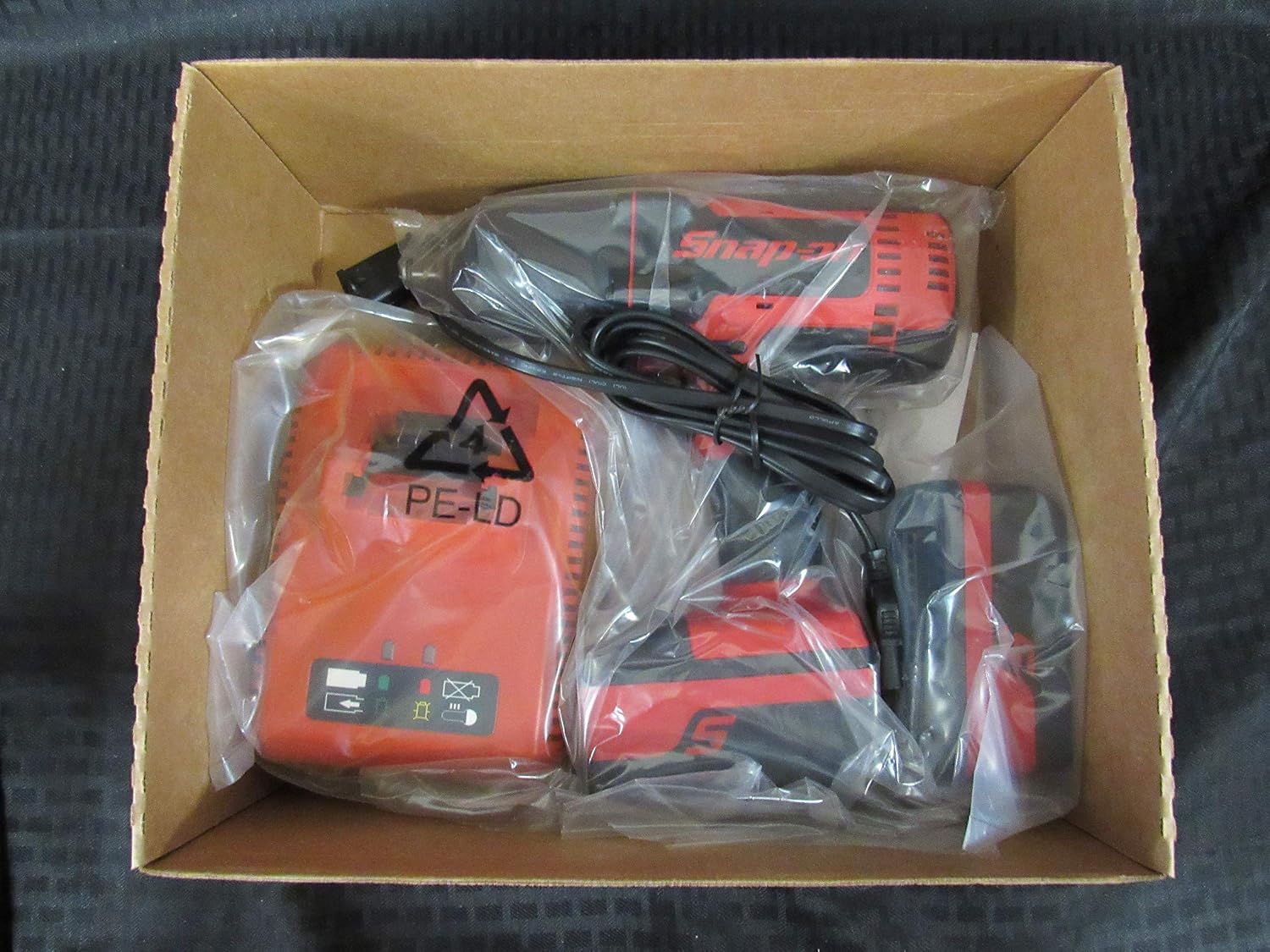
Image 1: The Snap-On 18V 1/2" Drive Green MonsterLithium Impact Wrench Kit contents, including the impact wrench, batteries, and charger, neatly packed in the box.

Image 2: The black Snap-On branded carry bag, designed for convenient storage and transport of the impact wrench kit components.
4. Installation
4.1 Chargement des piles
- Connect the dual-charger to a standard electrical outlet.
- Slide the 5 Ah MonsterLithium batteries into the charging slots on the dual-charger. Ensure they are fully seated.
- Les voyants du chargeur indiquent l'état de charge. Consultez le manuel du chargeur pour connaître la signification détaillée des voyants.
- Une fois les batteries complètement chargées, retirez-les du chargeur.
4.2 Installing/Removing Batteries
- Pour installer : Align the battery with the battery port on the impact wrench and slide it in until it clicks securely into place.
- Pour supprimer : Press the battery release button(s) on the side of the battery and slide the battery out of the tool.
4.3 Fixation/Retrait des douilles
- Attacher: Push the desired 1/2" drive socket onto the square drive anvil of the impact wrench until it locks securely.
- Pour supprimer : Pull the socket firmly off the anvil. Some sockets may require a slight twist while pulling.
5. Mode d'emploi
5.1 Mise sous/hors tension
The impact wrench is activated by pressing the variable speed trigger. The tool will turn off when the trigger is released.
5.2 Forward/Reverse Selection
A forward/reverse selector switch is located above the trigger. Push the switch to the left for forward (tightening) rotation and to the right for reverse (loosening) rotation. Ensure the switch is in the center position for trigger lock-off when not in use or when changing accessories.
5.3 Operating the Impact Wrench
- Sélectionnez la douille appropriée pour la fixation.
- Assurez-vous que la batterie est complètement chargée et correctement installée.
- Réglez le sélecteur avant/arrière sur la direction souhaitée.
- Placez fermement la douille sur la fixation.
- Press the variable speed trigger to begin operation. The speed is controlled by the amount of trigger depression.
- Apply steady pressure to the tool to prevent it from jumping off the fastener.
- For tightening, stop when the fastener is snug or reaches the desired torque. For loosening, continue until the fastener is free.
6. Maintenance et entretien
6.1 Nettoyage
- Nettoyez régulièrement les orifices de ventilation de l'outil pour éviter toute surchauffe.
- Utilisez un chiffon doux et sec.amp Utilisez un chiffon pour essuyer l'extérieur de l'outil. N'utilisez pas de produits chimiques agressifs ni de nettoyants abrasifs.
- Keep the drive anvil clean and free of debris.
6.2 Stockage
- Store the tool and batteries in a cool, dry place, away from direct sunlight and extreme temperatures.
- Ensure the forward/reverse selector is in the center (locked) position before storing.
- Store batteries with a partial charge (around 50%) if storing for extended periods to prolong battery life.
- Utilize the provided carry bag for organized and protected storage.
6.3 Entretien de la batterie
- Do not allow batteries to fully discharge before recharging.
- Évitez d'exposer les piles à l'eau ou à une chaleur extrême.
- If a battery is damaged or no longer holds a charge, dispose of it properly according to local regulations.
7. Dépannage
| Problème | Cause possible | Solution |
|---|---|---|
| L'outil ne démarre pas | Batterie non chargée Batterie mal installée Interrupteur marche avant/arrière en position centrale (verrouillée) | Charger la batterie Réinstallez la batterie en toute sécurité Déplacez le commutateur en position avant ou arrière. |
| Puissance/performance réduites | Batterie faible en charge Surchauffe Worn carbon brushes (if applicable) | Recharger la batterie Laisser l'outil refroidir Contacter le centre de service agréé |
| Socket not staying on anvil | Taille de prise incorrecte Worn anvil or socket retention pin | Ensure 1/2" drive socket is used Inspect anvil and retention pin; contact service if damaged |
If you encounter issues not listed here or if the suggested solutions do not resolve the problem, please contact Snap-On customer support or an authorized service center.
8. Spécifications techniques
| Fonctionnalité | Spécification |
|---|---|
| Numéro de modèle | CT8850 |
| Numéro de pièce | CT8850GK2 |
| Voltage | 18 volts |
| Taille du lecteur | 1/2 pouces |
| Type de batterie | MonsterLithium |
| Capacité de la batterie | 5 Ah |
| Mode de fonctionnement | Électrique |
| Style de tête | Carré fixe |
| Type de finition | Revêtement en poudre |
| Couleur | Vert, Rouge |
| Longueur de l'article | 8.2 pouces |
| Matériel | OUTIL |
| Code UPC | 635133722569 |
9. Garantie et support client
Specific warranty information for the Snap-On 18V 1/2" Drive Green MonsterLithium Impact Wrench Kit is typically provided with the product at the time of purchase or can be found on the official Snap-On webVeuillez conserver votre preuve d'achat pour toute réclamation au titre de la garantie.
For customer support, technical assistance, or to locate an authorized service center, please visit the official Snap-On webConsultez leur site web ou contactez directement leur service client. Les coordonnées se trouvent généralement sur le site du fabricant. website ou sur l'emballage du produit.