1. Introduction
The Browning Defender 850 (BTC-9D) is a high-performance trail camera designed for capturing wildlife images and videos. Featuring 20-megapixel resolution, Full HD video recording, and advanced infrared technology, it provides clear and detailed footage day or night. Its compact, camouflage design allows for discreet placement in various outdoor environments. This manual provides essential information for setting up, operating, and maintaining your camera.
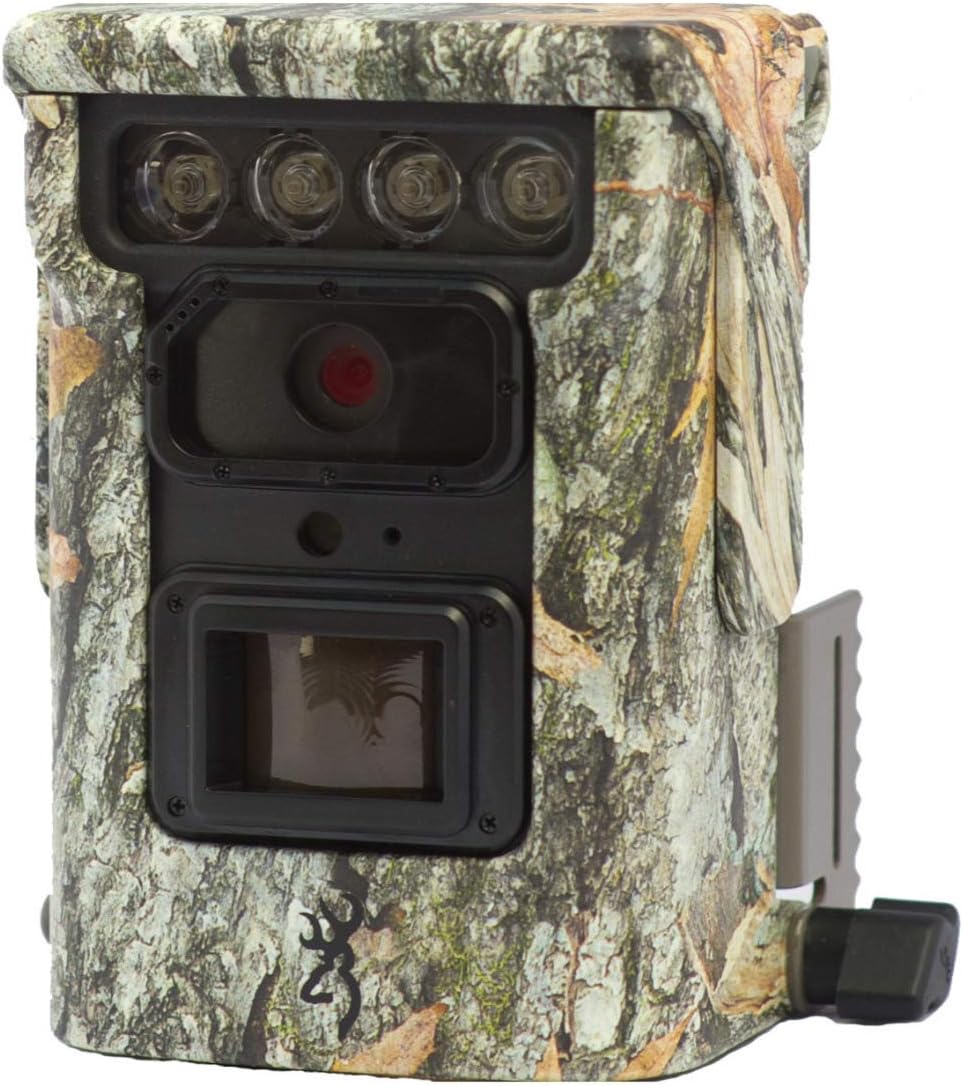
Illustration 1.1 : Avant view of the Browning Defender 850 trail camera, showcasing its lens, IR emitters, and camouflage casing.
2. Contenu du colis
Veuillez vérifier que tous les éléments énumérés ci-dessous sont inclus dans votre colis :
- 1x Browning Defender 850 Trail Camera (BTC-9D)
- 4x CR123 Lithium Batteries
- 1x 16GB SDXC SD Card
- CD with 'Time Lapse Viewer' Software
3. Principales caractéristiques
The Browning Defender 850 is equipped with several advanced features to enhance your trail monitoring experience:
- Imagerie haute résolution : Captures still images at 20 Megapixels.
- Vidéo Full HD : Records 1920x1080 Full HD videos with sound.
- Vitesse de déclenchement rapide : Ultra-fast 0.4-second trigger speed to capture fast-moving subjects.
- Invisible IR Flash: Features 850 nm infrared flash for silent, nearly invisible night illumination up to 36 meters (120 feet).
- Connectivité Wi-Fi et Bluetooth : Allows for wireless viewing and management of photos and videos via the Browning Trail Camera app on your smartphone or tablet.
- Multiple Capture Modes: Supports Photo, Video, Time-lapse, and Time-lapse Plus modes.
- Mode rafale : Captures 1-8 photos per trigger, with a fast burst option of 8 photos in 2 seconds.
- Superposition de données: Images and videos include time, date, camera ID, moon phase, and temperature stamps.
- Conception compacte : Small and discreet camouflage housing.
4. Guide de configuration
4.1. Installation de la batterie
The camera requires 4x CR123 Lithium batteries (included). To install:
- Localisez le compartiment de la batterie sur l'appareil photo.
- Ouvrez la porte du compartiment.
- Insert the 4 CR123 batteries, ensuring correct polarity (+/-) as indicated inside the compartment.
- Fermez bien la porte du compartiment à piles.
4.2. Insertion de la carte SD
A 16GB SDXC SD card is included. The camera supports up to 128GB SDXC cards. To insert:
- Repérez l'emplacement de la carte SD, généralement près du compartiment de la batterie.
- Insérez la carte SD avec l'étiquette tournée vers l'avant de l'appareil photo jusqu'à ce qu'elle s'enclenche.
- Pour la retirer, appuyez doucement sur la carte vers l'intérieur jusqu'à ce qu'elle se détache.
4.3. Montage de la caméra
The Defender 850 features a 1/4" tripod thread for versatile mounting options. It also comes with an integrated mounting bracket.
- Use the included strap or a compatible mounting accessory to secure the camera to a tree or post.
- Ensure the camera is stable and pointed towards the desired monitoring area.
- For optimal performance, position the camera at a height of approximately 1-2 meters (3-6 feet) from the ground.

Image 4.1 : Côté view of the Browning Defender 850, illustrating the integrated mounting bracket.
5. Mode d'emploi
5.1. Mise sous/hors tension
Once batteries and SD card are installed, the camera will enter a ready state. Most configuration and operation are managed through the Browning Trail Camera app.
5.2. Connecting via WiFi and Bluetooth
The Defender 850 utilizes WiFi and Bluetooth for seamless connectivity with your smartphone or tablet.
- Téléchargez le fichier officiel Browning Trail Camera App depuis la boutique d'applications de votre appareil (iOS ou Android).
- Assurez-vous que Bluetooth est activé sur votre smartphone/tablette.
- Open the Browning Trail Camera App and follow the on-screen instructions to discover and connect to your BTC-9D camera via Bluetooth.
- Once connected via Bluetooth, the app will guide you to establish a WiFi connection for faster data transfer and live viewing (if supported).
5.3. Modes et paramètres de l'appareil photo
Through the Browning Trail Camera App, you can configure various settings:
- Mode de capture: Select between Photo, Video, Time-lapse, or Time-lapse Plus.
- Résolution photo : Set to 20 Megapixels for highest quality.
- Video Resolution & Length: Choose 1920x1080 Full HD. Adjust video length (5/10/20/30 seconds, 1/2 minutes).
- Trigger Delay/Image Delay: Set the delay between detections (5/10/20/30 seconds, 1/5/10/30/60 minutes).
- Burst Settings: Configure the number of photos taken per trigger (1-8 photos).
- Time-lapse Interval: Define the interval for time-lapse captures (5/10/20/30 seconds, 1/2/5/10/30/60 minutes).
- Puissance du flash infrarouge : Adjust the infrared flash power (Power Save, Long Range, Fast Motion) based on your needs.
- Date et heure : Synchronize the camera's clock with your device.
- Identifiant de la caméra: Assign a unique ID to your camera for easier identification if you operate multiple units.
5.4. Viewgestion et administration Files
L'application vous permet de view captured images and videos directly on your device without retrieving the SD card.
- Browse thumbnails of captured media.
- Download selected photos or videos to your device.
- Supprimer les indésirables files de la carte SD.
- For time-lapse sequences, use the included 'Time Lapse Viewer' software on a computer for optimal playback.
6. Entretien
Proper maintenance ensures the longevity and optimal performance of your Browning Defender 850 camera.
- Nettoyage: Gently wipe the camera lens and IR emitters with a soft, lint-free cloth. Avoid abrasive materials or harsh chemicals. Keep the casing clean from dirt and debris.
- Entretien de la batterie: Replace batteries when the low battery indicator appears in the app. Remove batteries if the camera will be stored for an extended period to prevent leakage.
- Gestion de la carte SD: Periodically format the SD card using the camera's app or a computer to maintain optimal performance and prevent data corruption. Back up important files avant le formatage.
- Stockage: Lorsqu'elle n'est pas utilisée, rangez l'appareil photo dans un endroit frais et sec, à l'abri de la lumière directe du soleil et des températures extrêmes.
7. Dépannage
If you encounter issues with your Browning Defender 850, refer to the following common troubleshooting steps:
- La caméra ne s'allume pas :
- Assurez-vous que les piles sont insérées correctement en respectant la polarité.
- Replace with fresh CR123 Lithium batteries.
- Aucune image/vidéo capturée :
- Check if the SD card is properly inserted and not full.
- Ensure the SD card is formatted correctly (FAT32 or exFAT, depending on card size).
- Verify camera settings (e.g., trigger delay, operating schedule) via the app.
- Confirm the camera is in an active capture mode (Photo, Video, etc.).
- Qualité d'image/vidéo médiocre :
- Nettoyez l'objectif de la caméra et les émetteurs infrarouges.
- Veillez à ce que la caméra ne soit ni trop près ni trop loin du sujet.
- Check IR flash settings for night captures.
- Cannot Connect via App (WiFi/Bluetooth):
- Ensure Bluetooth and WiFi are enabled on your smartphone/tablet.
- Make sure the camera is powered on and within range.
- Restart both the camera (by removing/reinserting batteries) and your smartphone/tablet.
- Update the Browning Trail Camera App to the latest version.
- Accéléré Viewer Software Issues:
- Assurez-vous que votre ordinateur respecte la configuration système minimale requise pour le logiciel.
- Réinstallez le logiciel à partir du CD fourni.
If problems persist, contact Browning customer support for further assistance.
8. Spécifications
Detailed technical specifications for the Browning Defender 850 (BTC-9D) trail camera:
| Fonctionnalité | Spécification |
|---|---|
| Numéro de modèle | BTC-9D |
| Résolution d'image | 20 mégapixels |
| Résolution vidéo | 1920x1080 Full HD with Sound |
| Vitesse de déclenchement | 0.4 secondes |
| Type de flash infrarouge | 850 nm Infrared (Invisible) |
| Portée du flash infrarouge | 36 mètres (120 pieds) |
| Source d'énergie | 4x CR123A Lithium Batteries (included) |
| Alimentation externe | Connexion 12 Volts |
| Prise en charge de la carte mémoire | Up to 128GB SDXC (16GB included) |
| Connectivité | WiFi, Bluetooth, USB, TV Out |
| Dimensions (HxLxP) | 127 mm x 102 mm x 64 mm (environ 5 x 4 x 2.5 pouces) |
| Poids | 453.59 g (environ 1 lb) |
| Couleur | Camouflage |
| Température de fonctionnement | Not specified, typical for outdoor use. |
9. Garantie et assistance
The Browning Defender 850 (BTC-9D) trail camera comes with a Garantie de 24 mois à compter de la date d'achat, couvrant les défauts de fabrication.
For technical support, warranty claims, or further inquiries, please contact Browning customer service. Refer to the official Browning webPour obtenir les informations de contact les plus récentes, veuillez consulter le site web ou l'emballage du produit.
Note: Conservez votre preuve d'achat pour la validation de la garantie.


