1. Introduction
The Diamond Audio HX1600.1D Monoblock Amplifier is engineered for audiophiles demanding superior sound quality and power. This manual provides essential information for the proper installation, operation, and maintenance of your ampamplificateur, garantissant des performances et une longévité optimales.
The Hex Series Amplifiers are designed with meticulous precision and feature high-tolerance components, ensuring an unparalleled listening experience. With top-of-the-line features and user-friendly controls, these amplifiers seamlessly blend advanced technology with convenience.
2. Consignes de sécurité
Avertissement: This product can expose you to chemicals known to the State of California to cause cancer. For more information, please visit P65Warnings.ca.gov.
Veillez toujours à assurer une ventilation adéquate autour de l'appareil. amplifier. Do not expose the unit to moisture or extreme temperatures. Disconnect power before making any connections or performing maintenance. Professional installation is recommended for optimal safety and performance.
3. Contenu du colis
À l'ouverture du colis, vérifiez que tous les éléments énumérés ci-dessous sont présents et en bon état :
- 1 x Diamond Audio HX1600.1D - HEX Mono Class D Subwoofer Amplifier
- Télécommande
- Manuel du propriétaire (ce document)
4. Produit terminéview
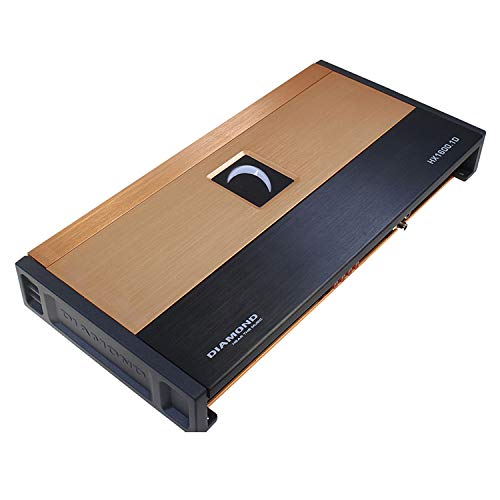
Figure 4.1 : Haut view of the Diamond Audio HX1600.1D Monoblock Ampamplificateur, montreasing its sleek design with a gold and black finish and illuminated logo.
Key features of the HX1600.1D Monoblock Amplificateur comprend :
- HEX Series Mono Amplifier engineered for audiophiles demanding superior sound quality and power.
- Delivers up to 1600 W x 1 @ 1Ω, ensuring robust power output and exceptional bass performance.
- High-end anodized extruded aluminum heat sink for superior thermal performance and long-lasting reliability.
- Advanced 4-layer PCB board with balanced differential inputs for clear, distortion-free sound.
- Full-range Class D IR chipset and audiophile-grade components for unmatched efficiency and sound clarity.
- Illuminated logo and fully concealed mounting for a sleek and stylish ampconfiguration du lificateur.
5. Configuration et installation
Une installation correcte est essentielle à la performance et à la longévité de votre appareil. amplifier. It is highly recommended to have the amplificateur installé par un professionnel qualifié.
5.1 Montage
The HX1600.1D features fully concealed mounting for a clean installation. Choose a mounting location that provides adequate ventilation and is protected from moisture and excessive heat. Ensure the surface is stable and secure.
5.2 Connexions de câblage
Refer to the wiring diagram (not provided in this manual, consult a professional or detailed product sheet) for correct power, ground, remote turn-on, and speaker connections. Use appropriate gauge wiring for all connections to prevent power loss and ensure safety.
- Puissance d'entrée : Connect to the vehicle's positive battery terminal via a fuse or circuit breaker.
- Sol: Se connecter à une surface métallique propre et non peinte du châssis du véhicule.
- Allumage à distance : Connect to the head unit's remote output.
- Sortie haut-parleur : Connect to your subwoofer(s). Ensure correct polarity and impedance matching (1Ω stable).
6. Mode d'emploi
Une fois installé, le amplifier requires proper configuration for optimal audio performance.
6.1 Mise sous tension initiale
After all connections are made, turn on your head unit. The amplifier's illuminated logo should light up, indicating it is powered on. If not, recheck all connections, especially the remote turn-on wire.
6.2 Réglage des commandes
The HX1600.1D features top-mounted controls for convenient adjustment. These include:
- Gain Control: Ajustez ceci pour correspondre au volume de sortietage of your head unit. Start low and gradually increase until the output clip indicator illuminates, then back off slightly.
- Filtre passe-bas (LPF) : A fully variable crossover allows you to set the upper frequency limit for the subwoofer. Typically set between 50Hz and 120Hz.
- Filtre subsonique : Filters out extremely low frequencies that are below the audible range and can damage subwoofers.
- Contrôle des phases : Adjusts the phase of the subwoofer output relative to the main speakers (0-180 degrees) to ensure proper bass integration.
- Output Clip Indicators: These indicators provide precise feedback for setting the gain, helping to prevent distortion and protect your speakers.
Adjust these settings incrementally and listen carefully to the sound output to achieve the desired audio balance and clarity.
7. Entretien
To ensure the longevity and optimal performance of your Diamond Audio HX1600.1D ampAmplificateur, suivez ces consignes d'entretien simples :
- Nettoyage: Essuyez périodiquement le ampNettoyez l'extérieur de l'appareil avec un chiffon doux et sec. Évitez d'utiliser des produits chimiques agressifs ou des nettoyants abrasifs.
- Ventilation: Assurez-vous que le amplifier's heat sink and ventilation areas are free from obstructions. Proper airflow is essential for thermal performance.
- Relations: Vérifiez régulièrement tous les branchements électriques pour vous assurer qu'ils sont bien fixés et exempts de corrosion. Des connexions desserrées peuvent entraîner un mauvais fonctionnement ou des dommages.
- Environnement: Protégez le amplifier from direct sunlight, excessive heat, and moisture.
8. Dépannage
Si vous rencontrez des problèmes avec votre amplifier, veuillez vous référer aux problèmes et solutions courants suivants :
| Problème | Cause possible | Solution |
|---|---|---|
| Pas de courant / AmpL'amplificateur ne s'allume pas | Fusible grillé ; fil d’alimentation/de masse/de télécommande desserré ; signal de mise en marche à distance défectueux. | Check and replace fuse; verify all power, ground, and remote connections are secure and correctly wired. |
| Pas de sortie audio | Loose RCA cables; incorrect gain setting; speaker wires disconnected; ampAmplificateur en mode protection. | Ensure RCA cables are firmly connected; adjust gain; check speaker wire connections; if in protect mode, check for short circuits or overheating. |
| Son déformé | Gain set too high; incorrect crossover settings; poor ground connection; damaged speaker. | Lower gain setting; adjust LPF/subsonic filters; verify ground connection; inspect speakers for damage. |
| AmpSurchauffe de l'amplificateur | Insufficient ventilation; impedance too low; prolonged high-volume operation. | Assurez une bonne circulation d'air autour de ampAmplificateur ; vérifier l'adaptation d'impédance des haut-parleurs amplifier's capabilities; reduce volume or allow cooling time. |
If the problem persists after attempting these solutions, contact Diamond Audio customer support or a qualified car audio technician.
9. Spécifications
The following are the technical specifications for the Diamond Audio HX1600.1D Monoblock Amplifier :
- Puissance de sortie (RMS):
- 700 W x 1 @ 4Ω
- 1150 W x 1 @ 2Ω
- 1600 W x 1 @ 1Ω
- Rapport signal/bruit (S/N) : ≥ 95 dBA
- Distorsion harmonique totale (THD): 0.06%
- Dimensions (L x l x H) : 15.8" x 7.67" x 2" (402 x 195 x 51.5 mm) (Remote Included)
- Dissipateur de chaleur: Aluminium extrudé anodisé
- Carte PCB : 4-Layer with Balanced Differential Inputs
- Jeu de puces : Full Range Class D IR
- Composants: "SNAP" Capacitors, Audiophile Grade High Tolerance
- FET Clips: Acier à ressort
- Contrôles : Fine Tuned Fully Variable Crossovers and Phase Control, Top Mounted
- Indicateurs : Indicateurs de clip de sortie
- Type de montage : Montage en surface
- Nombre de canaux : 1
- Poids de l'article : 12 livres
10. Garantie et assistance
Diamond Audio products are manufactured to the highest quality standards. For warranty information, please refer to the warranty card included with your product or visit the official Diamond Audio webConsultez le site. Conservez votre preuve d'achat pour toute réclamation au titre de la garantie.
For technical support, troubleshooting assistance, or to inquire about service, please contact Diamond Audio customer service. You can find contact information on the official Diamond Audio websur le site ou auprès de votre revendeur agréé.
Officiel Website: While a direct link isn't provided, you can typically find support information by searching for "Diamond Audio official website".