Produit terminéview
The Matias FK303QBT Laptop Pro is a compact, tenkeyless Bluetooth wireless keyboard designed for enhanced portability and ergonomic comfort. It features Matias Quiet Click mechanical switches, offering a tactile typing experience without excessive noise. The keyboard is compatible with a range of Apple and Android devices.

Image : Haut view of the Matias FK303QBT Laptop Pro Bluetooth Wireless Tenkeyless Keyboard, showcasing its compact layout and black keys on a silver body.
Instructions d'installation
1. Déballage et inspection initiale
Carefully remove the keyboard and included USB cable from the packaging. Inspect for any visible damage.
2. Charger le clavier
Before first use, it is recommended to fully charge the keyboard. Connect the provided USB-A to USB-A cable to the keyboard's charging port and to a compatible USB power source (e.g., computer USB port, USB wall adapter). The keyboard's battery life can last for several months on a full charge, depending on usage.
3. Couplage Bluetooth
- Assurez-vous que le clavier est sous tension.
- Activate Bluetooth on your device (Mac, iPad, iPhone, iPod Touch, or Android 3.0+).
- On the keyboard, press and hold the Bluetooth pairing button (refer to the keyboard layout for exact location, often indicated by a Bluetooth symbol or a dedicated pairing key) for a few seconds until the indicator light begins to flash, signifying it is in pairing mode.
- On your device, search for available Bluetooth devices. Select "Matias FK303QBT" or a similar name from the list.
- Follow any on-screen prompts to complete the pairing process. You may be asked to enter a code on the keyboard.
The keyboard remembers one paired device at a time. To re-pair with a different device, repeat the pairing process.

Image : Côté profile of the Matias FK303QBT keyboard, showing its ergonomic tilt with the kickstands extended for comfortable typing.
Mode d'emploi
Utilisation de base
The Matias FK303QBT keyboard functions like a standard tenkeyless keyboard. Its compact design provides more desk space and makes it easy to transport.
Matias Quiet Click Switches
This keyboard features Matias Quiet Click mechanical switches. These switches are designed to provide a tactile "bump" feedback during key presses, similar to traditional mechanical keyboards, but with significantly reduced noise levels, making them suitable for various environments.
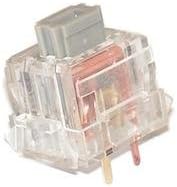
Image : Un gros plan view of a Matias Quiet Click mechanical key switch, illustrating its internal design for tactile feedback and quiet operation.
Ports USB
The Laptop Pro keyboard includes integrated USB ports. These ports can be used for connecting other low-power USB devices, such as a mouse or a USB flash drive, enhancing convenience and reducing the need for additional hubs.
Gestion de l'alimentation
The keyboard is designed to conserve battery life. If left idle, it will automatically enter a sleep mode. To wake it, simply press any key. It is not necessary to manually power off the keyboard for daily use.
Entretien
Nettoyage
To clean the keyboard, use a soft, dry cloth. For debris or dust under the keys, compressed air can be used. Hold the can upright and spray in short bursts, keeping the nozzle a few inches away from the keys. Avoid using liquid cleaners directly on the keyboard.
Entretien de la batterie
To maximize battery longevity, avoid extreme temperatures. While the keyboard has a long battery life, consistent deep discharges or overcharging can affect its overall lifespan. Charge the keyboard when the battery indicator suggests it is low.
Dépannage
- Keyboard not pairing or connecting:
Ensure Bluetooth is enabled on your device and the keyboard is in pairing mode. Check for other wireless signals nearby that might cause interference. Try re-pairing the keyboard by holding down the pairing button for several seconds.
- Touches qui se répètent ou qui ne sont pas enregistrées :
This can sometimes be caused by dust or debris under the keycaps. Use compressed air to clean around and under the affected keys. If the issue persists, ensure the keyboard's firmware is up to date (check the manufacturer's website pour les mises à jour).
- La batterie ne se charge pas:
Verify that the USB-A to USB-A charging cable is securely connected to both the keyboard and a working USB power source. Try a different USB port or power adapter. If the keyboard only works when plugged in, the battery may require service.
- Keyboard unresponsive:
Ensure the keyboard is charged and powered on. If it has entered sleep mode, press any key to wake it. If the issue continues, try turning the keyboard off and on, or re-pairing it with your device.
Caractéristiques
| Fonctionnalité | Détail |
|---|---|
| Numéro de modèle | FK303QBT (8541647696) |
| Connectivité | Bluetooth, USB |
| Type de clavier | Clavier mécanique sans clé |
| Type de commutateur | Matias Quiet Click |
| Appareils compatibles | Mac, iPad, iPhone, iPod Touch, Android 3.0+, Laptop |
| Dimensions | 19 x 3 x 10 pouces |
| Poids de l'article | 2.59 livres |
| Couleur | Noir |
| Matériel | Plastique |
| Composants inclus | Câble USB |
Garantie et assistance
Information regarding the specific warranty period for the Matias FK303QBT Laptop Pro keyboard was not provided in the product details. For warranty claims or detailed technical support, please contact Matias Corporation directly through their official websites ou canaux de service client.
Il est recommandé de conserver votre preuve d'achat pour toute demande relative à la garantie.


