Introduction
The Extreme DM58 Dynamic Microphone is a versatile audio tool designed for voice, singing, and karaoke applications. This professional-grade microphone delivers clear and robust sound, making it suitable for various performance environments. Its durable construction and included accessories ensure reliable operation and convenient portability.
Contenu du colis
Veuillez vérifier que tous les éléments énumérés ci-dessous sont inclus dans votre colis :
- Extreme DM58 Dynamic Microphone
- eXtreme MS Series Pole Clamp
- Professional Balanced XLR (M) to XLR (F) Cable (3 meters, OD 7mm, black)
- Sacoche de transport
- Carte de garantie

Image: The Extreme DM58 microphone, XLR cable, and pole clamp, all neatly packed within the included hard carrying case.

Image : A view of the Extreme DM58 microphone, its XLR cable, and the pole clamp, arranged within the custom-fit foam interior of the hard case.
Installation
- Déballer les composants : Carefully remove the microphone, XLR cable, and pole clamp from the hard carrying case.
- Attach Pole Clamp: Secure the eXtreme MS Series Pole Clamp to a standard microphone stand. Ensure it is tightened sufficiently to hold the microphone securely.
- Insérer le microphone : Gently insert the base of the DM58 microphone into the pole clamp. Le CLamp should hold the microphone firmly without excessive force.
- Câble de connexion XLR : Connect the male end of the provided XLR cable to the XLR port at the base of the microphone. Connect the female end of the XLR cable to the microphone input of your audio mixer, amplifier, or karaoke machine. Ensure both connections are secure.
- Mise sous tension (le cas échéant) : If your audio device requires it, ensure phantom power is turned off for dynamic microphones. The DM58 does not require phantom power.
Opération
The Extreme DM58 microphone is designed for straightforward operation. Follow these guidelines for optimal performance:

Image : Un gros plan view of the Extreme DM58 microphone body, highlighting the integrated ON/OFF switch.
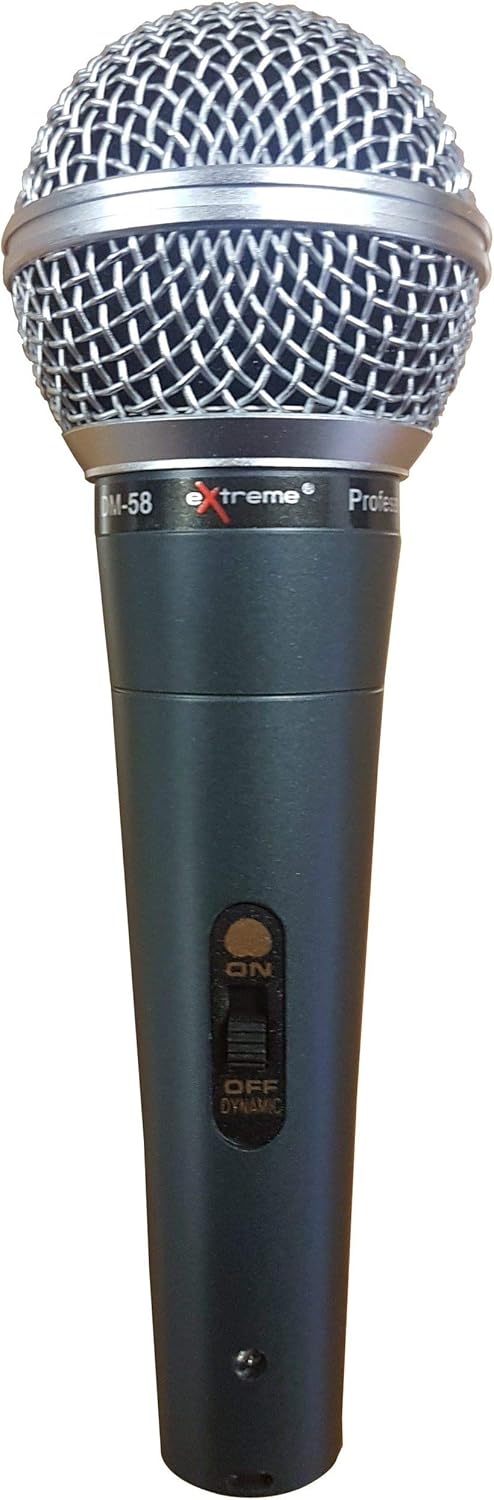
Image : Un front direct view of the Extreme DM58 microphone, showcasing its silver ball grill and black body.
- Interrupteur: Locate the ON/OFF switch on the microphone body. Slide the switch to the "ON" position to activate the microphone. Slide it to "OFF" when not in use to prevent unwanted noise and preserve connected equipment.
- Emplacement du microphone : For singing and voice applications, hold the microphone approximately 2-6 inches (5-15 cm) from your mouth. Experiment with distance to achieve the desired vocal presence and avoid plosive sounds.
- Diagramme polaire : The DM58 features a unidirectional (cardioid) polar pattern, meaning it is most sensitive to sound coming from the front and rejects sound from the sides and rear. This helps to minimize feedback and isolate the desired sound source.
- Contrôle du volume : Adjust the input volume on your mixer or amplifier to a suitable level. Start with a low volume and gradually increase it to avoid clipping or distortion.
Entretien
Proper care will extend the life and performance of your Extreme DM58 microphone:
- Nettoyage: Use a soft, dry cloth to wipe down the microphone body and grill after each use. For stubborn grime on the metal parts, a slightly damp Un chiffon peut être utilisé, mais veillez à ce qu'aucune humidité ne pénètre dans la capsule du microphone. N'utilisez pas de produits chimiques agressifs ni de nettoyants abrasifs.
- Stockage: Always store the microphone, cable, and clamp in the provided hard carrying case when not in use. This protects the components from dust, moisture, and physical damage.
- Entretien des câbles : Avoid kinking or sharply bending the XLR cable. Coil it loosely when storing to prevent internal wire damage.
- Évitez les chutes : While durable, dropping the microphone can damage the internal components or the grill. Handle with care.
Dépannage
If you encounter issues with your Extreme DM58 microphone, try the following solutions:
- Pas de sortie audio :
- Assurez-vous que l'interrupteur MARCHE/ARRÊT du microphone est en position « MARCHE ».
- Check that the XLR cable is securely connected to both the microphone and your audio device (mixer, amplificateur, etc.).
- Verify that the input volume on your audio device is turned up.
- Test the microphone with a different XLR cable if available, to rule out a faulty cable.
- Test the microphone with a different audio input on your device, or a different audio device entirely, to isolate the problem.
- Son déformé :
- Baissez le volume d'entrée de votre appareil audio.
- Ensure you are not speaking or singing too close to the microphone, which can cause clipping.
- Larsen (sifflement aigu) :
- Éloignez le microphone des haut-parleurs.
- Point the microphone away from speakers.
- Reduce the overall volume or specific frequency ranges on your audio device.
Caractéristiques
| Fonctionnalité | Spécification |
|---|---|
| Marque | Extrême |
| Numéro de modèle | 8057737498350 |
| Facteur de forme du microphone | Portable |
| Technologie de connectivité | XLR |
| Type de connecteur | XLR |
| Diagramme polaire | Unidirectionnel |
| Impédance | 600 ohms |
| Sensibilité Audio | 58 dB |
| Signal-to-Noise Ratio | 58 dB |
| Source d'énergie | Électrique avec fil |
| Matériel | Métal |
| Couleur | Blue, Silver, Black |
| Utilisations recommandées | Canto, Karaoke |
| Appareils compatibles | Amplifier |
| Composants inclus | Carte de garantie |
Garantie et assistance
Your Extreme DM58 Dynamic Microphone comes with a warranty. Please refer to the included carte de garantie for specific terms, conditions, and duration of coverage. Keep your proof of purchase for any warranty claims.
For technical support or further assistance, please contact the manufacturer or your point of purchase. Ensure you have your model number (8057737498350) and a description of the issue ready when seeking support.