Introduction
This manual provides essential instructions for the safe and effective use of your Coby CVG-02-RC Virtual Reality Goggles. Please read this manual thoroughly before using the device and retain it for future reference.
The Coby CVG-02-RC transforms your smartphone into a 3D virtual reality headset, offering an immersive experience for compatible VR applications and content. It features adjustable optics and comes with a wireless remote control for enhanced interaction.
Consignes de sécurité
- Do not use the VR goggles while operating a vehicle or machinery, or in situations requiring full attention to your surroundings.
- Take frequent breaks during use to prevent eye strain, dizziness, or discomfort. If you experience any discomfort, discontinue use immediately.
- Ensure your surroundings are clear of obstacles to avoid injury while immersed in virtual reality.
- Conservez l'appareil à l'abri de la lumière directe du soleil, des températures élevées et de l'humidité.
- Ne tentez pas de démonter ou de modifier l'appareil. Cela annulera la garantie et pourrait l'endommager.
- This device is not suitable for children under 13 years of age. Adult supervision is recommended for younger users.
Contenu du colis
Vérifiez que tous les éléments sont présents dans le colis :
- Coby CVG-02-RC Virtual Reality Goggles
- Télécommande sans fil
- Manuel de l'utilisateur (ce document)
Produit terminéview
Familiarize yourself with the components of your Coby VR Goggles.
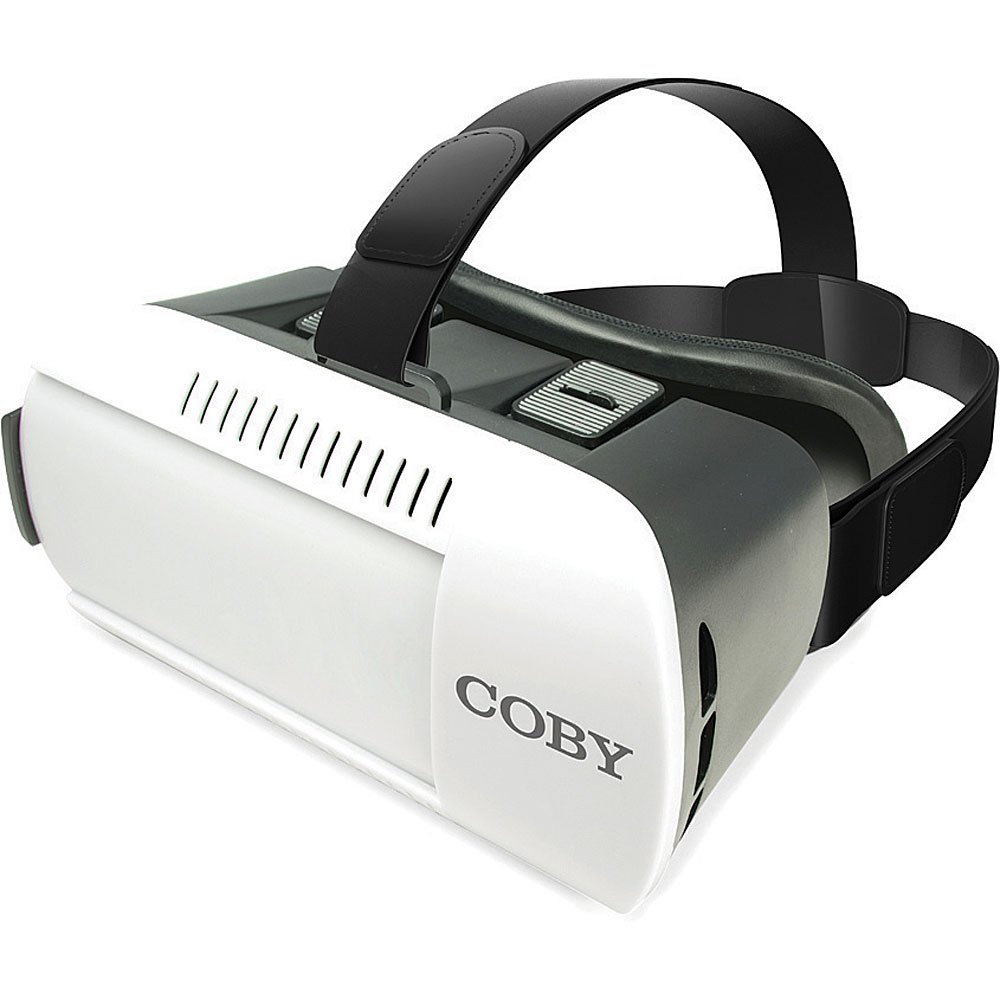
Figure 1 : Devant view of the Coby CVG-02-RC Virtual Reality Goggles. This image shows the main body of the goggles, including the adjustable head strap, the padded face cushion, and the lenses visible from the user's perspective. The top features adjustment sliders for lens positioning.
Goggles Components:
- Sangle de tête réglable : Secures the goggles to your head.
- Padded Face Cushion: Provides comfort and blocks external light.
- Spherical Lenses: Provide the 3D virtual reality view.
- Lens Adjustment Dials/Sliders: Located on top, these allow for focus and interpupillary distance (IPD) adjustments.
- Smartphone Tray/Compartment: Front section where the smartphone is inserted.
Télécommande sans fil :
The remote control typically includes buttons for navigation, selection, and volume, enhancing interaction within VR applications. Refer to the remote's specific instructions for detailed button functions.
Installation
1. Insertion de votre smartphone
- Open the front cover of the VR goggles. This usually involves unlatching or sliding the front panel.
- Place your smartphone into the designated tray or holder. Ensure the phone is centered and securely held. The screen should face the lenses.
- Fermez correctement le capot avant.
- Note: The goggles are compatible with smartphones up to 6 inches in screen size.
2. Adjusting the Head Straps
- Place the goggles on your head.
- Adjust the side and top straps to achieve a comfortable and secure fit. The goggles should feel snug but not overly tight, and the image should be centered in your vision.
3. Appairage de la télécommande sans fil
- Assurez-vous que le Bluetooth de votre smartphone est activé.
- Turn on the wireless remote control (refer to the remote's specific instructions for power on/off).
- Sur votre smartphone, recherchez les appareils Bluetooth disponibles.
- Select the remote control from the list (e.g., "VR-Remote" or similar) to pair.
- Once paired, the remote can be used to navigate within VR applications.
4. Téléchargement d'applications de réalité virtuelle
For the best experience, download virtual reality applications from your smartphone's app store:
- Pour les appareils iOS : Visitez le App Store d'Apple and search for "VR games," "3D split screen," or "virtual reality."
- Pour les appareils Android : Visitez le Google Play Store and search for "VR games," "3D split screen," or "virtual reality."
Many VR apps are designed for split-screen viewing, which is necessary for these goggles.
Opérationnel
Using the VR Goggles
- Launch a VR application on your smartphone. The screen should display a split-screen view.
- Insert your smartphone into the goggles as described in the "Setup" section.
- Put on the goggles and adjust the head straps for comfort.
- Use the lens adjustment dials/sliders on the top of the goggles to achieve a clear and focused image. Adjust both the focus (distance from lenses to screen) and the interpupillary distance (IPD - distance between the centers of the lenses) until the image is sharp and comfortable for both eyes.
- Use the wireless remote control to interact with the VR application.
Adjusting Lenses
The Coby CVG-02-RC features adjustable dual optics to optimize your viewexpérience en matière de :
- Réglage de la mise au point : Slide the dials on the top of the goggles forward or backward to adjust the clarity of the image. This compensates for different vision needs.
- Ajustement IPD (distance interpupillaire) : Slide the dials left or right to adjust the distance between the lenses. This aligns the lenses with your eyes for a single, clear 3D image.

Figure 2 : Haut view of the Coby CVG-02-RC Virtual Reality Goggles, highlighting the lens adjustment sliders. These sliders allow users to fine-tune the focus and interpupillary distance for optimal viewconfort et clarté.
Entretien
- Nettoyage des lentilles : Use a soft, dry microfiber cloth specifically designed for optical lenses. Do not use abrasive cleaners or paper towels.
- Cleaning Goggles Body: Essuyez l'extérieur avec un chiffon doux, légèrement huilé.amp Tissu. Évitez toute infiltration d'humidité dans les ouvertures.
- Stockage: Store the goggles in a cool, dry place away from direct sunlight and dust. Use the original packaging or a protective case if available.
- Padded Cushion: The foam padding can be gently wiped with a damp Nettoyer avec un chiffon et du savon doux si nécessaire. S'assurer qu'il soit parfaitement sec avant utilisation.
Dépannage
| Problème | Cause possible | Solution |
|---|---|---|
| L'image est floue ou hors focus. | Incorrect lens adjustment. | Adjust the focus and IPD dials/sliders on top of the goggles until the image is clear. |
| Double vision or eye strain. | Incorrect IPD adjustment; phone not centered. | Adjust the IPD dials to match your eye distance. Ensure your smartphone is perfectly centered in the tray. Take a break. |
| La télécommande ne se connecte pas. | Bluetooth not enabled; remote not powered on; remote not paired. | Ensure Bluetooth is on your phone. Power on the remote. Re-pair the remote via your phone's Bluetooth settings. Check remote battery. |
| No 3D effect or distorted image. | App not designed for VR; phone not properly seated. | Ensure the app displays a split-screen VR view. Re-seat your smartphone securely and centered in the goggles. |
| Smartphone overheating. | Extended use of demanding VR apps. | Remove the phone from the goggles and allow it to cool down. Reduce usage time for demanding applications. |
Caractéristiques
- Modèle: CVG-02-RC
- Domaine de View (FOV) : 98-99 degrés
- Type d'objectif : High Transparency Spherical Lens
- Compatibilité des smartphones : Up to 6 inches screen size (iOS/Android)
- Connectivity (Remote): Bluetooth
- Dimensions du produit : 13 x 14 x 20 pouces (dimensions approximatives, selon les données du produit)
- Poids de l'article : 1.2 livres (environ, selon les données du produit)
- Fabricant: Coby
Garantie et assistance
For warranty information and technical support, please refer to the warranty card included with your product or visit the official Coby webConsultez le site. Conservez votre reçu d'achat comme preuve d'achat.
For further assistance, you may contact Coby customer service through their official channels.


