1. Produit terminéview
The Xiaomi Mi Bluetooth Speaker Mini (Model: XMYX02YM) is a compact and portable wireless speaker designed for high-quality audio playback. It features Bluetooth connectivity for seamless pairing with various devices and a durable, waterproof design for versatile use.
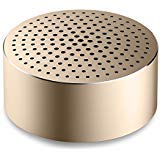
Image: The Xiaomi Mi Bluetooth Speaker Mini, a small, cylindrical black speaker with a mesh grille, showcasing son design compact.
2. Installation
2.1 Déballage
Carefully remove all components from the packaging. The box should contain the Mi Bluetooth Speaker Mini.
2.2 Chargement de l'enceinte
The speaker is powered by an internal battery. Before first use, ensure the speaker is fully charged. Connect the appropriate charging cable (not included) to the speaker's charging port and to a compatible USB power source. The charging indicator light will provide status updates.
2.3 Couplage Bluetooth
- Mise sous tension : Press and hold the power button on the speaker until you hear an audible prompt or see the indicator light flash, indicating it is in pairing mode.
- Activer le Bluetooth : On your device (smartphone, tablet, laptop, MP3 player), enable Bluetooth.
- Sélectionner l'intervenant : In your device's Bluetooth settings, search for available devices. Select "Mi Bluetooth Speaker Mini" from the list.
- Confirmer la connexion : Once paired, the speaker will provide an audible confirmation, and the indicator light will change to a steady state.
L'enceinte est maintenant prête pour la lecture audio.
3. Mode d'emploi
3.1 Mise sous/hors tension
- Pour allumer : Maintenez le bouton d'alimentation enfoncé pendant environ 2 à 3 secondes.
- Pour éteindre : Press and hold the power button for approximately 3-4 seconds until the speaker powers down.
3.2 Lecture audio
After successful Bluetooth pairing, play audio from your connected device. The sound will be transmitted wirelessly to the Mi Bluetooth Speaker Mini. The speaker supports stereo audio output.
3.3 Commandes tactiles
The speaker features touch controls for basic functions. Refer to the specific touch areas on your speaker for volume adjustment, play/pause, and track navigation. (Specific touch control details may vary; consult product packaging or quick start guide for exact touch gestures).
3.4 entrée auxiliaire
While primarily a Bluetooth speaker, the device may support an auxiliary audio input. If available, connect an audio cable (not included) from your device's audio output to the speaker's auxiliary input port for wired audio playback.
4. Entretien
4.1 Nettoyage
To clean the speaker, use a soft, dry, lint-free cloth. Do not use abrasive cleaners, solvents, or strong chemicals, as these can damage the speaker's surface or internal components.
4.2 Résistance à l'eau
The Xiaomi Mi Bluetooth Speaker Mini is waterproof. While it can withstand splashes and light exposure to water, it is not designed for prolonged submersion. Ensure all ports are securely closed before exposure to water. After exposure, dry the speaker thoroughly before charging or using it again.
4.3 Stockage
When not in use for extended periods, store the speaker in a cool, dry place away from direct sunlight and extreme temperatures. It is recommended to charge the speaker periodically to maintain battery health.
5. Dépannage
- Le haut-parleur ne s'allume pas : Vérifiez que la batterie est chargée. Branchez l'enceinte à une source d'alimentation et réessayez.
- Impossible de coupler avec l'appareil :
- Assurez-vous que l'enceinte est en mode appairage (voyant clignotant).
- Activez puis désactivez le Bluetooth sur votre appareil.
- Rapprochez le haut-parleur de votre appareil.
- Effacez les connexions Bluetooth précédentes sur votre appareil et essayez de les appairer à nouveau.
- Aucun son pendant la lecture :
- Vérifiez le niveau sonore de l'enceinte et de votre appareil connecté.
- Assurez-vous que l'enceinte est correctement appariée et connectée à votre appareil.
- Essayez de lire le fichier audio depuis une autre application ou un autre appareil.
- Mauvaise qualité audio :
- Assurez-vous qu'aucun obstacle ne se trouve entre le haut-parleur et votre appareil.
- Éloignez-vous des sources d'interférences (par exemple, les routeurs Wi-Fi, les autres appareils Bluetooth).
- Vérifiez la qualité de la source audio.
6. Spécifications
| Fonctionnalité | Détail |
|---|---|
| Modèle | XMYX02YM |
| Marque | XIAOMI |
| Type de haut-parleur | Bibliothèque (portable) |
| Technologie de connectivité | Bluetooth, sans fil |
| Technologie de communication sans fil | Bluetooth |
| Appareils compatibles | Ordinateur portable, lecteur MP3, smartphone, tablette |
| Source d'énergie | Alimenté par batterie |
| Méthode de contrôle | Touche |
| Mode de sortie audio | Stéréo |
| Type de pilote audio | Pilote dynamique |
| Configuration des canaux de son surround | 2.1 |
| Poids de l'article | 59 g |
| Dimensions du produit (L x l x H) | 0.43 x 0.43 x 0.2 cm (4 x 4 x 2 millimètres) |
| Couleur | Noir |
| Étanche | Oui |
| Piles requises | Yes (Internal, rechargeable) |
| Composants inclus | Mi Bluetooth Speaker Mini |
| Fabricant | Xiaomi Technology Inc. |
7. Garantie et assistance
Pour obtenir des informations sur la garantie, veuillez consulter la documentation fournie avec votre achat ou visiter le site officiel de Xiaomi. webPour toute assistance technique ou demande de service, veuillez contacter le service client de Xiaomi via ses canaux officiels.