Introduction
This manual provides detailed instructions for the installation, operation, and maintenance of your Venstar T1900 Residential Slimline Platinum Thermostat. Please read this manual thoroughly before attempting to install or operate the thermostat to ensure proper function and to avoid potential damage.
Informations importantes sur la sécurité
- Coupez toujours l'alimentation du système de chauffage/climatisation au niveau du disjoncteur principal ou du tableau électrique avant d'installer ou d'entretenir le thermostat.
- This thermostat operates on 24 Volts AC. Do not connect to line voltage (120V ou 240V).
- Si vous n'êtes pas familiarisé avec le câblage électrique, l'installation doit être effectuée par un technicien qualifié.
- Do not short circuit the terminals on the gas valve or at the system control to test the thermostat. This will damage the thermostat and void the warranty.
- Assurez-vous que tous les branchements électriques sont bien fixés et isolés afin d'éviter les courts-circuits.
Contenu du colis
Vérifiez que votre colis contient les éléments suivants :
- Unité de thermostat Venstar T1900
- Matériel de montage (vis et chevilles)
- Manuel de l'utilisateur (ce document)
Produit terminéview
The Venstar T1900 is a 7-day programmable digital thermostat designed for residential use. It offers precise temperature control and energy-saving scheduling capabilities. This thermostat is compatible with heat/cool, heat pump, and dual-fuel systems, controlling up to three heat stages et deux cool staget.
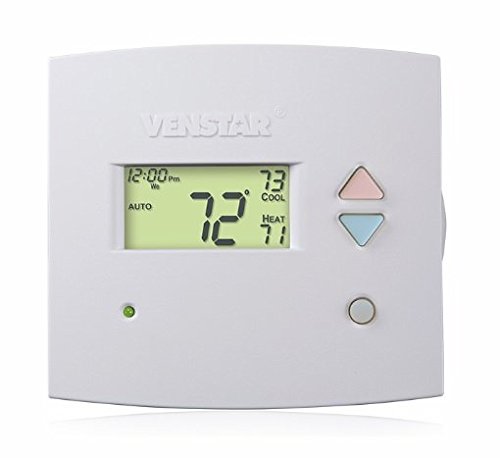
Figure 1 : Devant view of the Venstar T1900 Thermostat. This image displays the thermostat's LCD screen and control buttons, indicating its slimline design.
Caractéristiques principales :
- 7-Day Programmability: Allows for customized heating and cooling schedules for each day of the week.
- Compatibilité du système : Works with heat/cool, dual-fuel, and heat pump systems.
- Multi-Stage Contrôle : Manages up to three heat stages et deux cool staget.
- Capacité de contrôle à distance : Controllable by phone using an optional add-on (sold separately).
- Automatic or Manual Operation: Provides flexibility for scheduled or on-demand temperature adjustments.
Guide d'installation
Outils requis :
- Tournevis (Phillips et/ou plat)
- Percez avec le foret approprié (si vous installez de nouvelles chevilles murales).
- Pinces à dénuder
- Crayon
- Niveau (optionnel)
1. Coupez l'alimentation
Locate the circuit breaker or fuse box that controls your heating and cooling system. Turn off the power completely before proceeding with any wiring.
2. Remove Old Thermostat (if applicable)
- Retirez délicatement le couvercle de votre ancien thermostat.
- Take a picture of the existing wiring connections for reference.
- Label each wire with the terminal designation it was connected to (e.g., R, G, Y, W).
- Débranchez les fils et retirez la plaque de fixation de l'ancien thermostat du mur.
3. Installez le nouveau socle du thermostat
- Separate the front cover of the T1900 thermostat from its base plate.
- Position the base plate on the wall where you want to install the thermostat. Ensure it is level.
- Marquez les trous de montage avec un crayon.
- Percez des avant-trous si nécessaire et insérez les chevilles murales.
- Secure the thermostat base plate to the wall using the provided screws.
4. Câblage
Connect the wires from your HVAC system to the corresponding terminals on the T1900 thermostat base. Refer to the wiring diagram provided with your specific HVAC system for precise connections. Ensure wires are stripped approximately 3/8 inch and securely fastened under the terminal screws.
Désignations courantes des terminaux :
- R/Rc/Rh: 24V Power (Heating/Cooling)
- C: Common (24V return)
- G: Ventilateur
- Y/Y1: Compresseur Stage 1 (refroidissement)
- Y2 : Compresseur Stage 2 (refroidissement)
- W/W1: Chaleurstage 1 (Chauffage)
- W2: Chaleurstage 2 (Chauffage)
- O / B: Reversing Valve (Heat Pumps)
Note: The T1900 supports various system types. Consult the detailed wiring diagrams in the full installation manual for specific configurations (e.g., heat pump with auxiliary heat, conventional multi-stage systèmes).
5. Fixez le thermostat à sa base.
Once wiring is complete and verified, carefully align the thermostat front cover with the mounted base plate and snap it into place.
6. Rétablir l'alimentation
Return to your circuit breaker or fuse box and restore power to your heating and cooling system.
Configuration initiale
Upon initial power-up, the thermostat may prompt you to configure basic settings. Follow the on-screen instructions to set the current date, time, and system type (e.g., Conventional, Heat Pump).
Configuration du type de système :
It is crucial to correctly configure the thermostat for your specific HVAC system. Incorrect settings can lead to improper operation or damage. Access the installer settings menu (refer to the full installation guide for specific button sequences) to select:
- Type de système : Heat/Cool, Heat Pump, Dual Fuel
- Nombre de manche Stages
- Nombre de Cool Stages
- Reversing Valve Operation: O (Refroidissement) ou B (Chauffage)
Mode d'emploi
Comprendre l'affichage :
The LCD screen displays the current temperature, set temperature, system mode, fan mode, time, and programming status. Refer to the icons and indicators on the screen for current operational status.
Setting System Mode:
Appuyez sur le MODE bouton permettant de parcourir les modes système disponibles :
- CHALEUR: The system will operate to maintain the heating setpoint.
- FRAIS: The system will operate to maintain the cooling setpoint.
- VOITURE: The thermostat automatically switches between heating and cooling as needed to maintain the set temperature range.
- OFF: Le système de chauffage et de climatisation est éteint.
Setting Fan Mode:
Appuyez sur le FAN bouton permettant de sélectionner le mode de ventilation :
- VOITURE: Le ventilateur ne fonctionne que lorsque le système de chauffage ou de refroidissement est en marche.
- SUR: Le ventilateur fonctionne en continu, indépendamment des demandes de chauffage ou de refroidissement.
Réglage de la température :
Utilisez le UP et VERS LE BAS arrow buttons to adjust the desired temperature setpoint. In programmable modes, this will temporarily override the schedule until the next scheduled change.
Programmation horaire (7 jours) :
The T1900 allows for 7-day programming, enabling different schedules for each day of the week. This feature helps save energy by adjusting temperatures when you are away or asleep.
- Appuyez sur le PROGRAMME bouton pour accéder au mode de programmation.
- Utilisez le JOUR button to select the day or group of days you wish to program (e.g., Mon-Fri, Sat-Sun, or individual days).
- Utilisez le TEMPS button to cycle through the four available periods: Wake, Leave, Return, Sleep.
- Utilisez le UP et VERS LE BAS arrow buttons to set the desired temperature for each period.
- Utilisez le PRISE button to exit programming mode or save changes.
Refer to the detailed programming section in the full user guide for advanced options and specific button sequences.
Remote Control (Optional Add-on):
The Venstar T1900 thermostat can be controlled remotely via a phone using an optional add-on module (sold separately). This module connects to the thermostat and allows for remote access and control through a dedicated application. Installation and setup instructions for the remote control module are provided with the module itself.
Entretien
Nettoyage du thermostat :
Pour préserver l'apparence et le bon fonctionnement de votre thermostat, essuyez périodiquement l'extérieur avec un chiffon doux et sec.amp Utilisez un chiffon. N’utilisez pas de nettoyants abrasifs, de solvants ou de sprays chimiques, car ils peuvent endommager les composants en plastique et électroniques.
Remplacement de la batterie :
The Venstar T1900 thermostat does not require batteries for operation as it is powered by the 24V AC system.
Dépannage
If you experience issues with your Venstar T1900 thermostat, consult the following common problems and solutions:
| Problème | Cause possible | Solution |
|---|---|---|
| L'affichage du thermostat est vide | Le thermostat n'est pas alimenté. | Vérifiez le disjoncteur de votre système de chauffage, ventilation et climatisation. Assurez-vous que tous les branchements électriques sont bien serrés. |
| Heating/Cooling system does not respond | Incorrect system mode selected; wiring issue; system lockout. | Verify the system mode (HEAT/COOL/AUTO). Check wiring connections. Wait 5 minutes for system lockout to reset. |
| La lecture de la température semble inexacte. | Emplacement du thermostat ; obstruction du capteur. | Ensure the thermostat is not exposed to direct sunlight, drafts, or heat sources. Clean any dust from the thermostat vents. |
| Programming schedule is not working | Program not saved; temporary override active; incorrect time/day setting. | Ensure programs are saved. Check if a temporary override is active and cancel it. Verify current time and day settings. |
| Le ventilateur fonctionne en continu en mode AUTO. | Fan mode set to ON; wiring issue. | Press the FAN button to ensure it is set to AUTO. Check fan wiring. |
If these solutions do not resolve the issue, please contact customer support or a qualified HVAC technician.
Caractéristiques
| Fonctionnalité | Spécification |
|---|---|
| Marque | Venstar |
| Nom du modèle | Venstar T1900 |
| Type de contrôleur | Bouton poussoir |
| Dossier spécial | Programmable |
| Couleur | Blanc |
| Utilisations spécifiques du produit | Heat Pump, Heater |
| Type de contrôle de température | Programmable, Smart/Remote (with add-on) |
| Voltage | 24 Volts AC |
| Type d'affichage | LCD ou LED |
| Méthode de contrôle | Remote (with add-on) |
| Rétroéclairage | Oui |
| Dimensions du produit | 5.3 x 2 x 2 pouces |
| Poids de l'article | 0.01 onces |
| Des piles sont-elles nécessaires ? | Non |
Informations sur la garantie
Venstar products are manufactured to high-quality standards. This product is covered by a limited warranty against defects in materials and workmanship. The specific terms and duration of the warranty may vary. Please refer to the warranty card included with your product or visit the official Venstar webSite web pour obtenir des informations détaillées sur la garantie et les procédures d'enregistrement.
Assistance clientèle
For technical assistance, troubleshooting, or warranty inquiries, please contact Venstar customer support. You can typically find contact information, including phone numbers and email addresses, on the official Venstar website (www.venstar.com) ou sur l'emballage du produit.
When contacting support, please have your thermostat model number (T1900) and any relevant purchase information ready.


