Introduction
This manual provides detailed instructions for the setup, operation, maintenance, and troubleshooting of your EZCAP284 HD 1080P Capture HDMI YPbPr Recorder. Please read this manual thoroughly before using the device to ensure proper functionality and to prevent damage.
Consignes de sécurité
- N’exposez pas l’appareil à l’humidité, à la pluie ou à des températures extrêmes.
- Évitez de laisser tomber ou de soumettre l'appareil à des impacts violents.
- Utilisez uniquement l'adaptateur secteur spécifié.
- Ne tentez pas de démonter ou de modifier l'appareil. Cela annulera la garantie.
- Gardez l'appareil hors de portée des enfants.
Contenu du colis
Vérifiez que tous les éléments sont présents dans votre colis :
- EZCAP284 HD 1080P Capture Device
- Télécommande
- Adaptateur secteur (non mentionné explicitement, mais nécessaire à son fonctionnement)
- Manuel de l'utilisateur (ce document)
Produit terminéview
The EZCAP284 is a standalone HD video capture device designed for recording gameplay and other HDMI/YPbPr sources directly to a USB storage device without the need for a PC. It features HDMI pass-through for real-time viewing.

Figure 1 : Haut view of the EZCAP284 device, featuring a prominent record button.

Figure 2 : Détaillé view of the input and output ports on the EZCAP284.
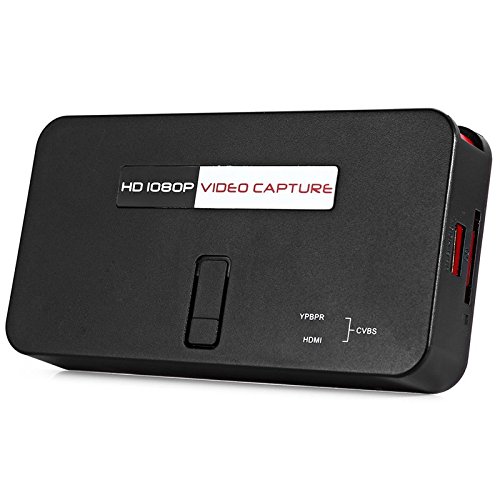
Figure 3 : Bas view of the EZCAP284 device, indicating model and certification information.
Installation
- Connecter la source vidéo : Connect your game console (e.g., PS3) or other video source to the HDMI IN or YPbPr DANS port on the EZCAP284 using the appropriate cables.
- Connecter l'écran : Connectez votre téléviseur ou votre moniteur au SORTIE HDMI port on the EZCAP284. This allows you to view your gameplay in real-time while recording.
- Connect USB Storage: Insert a USB flash drive or external hard drive (formatted as FAT32 or NTFS) into the USB 2.0 port on the EZCAP284. This is where your recordings will be saved.
- Connecter l'alimentation : Connect the power adapter to the DC IN port on the EZCAP284 and then plug it into a power outlet. The device will power on.
- Optional Audio Input: If you wish to record live commentary, connect a microphone to the Entrée audio 3.5 mm port.
Mode d'emploi
Enregistrement de gameplay
- Assurez-vous que toutes les connexions sont sécurisées comme décrit dans la section Configuration.
- Turn on your video source (e.g., game console) and your display.
- Appuyez sur le REC button on the EZCAP284 device or the remote control to start recording. The indicator light will change to show recording is in progress.
- Appuyez sur le REC button again to stop recording. The indicator light will revert to its standby state.
- Your recorded video file Les données seront enregistrées sur le périphérique de stockage USB connecté.
Adding Live Commentary
To record your voice along with the gameplay:
- Connectez un microphone au Entrée audio 3.5 mm port before starting your recording.
- The device will automatically mix the microphone audio with the video source audio during recording.
Lecture
À view your recorded videos, safely remove the USB storage device from the EZCAP284 and connect it to a computer or a media player that supports the recorded video format.
Entretien
- Nettoyage: Utilisez un chiffon doux et sec pour nettoyer l'extérieur de l'appareil. N'utilisez pas de nettoyants liquides ni de solvants.
- Stockage: Rangez l'appareil dans un endroit frais et sec, à l'abri de la lumière directe du soleil et des températures extrêmes lorsqu'il n'est pas utilisé.
- Micrologiciel : Vérifiez le fabricant webConsultez régulièrement ce site pour prendre connaissance des mises à jour du micrologiciel susceptibles d'améliorer les performances ou d'ajouter des fonctionnalités.
Dépannage
| Problème | Cause possible | Solution |
|---|---|---|
| Aucun affichage vidéo. | Incorrect cable connection; input source not active; display input not selected. | Check HDMI/YPbPr connections. Ensure video source is on. Select correct input on your TV/monitor. |
| L'enregistrement échoue ou s'arrête de manière inattendue. | USB storage full; USB drive not compatible; power interruption. | Ensure USB drive has sufficient space. Try a different USB drive (FAT32/NTFS). Check power connection. |
| No audio in recording. | Audio cables not connected; source audio muted; microphone not connected or faulty. | Verify audio connections from source. Ensure source audio is not muted. Check microphone connection and functionality. |
| La télécommande ne fonctionne pas. | Piles faibles ou mal insérées ; capteur IR bloqué. | Replace batteries. Ensure line of sight to the device's IR sensor. |
Caractéristiques
| Fonctionnalité | Description |
|---|---|
| Modèle | EZCAP284 |
| Taper | Adapter / Video Capture Device |
| Matériel | Cuivre (composants internes) |
| Interfaces | 3.5mm Audio In, HDMI In, HDMI Out, YPbPr In, USB 2.0 |
| Résolution de capture vidéo | Jusqu'à 1080p |
| Compatibilité de la plateforme | PlayStation (and other HDMI/YPbPr sources) |
| Composants inclus | Télécommande |
| Couleur | Noir |
| Dimensions (L x l x H) | 14.00 x 7.40 x 2.00 cm (environ) |
| Poids | 0.463 kg (poids approximatif du colis) |
Garantie et assistance
Pour toute information relative à la garantie et à l'assistance technique, veuillez consulter la documentation fournie avec votre achat ou contacter directement le vendeur/fabricant. Conservez votre preuve d'achat pour toute réclamation au titre de la garantie.


