Introduction
This manual provides comprehensive instructions for the safe and proper installation, operation, and maintenance of your Vogel's MA4000 Flat Screen Wall Mount. Please read all instructions carefully before installation and retain this manual for future reference.
The Vogel's MA4000 is designed to securely mount flat screen televisions ranging from 40 to 80 inches (102-203 cm) with a maximum weight capacity of 80 kg (176 lbs). It features a slim profile and a tilt function to optimize viewangles d'inclinaison et réduire l'éblouissement.
Consignes de sécurité
AVERTISSEMENT:
- Assurez-vous que la surface de montage puisse supporter en toute sécurité le poids combiné du support et du téléviseur.
- Always use appropriate tools and follow all installation steps precisely.
- Ne pas dépasser la capacité de poids maximale de 80 kg (176 lbs).
- Verify VESA compatibility with your television before installation.
- En cas de doute concernant un quelconque aspect de l'installation, consultez un professionnel qualifié.
Contenu du colis
Before beginning installation, please verify that all components are present and undamaged. Refer to the included parts list in your product packaging for a complete inventory.

Description de l'image : Un surcoût view of the Vogel's MA4000 Flat Screen Wall Mount, showing the main wall plate and the two vertical TV brackets. The mount is black and designed for flat panel televisions.
The image above displays the primary components of the Vogel's MA4000 wall mount: the wall plate and the two TV interface bars. Additional hardware such as screws, washers, and spacers are included in the retail package.
Caractéristiques
| Numéro de modèle | MA4000 (8554000) |
| Marque | Oiseaux |
| Type de montage | Flat, Tilting |
| Matériel | Acier inoxydable |
| Couleur | Noir |
| Tailles de téléviseurs compatibles | 40 - 80 pouces (102 - 203 cm) |
| Capacité de poids maximale | 80 kg (176 lb) |
| Compatibilité VESA | Min 100x100 mm, Max 600x400 mm |
| Angle d'inclinaison maximal | 12 degrés |
| Distance du mur | Environ 30 mm (1.2 pouces) |
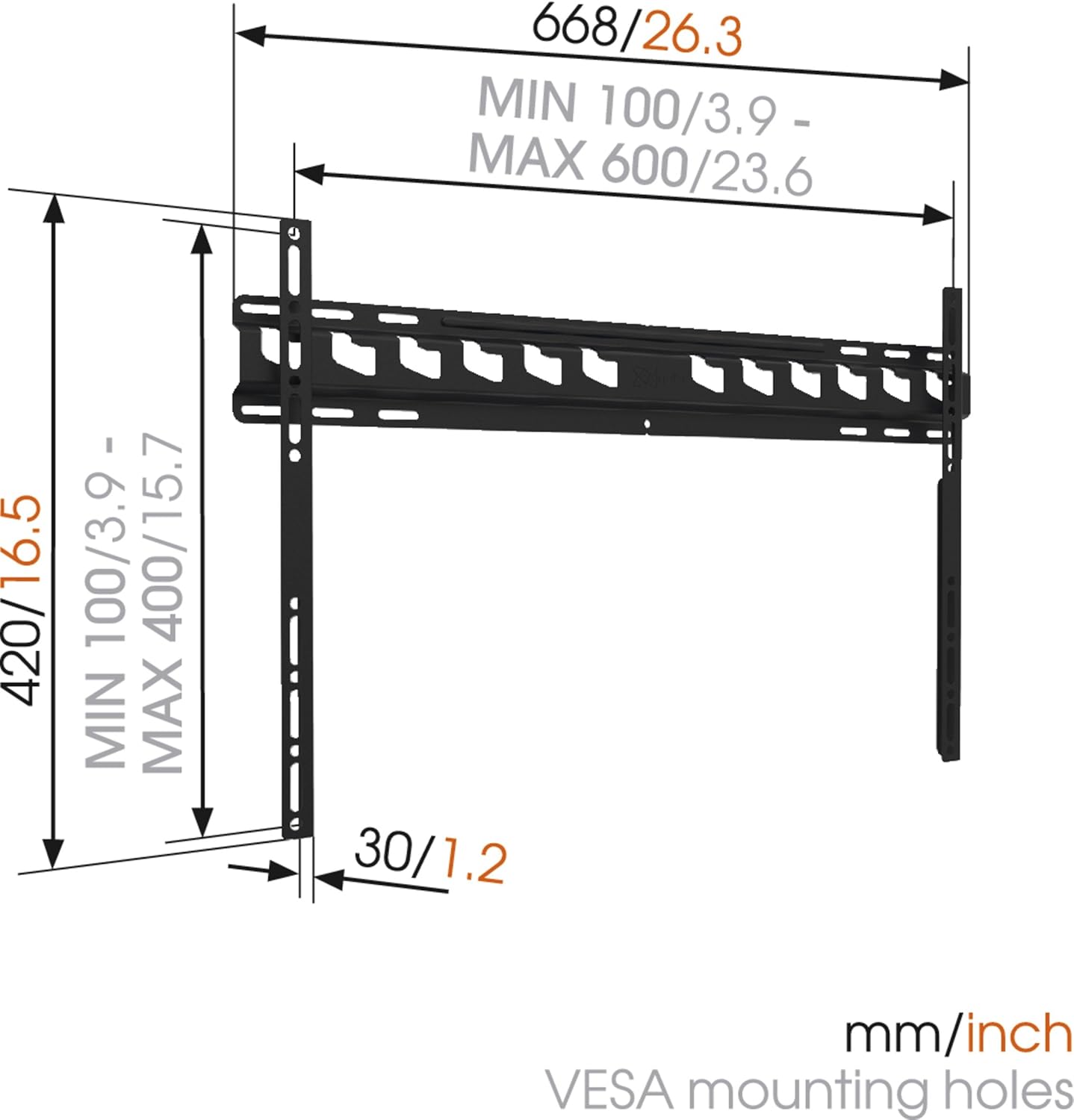
Description de l'image : A technical diagram illustrating the dimensions of the Vogel's MA4000 wall mount. It shows the overall width (668mm / 26.3 inches), height (420mm / 16.5 inches), and the minimum and maximum VESA mounting hole patterns (100-600mm horizontally, 100-400mm vertically). The distance from the wall is indicated as 30mm (1.2 inches).
Configuration et installation
This section outlines the general steps for installing your Vogel's MA4000 wall mount. Always refer to the detailed graphical instructions included with your product for specific drilling templates and hardware usage.
Outils requis (non inclus) :
- Percer
- Drill bits appropriate for your wall type (wood, concrete, brick, etc.)
- Stud finder (for wood stud walls)
- Niveau
- Crayon
- Mètre à ruban
- Tournevis ou clé
Étapes d'installation :
- Déterminez l’emplacement de montage : Choose a suitable location on your wall, ensuring it is structurally sound and free from electrical wires or plumbing. Use a stud finder if mounting to wood studs.
- Marquer les trous de perçage : Hold the wall plate against the wall at the desired height and use a level to ensure it is straight. Mark the drilling holes with a pencil.
- Trous de forage : Drill pilot holes according to the marked positions and your wall type. Insert wall anchors if required.
- Fixer la plaque murale : Fixez la plaque murale au mur à l'aide des vis et rondelles fournies. Assurez-vous qu'elle est bien fixée et de niveau.
- Fixez les supports de télévision au téléviseur : Attach the two vertical TV interface bars to the back of your television using the appropriate screws, washers, and spacers from the hardware kit. Ensure the brackets are centered and securely fastened to the VESA mounting points.
- Fixation du téléviseur à la plaque murale : Carefully lift the television and hook the TV brackets onto the wall plate. Ensure both brackets are properly seated.
- Télévision sécurisée : Engage the safety locking mechanism (if applicable) to prevent the TV from accidentally dislodging from the wall plate.

Description de l'image : Un côté profile view of a flat screen television mounted flush against a white wall, demonstrating the slim design and minimal wall distance achieved with the Vogel's MA4000 wall mount. The mount itself is barely visible behind the television.
Operating Instructions (Tilting Function)
The Vogel's MA4000 wall mount allows for a slight tilt to optimize your viewAméliorez l'expérience et réduisez l'éblouissement.
- Réglage de l'inclinaison : Gently push or pull the bottom edge of the television to achieve the desired tilt angle. The mount supports a maximum tilt of 12 degrees.
- Securing Tilt: Some models may have a locking mechanism for the tilt. Refer to your product's specific instructions for details on securing the tilt position if available.
Entretien
The Vogel's MA4000 wall mount requires minimal maintenance to ensure long-term performance and safety.
- Inspection régulière : Vérifiez régulièrement le serrage de toutes les vis et fixations. Resserrer si nécessaire.
- Nettoyage: Nettoyez le support avec un chiffon doux et sec. Évitez les nettoyants abrasifs ou les solvants qui pourraient endommager la finition.
- Limite de poids: Ne jamais dépasser la capacité de poids maximale de 80 kg (176 lbs).
Dépannage
| Problème | Cause possible | Solution |
|---|---|---|
| Le téléviseur n'est pas de niveau après son installation. | La plaque murale n'était pas installée de niveau. | Remove TV, adjust wall plate, and remount. Ensure a level is used during installation. |
| Le téléviseur semble instable sur son support. | Screws are loose; TV not properly seated; safety lock not engaged. | Ensure all screws are tightened. Verify TV brackets are fully engaged with the wall plate. Engage safety lock. Do not exceed weight capacity. |
| Cannot achieve desired tilt angle. | Obstruction; maximum tilt angle reached. | Check for cables or other obstructions. The mount has a maximum tilt of 12 degrees. |
Garantie et assistance
For warranty information and customer support, please refer to the documentation included with your product or visit the official Vogel's webConsultez le site. Conservez votre preuve d'achat pour toute réclamation au titre de la garantie.
Vogel's Official Website: www.vogels.com


