1. Produit terminéview
The Vonyx STM3030 is a compact and versatile 4-channel DJ mixer designed for various audio applications. Despite its size, it offers extensive connectivity, including two switchable phono/line inputs for turntables and three dedicated line inputs for external audio sources such as CD players, laptops, or smartphones. An integrated MP3 player allows direct music playback from USB drives or SD cards. For wireless convenience, the STM3030 features a Bluetooth receiver, enabling seamless audio streaming from compatible devices. Additionally, it includes a recording function, allowing users to capture their mixes directly to a USB drive or SD card. The mixer is equipped with an LED VU meter for visual signal monitoring and illuminated potentiometers for enhanced visibility in low-light environments. Microphone inputs are provided for vocal performances or announcements, and a headphone output facilitates pre-listening to tracks before they go live.
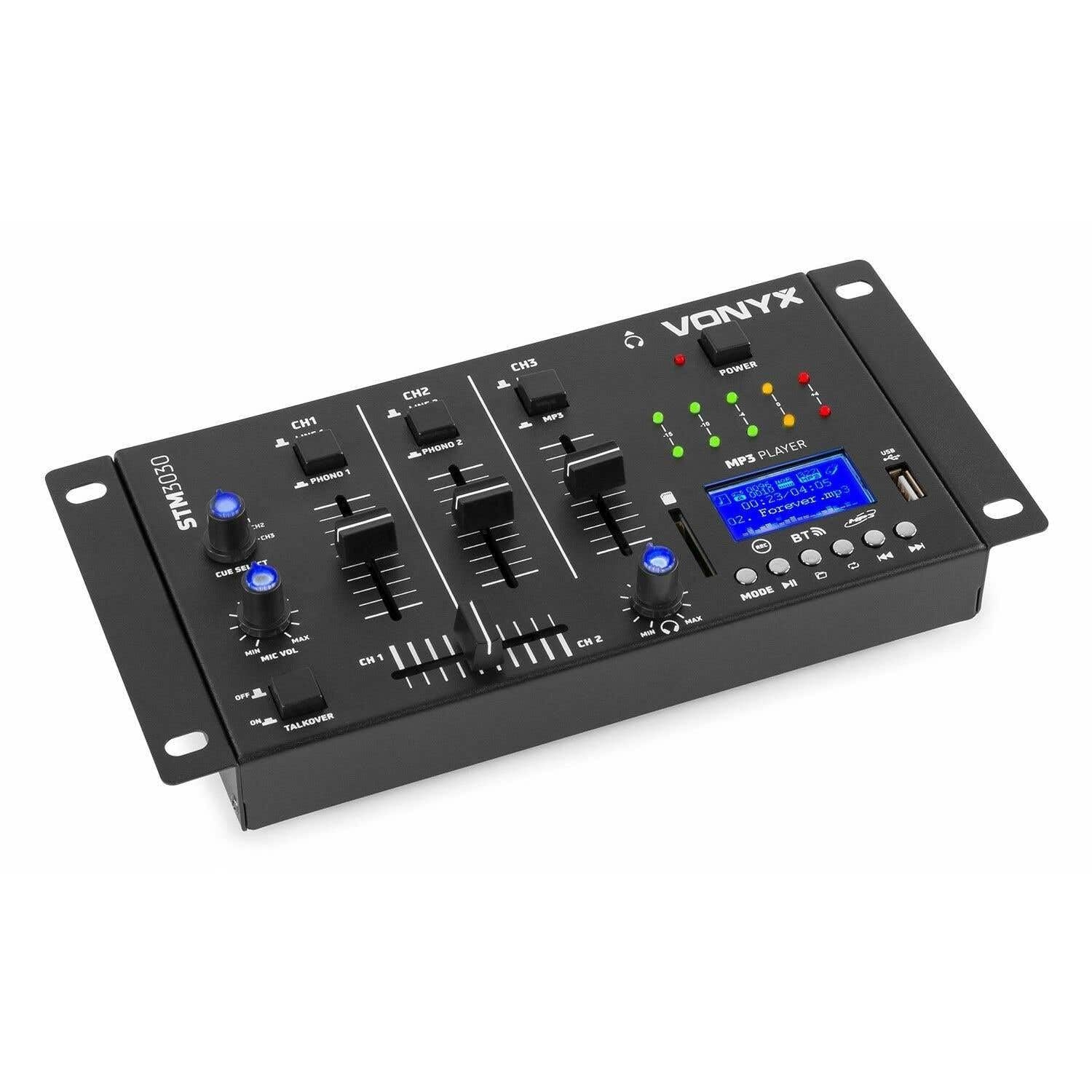
Image 1.1: Devant view of the Vonyx STM3030 DJ Mixer, showcasing son design compact et l'agencement de ses commandes.
2. Principales caractéristiques
- Mélangeur 4 canaux : Provides four input channels for connecting multiple audio sources.
- Connectivité polyvalente : Includes Jack and RCA inputs for various devices.
- InterfaceBluetooth : Enables wireless music streaming from smartphones, tablets, or computers.
- Integrated MP3 Player: Supports direct playback from USB drives and SD cards.
- USB Recording Function: Allows recording of live mixes to USB or SD storage.
- Fonction de repère : For pre-listening to tracks through headphones.
- LED VU Meter: Provides visual feedback on audio signal levels.
- Illuminated Controls: Potentiometers are illuminated for easy operation in dark environments.
- Crossfader : Pour des transitions fluides entre les canaux.
- Fonction Talkover : Automatically reduces music volume when the microphone is used.
- Conception compacte : Easy to integrate into any DJ setup.
3. Consignes de sécurité
Veuillez lire attentivement ces consignes de sécurité avant d'utiliser l'appareil et conservez-les pour toute consultation ultérieure. Une utilisation incorrecte peut entraîner un choc électrique, un incendie ou d'autres dangers.
- Alimentation: Utilisez uniquement l'adaptateur secteur fourni. Assurez-vous que le volumetage correspond aux exigences spécifiées sur l’appareil.
- Eau et humidité : Do not expose the device to rain, moisture, or liquids. Never place objects filled with liquids on the device.
- Ventilation: Ensure proper ventilation. Do not block any ventilation openings. Install the device according to the manufacturer's instructions.
- Sources de chaleur : Ne pas installer à proximité de sources de chaleur telles que radiateurs, bouches de chauffage, poêles ou autres appareils (y compris amp(échangeurs thermiques) qui produisent de la chaleur.
- Protection du cordon d'alimentation : Protégez le cordon d’alimentation pour éviter qu’il ne soit piétiné ou pincé, en particulier au niveau des fiches, des prises de courant et du point de sortie de l’appareil.
- Nettoyage: Unplug the device from the power outlet before cleaning. Use only a dry, soft cloth.
- Entretien: N’essayez pas de réparer ce produit vous-même. Confiez toute réparation à un technicien qualifié. Une réparation est nécessaire si l’appareil a été endommagé de quelque manière que ce soit : cordon d’alimentation ou prise endommagés, liquide renversé ou objets tombés à l’intérieur, exposition à la pluie ou à l’humidité, dysfonctionnement ou chute.
- Foudre: Débranchez cet appareil en cas d’orage ou lorsqu’il n’est pas utilisé pendant de longues périodes.
4. Commandes et connexions
4.1 Commandes du panneau avant

Image 4.1: Dessus incliné view of the Vonyx STM3030, highlighting the front panel controls.
- CH1 / CH2 / CH3: Input channels.
- LINE 1 / PHONO 1 (CH1): Selector switch for Channel 1 input source.
- LINE 2 / PHONO 2 (CH2): Selector switch for Channel 2 input source.
- LINE 3 / MP3 (CH3): Selector switch for Channel 3 input source.
- Faders de canal: Adjust the volume level for each channel.
- Crossfader : Mélange l'audio entre le canal 1 et le canal 2.
- CUE SELECT: Rotary knob to select which channel(s) to monitor through headphones.
- MIC VOL (MIN/MAX): Régle le volume de l'entrée microphone.
- TALKOVER (OFF/ON): Activates the talkover function, which automatically lowers music volume when the microphone is in use.
- DEL D'ALIMENTATION : Indique lorsque la table de mixage est sous tension.
- LED VU Meter: Displays the output level of the master mix.
- MP3 PLAYER Display: Shows track information, mode, and status.
- Port USB : Pour connecter des clés USB.
- Emplacement pour carte SD : Pour insérer des cartes mémoire SD.
- MP3 Player Controls (MODE, Play/Pause, Skip, REC, BT):
- MODE: Switches between USB, SD, and Bluetooth modes.
- Lecture/Pause : Démarre ou interrompt la lecture.
- Skip (Previous/Next): Permet de naviguer entre les pistes.
- REC : Initiates or stops recording to USB/SD.
- BT: Active le mode de couplage Bluetooth.

Image 4.2: Close-up of the integrated MP3 player, showing the display, controls, USB port, and SD card slot.
4.2 Connexions du panneau arrière

Image 4.3: Rear panel of the Vonyx STM3030, detailing all input and output connections.
- AC 12V 500mA: Prise d'alimentation pour l'adaptateur secteur inclus.
- Sortie casque (prise jack 6.3 mm) : Pour connecter des écouteurs pour le monitoring.
- OUTPUT (RCA L/R): Main stereo RCA output to connect to an amplificateur ou enceintes amplifiées.
- LINE 3 (RCA L/R): Stereo RCA input for Channel 3.
- LINE 2 / PHONO 2 (RCA L/R): Stereo RCA input for Channel 2, switchable between Line and Phono.
- LINE 1 / PHONO 1 (RCA L/R): Stereo RCA input for Channel 1, switchable between Line and Phono.
- MIC 1 / MIC 2 (6.3mm Jack): Prises d'entrée micro.
5. Guide de configuration
- Déballez et installez : Carefully remove the mixer from its packaging. Place it on a stable, flat surface with adequate ventilation.
- Connecter l'alimentation : Connect the provided AC power adapter to the 'AC 12V 500mA' input on the rear panel of the mixer. Plug the adapter into a suitable wall outlet. The POWER LED on the front panel should illuminate.
- Connect Main Output: Connect the 'OUTPUT' RCA jacks on the rear panel to the input of your ampAmplificateur ou haut-parleurs amplifiés utilisant des câbles RCA.
- Connectez les sources audio :
- Platines vinyles : Connect turntables to the 'PHONO 1' and 'PHONO 2' RCA inputs. Ensure the corresponding channel selector switches (CH1, CH2) are set to 'PHONO'.
- CD Players/Laptops/Other Line Devices: Connect these devices to the 'LINE 1', 'LINE 2', or 'LINE 3' RCA inputs. Set the corresponding channel selector switches to 'LINE'.
- Connecter les microphones : If using microphones, plug them into the 'MIC 1' or 'MIC 2' 6.3mm jack inputs on the rear panel.
- Connectez des écouteurs : Plug your headphones into the 6.3mm headphone output jack on the rear panel for monitoring.
6. Mode d'emploi
6.1 Fonctionnement de base
- Mise sous tension : Ensure all connections are secure. Turn on your amplifier/speakers first, then the STM3030 mixer.
- Sélectionnez Entrée : For each channel, use the LINE/PHONO/MP3 selector switch to choose the desired audio source.
- Régler le volume du canal : Use the individual channel faders (CH1, CH2, CH3) to adjust the volume of each input.
- Sortie moniteur: Observe the LED VU meter to ensure your master output level is not clipping (reaching the red indicators).
6.2 Using the MP3 Player (USB/SD)
- Insérer un média : Insérez une clé USB dans le port USB ou une carte SD dans la fente pour carte SD.
- Sélectionnez le mode MP3 : Ensure the CH3 selector switch is set to 'MP3'. Press the 'MODE' button on the MP3 player until 'USB' or 'SD' is displayed.
- Lecture: Use the Play/Pause button to start or pause playback. Use the Skip buttons to navigate between tracks.
6.3 Connectivité Bluetooth
- Activer le Bluetooth : Ensure the CH3 selector switch is set to 'MP3'. Press the 'MODE' button on the MP3 player until 'BT' is displayed. The display will show 'BT' and typically flash, indicating it's in pairing mode.
- Associer l'appareil : On your smartphone, tablet, or laptop, go to Bluetooth settings and search for available devices. Select 'Vonyx STM3030' (or similar name) to pair.
- Diffusion audio : Once paired, you can stream audio wirelessly from your device through Channel 3 of the mixer.
6.4 Fonction d'enregistrement
- Préparer le stockage : Insert a USB flash drive or SD card into the MP3 player section. Ensure it has sufficient free space and is formatted correctly (FAT32 is generally recommended).
- Démarrer l'enregistrement : Press the 'REC' button on the MP3 player. The display will indicate that recording has started.
- Niveaux de surveillance : Adjust your channel faders and monitor the VU meter to ensure optimal recording levels without distortion.
- Arrêter l'enregistrement : Appuyez de nouveau sur le bouton « REC » pour arrêter l'enregistrement. L'enregistrement s'est déroulé. file sera enregistré sur votre clé USB ou votre carte SD.
6.5 Microphone Usage and Talkover
- Connecter le microphone : Plug your microphone(s) into the MIC 1 or MIC 2 jacks on the rear panel.
- Régler le volume du micro : Use the 'MIC VOL' knob on the front panel to adjust the microphone's volume.
- Activate Talkover: If you wish for the music volume to automatically decrease when you speak into the microphone, set the 'TALKOVER' switch to 'ON'. Set it to 'OFF' to disable this function.
6.6 Headphone Monitoring (Cue)
- Connectez des écouteurs : Plug your headphones into the headphone output jack.
- Sélectionnez les chaînes : Use the 'CUE SELECT' rotary knob to choose which channel(s) you want to pre-listen to in your headphones without affecting the main output.
7. Dépannage
- Pas de sortie audio :
- Check if the mixer is powered on and the POWER LED is lit.
- Ensure all audio cables are securely connected to the correct inputs and outputs.
- Verify that channel faders and the master output level are raised.
- Confirm the correct input source (LINE/PHONO/MP3) is selected for each channel.
- Check the volume and input selection on your connected amplificateur ou enceintes amplifiées.
- Son déformé :
- Reduce the input level of the audio source.
- Lower the channel faders or master output level to prevent clipping (indicated by red LEDs on the VU meter).
- Ensure the correct input type (LINE/PHONO) is selected for turntables; incorrect selection can cause distortion.
- Bluetooth ne se connecte pas :
- Ensure the mixer's MP3 player is in 'BT' mode and flashing, indicating pairing mode.
- Make sure your Bluetooth device is within range (typically up to 10 meters) and has Bluetooth enabled.
- Essayez de déconnecter puis de reconnecter l'appareil.
- USB/SD Recording Not Working:
- Check if the USB drive or SD card is properly inserted.
- Ensure the storage device is formatted to FAT32.
- Verify that there is sufficient free space on the USB drive or SD card.
8. Spécifications
| Marque | Vonyx |
| Modèle | STM3030 |
| Nombre de canaux | 4 |
| Technologie de connectivité | Bluetooth, USB |
| Source d'énergie | Mains powered (AC 12V / 500mA adapter included) |
| Réponse en fréquence | 20 Hz - 20 kHz |
| Entrées audio | 2x Phono (RCA), 3x Line (RCA), 2x Microphone (6.3mm Jack), USB, SD, Bluetooth |
| Sorties audio | 1x Master (RCA), 1x Headphone (6.3mm Jack) |
| Types de données pris en charge | MP3, WAV |
| Dimensions (L x l x H) | 125 x 267 x 55 mm |
| Poids de l'article | 0.9 kg (Product weight), 1.3 kg (Shipping weight) |
9. Entretien
To ensure the longevity and optimal performance of your Vonyx STM3030 DJ Mixer, follow these maintenance guidelines:
- Nettoyage: Regularly wipe the mixer with a dry, soft, lint-free cloth. Do not use abrasive cleaners, solvents, or strong detergents, as these can damage the finish and internal components.
- Protection contre la poussière: Keep the mixer free from dust. When not in use for extended periods, consider covering it with a dust cover.
- Environnement: Avoid operating the mixer in excessively hot, cold, humid, or dusty environments. Keep it away from direct sunlight and sources of vibration.
- Gestion des câbles: Ensure cables are not tangled or pinched, which can lead to damage over time.
10. Garantie et assistance
The Vonyx STM3030 DJ Mixer comes with a Garantie de 24 mois À compter de la date d'achat, cette garantie couvre les défauts de fabrication et les vices de matériaux dans des conditions normales d'utilisation.
For warranty claims, technical support, or service inquiries, please contact your retailer or the manufacturer directly. Please retain your proof of purchase for warranty validation.


