Introduction
The Wasabi Mango UHD430 Real 4K HDMI 2.0 Monitor is a high-performance display featuring a 43-inch LG AH-IPS panel, delivering stunning 3840 x 2160 UHD 4K resolution. Designed for clarity and vibrant colors, this monitor supports 10-bit color depth and offers wide viewangles d'inclinaison.
Les principales caractéristiques comprennent :
- 43-inch LG AH-IPS LED Backlit Panel for superior image quality.
- UHD 4K (3840 x 2160) resolution for incredibly detailed visuals.
- 1.06 billion colors (10-bit) for rich and accurate color reproduction.
- Multiple connectivity options: HDMI 2.0 (x2), HDMI 1.4a (x2), DisplayPort 1.2 (x1), D-Sub, USB 3.0 Hub.
- 60Hz refresh rate via DisplayPort 1.2 and HDMI 2.0 for smooth motion.
- Built-in 10W + 10W speakers for integrated audio.

Image : Avant view of the Wasabi Mango UHD430 4K monitor, showcasing its sleek design and a remote control for operation.
Contenu du colis
Veuillez cocher la case correspondant aux éléments suivants :
- Wasabi Mango UHD430 Monitor
- Câble DisplayPort
- Câble HDMI
- Remote Control (Note: Text on remote may be in Korean)
- Power Cable (110~240V adapter + US plug)
- Câble de concentrateur USB
- Screws for stand
- Câble audio optique
- Manuel d'utilisation
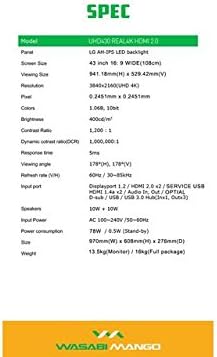
Image: A visual representation of the monitor's dimensions and a list of all accessories included in the package, such as various cables, remote control, and stand screws.
Installation
1. Assemblage du support
- Placez soigneusement l'écran face vers le bas sur une surface douce et propre afin d'éviter les rayures.
- Attach the stand base to the monitor using the provided screws. Ensure it is securely fastened.
2. Raccordement à une source d'alimentation
- Branchez le câble d'alimentation au port d'entrée d'alimentation du moniteur.
- Branchez l'autre extrémité du câble d'alimentation dans une prise électrique mise à la terre.
3. Connexion à un périphérique source
The monitor supports various input types. Choose the appropriate cable for your device:
- DisplayPort 1.2 : For optimal 4K @ 60Hz performance, use the included DisplayPort cable. Connect one end to the monitor's DisplayPort input and the other to your computer's DisplayPort output.
- HDMI 2.0: For 4K @ 60Hz, use an HDMI 2.0 cable. Connect to one of the HDMI 2.0 ports on the monitor.
- HDMI 1.4a : Supports 4K @ 30Hz. Connect to one of the HDMI 1.4a ports.
- D-Sub : For analog connections.
- Concentrateur USB 3.0 : Connect the USB Hub cable from your computer to the monitor's USB 3.0 input to enable the monitor's USB ports.
Note: Using a longer (over 1.5m) or low-quality DisplayPort/HDMI cable may limit the refresh rate to 30Hz at 4K resolution.
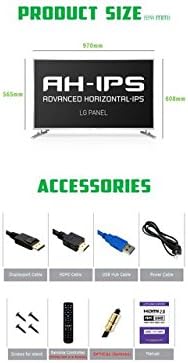
Image: The back panel of the monitor, illustrating the arrangement of power input, DisplayPort, HDMI, D-Sub, and USB ports for connection.
Fonctionnement du moniteur
Marche/Arrêt
- Appuyez sur le bouton d'alimentation du moniteur ou sur la télécommande pour allumer ou éteindre le moniteur.
Sélection d'entrée
- Use the "Input" button on the remote control to cycle through available input sources (DisplayPort, HDMI1, HDMI2, HDMI3, HDMI4, D-Sub).
Menu d'affichage à l'écran (OSD)
The OSD menu allows you to adjust various display settings. Use the remote control to navigate:
- Appuyez sur le bouton « Menu » pour ouvrir l'OSD.
- Use the arrow keys (Up/Down/Left/Right) to navigate through menu options.
- Press "OK" or "Enter" to select an option or confirm a setting.
- Appuyez à nouveau sur « Quitter » ou « Menu » pour fermer l’OSD.
Les paramètres OSD courants incluent :
- Paramètres d'image : Brightness, Contrast, Color Temperature, Sharpness.
- Paramètres audio : Volume, Muet.
- Sélection d'entrée : Manual input source selection.
- Paramètres OSD : Langue OSD, transparence OSD, délai d'expiration OSD.
- Autres réglages: Aspect Ratio, ECO Mode.

Image: The monitor displaying content, with the remote control visible, indicating its use for navigating the monitor's functions and settings.
Entretien
Nettoyage du moniteur
- Débranchez toujours le moniteur de la prise de courant avant de le nettoyer.
- Utilisez un chiffon doux et non pelucheux légèrement dampterminer avec de l'eau ou un nettoyant pour écrans non abrasif.
- Ne pas vaporiser le nettoyant directement sur l'écran.
- Évitez d'utiliser du benzène, du diluant, de l'ammoniaque ou des nettoyants abrasifs, car ils peuvent endommager la surface de l'écran.
- Essuyez délicatement l'écran pour enlever la poussière et les traces de doigts.
Soins généraux
- Tenez le moniteur à l'écart de la lumière directe du soleil, des sources de chaleur et de la poussière excessive.
- Assurez une ventilation adéquate autour du moniteur pour éviter toute surchauffe.
- Ne placez pas d'objets lourds sur le moniteur ou ses câbles.
- Évitez de faire tomber le moniteur ou de le soumettre à des chocs violents.
Dépannage
| Problème | Cause possible | Solution |
|---|---|---|
| Pas de courant | Câble d'alimentation non branché ; prise de courant défectueuse. | Vérifiez que le câble d'alimentation est bien branché au moniteur et à la prise. Testez la prise avec un autre appareil. |
| Aucun signal / Écran noir | Source d'entrée incorrecte sélectionnée ; câble vidéo mal branché ou défectueux ; périphérique source non alimenté. | Press "Input" button on remote to select correct source. Check video cable connections. Ensure source device is on and outputting video. |
| L'image est déformée ou floue. | Incorrect resolution setting; Faulty video cable; Graphics card driver issue. | Set display resolution to 3840x2160. Try a different video cable. Update graphics card drivers. |
| Pas de son | Volume too low or muted; Audio cable not connected (if using external speakers); Incorrect audio output selected on source device. | Increase volume or unmute. Ensure audio is routed correctly from source device to monitor. |
| La télécommande ne fonctionne pas | Batteries are dead or incorrectly inserted; Obstruction between remote and monitor. | Replace batteries. Ensure clear line of sight to the monitor's IR receiver. |
Caractéristiques
| Fonctionnalité | Détail |
|---|---|
| Nom du modèle | UHD430 Real 4K HDMI 2.0 |
| Type de panneau | LG AH-IPS LED Backlight |
| Taille de l'écran | 43 inches (109.2 cm), 16:9 Wide |
| Résolution | 3840 x 2160 UHD 4K |
| Couleurs | 1.06 milliard (10 bits) |
| Rapport de contraste | 1200:1 |
| Rapport de contraste dynamique | 1,000,000:1 |
| Luminosité | 400 cd/m² |
| Temps de réponse | 5 ms (G à G) |
| ViewAngle d'attaque | 178 degrés horizontaux, 178 degrés verticaux |
| Taux de rafraîchissement | 60 Hz (DisplayPort 1.2 & HDMI 2.0), 30 Hz (HDMI 1.4a) |
| Ports d'entrée | DisplayPort 1.2 x1, HDMI 2.0 x2, HDMI 1.4a x2, D-Sub x1, USB 3.0 Hub (In x1, Out x3) |
| Audio | 10W + 10W Speakers |
| Puissance d'entrée | AC 100-240V / 50-60Hz |
| Consommation d'énergie | 78W (Operating) / 0.5W (Stand-by) |
| Dimensions (L x H x P) | 970 mm x 608 mm x 276 mm (avec support) |
| Poids | 13.5 kg (Monitor) / 18 kg (Full package) |
Image: A graphic detailing the technical specifications of the UHD430 monitor, such as screen size, resolution, and refresh rate.
Garantie et assistance
The Wasabi Mango UHD430 monitor comes with a manufacturer's warranty. Please refer to the warranty card included in your package for specific terms and conditions.
Defective Pixel Policy: For the UHD430 SE model, 0-15 defective pixels (including dead/stuck/sub pixels) are permitted under the warranty policy.
For technical support or service inquiries, please contact your retailer or the official Wasabi Mango support channels. Keep your purchase receipt and product serial number handy for faster service.


