1. Introduction
This manual provides instructions for the installation and operation of your GOTHAM 1237924 Rear View Camera Kit. This kit is designed to enhance vehicle safety by providing a clear view of the area behind your vehicle, aiding in parking and reversing maneuvers. It includes a waterproof camera and a 4.2-inch color LCD monitor with an anti-glare visor.

Image 1: The GOTHAM Rear View Camera Kit, showing the product packaging, 4.2-inch LCD monitor, and the compact rear view camera with its wiring.
2. Consignes de sécurité
Please read all safety instructions before installing and operating this product. Failure to follow these instructions may result in injury or damage to the product or vehicle.
- Installation professionnelle recommandée : Si vous avez des doutes concernant une quelconque étape du processus d'installation, consultez un technicien automobile qualifié.
- Source d'alimentation : Connect the system only to a 12V DC power source. Incorrect voltage peut endommager l'appareil.
- Câblage : Ensure all wiring is properly insulated and secured to prevent short circuits or interference. Avoid routing cables near hot engine parts or sharp edges.
- Visibilité: Ne pas gêner le conducteur view with the monitor. Mount it in a location that is easily visible but does not impede driving.
- Résistance à l'eau : The camera is water-resistant, but avoid submerging it or directing high-pressure water jets directly at it.
- Aide au stationnement : This system is a parking aid and should not replace careful driving and direct observation. Always check your surroundings manually before reversing.
3. Contenu du colis
Vérifiez que tous les composants sont présents dans le package :
- 4.2-inch Color LCD Monitor with Anti-Glare Visor
- Arrière View Caméra avec support
- Câble vidéo (RCA)
- Câbles d'alimentation pour moniteur et caméra
- Manuel d'instructions (ce document)

Image 2: All components of the GOTHAM Rear View Camera Kit, including the monitor, camera, and various cables, laid out on a white surface.
4. Configuration et installation
Follow these steps for proper installation of your GOTHAM Rear View Camera Kit.
4.1. Installation de la caméra
- Choisissez un emplacement de montage : The camera should be mounted at the rear of the vehicle, typically above the license plate or near the trunk handle, to provide a clear, unobstructed view. Refer to Image 4 for ideal placement suggestions.
- Sécurisez la caméra : Use the provided mount and screws to securely attach the camera to the chosen location. Ensure the camera is angled correctly for optimal viewing.
- Route Camera Cables: Carefully route the camera's video and power cables into the vehicle interior. Ensure cables are protected from moisture, heat, and moving parts.

Image 3: The compact GOTHAM rear view camera with its attached RCA video cable (yellow connector) and power cable (red connector).

Image 4: A diagram illustrating recommended external mounting positions for the rear view camera on a vehicle, typically near the license plate or bumper.
4.2. Installation du moniteur
- Monter le moniteur : Place the 4.2-inch LCD monitor on your dashboard or another suitable location that does not obstruct your view of the road. The monitor comes with a stand for easy placement.
- Connectez le câble vidéo : Connect the yellow RCA video cable from the camera to the video input (AV1 or AV2) on the monitor.
- Connecter l'alimentation : Connect the monitor's power cable to a 12V DC power source. For automatic activation, connect the camera's power cable to the vehicle's reverse light circuit. Connect the monitor's power cable to a switched 12V source or also to the reverse light circuit if you only want it on when reversing.
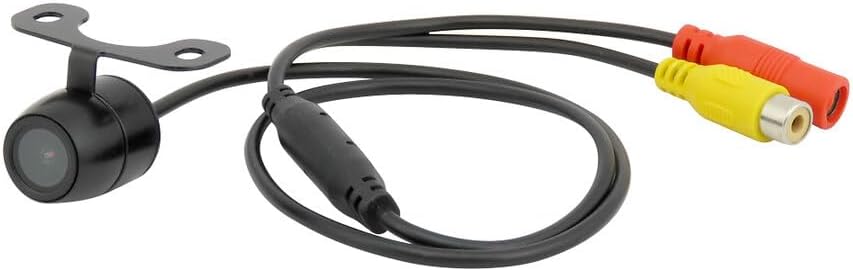
Image 5: The GOTHAM 4.2-inch LCD monitor, featuring an anti-glare visor and RCA input connectors for video and power.
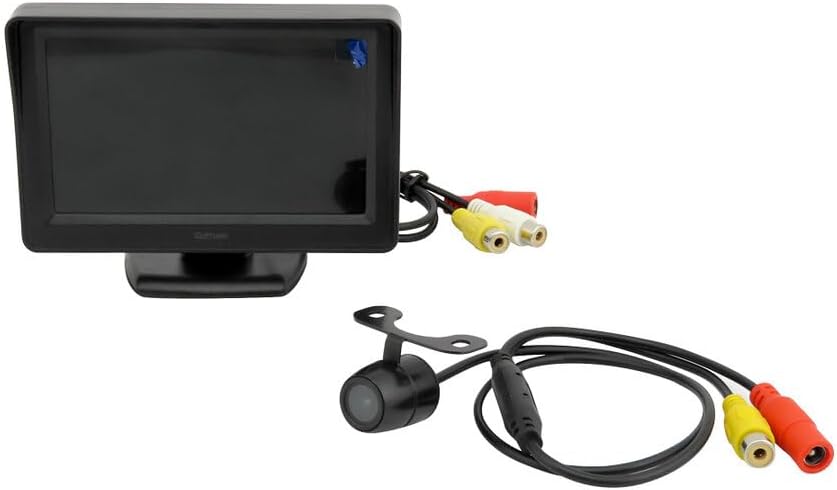
Image 6: The GOTHAM 4.2-inch LCD monitor and the rear view camera, shown together with their respective connection cables.
5. Mode d'emploi
Once installed, the GOTHAM Rear View Camera Kit operates simply:
- Activation automatique: If wired to the reverse light circuit, the monitor will automatically display the camera feed when the vehicle is shifted into reverse gear.
- Lignes de stationnement : The camera provides colored parking assistance lines on the screen to help estimate distance and trajectory.
- Affichage du moniteur : The 4.2-inch color LCD provides a wide-angle, high-definition view. The anti-glare visor helps improve visibility in bright conditions.
6. Entretien
To ensure the longevity and optimal performance of your camera kit:
- Nettoyage de l'objectif de l'appareil photo : Nettoyez régulièrement l'objectif de l'appareil photo avec un chiffon doux et sec.amp chiffon pour enlever la saleté, la poussière ou les taches d'eau qui pourraient obscurcir le viewÉvitez les nettoyants abrasifs.
- Nettoyage de l'écran du moniteur : Use a soft, lint-free cloth to clean the LCD screen. Do not spray cleaning solutions directly onto the screen.
- Vérifier les connexions : Inspectez périodiquement tous les branchements de câbles pour vous assurer qu'ils sont bien fixés et exempts de corrosion ou de dommages.
- Protection contre les intempéries : While the camera is water-resistant, extreme weather conditions (e.g., heavy snow, ice) may temporarily affect performance. Clear any obstructions from the lens before use.
7. Dépannage
If you encounter issues with your GOTHAM Rear View Camera Kit, refer to the following common problems and solutions:
| Problème | Cause possible | Solution |
|---|---|---|
| Aucune image sur le moniteur | No power to monitor or camera; Loose video cable connection; Faulty camera or monitor. | Check all power connections; Ensure video cable is securely plugged in; Test components if possible. |
| Mauvaise qualité d'image (floue, déformée) | Dirty camera lens; Loose video connection; Electrical interference. | Clean camera lens; Secure video cable; Reroute cables away from power sources if interference is suspected. |
| Monitor does not turn on automatically | Camera/monitor not wired to reverse light circuit; Faulty reverse light switch. | Verify wiring to reverse lights; Check reverse light functionality. |
8. Spécifications
Spécifications de l'appareil photo :
- Capteur: CMOS
- Éclairage: 0.01 lux
- Pixels effectifs : 720x576
- Résolution: 480 lignes TV
- ViewAngle d'attaque : 170°
- Image Vision Area: 4.3x3.4mm
- Système vidéo: PAL/NTSC
- Pouvoir: DC 11-13V
- Rapport signal/bruit : >50 dB
- Sortie vidéo : 1.0Vp-p, 75 Ohms
- Résistance aux intempéries : Water-resistant for all weather conditions
Moniteur Spécifications:
- Taper: Écran LCD TFT
- Taille de l'écran : 4.2 pouces
- Résolution: 480(W) RGB x 272(H)
- Rapport hauteur/largeur : 16:9
- Système vidéo: PAL/NTSC
- Entrée vidéo: 2 AV Inputs
- Alimentation: 12 V CC
- Consommation: 1.3 W
- Courant de charge : 100 mA
9. Garantie et assistance
For warranty information and technical support, please refer to the documentation provided with your purchase or contact GOTHAM customer service. Specific warranty details may vary by region and retailer.
Fabricant: Gotham
Numéro de modèle : PARK/LCD-DIS-42+CAM/BK
ASIN: B01BKDA32K