Introduction
Thank you for choosing the Naztech N750 Emerge Wireless Bluetooth Headset. This manual provides detailed instructions on how to set up, operate, and maintain your headset to ensure optimal performance and longevity. The N750 Emerge is designed for clear communication and media playback, featuring advanced noise cancellation and versatile connectivity.
Contenu du colis

Image: Contents of the Naztech N750 Emerge package.
- Naztech N750 Emerge Wireless Headset
- Chargeur de voiture
- Ear Gels (S/M/L)
- Manuel d'utilisation
- Flat Micro USB Cable
Produit terminéview
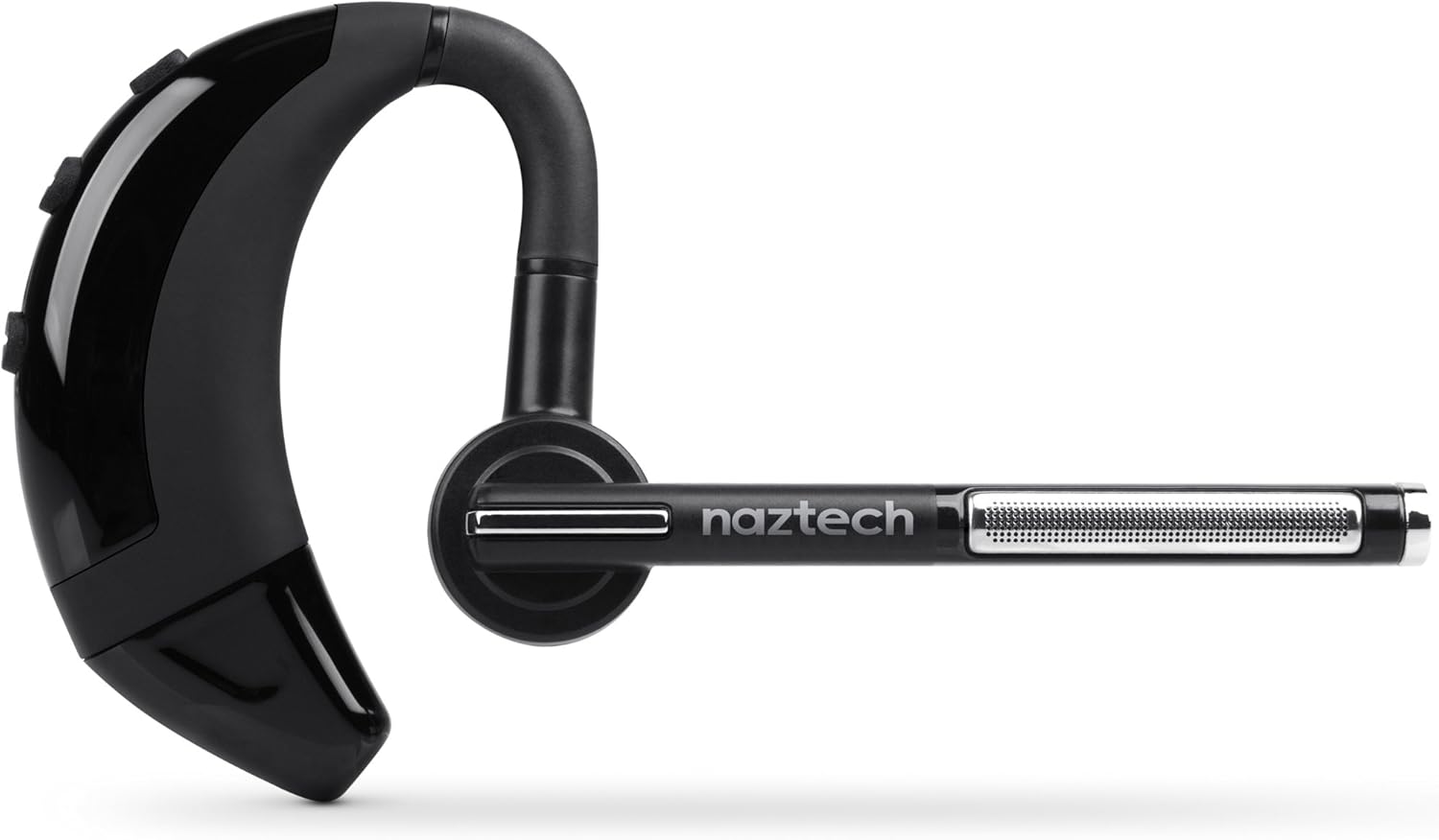
Image: The Naztech N750 Emerge Wireless Bluetooth Headset.
The Naztech N750 Emerge features an ergonomic design for comfortable wear and intuitive controls for easy operation. Key components include the ear hook, main body with control buttons, microphone boom, and ear tip.
Installation
1. Charger le casque
Before first use, fully charge the N750 Emerge headset. Connect the provided Micro USB cable to the charging port on the headset and the other end to a USB power source (e.g., the included car charger, a computer USB port, or a wall adapter). The LED indicator will show charging status and turn off or change color when fully charged.
2. Couplage avec un appareil Bluetooth
- Assurez-vous que le casque est éteint.
- Maintenez enfoncé le bouton multifonction (MFB) du casque jusqu'à ce que le voyant LED clignote alternativement en bleu et en rouge, indiquant le mode de couplage.
- On your smartphone or Bluetooth-enabled device, go to the Bluetooth settings and enable Bluetooth.
- Rechercher available devices. Select "Naztech N750" from the list.
- Si un code d'accès vous est demandé, entrez « 0000 » (quatre zéros).
- Once successfully paired, the LED indicator will flash blue slowly, and you may hear a confirmation tone.
3. Port du casque

Image: The Naztech N750 Emerge headset demonstrating its 180-degree swivel for left or right ear use.
The N750 Emerge is designed for comfortable wear on either the left or right ear. The ear hook swivels 180 degrees to accommodate your preference. Adjust the ear hook and select the appropriate ear gel size (S/M/L) for a secure and comfortable fit. The microphone boom should be positioned towards your mouth for optimal voice pickup.
Mode d'emploi
Marche/Arrêt
- Mise sous tension : Press and hold the MFB for approximately 3 seconds until the LED flashes blue.
- Éteindre: Press and hold the MFB for approximately 5 seconds until the LED flashes red and then turns off.
Gestion des appels

Image: The headset's advanced call technology automatically pauses music and routes incoming calls.
- Répondre à l'appel : Press the MFB once when a call comes in.
- Fin d'appel : Appuyez une fois sur le bouton multifonction (MFB) pendant un appel.
- Rejeter l'appel : Press and hold the MFB for approximately 2 seconds when a call comes in.
- Recomposer le dernier numéro : Appuyez deux fois sur le bouton multifonction (MFB) lorsque le casque est inactif.
- Numérotation vocale: Press the MFB once when the headset is idle to activate your phone's voice assistant (if supported).
Contrôle du volume
Utilisez les boutons Volume + et Volume - du casque pour régler le volume des appels ou des médias.
GPS & Voice Prompt / Caller ID Announcement

Image: The headset provides GPS voice prompts and announces caller ID for incoming calls.
The N750 Emerge supports voice prompts for GPS navigation and announces the caller ID for incoming calls, allowing for hands-free information and call management.
Lecture de musique
When connected to a device, the headset can play audio. Use your device's controls for play/pause, skip track, etc. Incoming calls will automatically pause music playback.
Technologie multipoint

Image: The headset supports Multipoint Technology for connecting to two devices simultaneously.
The N750 Emerge supports multipoint technology, allowing it to be connected to two Bluetooth devices simultaneously. This enables seamless switching between calls or audio from two different paired devices.
Suppression du bruit

Image: The headset utilizes Noisehush Technology for crystal clear conversations with noise cancellation.
The integrated Noisehush® Technology provides ultimate HD clarity and noise cancellation, ensuring crystal clear conversations for both you and your callers by reducing distracting ambient sound.
Entretien
- Clean the headset regularly with a soft, dry cloth. Do not use harsh chemicals or abrasive cleaners.
- Évitez d'exposer le casque à des températures extrêmes, à l'humidité ou à la lumière directe du soleil.
- Rangez le casque dans un endroit frais et sec lorsqu'il n'est pas utilisé.
- Ne tentez pas de démonter ou de modifier le casque, car cela annulera la garantie et pourrait l'endommager.
Dépannage
| Problème | Cause possible | Solution |
|---|---|---|
| Le casque ne s'allume pas. | Batterie faible ou déchargée. | Chargez complètement le casque. |
| Impossible de jumeler l'appareil. | Casque non en mode appairage ; Bluetooth désactivé sur l’appareil ; appareil trop éloigné. | Assurez-vous que le casque est en mode appairage (voyant bleu/rouge clignotant). Activez le Bluetooth sur votre appareil. Rapprochez le casque de l'appareil (à moins de 10 mètres). |
| Aucun son ou volume faible. | Volume trop faible ; casque non connecté ; sortie audio incorrecte sélectionnée. | Increase volume on headset and device. Reconnect headset. Ensure audio is routed to the headset on your device. |
| Poor call quality / Noise. | Weak signal; environmental interference; microphone not positioned correctly. | Move closer to the paired device. Avoid strong electromagnetic interference. Adjust microphone boom towards your mouth. |
Caractéristiques
- Modèle: N750 Emerge
- Version Bluetooth : v4.1
- Technologies de communication sans fil : Bluetooth
- Technologie de connectivité: Sans fil
- Suppression du bruit: Noisehush® Technology
- Technologie multipoint : Oui
- iOS Battery Tracker: Oui
- Temps de conversation : Jusqu'à 8 XNUMX heures
- Autonomie en veille : Jusqu'à 140 XNUMX heures
- Batterie: 1 batterie lithium-ion requise
- Dimensions du produit : 10.16 x 10.16 x 2.54 cm
- Poids de l'article : 22.7 g
- Couleur: Noir
Garantie et assistance
Naztech products are designed and manufactured to the highest quality standards. For warranty information and technical support, please refer to the warranty card included with your product or visit the official Naztech webConsultez le site. Conservez votre reçu d'achat comme preuve d'achat pour toute réclamation au titre de la garantie.


