1. Mise en route
1.1 Contenu du paquet
Verify that all items are present in your Ultimate Ears Boom 2 package:
- Ultimate Ears Boom 2 Bluetooth Speaker
- Câble de chargement micro-USB
- Adaptateur secteur (peut varier selon la région)
1.2 Chargement de votre haut-parleur
Before initial use, fully charge your Ultimate Ears Boom 2 speaker. Connect the micro-USB cable to the charging port on the speaker and the other end to the power adapter, then plug into a wall outlet. The LED indicator will show charging status.

The Ultimate Ears Boom 2 speaker, ready for charging.
1.3 Couplage Bluetooth
Pour connecter votre enceinte à un appareil compatible Bluetooth :
- Press and hold the Power button on the top of the speaker until you hear a tone and the LED flashes white.
- Sur votre appareil mobile, accédez aux paramètres Bluetooth.
- Select 'UE Boom 2' from the list of available devices.
- Une fois la connexion établie, vous entendrez une tonalité de confirmation provenant du haut-parleur.

Haut view of the speaker, highlighting the power and Bluetooth pairing buttons.
1.4 Ultimate Ears App
For enhanced control and additional features, download the Ultimate Ears app from your device's app store (iOS 9.0 or later required for Apple devices, Android compatible). The app allows for remote power control, equalizer adjustments, and PartyUp mode.
2. Fonctionnement du haut-parleur
2.1 Mise sous/hors tension
Press the Power button located on the top of the speaker to turn it on or off. A distinct sound will indicate the power status.
2.2 Contrôle du volume
Adjust the volume using the large '+' and '-' buttons located on the side of the speaker. You can also control the volume from your connected Bluetooth device.
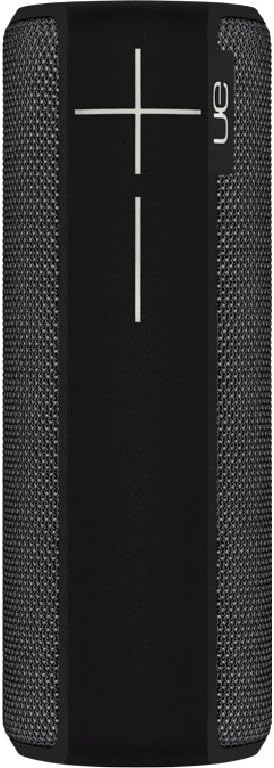
Côté view of the speaker, featuring the prominent volume control buttons.
2.3 Music Control (Tap Gestures)
The Boom 2 features tap controls for music playback:
- Un seul clic: Tap the top of the speaker once to play or pause the current track.
- Tapez deux fois: Tap the top of the speaker twice to skip to the next track.
2.4 État de la batterie
To check the battery level, press both the '+' and '-' volume buttons simultaneously. The speaker will announce the remaining battery percentage.
2.5 Waterproof and Durability Features
The Ultimate Ears Boom 2 is designed to be waterproof (IPX7 rated) and shockproof. It can be immersed in water up to 1 meter for 30 minutes. Ensure the charging port cover is securely closed before exposing the speaker to water.

The speaker's waterproof design allows for use in various environments.

The Ultimate Ears Boom 2 demonstrating its water resistance.
2.6 PartyUp Mode (Connecting Multiple Speakers)
Use the Ultimate Ears app to connect multiple Boom speakers together for a more expansive sound experience. Follow the instructions within the app to activate PartyUp mode.
3. Entretien et maintenance
3.1 Consignes de nettoyage
Pour nettoyer votre haut-parleur, utilisez un chiffon doux et sec.amp cloth. Avoid using harsh chemicals or abrasive cleaners, as these can damage the speaker's finish or waterproof seals. Ensure the charging port is dry before charging.
3.2 Durée de vie de la batterie
To maximize battery life, avoid fully discharging the speaker frequently. Charge the speaker regularly, and if storing for an extended period, ensure it has at least a 50% charge.
3.3 Stockage
Store the speaker in a cool, dry place away from direct sunlight and extreme temperatures. Ensure the charging port cover is closed to prevent dust and debris from entering.
4. Guide de dépannage
4.1 Pas d'alimentation
- Ensure the speaker is charged. Connect it to the power adapter and allow it to charge for at least 15 minutes before attempting to power on.
- Appuyez fermement sur le bouton Marche/Arrêt et maintenez-le enfoncé pendant quelques secondes.
4.2 Problèmes de connexion Bluetooth
- Ensure the speaker is in pairing mode (flashing white LED).
- Activez puis désactivez le Bluetooth sur votre appareil mobile.
- Forget 'UE Boom 2' from your device's Bluetooth list and attempt to re-pair.
- Move the speaker closer to your device; the maximum range is approximately 33 meters (100 feet).
4.3 Aucun son ou volume faible
- Augmentez le volume à la fois sur le haut-parleur et sur votre appareil connecté.
- Assurez-vous que l'enceinte est correctement connectée via Bluetooth.
- Check if the audio source on your device is playing correctly.
4.4 Sound Distortion
- Baissez le volume à la fois sur l'enceinte et sur votre appareil connecté.
- Assurez-vous que le son file or streaming quality is not low.
- Éloignez-vous des sources potentielles d'interférences (par exemple, les routeurs Wi-Fi, les autres appareils Bluetooth).
4.5 Problèmes de connectivité de l'application
- Ensure your mobile device's operating system meets the app's requirements (iOS 9.0+).
- Redémarrez l'application ou réinstallez-la.
- Ensure the speaker's firmware is up to date via the app.
5. Spécifications techniques
| Fonctionnalité | Spécification |
|---|---|
| Nom du modèle | Boum 2 |
| Numéro de modèle | 984-000557 |
| ASIN | B0141208EA |
| Technologie de connectivité | Bluetooth, USB |
| Technologie de communication sans fil | Bluetooth |
| Appareils compatibles | Computers, Smartphones (Android, iOS) |
| Autonomie de la batterie | Jusqu'à 15 XNUMX heures |
| Indice d'étanchéité | IPX7 (jusqu'à 1 mètre pendant 30 minutes) |
| Portée maximale | 33 mètres (100 pieds) |
| Puissance de sortie du haut-parleur | 25 watts |
| Dimensions du produit | 6.7D x 6.7W x 18H cm (approx. 15 x 5 x 5 cm; 0.54 grams) |
| Mode de sortie audio | Entourer |
| Source d'énergie | Alimenté par batterie (1 batterie au lithium polymère incluse) |
6. Garantie et support client
6.1 Garantie limitée
The Ultimate Ears Boom 2 comes with a Limited Warranty. For specific details regarding warranty coverage, terms, and conditions, please refer to the warranty documentation included with your product or visit the official Ultimate Ears website.
6.2 Assistance clientèle
If you encounter any issues not covered in this manual or require further assistance, please contact Ultimate Ears customer support through their official website. For return policies or issues related to your purchase, consult the retailer's (e.g., Amazon.it) help pages.