Introduction
This manual provides detailed instructions for the setup, operation, and maintenance of your Zebronic ZEB-250JP USB Vibration Game Pad. Please read this manual carefully before using the product to ensure proper functionality and longevity.
Caractéristiques du produit
- Dual vibration and shock function for immersive gaming.
- Ergonomic slip-proof handle design for comfortable grip.
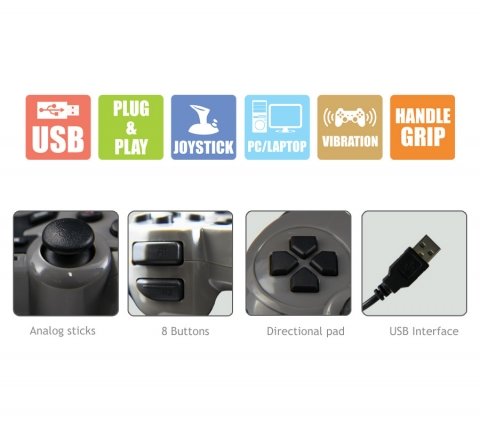
- Equipped with a directional pad, 8 fire buttons, and 2 analog sticks.
- Compatible with Windows XP, Vista, and Windows 7 operating systems.
- Supports both digital and analog modes.
Contenu du colis
- Zebronic ZEB-250JP Game Pad
- Installation CD (for drivers, if required)
Instructions d'installation
- Connect the Game Pad: Locate an available USB port on your computer (Desktop or Laptop). Insert the USB connector of the ZEB-250JP Game Pad into the USB port. The device is designed for plug-and-play functionality.
- Installation du pilote : For optimal performance, especially on older operating systems like Windows XP or Vista, it is recommended to install the drivers from the provided installation CD. Insert the CD into your computer's optical drive and follow the on-screen instructions. For Windows 7 and newer, drivers may install automatically.
- Compatibilité du système : Ensure your computer is running a compatible operating system (Windows XP, Vista, Windows 7).
Mode d'emploi
Contrôles surview
- Croix directionnelle (D-Pad) : Used for directional movement or menu navigation.
- Joysticks analogiques : Two analog sticks provide 360-degree movement for finer control in games.
- Fire Buttons (8 buttons): Boutons d'action pour les commandes en jeu.
- Fonction vibrante : The game pad features dual vibration motors that provide tactile feedback during gameplay, enhancing immersion. This function is automatically activated by compatible games.
Sélection du mode
The game pad supports both digital and analog modes. The mode can typically be switched using a dedicated button on the game pad (often labeled 'Mode' or 'Analog') or is automatically detected by the game. Refer to your game's settings for specific controller configurations.
Entretien
- Keep the game pad clean by wiping it with a soft, dry cloth.
- Évitez d'exposer l'appareil à des températures extrêmes, à la lumière directe du soleil ou à l'humidité.
- N'utilisez pas de produits chimiques agressifs ou de nettoyants abrasifs.
- Store the game pad in a safe place when not in use to prevent damage to the cable or buttons.
Dépannage
- Game Pad Not Detected:
- Ensure the USB cable is securely connected to both the game pad and the computer.
- Try connecting the game pad to a different USB port.
- Redémarrez votre ordinateur.
- Verify that the necessary drivers are installed from the provided CD or through Windows Update.
- La fonction vibration ne fonctionne pas :
- Vérifiez que le jeu auquel vous jouez prend en charge le retour de vibration.
- Vérifiez les paramètres du jeu pour vous assurer que les vibrations sont activées.
- Vérifiez que les pilotes sont correctement installés.
- Buttons or Analog Sticks Unresponsive:
- Test the game pad on another computer or in a different game to isolate the issue.
- Ensure the game pad is in the correct mode (digital/analog) for the game.
- Reinstall the device drivers.
Caractéristiques
| Marque | ZEBRONIQUE |
| Modèle | ZEB-250JP |
| Technologie de connectivité | USB |
| Type de contrôleur | Manette de jeu |
| Appareils compatibles | Windows (Desktop, Laptop) |
| Prise en charge du système d'exploitation | Windows XP, Vista, Windows 7 |
| Caractéristiques spéciales | Handle Grip, Joystick, Plug and Play, Vibration |
| Dimensions du produit | 24.1 x 18.3 x 6.4 cm |
| Poids de l'article | 290 g |
Informations sur la garantie
This product is covered by a standard manufacturer's warranty. Please refer to the warranty card included in your package or contact Zebronic's customer support for specific warranty terms and conditions. Keep your purchase receipt as proof of purchase.
Soutien
For further assistance, technical support, or service inquiries, please visit the official Zebronics webVous trouverez plus d'informations et les coordonnées sur le site web ou en contactant leur service client. Zebronics Store on Amazon.