1. Introduction
This manual provides essential information for the safe and efficient operation of your InFocus IN112a SVGA DLP Projector. Please read it thoroughly before using the projector and retain it for future reference. The InFocus IN112a is designed to deliver clear and bright projections for various applications, featuring SVGA resolution, HDMI connectivity, and 3D support.
2. Consignes de sécurité
Respectez les consignes de sécurité suivantes afin d'éviter d'endommager le projecteur et d'assurer la sécurité de l'utilisateur :
- Do not look directly into the projector lens quand le lamp est allumée. La lumière intense peut endommager les yeux.
- Assurez une ventilation adéquate. Ne bloquez pas les ouvertures de ventilation.
- Only qualified service personnel should open the projector casing. Il n'y a aucune pièce réparable par l'utilisateur à l'intérieur.
- Utilisez uniquement le cordon d'alimentation fourni avec le projecteur.
- Gardez le projecteur loin de l’eau ou des environnements humides.
- Le projecteur lamp contains mercury. Dispose of lamps according to local regulations. Visit www.lamprecycle.org pour plus d'informations.

Image : Bas view of the InFocus IN112a projector, displaying various warning labels, regulatory compliance marks (like CE, FCC), and information regarding the mercury content in the lamp and recycling instructions.
3. Produit terminéview
3.1. Dimensions du projecteur

Image : Avant view of the InFocus IN112a projector, illustrating its physical dimensions. The projector measures approximately 292 mm in width, 220 mm in depth, and 108 mm in height.
3.2. Commandes du panneau supérieur
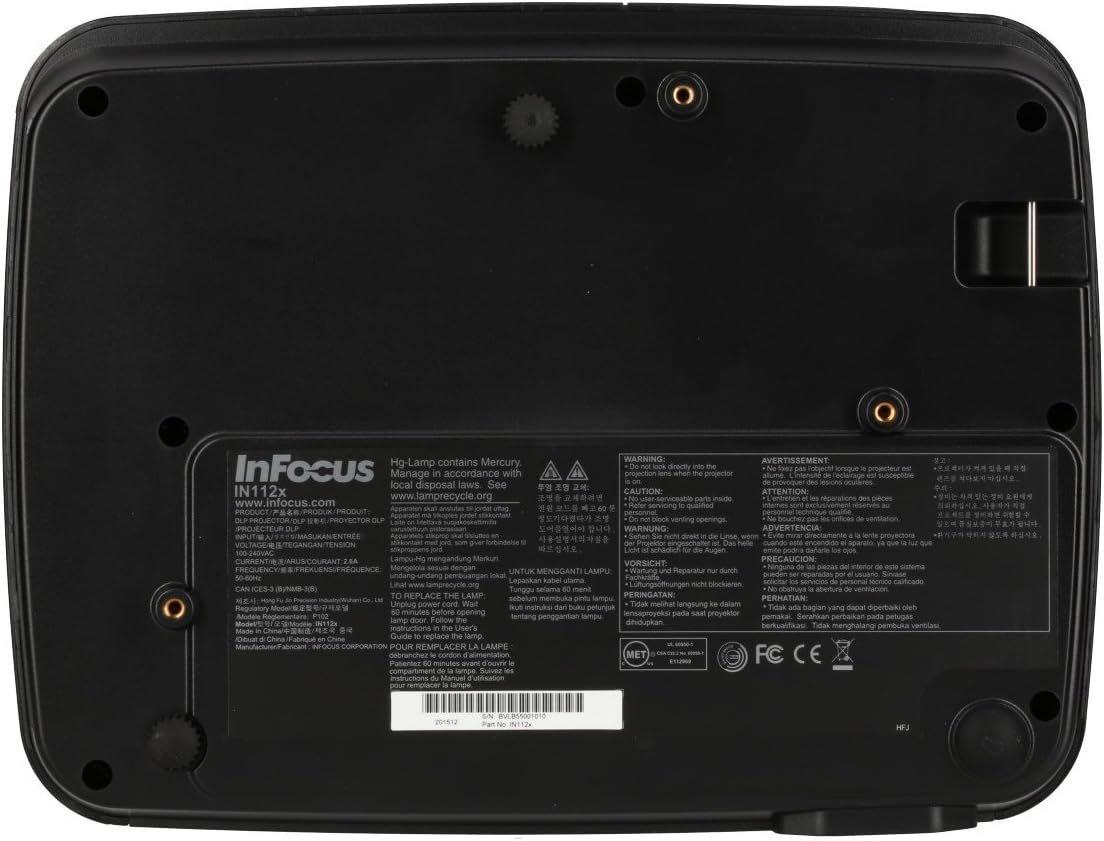
Image : Haut view of the InFocus IN112a projector, highlighting the control panel. This panel includes buttons for power, menu access, source selection, and directional navigation for menu adjustments.
The top panel features buttons for power on/off, menu access, input source selection, and navigation arrows for adjusting settings within the on-screen display (OSD) menu. The focus and zoom rings are located near the lens.
3.3. Connexions du panneau arrière

Image : Arrière view of the InFocus IN112a projector, displaying its comprehensive array of connectivity ports. These include HDMI 1.4, two VGA inputs (Computer 1, Computer 2), a VGA monitor output, S-Video, Composite video, two 3.5mm stereo audio inputs, one 3.5mm stereo audio output, an RS232C control port, and a USB-B port.
The rear panel provides a variety of connection options:
- HDMI 1.4: Pour l'entrée vidéo et audio numérique.
- VGA (Computer 1, Computer 2): Two inputs for analog computer signals.
- VGA Monitor Out: For connecting an external monitor.
- Vidéo composite : For standard definition video input.
- S-Vidéo: For enhanced standard definition video input.
- Audio In (3.5mm x 2): Pour entrée audio stéréo.
- Sortie audio (3.5 mm) : For stereo audio output to external speakers.
- RS232C : Pour le contrôle du projecteur via un ordinateur ou un système de contrôle.
- USB-B : Pour les mises à jour de service ou de micrologiciel.
4. Installation
4.1. Placement
Position the projector on a stable, flat surface or mount it securely to a ceiling. Ensure there is adequate space around the projector for ventilation. The distance from the screen will determine the image size. Refer to the specifications section for throw ratio details.
4.2. Connexion de l'alimentation
Connect the supplied power cord to the projector's power inlet and then to a grounded electrical outlet. The power LED will illuminate, indicating standby mode.
4.3. Connexion des sources vidéo
Connect your video source (e.g., computer, Blu-ray player, cable box) to the appropriate input port on the projector's rear panel using a compatible cable. For best quality, use the HDMI input.
- HDMI: Connect an HDMI cable from your source to the projector's HDMI port.
- VGA: Connect a VGA cable from your computer to either the Computer 1 or Computer 2 port.
- Composite/S-Video: Connect the respective cable for older video sources.
4.4. Connexion audio
If using VGA, Composite, or S-Video inputs, connect an audio cable from your source's audio output to one of the projector's 3.5mm Audio In ports. HDMI carries both video and audio, so a separate audio connection is not typically needed for HDMI sources.
4.5. Adjusting Focus and Zoom
After powering on the projector and displaying an image, rotate the Bague de mise au point around the lens until the image is sharp and clear. Use the Bague de zoom to adjust the image size to fit your screen.
5. Fonctionnement
5.1. Mise sous/hors tension
- Pour allumer : Press the Power button on the projector's top panel or the remote control. The power indicator will turn green.
- Pour éteindre : Press the Power button twice. The projector will enter a cooling cycle, and the power indicator will turn red (standby) once complete.
5.2. Sélection de la source d'entrée
Press the "Source" button on the projector or remote control repeatedly to cycle through available input sources (HDMI, VGA1, VGA2, S-Video, Video). The projector will automatically detect an active signal if "Auto Source" is enabled in the menu.
5.3. Navigation dans les menus
Press the "Menu" button to access the On-Screen Display (OSD) menu. Use the directional arrows to navigate through menu options and the "Enter" button to select. Press "Menu" again to exit.
5.4. 3D Content Playback
The IN112a supports 3D content from Blu-ray players, cable boxes, dish services (over HDMI), and PC-based 3D content at 120Hz. To view 3D content, you will need 144 Hz DLP Link 3D glasses (sold separately).
- Ensure your 3D source is connected via HDMI.
- Play 3D content from your source.
- Turn on your 144 Hz DLP Link 3D glasses. The projector should automatically detect the 3D signal.
6. Entretien
6.1. Cleaning the Projector Lens
Gently wipe the lens with a soft, lint-free cloth specifically designed for optical surfaces. Do not use abrasive cleaners or excessive force, as this can scratch the lens.
6.2. Lamp Remplacement
Le projecteur lamp a une durée de vie allant jusqu'à 10 000 heures. Lorsque le lamp life is nearing its end, a warning message may appear, or the lamp indicator LED may illuminate. Refer to the full service manual for detailed lamp consignes de remplacement. Avertissement : Le lamp contient du mercure. Jetez les bouteilles usagéesamps according to local environmental regulations.
6.3. Nettoyage des filtres à air
Regularly clean the air filters to ensure proper ventilation and prevent overheating. Dust and debris can accumulate, reducing cooling efficiency. Gently remove the filter cover and clean the filter with a soft brush or vacuum cleaner. Replace the filter cover securely.
7. Dépannage
| Problème | Cause possible | Solution |
|---|---|---|
| Aucune image affichée |
|
|
| L'image est floue |
|
|
| Pas de son |
|
|
| Le projecteur surchauffe et s'éteint. |
|
|
8. Spécifications
| Fonctionnalité | Détail |
|---|---|
| Numéro de modèle | IN112X |
| Technologie d'affichage | DLP |
| Résolution native | SVGA (800x600) |
| Luminosité | Jusqu'à 3200 Lumens |
| Rapport de contraste | 15,000:1 |
| Lamp Vie | Jusqu'à 10,000 XNUMX heures |
| Connectivité | HDMI 1.4, VGA x 2, Composite video, S-Video, 3.5 mm stereo in x 2, 3.5mm stereo out, VGA monitor out, RS232C, USB-B |
| Prise en charge de 3D | Yes (requires 144 Hz DLP Link 3D glasses) |
| Rapport de projection | 1.9 - 2.09 |
| Dimensions du produit | 14.25 x 12 x 7.75 pouces (environ 36.2 x 30.5 x 19.7 cm) |
| Poids de l'article | 5.4 livre (environ 2.45 kg) |
| Utilisation recommandée | Intérieur/Extérieur |
| Dossier spécial | Haut-parleurs intégrés |
9. Garantie et assistance
For warranty information and technical support, please refer to the documentation included with your purchase or visit the official InFocus webConsultez le site. Conservez votre preuve d'achat pour toute réclamation au titre de la garantie.