1. Introduction
This manual provides essential information for the installation, operation, and maintenance of your HGST Ultrastar He8 HUH728080ALE604 8TB SATA Hard Drive. The Ultrastar He8 series utilizes HelioSeal technology, replacing air with helium inside the drive to reduce turbulence and enable a seven-disk design within a standard 3.5-inch form factor. This design contributes to industry-leading capacity, improved power efficiency, and enhanced performance for enterprise environments.

Figure 1: HGST Ultrastar He8 8TB SATA Hard Drive, top view.
2. Consignes de sécurité
Observe the following safety precautions to prevent damage to the drive and ensure safe operation:
- Protection contre les décharges électrostatiques (ESD) : Manipulez toujours le disque dur par ses bords. Portez un bracelet antistatique ou touchez fréquemment un objet métallique relié à la terre avant de manipuler le disque afin de dissiper l'électricité statique.
- Manutention physique : Avoid dropping or subjecting the drive to sudden impacts. Hard drives are precision instruments and can be damaged by rough handling.
- Alimentation: Ensure your power supply unit (PSU) provides stable and sufficient power for the drive. Incorrect voltage or unstable power can damage the drive.
- Ventilation: Install the drive in a well-ventilated area to prevent overheating. Excessive heat can reduce the lifespan of the drive.
3. Contenu du colis
Vérifiez que votre colis contient les éléments suivants :
- HGST Ultrastar He8 HUH728080ALE604 8TB SATA Hard Drive
- Documentation (this user manual, if provided in print)
Note: SATA data cables, power cables, and mounting screws are typically supplied with your computer system or enclosure and are not usually included with the bare drive.
4. Installation
4.1 Installation physique
- Préparez votre système : Power off your computer and disconnect the power cord. Open the computer case to access the drive bays.
- Monter le disque dur : Slide the HGST Ultrastar He8 drive into an available 3.5-inch drive bay. Secure the drive with appropriate mounting screws on both sides to prevent vibration.
- Connecter les câbles :
- Connectez une extrémité d'un câble de données SATA au port SATA du disque dur et l'autre extrémité à un port SATA disponible sur votre carte mère.
- Connectez un câble d'alimentation SATA de votre bloc d'alimentation (PSU) au connecteur d'alimentation du disque dur.
- Fermer le boîtier et mettre sous tension : Close your computer case, reconnect the power cord, and power on your system.
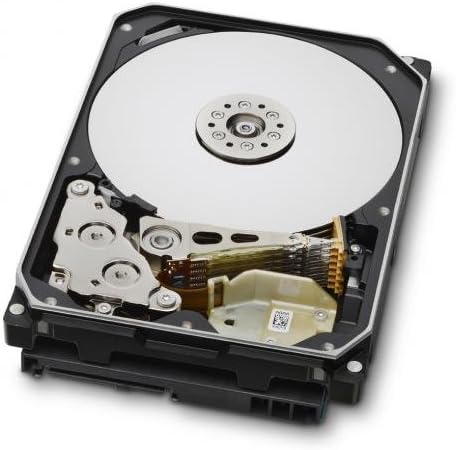
Figure 2: Internal components of the HGST Ultrastar He8, illustrating the platters and read/write head assembly.
4.2 Configuration initiale (système d'exploitation)
After physical installation, the drive needs to be initialized, partitioned, and formatted by your operating system before it can be used for storage.
- Gestion des disques d'accès :
- Fenêtres : Right-click on the Start button, then select "Disk Management."
- Linux: Use utilities like
fdisk,gparted, ouDisks. - macOS: Use "Disk Utility."
- Initialiser le disque : The new drive should appear as "Unallocated Space." You may be prompted to initialize the disk. Choose GPT (GUID Partition Table) for drives larger than 2TB.
- Create New Simple Volume (Partition): Right-click on the unallocated space and select "New Simple Volume." Follow the wizard to define the partition size, assign a drive letter, and format the volume.
- Format the Drive: Sélectionnez un file system (e.g., NTFS for Windows, ext4 for Linux, APFS/HFS+ for macOS). Perform a quick format for faster setup, or a full format for a more thorough check (which takes significantly longer).
5. Fonctionnement
The HGST Ultrastar He8 is designed for continuous operation in enterprise environments, offering high capacity and reliable performance. Once configured, it functions like any other storage drive within your system.
- Transfert de données : Transfert files vers et depuis le lecteur en utilisant les paramètres de votre système d'exploitation file explorer or command-line tools.
- Performance: The drive operates at 7200 RPM with a SATA 6Gb/s interface, providing fast data access and transfer speeds suitable for demanding applications.
- Gestion de l'alimentation: Ensure your operating system's power settings are configured appropriately for hard drives, especially in server environments, to optimize power consumption and drive longevity.
6. Entretien
Regular maintenance helps ensure the longevity and reliability of your hard drive and the data stored on it.
- Sauvegarde des données : Regularly back up critical data to another storage device or cloud service. No storage device is infallible.
- Surveiller l'état du disque dur : Use S.M.A.R.T. (Self-Monitoring, Analysis and Reporting Technology) tools to monitor the drive's health status. Many operating systems and third-party utilities offer this functionality.
- Conditions environnementales : Maintain a stable operating environment. Avoid extreme temperatures, high humidity, and excessive vibrations.
- Mises à jour du micrologiciel : Periodically check the Western Digital support website for firmware updates for your specific drive model. Firmware updates can improve performance, stability, or address known issues. Exercise caution when performing firmware updates, as an interrupted update can render the drive inoperable.
7. Dépannage
If you encounter issues with your HGST Ultrastar He8 drive, consider the following troubleshooting steps:
- Lecteur non détecté :
- Vérifiez que toutes les connexions des câbles (données SATA et alimentation) sont bien fixées.
- Verify that the SATA port on the motherboard is enabled in the system's BIOS/UEFI settings.
- Test the drive in a different SATA port or with different cables.
- Ensure the drive is initialized and formatted in Disk Management (Windows) or equivalent utility (Linux/macOS).
- Performances lentes :
- Vérifiez les processus en arrière-plan qui consomment des ressources disque.
- Ensure the drive is connected to a SATA 6Gb/s port and that the necessary drivers are installed.
- Surveillez l'état de votre disque dur à l'aide des outils SMART pour détecter les problèmes potentiels.
- Assurez une ventilation adéquate pour éviter la surchauffe.
- Bruits inhabituels :
- Clicking, grinding, or repetitive beeping sounds can indicate a mechanical failure. Immediately back up any accessible data and consider replacing the drive.
- A slight hum or whirring is normal for a spinning hard drive.
- Corruption des données :
- Exécutez les utilitaires de vérification des erreurs de disque (par exemple,
chkdsksous Windows,fsckon Linux). - Ensure proper system shutdowns to prevent data loss.
- Exécutez les utilitaires de vérification des erreurs de disque (par exemple,
8. Spécifications
| Fonctionnalité | Spécification |
|---|---|
| Numéros de modèle | HUH728080ALE604, 0F23668, 0F25721 |
| Capacité | 8 To |
| Interface | SATA 6Gb/s (Serial ATA-600) |
| Facteur de forme | 3.5 pouces |
| Vitesse de rotation | 7200 tr/min |
| Cache | 128 Mo |
| Dimensions (L x l x H) | 5.79 x 4 x 1.03 pouces |
| Poids | 1.43 livres |
| Technologie | HelioSeal |
| Fiabilité (MTBF) | 2+ Million Hours (typical) |
9. Informations sur la garantie
The HGST Ultrastar He8 hard drive typically comes with a 3-year seller warranty, covering defects in materials and workmanship under normal use. For specific warranty terms and conditions, please refer to the documentation provided at the time of purchase or contact your seller directly.
Standard return policies usually allow for returns or replacements within 30 days of purchase, subject to the seller's terms.
10. Assistance
For further assistance, technical support, or warranty claims, please contact Western Digital customer support or visit their official website:
- Assistance Western Digital Website: https://support.wdc.com
- Western Digital Store: Western Digital Store on Amazon
When contacting support, please have your drive's model number (HUH728080ALE604 or 0F23668) and serial number ready.


