1. Introduction
The THOMSON CT390 is a compact and versatile radio alarm clock designed to provide timekeeping, radio entertainment, and alarm functions. It features an intuitive LCD display with touch controls, FM/MW radio tuning, dual alarms with a weekend function, and connectivity options including USB and AUX for external audio playback. This manual provides detailed instructions for setting up and operating your CT390 unit.
2. Consignes de sécurité
- Ensure the power adapter is connected to a compatible power outlet.
- N’exposez pas l’appareil à l’eau, à l’humidité ou à des températures extrêmes.
- Évitez de placer l’appareil à proximité de sources de chaleur ou en plein soleil.
- Nettoyez l'appareil avec un chiffon doux et sec. N'utilisez pas de nettoyants liquides ni de produits abrasifs.
- N’essayez pas de démonter ou de réparer l’appareil vous-même. Confiez toute intervention à un personnel qualifié.
3. Contenu du colis
Veuillez vérifier que tous les articles sont présents dans le colis :
- THOMSON CT390 Radio Alarm Clock Unit
- Adaptateur secteur
- External Temperature Sensor (for outdoor temperature display)
- Manuel de l'utilisateur (ce document)
4. Produit terminéview
4.1 Panneau avant et écran
The front panel features a large LCD display and touch-sensitive controls for various functions.
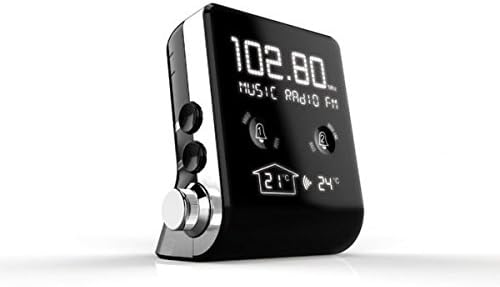
Image 1: Devant view of the THOMSON CT390, showing the LCD display with radio frequency (e.g., 102.80 MHz), 'MUSIC RADIO FM' text, two alarm bell icons, and indoor (21°C) and outdoor (24°C) temperature readings.

Image 2: Devant view of the THOMSON CT390, showing the LCD display with the current time (e.g., 0:20) and date (e.g., SU 01 JAN 2012). This view also shows the alarm icons and temperature readings at the bottom.
4.2 Side and Rear Controls/Ports
The side and rear panels house physical buttons, a rotary knob, and connection ports.

Image 3: Côté et arrière view of the THOMSON CT390. Visible controls include 'SYNC TIME', 'DIMMER', 'SET', 'MODE' buttons, a 'TUNING/ADJUST' rotary knob, a USB port, and an AUX input jack.
4.3 Capteur de température externe
The unit includes an external sensor for displaying outdoor temperature.
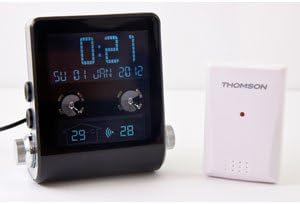
Image 4: The THOMSON CT390 unit displayed alongside its compact white external temperature sensor, which wirelessly transmits outdoor temperature data to the main unit.
5. Installation
5.1 Connexion d'alimentation
- Connect the power adapter to the DC input jack on the rear of the CT390.
- Branchez l'adaptateur secteur à une prise murale standard. L'appareil s'allumera et l'écran s'illuminera.
5.2 Réglage initial de la date et de l'heure
The CT390 supports automatic time adjustment via RDS (Radio Data System) when tuned to an FM station that broadcasts time information. Manual setting is also possible.
- Automatic Setting (via RDS): Tune to an FM radio station. If the station broadcasts RDS time, the clock will automatically synchronize.
- Réglage manuel :
- Press and hold the 'SET' button (refer to Image 3) to enter time setting mode.
- Use the 'TUNING/ADJUST' knob to adjust the hour, then press 'SET' to confirm.
- Répétez l'opération pour les minutes, l'année, le mois et le jour.
- Appuyez de nouveau sur « SET » pour quitter le mode de réglage.
5.3 External Temperature Sensor Pairing
The external sensor should automatically pair with the main unit upon power-up. Ensure the sensor is placed in a suitable outdoor location, protected from direct rain and sunlight, for accurate readings.
6. Mode d'emploi
6.1 Affichage de l'heure et de la date
The LCD display continuously shows the current time and date. Indoor and outdoor temperatures are also displayed.
6.2 Fonctionnement radio
- Marche/Arrêt : Press the 'MODE' button to switch between radio and other modes.
- Sélection de bande : In radio mode, press 'MODE' to cycle between FM and MW bands.
- Tuning: Use the 'TUNING/ADJUST' knob to manually tune to a desired frequency.
- Analyse automatique : Press and hold the 'TUNING/ADJUST' knob to automatically scan for the next available station.
- Réglage du volume : Use the dedicated volume control (if present, otherwise the 'TUNING/ADJUST' knob might double as volume in certain modes).
6.3 Paramètres d'alarme
The CT390 features two independent alarms (Alarm 1 and Alarm 2) and a weekend function.
- Définir une alarme :
- Press the Alarm 1 or Alarm 2 touch icon on the front display to activate/deactivate.
- Press and hold the respective alarm icon to enter alarm setting mode.
- Use the 'TUNING/ADJUST' knob to set the alarm time (hour and minute), then press the alarm icon to confirm each step.
- Select the alarm source: Radio, Buzzer, or USB (if a USB device is connected).
- Confirm the alarm settings to exit.
- Weekend Function: Activate the weekend function to disable alarms on Saturdays and Sundays. This option is typically set during the alarm setup process.
- Fonction de répétition: When an alarm sounds, press the 'SNOOZE' button (often a large button on top or a specific touch area) to temporarily silence the alarm for a few minutes.
- Arrêter une alarme : To turn off a sounding alarm, press any button other than 'SNOOZE'. The alarm will reset for the next day.
6.4 Paramètres d'affichage
Ajustez la luminosité de l'écran pour un résultat optimal viewing.
- Variateur: Press the 'DIMMER' button (refer to Image 3) to cycle through different brightness levels for the LCD display.
6.5 Lecture USB et AUX
Connect external audio devices for playback through the CT390's speaker.
- Lecture USB: Insérez une clé USB avec MP3 files into the USB port. The unit should automatically switch to USB mode or require selection via the 'MODE' button.
- Entrée AUX: Connect an external audio device (e.g., smartphone, MP3 player) to the AUX input jack using a 3.5mm audio cable. Select AUX mode via the 'MODE' button.
7. Entretien
To ensure the longevity and optimal performance of your THOMSON CT390:
- Essuyez l'appareil avec un chiffon doux, sec et non pelucheux.
- N’utilisez pas de nettoyants abrasifs, de cires ou de solvants, car ils pourraient endommager la finition.
- Veillez à ce que l'appareil soit exempt de poussière et de débris.
8. Dépannage
If you encounter issues with your CT390, refer to the following common problems and solutions:
| Problème | Cause possible | Solution |
|---|---|---|
| L'heure est inexacte ou dérive. | No RDS signal; manual setting error; internal clock drift. | Tune to an FM station with RDS. Manually reset the time. Ensure the unit is not subject to frequent power interruptions. |
| L'alarme ne sonne pas. | Alarm not activated; volume too low; weekend function active. | Ensure the alarm icon is displayed. Increase volume. Check weekend function settings. |
| Mauvaise réception radio. | Signal faible ; antenne non déployée ; interférences. | Extend the FM wire antenna fully. Reposition the unit. Avoid placing near electronic devices that may cause interference. |
| L'écran est trop sombre ou trop lumineux. | Réglage de l'intensité lumineuse. | Press the 'DIMMER' button to adjust brightness. |
| Température extérieure non affichée. | External sensor not paired or out of range; sensor battery low (if applicable). | Ensure the external sensor is within range of the main unit. Check for any battery compartment on the sensor. |
9. Spécifications
- Marque: Thomson
- Numéro de modèle : CT390
- Couleur: Noir
- Matériel: Plastique
- Type d'affichage : LCD numérique
- Bandes radio : FM, MW
- Caractéristiques spéciales : Calendar, Alarm Function, Integrated Speakers, Indoor/Outdoor Temperature Display, USB Port, AUX Input
- Source d'alimentation : AC (Mains Power)
- Poids de l'article : Environ 760 g
- Dimensions du colis : 20.4 x 16.8 x 12.4 cm
10. Garantie et assistance
For warranty information and customer support, please refer to the documentation provided at the time of purchase or contact your local Thomson service center. Keep your proof of purchase for warranty claims.


