1. Introduction
1.1 Produit terminéview
The Uniden Indoor Panel Directional Antenna is designed to enhance cellular signal distribution within an indoor environment. This high-gain antenna works in conjunction with a cellular signal booster to improve signal quality and expand coverage in areas with weak reception. Its directional nature allows for focused signal transmission and reception, optimizing performance when pointed towards a specific 'troubled area' or signal source.
This antenna is intended for indoor use and can be mounted on a wall, ceiling, or pole to direct the signal effectively.
1.2 Principales caractéristiques
- Utilisation en intérieur : Specifically designed for internal environments.
- Impédance 50 ohms : Standard impedance for compatibility with most cellular booster systems.
- Gamme de fréquences : Supports 700 - 2500 MHz, covering common cellular bands.
- Gagner: 10 dBi for enhanced signal strength.
- Connecteurs : Equipped with N-Female connectors for secure attachment.
- Antenne directionnelle : Focuses signal in a specific direction for targeted coverage improvement.
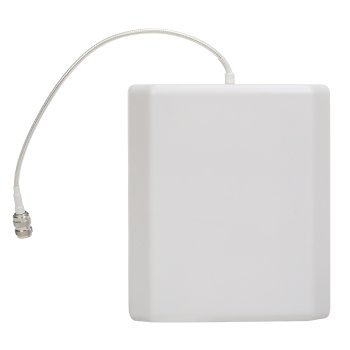
Image 1: Uniden Indoor Panel Directional Antenna (Model UNI-374)
2. Instructions de configuration
2.1 Contenu du paquet
- Uniden Indoor Panel Directional Antenna (Model UNI-374)
- Mounting hardware (if included with your specific purchase)
2.2 Directives de placement
- Identify Weak Signal Areas: Determine the specific indoor locations where cellular signal is weakest or non-existent. This is your 'troubled area'.
- Emplacement de montage : Choose a mounting location (wall, ceiling, or pole) that allows the antenna to be directed towards the identified troubled area. The antenna should be positioned to provide the most effective coverage.
- Orientation: As a directional antenna, its performance is optimized when pointed accurately. Experiment with slight adjustments to the antenna's angle to achieve the best signal improvement.
- Évitez les obstacles : Ensure the antenna's path to the desired coverage area is free from major obstructions like thick walls, metal objects, or large furniture.
2.3 Étapes de connexion
- Montage sécurisé : Mount the antenna securely using appropriate hardware.
- Câble de connexion: Connect a coaxial cable (not included, typically) with N-Male connectors to the N-Female connector on the antenna. Ensure the connection is hand-tightened.
- Booster Connection: Connect the other end of the coaxial cable to the appropriate indoor antenna port on your cellular signal booster. Refer to your signal booster's manual for specific port identification.
- Mise sous tension : Once all connections are secure, power on your cellular signal booster.
3. Fonctionnement
3.1 Fonctionnalité
The Uniden Indoor Panel Directional Antenna functions as a service antenna within a cellular signal boosting system. It receives the amplified cellular signal from your booster and distributes it into your desired indoor area. Conversely, it collects cellular signals from devices within its coverage area and sends them back to the booster for amplification and transmission to the cellular tower.
3.2 Optimisation du signal
After initial setup, monitor the cellular signal strength in your target area. If performance is not optimal, try making small adjustments to the antenna's direction. Since it is directional, even minor changes in angle can significantly impact coverage and signal quality. Use a signal strength indicator on your mobile device to gauge improvements.
4. Entretien
4.1 Nettoyage
The antenna requires minimal maintenance. Periodically wipe the exterior with a soft, dry cloth to remove dust. Do not use harsh chemicals or abrasive cleaners.
4.2 Inspection
Occasionally inspect the antenna and its cable connections for any signs of damage or loose fittings. Ensure all connections remain secure for optimal performance.
5. Dépannage
5.1 Poor Signal Performance
- Check Direction: Ensure the antenna is correctly oriented towards the area requiring improved signal. Adjust its angle slightly.
- Vérifiez les connexions : Confirm all coaxial cable connections are tight and secure at both the antenna and the signal booster.
- Booster Status: Check the status indicators on your cellular signal booster to ensure it is operating correctly. Refer to your booster's manual for troubleshooting specific to the booster unit.
- Intégrité du câble : Inspect the coaxial cable for any kinks, cuts, or damage that could impede signal flow.
5.2 Aucune amélioration du signal
- Vérification de l'alimentation : Ensure the signal booster connected to the antenna is powered on.
- Compatibilité: Verify that the antenna's frequency range (700-2500 MHz) is compatible with your cellular carrier's bands and your signal booster.
- Isolement: Ensure there is sufficient separation between your outdoor donor antenna (if applicable) and this indoor service antenna to prevent oscillation or feedback.
6. Spécifications
| Numéro de modèle | UNI-374 |
| Gamme de fréquences | 700 - 2500 MHz |
| Gagner | 10 dBi |
| Impédance | 50 ohms |
| Type de connecteur | N-Femelle |
| Type d'antenne | Directional Panel |
| Usage | Intérieur |
| Dimensions du produit | 10 x 2.5 x 7.5 pouces |
| Poids de l'article | 1.2 livres |
| Fabricant | Uniden Cellular |
7. Garantie et assistance
For warranty information, technical support, or service inquiries regarding your Uniden Indoor Panel Directional Antenna (Model UNI-374), please refer to the documentation provided with your original purchase or visit the official Uniden website. You may also contact Uniden customer support directly for assistance.
Uniden Customer Support: S'il vous plaît visitez www.uniden.com pour obtenir les coordonnées et les ressources d'assistance.


