1. Consignes de sécurité
Please read all instructions carefully before using the Vivitar Women's Shaver. Keep this manual for future reference.
- À utiliser avec précaution pour éviter les coupures.
- Ne pas utiliser à proximité de l'eau pendant la charge.
- Nettoyer après chaque utilisation pour éviter la prolifération bactérienne.
- Avoid use in shower to prevent slipping.
- Tenir hors de portée des enfants.
- Ne démontez pas et n'essayez pas de réparer le rasoir vous-même. Contactez le service client pour obtenir de l'aide.
- Assurez-vous que le compartiment à piles est bien fermé avant utilisation.
2. Contenu du colis
Vérifiez que tous les éléments sont présents dans le colis :
- Vivitar Women's Shaver (Model PG-V007)
- 1 batterie lithium-ion (préinstallée ou séparée)
- Manuel d'instructions

Image 1: Vivitar Women's Shaver PG-V007. This image displays the complete shaver unit, highlighting its ergonomic design and overall appearance.
3. Installation
3.1 Installation de la batterie
- Locate the battery compartment cover, usually at the bottom of the shaver handle.
- Tournez ou faites glisser le couvercle pour l'ouvrir.
- Insérez la batterie lithium-ion en veillant à ce que les bornes positive (+) et négative (-) soient correctement alignées avec les marquages à l'intérieur du compartiment.
- Remettez le couvercle du compartiment à piles en place et fixez-le fermement.
3.2 Initial Charge (if applicable)
Although the product uses a Lithium Ion battery, it is recommended to fully charge the shaver before its first use to ensure optimal performance. Connect the charging cable (if included) to the shaver and a suitable power source. Refer to the charging indicator for status.
4. Fonctionnement
4.1 Allumer/Éteindre
To turn on the shaver, slide the power switch located on the body of the unit to the "ON" position. To turn off, slide the switch to the "OFF" position.
4.2 Technique de rasage
- Ensure your skin is clean and dry for best results, though the shaver supports wet/dry application.
- Hold the shaver at a 90-degree angle to the skin.
- Gently glide the shaver against the direction of hair growth.
- Do not press too hard; the hypoallergenic stainless steel blades are designed to remove hair effectively with light pressure.
- For sensitive areas, stretch the skin taut to achieve a closer shave and prevent irritation.
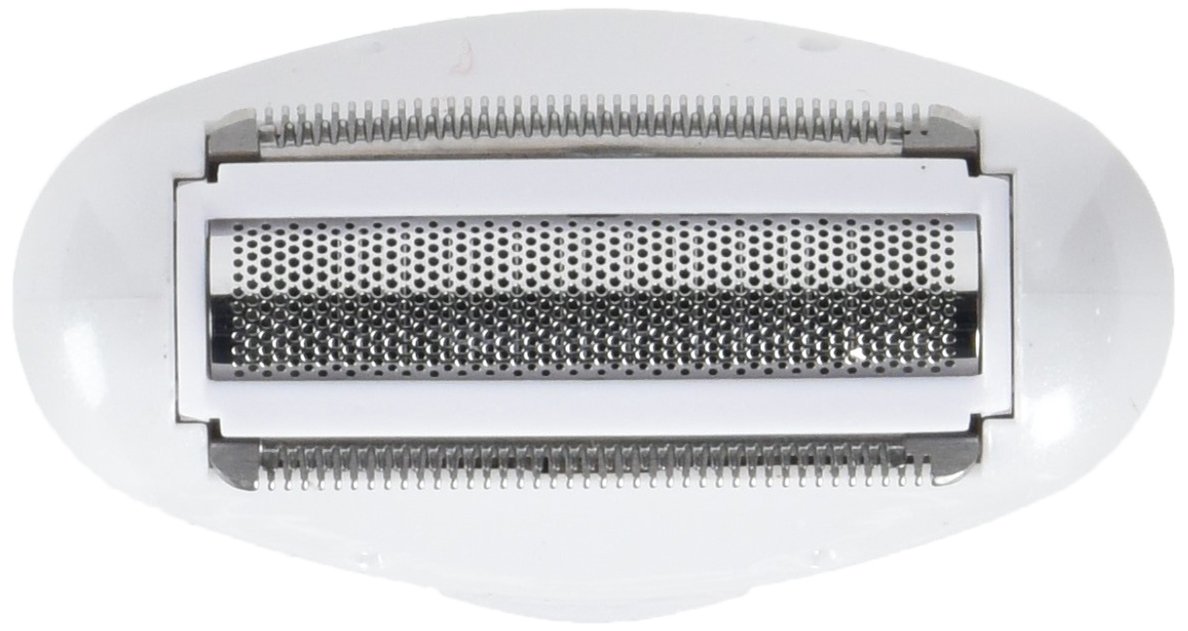
Image 2: Close-up of the Vivitar Women's Shaver foil head. This image shows the precision foil and trimmer blades, designed for a smooth shave.
4.3 Utilisation humide/sèche
The Vivitar Women's Shaver is designed for both wet and dry use, offering versatility. For wet shaving, you may use shaving cream or gel. Always ensure the shaver is completely dry before charging.
5. Entretien
5.1 Nettoyage de la tête de rasoir
Regular cleaning ensures optimal performance and hygiene. It is recommended to clean the shaver after each use.
- Éteignez le rasoir et débranchez-le de toute source d'alimentation.
- Carefully remove the foil head assembly. This usually involves pressing release buttons on the sides or gently pulling it upwards.
- Tap out any accumulated hair from the foil and cutter blades.
- Use the small cleaning brush (if included) to brush away fine hairs from the blades and inside the shaver body.
- Rinse the foil head and cutter blades under running water. Ensure all hair residue is removed.
- Laisser sécher complètement toutes les pièces à l'air libre avant de remonter le rasoir.
- Once dry, reattach the foil head assembly securely.
Important: Do not use harsh chemicals or abrasive cleaners on the shaver. Do not immerse the entire shaver body in water unless explicitly stated as fully waterproof.
6. Dépannage
| Problème | Cause possible | Solution |
|---|---|---|
| Le rasoir ne s'allume pas. | La batterie est déchargée ou mal installée. | Check battery installation. Replace battery if necessary. Ensure battery compartment is closed securely. |
| Le rasoir arrache les poils ou ne rase pas efficacement. | Blades are dull or clogged with hair. Incorrect shaving technique. | Clean the shaver head thoroughly. Ensure you are shaving against the direction of hair growth with light pressure. Consider replacing the foil/cutter if blades are dull (replacement parts sold separately). |
| Le rasoir cesse de fonctionner inopinément. | Batterie faible. Surchauffe. | Replace or recharge the battery. Allow the shaver to cool down if it feels warm. |
| Irritation après le rasage. | Skin sensitivity. Improper technique. Dirty shaver head. | Ensure skin is clean before shaving. Use light pressure. Clean shaver head regularly. Consider using a pre-shave lotion or post-shave balm. |
7. Spécifications
| Fonctionnalité | Détail |
|---|---|
| Numéro de modèle | PG-V007 |
| Dimensions du produit | 4.25 x 2.1 x 7.75 pouces |
| Poids de l'article | 5.6 onces |
| Source d'énergie | Alimenté par batterie |
| Type de batterie | 1 batterie lithium-ion (incluse) |
| Type de tête | Déjouer |
| Matériau de la lame | Acier inoxydable |
| Fonctionnalités supplémentaires | Cordless, Wet/Dry Application |

Image 3: Vivitar Women's Shaver demonstrating its compact size. This image provides a visual reference for the product's dimensions, showing it held in hand.
8. Garantie et assistance
Vivitar products are manufactured to high-quality standards. For information regarding warranty coverage, please refer to the warranty card included with your purchase or visit the official Vivitar website.
For technical support, troubleshooting assistance, or to inquire about replacement parts, please contact Vivitar Customer Service. Contact details can typically be found on the product packaging or the official Vivitar website.
Fabricant: Sakar International/GNC


