1. Introduction
1.1 Produit terminéview
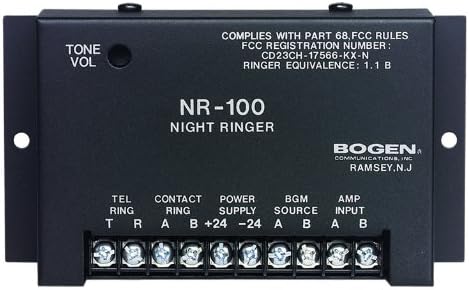
The Bogen BG-NR100 Night Ringer is an essential component for integrating telephone ringing into a paging or public address system. It is engineered to detect incoming telephone ring signals or external contact closures and generate a loud, clear electronic ringer tone. Its compact design and low current draw make it an efficient and reliable solution for various commercial and industrial applications.
1.2 Principales caractéristiques
- Responds to 90V ring signals or external contact closures.
- Produces a clear dual-frequency electronic ringer tone.
- Easily connects to any standard paging system.
- Automatically mutes background music while ringing.
- Features a 0-level ringer volume control for adjustable output.
- Compact size for convenient installation.
- Low current draw for energy efficiency.
2. Consignes de sécurité
Please read all safety instructions carefully before installing or operating the Bogen BG-NR100 Night Ringer. Failure to follow these instructions may result in electric shock, fire, or other hazards.
2.1 Précautions générales de sécurité
- N'exposez pas cet appareil à la pluie ou à l'humidité.
- Ne bloquez aucune ouverture de ventilation.
- Ne pas installer à proximité de sources de chaleur telles que radiateurs, bouches de chauffage, poêles ou autres appareils produisant de la chaleur.
- Utilisez uniquement les accessoires spécifiés par le fabricant.
- Confiez toute intervention d'entretien à un personnel qualifié.
2.2 Sécurité électrique
- Assurer l'alimentation voltage correspond aux exigences spécifiées pour l'appareil.
- Coupez l'alimentation électrique avant d'effectuer tout branchement ou toute opération de maintenance.
- Avoid touching exposed wires or terminals when the unit is powered.
- Une mise à la terre adéquate est essentielle pour un fonctionnement en toute sécurité.
3. Installation
3.1 Déballage
Carefully remove the Night Ringer from its packaging. Inspect the unit for any signs of damage that may have occurred during shipping. If damage is found, contact your supplier immediately.
3.2 Montage
The BG-NR100 is designed for surface mounting. Use appropriate screws (not supplied) to secure the unit to a wall or other stable surface using the mounting tabs on either side of the enclosure. Ensure the mounting location allows for adequate ventilation and access to connections.
3.3 Connexions de câblage
All connections are made via the screw terminal block located on the front of the unit. Ensure power is disconnected before making any wiring connections.
| Étiquette de borne | Description | Fonction |
|---|---|---|
| TEL RING (T, R) | Telephone Ring Input | Connect to the tip (T) and ring (R) lines of a standard 90V telephone ring signal source. |
| CONTACT RING (A, B) | External Contact Closure Input | Connect to a dry contact closure (e.g., from a relay or switch) to trigger the ringer. |
| POWER SUPPLY (+24, -24) | Puissance d'entrée | Connect to a regulated 24V DC power supply. Observe polarity (+24V to +24, -24V to -24). |
| BGM SOURCE (A, B) | Entrée de musique de fond | Connect the background music source here. The unit will mute this input during a ring event. |
| AMP INPUT (A, B) | Amplifier Input / Output to Paging System | Connect this output to the input of your paging amplifier or public address system. This carries the ringer tone and the muted BGM. |
4. Fonctionnement
4.1 Fonctionnement de base
Once properly connected and powered, the BG-NR100 will automatically detect an incoming 90V telephone ring signal or a closure on the Contact Ring terminals. Upon detection, the unit will generate a dual-frequency electronic ringer tone and simultaneously mute any background music connected to the BGM Source input. The ringer tone will be sent to the Amp Input terminals for connection to your paging system.
4.2 Contrôle du volume
The ringer volume can be adjusted using the VOLUME DE TONALITÉ knob located on the top left of the unit. Rotate the knob clockwise to increase the volume and counter-clockwise to decrease it. Adjust the volume to a suitable level for your environment.
5. Entretien
5.1 Nettoyage
To clean the unit, wipe the exterior with a soft, dry cloth. Do not use liquid cleaners or aerosol cleaners. Ensure the unit is powered off and disconnected from all sources before cleaning.
5.2 Entretien général
The BG-NR100 is designed for reliable operation and requires minimal maintenance. Ensure it is installed in a location free from excessive dust, moisture, and extreme temperatures. Periodically check all wiring connections to ensure they are secure.
6. Dépannage
If you experience issues with your Bogen BG-NR100 Night Ringer, refer to the following table for common problems and solutions.
| Problème | Cause possible | Solution |
|---|---|---|
| No ringer tone output. | Pas d'alimentation électrique à l'unité. | Check power supply connections and ensure 24V DC is present. |
| Incorrect or no input signal (TEL RING or CONTACT RING). | Verify 90V ring signal on TEL RING or proper contact closure on CONTACT RING. | |
| Le bouton de volume est réglé trop bas. | Adjust the TONE VOL knob clockwise. | |
| Ringer tone is distorted or weak. | Improper connection to paging amplifier. | Assurer AMP INPUT is correctly connected to the amplifier input. Check ampparamètres de lifier. |
| Background music does not mute. | BGM SOURCE not connected correctly. | Verify BGM SOURCE connections. Ensure the music source is routed through the Night Ringer. |
If the problem persists after attempting these solutions, please contact Bogen technical support or a qualified service technician.
7. Spécifications
Technical specifications for the Bogen BG-NR100 Night Ringer:
| Attribut | Valeur |
|---|---|
| Fabricant | ARC |
| Marque | Arc |
| Numéro de modèle | BG-NR100 |
| Poids de l'article | 1 livre |
| Dimensions du produit | 1 x 5 x 3 pouces |
| FCC Registration Number | CD23CH-17566-KX-N |
| Équivalence de sonnerie | 1.1 B |
| Date de première disponibilité | 27 novembre 2013 |
8. Garantie et assistance
8.1 Informations sur la garantie
For specific warranty terms and conditions, please refer to the warranty card included with your product or visit the official Bogen website. Bogen Communications, Inc. typically provides a limited warranty against defects in materials and workmanship for a specified period from the date of purchase.
8.2 Assistance technique
If you require technical assistance or have questions regarding the installation or operation of your BG-NR100 Night Ringer, please contact Bogen technical support. Contact information can usually be found on the Bogen website ou dans l'emballage du produit.


