1. Introduction
Thank you for choosing the SCHWAIGER DCR600HD Full HD Cable TV Receiver. This manual provides essential information for the safe and efficient use of your device. Please read these instructions carefully before installation and operation, and keep them for future reference.
2. Consignes de sécurité
- Alimentation: Only use the power adapter supplied with the device. Ensure the voltage correspond à votre alimentation électrique locale.
- Ventilation: Do not block ventilation openings. Ensure adequate space around the receiver for proper airflow to prevent overheating.
- Humidité: Keep the device away from water, moisture, and high humidity. Do not expose it to rain or splashes.
- Nettoyage: Débranchez l'appareil avant de le nettoyer. Utilisez un chiffon doux et sec. N'utilisez pas de nettoyants liquides ni en aérosol.
- Emplacement: Place the receiver on a stable, flat surface. Avoid direct sunlight, heat sources, and strong magnetic fields.
- Entretien: N’essayez pas d’ouvrir ou de réparer l’appareil vous-même. Confiez toute réparation à un personnel qualifié.
3. Contenu du colis
Veuillez vérifier que le colis contient les éléments suivants :
- SCHWAIGER DCR600HD Cable TV Receiver
- Télécommande
- Power Cable (integrated or separate adapter)
- Manuel de l'utilisateur (ce document)
4. Produit terminéview
4.1 Panneau avant
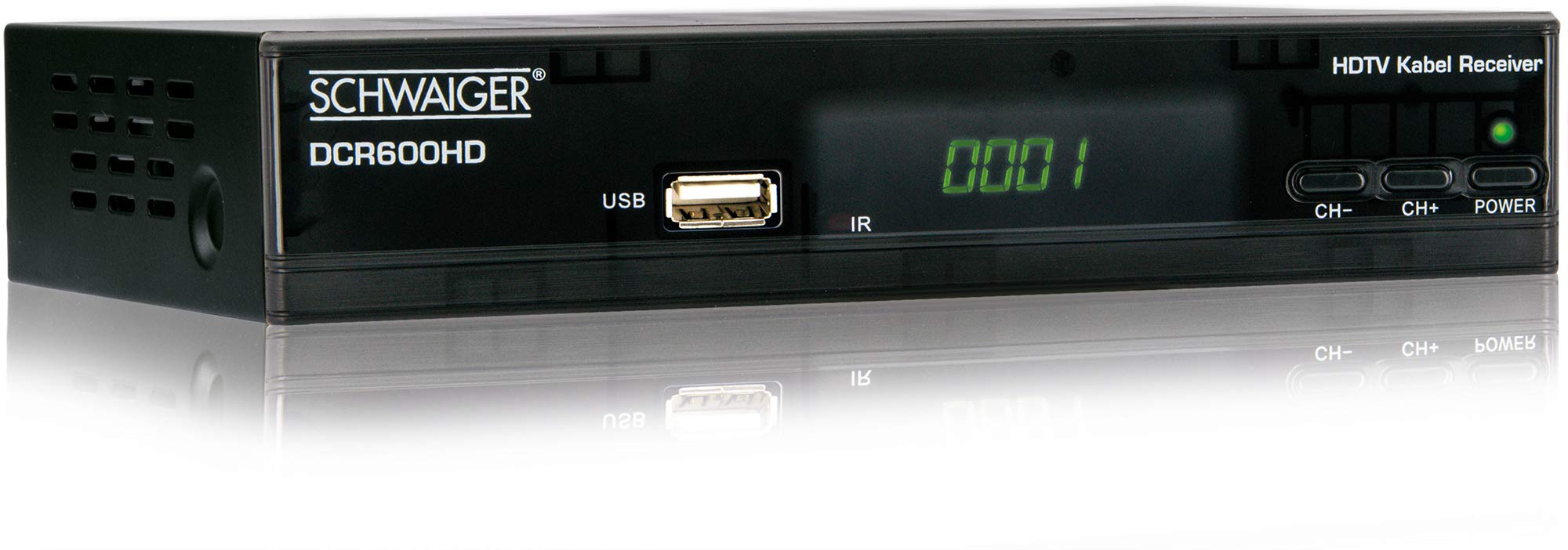
Image: Devant view of the SCHWAIGER DCR600HD receiver, showing the display, USB port, IR receiver, and control buttons.
- Afficher: Affiche le numéro de chaîne ou l'heure.
- Port USB : Pour connecter des périphériques de stockage USB pour la lecture multimédia.
- FR: Récepteur infrarouge pour la télécommande.
- CH- / CH+ : Buttons for changing channels.
- POUVOIR: Button to turn the receiver on or off (standby).
4.2 Panneau arrière

Image: Arrière view of the SCHWAIGER DCR600HD receiver, displaying various input and output ports.
- ENTRÉE RF : Input for connecting to your cable TV network.
- ETHERNET / LAN: For network connection (if supported for updates or specific services).
- HDMI: High-Definition Multimedia Interface output for connecting to an HD TV.
- TV SCART (CVBS): SCART output for connecting to older TVs or other devices.
- ~220-240V 50/60Hz: Alimentation du récepteur.
Télécommande 4.3

Image: Layout of the SCHWAIGER DCR600HD remote control, showing various function buttons.
The remote control allows you to operate all functions of your receiver. Familiarize yourself with the button layout for easy navigation.
5. Installation
5.1 Connexion du récepteur
- Connect to Cable Network: Connect your cable TV antenna cable to the ENTRÉE RF port situé sur le panneau arrière du récepteur.
- Se connecter à la télévision :
- For High Definition (HD) picture quality, connect an HDMI cable from the HDMI Connectez le port du récepteur à une entrée HDMI de votre téléviseur.
- For standard definition (SD) or older TVs, connect a SCART cable from the TV SCART (CVBS) port on the receiver to the SCART input on your TV.
- Connecter l'alimentation : Plug the power cable into the receiver's power input and then into a wall outlet.
- Allumez la télévision : Switch on your television and select the correct input source (HDMI or SCART) corresponding to your connection.
5.2 Première installation
Upon first power-on, the receiver will typically guide you through an initial setup process:
- Sélection de la langue : Use the remote control to select your preferred language for the on-screen menus.
- Sélection du pays : Select your country. This helps configure regional settings and channel frequencies.
- Balayage des chaînes : The receiver will prompt you to perform an automatic channel scan. Confirm to start scanning for available cable TV channels. This process may take several minutes.
- Enregistrer les paramètres : Once the scan is complete, save the found channels. Your receiver is now ready for use.
6. Mode d'emploi
6.1 Fonctionnement de base
- Marche/Arrêt : Appuyez sur le POUVOIR button on the remote control or front panel to switch the receiver on or to standby mode.
- Sélection des chaînes : Utilisez le CH+ / CH- buttons on the remote or front panel to change channels sequentially. Alternatively, use the number buttons to directly enter a channel number.
- Réglage du volume : Utilisez le VOL+ / vol- boutons sur la télécommande pour régler le volume audio.
- Muet: Appuyez sur le MUTE Appuyez sur ce bouton pour couper temporairement le son. Appuyez de nouveau pour le rétablir.
6.2 Guide électronique des programmes (EPG)
The EPG provides a schedule of current and upcoming TV programs.
- Appuyez sur le Guide électronique des programmes button on the remote control to access the Electronic Program Guide.
- Navigate through channels and program times using the arrow buttons.
- Presse OK à view des informations détaillées sur un programme sélectionné.
6.3 Lecture multimédia via USB
Vous pouvez lire des contenus multimédias files (AVI, MKV, MP3) from a USB storage device.
- Insérez une clé USB ou un disque dur externe dans le USB port sur le panneau avant.
- The receiver should detect the USB device and prompt you to open the media player, or you can access it via the main menu.
- Naviguez à travers votre files and folders using the arrow buttons and press OK to select and play a file.
- Use the media control buttons (Play, Pause, Stop, Fast Forward, Rewind) on the remote control for playback.
6.4 Télétexte
Access teletext services provided by broadcasters.
- Appuyez sur le TTX button on the remote control to activate teletext.
- Use the number buttons to enter page numbers or the arrow buttons to navigate.
- Presse TTX again to exit teletext.
7. Entretien
- Nettoyage: Regularly wipe the receiver with a soft, dry, lint-free cloth. Do not use abrasive cleaners, waxes, or solvents.
- Ventilation: Ensure that the ventilation slots are not obstructed by dust or other objects.
- Mises à jour logicielles : Vérifiez périodiquement les instructions du fabricant. website for any available software updates for your model. Follow the instructions provided with the update carefully.
8. Dépannage
Si vous rencontrez des problèmes avec votre récepteur, consultez les problèmes courants et leurs solutions ci-dessous :
| Problème | Cause/solution possible |
|---|---|
| Pas d'image ni de son |
|
| La télécommande ne fonctionne pas |
|
| Aucune chaîne trouvée lors de la recherche |
|
| Lecture impossible du périphérique USB |
|
9. Spécifications
| Fonctionnalité | Description |
|---|---|
| Nom du modèle | DCR600HD |
| Type de produit | Digital DVB TV Tuner / Digital Player |
| Couleur | Noir |
| Dimensions (L x P x H) | 17 cm x 4.5 cm x 10 cm |
| Poids | 380 g |
| Technologie de connectivité | HDMI, USB, SCART, RF |
| Appareils compatibles | Télévision |
| Encodage vidéo | H.264 |
| Résolutions prises en charge | 576i, 576p, 720p, 1080i, 1080p |
| Rapports d'aspect | 4:3, 16:9 |
| Mode de sortie audio | Stéréo |
| Formats audio pris en charge | MP3 |
| Types de supports pris en charge | AVI, MKV, MP3 |
| Nombre total de ports USB | 1 (USB 4-pin Type A) |
| Nombre total de ports HDMI | 1 |
| Consommation d'énergie | 3.8 W |
| Voltage | 240 volts |
| Caractéristiques spéciales | Electronic Program Guide (EPG), Teletext, Built-in Bluetooth (Note: Bluetooth functionality may vary by region/firmware) |
| Télécommande | Compris |
10. Garantie et assistance
For warranty information and technical support, please refer to the documentation included with your product packaging or visit the official SCHWAIGER webConsultez le site. Conservez votre reçu d'achat comme preuve d'achat pour toute réclamation au titre de la garantie.


