Introduction
Le boîtier PC Phanteks Enthoo Primo est un modèle tour complet conçu pour les passionnés recherchant un refroidissement optimal et un design fonctionnel. Ce manuel fournit des instructions détaillées pour l'installation, l'utilisation, la maintenance et le dépannage de votre boîtier Enthoo Primo, garantissant ainsi des performances et une durée de vie optimales.

Figure 1: Phanteks Enthoo Primo Ultimate Full Tower Computer Case (Black/Blue)
Configuration et installation
Proper installation is crucial for the performance and stability of your system. Follow these steps carefully.
1. Installation du bloc d'alimentation (PSU)
The Enthoo Primo features a unique thermally isolated PSU location at the rear of the case, promoting cooler temperatures and improved cable management.
- Locate the PSU compartment at the bottom rear of the case.
- Slide your PSU into the designated area.
- Secure the PSU with the provided screws from the rear of the case.
Video 1: Animated demonstration of internal case features, including PSU placement, HDD trays, and cable management. This video highlights the thermally isolated PSU location and hidden cable routing.

Figure 2 : Arrière view of the Enthoo Primo case, showing the PSU mounting area at the bottom.
2. Drive Installation (HDD/SSD)
The case supports up to 6 HDDs with dual repositionable and removable HDD cages, and features Drop-n-Lock double stack SSD brackets.
- Access the hidden HDD trays by removing the side panel.
- Slide your 3.5" HDDs into the trays and secure them.
- For 2.5" SSDs, utilize the removable Drop-n-Lock brackets. These can be installed in three different locations within the case.
- Ensure all drives are securely fastened to prevent vibration.

Figure 3 : Intérieur view of the Enthoo Primo, highlighting the hidden HDD trays and SSD mounting points.
3. Installation de la carte mère et des composants
The Enthoo Primo supports ATX motherboards and offers ample space for various components.
- Install your ATX motherboard onto the standoffs.
- Install your CPU, RAM, and graphics cards as per their respective manuals.
- Utilize the pre-installed cable management tools behind the motherboard tray to route cables neatly.
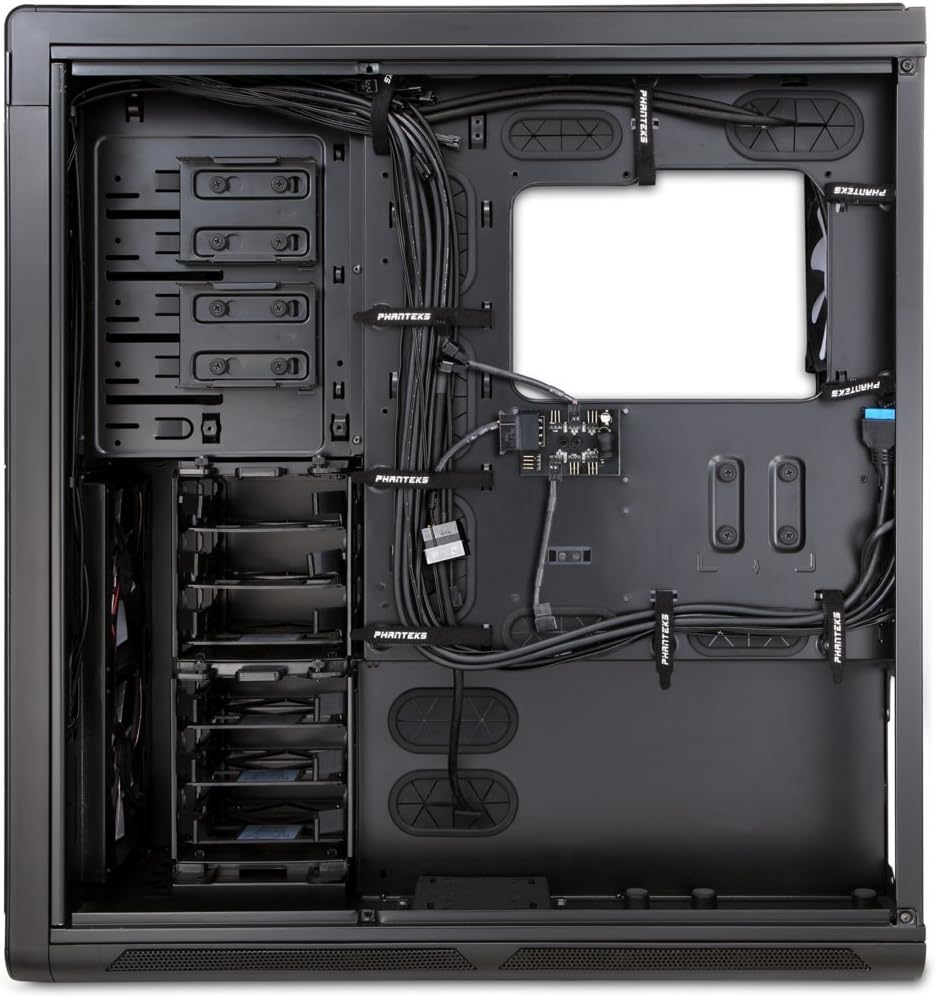
Figure 4 : Intérieur view of the Enthoo Primo, showcasing the cable management features behind the motherboard tray.
Caractéristiques de fonctionnement
The Enthoo Primo is designed with user convenience and optimal performance in mind.
E / S du panneau avant
Le panneau d'E/S en façade offre un accès facile aux ports et commandes essentiels :
- 2 ports USB 3.0 : Pour le transfert de données à haut débit.
- 2 ports USB 2.0 : Pour les connexions périphériques standard.
- Prise microphone: Pour l'entrée audio.
- Prise audio 3.5 mm : Pour la sortie audio.
- Interrupteur DEL : Controls the integrated LED lighting (LED strip & Fan LED).

Figure 5: Top angled view of the Enthoo Primo, illustrating the accessible front I/O panel.
Circuit de refroidissement
The Enthoo Primo offers extensive cooling support for both air and liquid cooling configurations.
- Ventilateurs préinstallés : Includes 1x 140mm fan on top, 2x 140mm LED fans in front, 1x 140mm fan in the rear, and 1x 140mm fan on the bottom. All are Phanteks' PH-F140SP fans.
- Refroidissement par air : Supports up to 14x 120mm fans or 11x 140mm fans for comprehensive airflow.
- Eau froide: Provides up to 5 different installation areas for slim and thick radiators (120mm and 140mm form factors), including clearance for push-pull fan configurations. Innovative liquid cooling mounting systems include radiator brackets and a versatile reservoir/pump bracket.

Figure 6 : Face avant view of the Enthoo Primo, showcasing the clean design and intake areas.
Entretien
Regular maintenance ensures optimal performance and extends the lifespan of your computer case.
- Filtres à poussière : The Enthoo Primo features removable dust filters located at the front, top, bottom (2x), and side panel (2x). Regularly remove and clean these filters to maintain optimal airflow and prevent dust buildup inside the case.
- Nettoyage extérieur : Utilisez un chiffon doux et sec.amp cloth to wipe down the aluminum front and top panels. Avoid abrasive cleaners.
- Nettoyage intérieur: Periodically use compressed air to clear dust from internal components and fan blades. Ensure the system is powered off and unplugged before cleaning.
Dépannage
Cette section aborde les problèmes courants que vous pourriez rencontrer.
- Pas d'alimentation :
- Ensure the PSU is properly seated and connected to the motherboard and wall outlet.
- Vérifiez que le câble de l'interrupteur d'alimentation du panneau avant est correctement connecté au connecteur de la carte mère.
- Fans Not Spinning / LED Not Lighting:
- Check fan connections to the motherboard or fan hub.
- Ensure the fan hub is powered (SATA connection).
- Verify the LED switch on the front panel is in the 'on' position.
- Ports USB non fonctionnels :
- Confirm that the USB 3.0 and USB 2.0 headers from the front panel are securely connected to the motherboard.
- Bruit excessif :
- Check if all fans are securely mounted and free from obstructions.
- Ensure drive trays are properly secured to minimize vibration.
- Clean dust filters and fan blades if necessary.
Caractéristiques
| Fonctionnalité | Détail |
|---|---|
| Nom du modèle | PH-ES813P_BL |
| Type de cas | Tour complète |
| Compatibilité de la carte mère | ATX |
| Matériel | Aluminum Faceplates, Steel Chassis |
| Couleur | Noir/Bleu |
| Dimensions (L x l x H) | 23.62 x 9.84 x 25.59 pouces |
| Poids de l'article | 50 livres |
| Ports USB 3.0 | 2 |
| Ports USB 2.0 | 2 |
| Ports audio | 1x Microphone, 1x 3.5mm Audio Jack |
| Emplacements d'extension | 8 |
| Méthode de refroidissement | Air / Eau |
| Ventilateurs préinstallés | 5x 140mm (1 top, 2 front LED, 1 rear, 1 bottom) |
| Support Max Fan | 14 x 120 mm ou 11 x 140 mm |
| Support de radiateur | Up to 5 locations (120mm/140mm form factors) |
Garantie et assistance
Pour obtenir des informations sur la garantie et une assistance technique, veuillez consulter le site officiel de Phanteks. website ou le manuel d'utilisation complet.
You can download the complete user manual in PDF format here: Phanteks Enthoo Primo User Manual (PDF)


