1. Introduction
1.1. Plus deview
The Hager WITTY charging station is designed for charging electric vehicles in accordance with Mode 3 (IEC 61851-1) and Mode 2 standards. It supports both Type 3 and standard socket connections, offering flexible charging solutions for various electric vehicles. This device operates on a 3-phase + Neutral, 32A electrical supply, delivering power from 4 kW to 22 kW.
1.2. Consignes de sécurité
- L'installation doit être effectuée par un électricien qualifié, conformément aux normes électriques locales et nationales.
- Do not attempt to open or repair the charging station yourself. Contact qualified service personnel.
- Assurez-vous que la borne de recharge est correctement mise à la terre.
- Do not use the charging station if it is damaged or shows signs of malfunction.
- Keep children and unauthorized persons away from the charging station during operation.
- Avoid exposing the charging station to extreme temperatures, direct sunlight for prolonged periods, or corrosive substances.
2. Description du produit
2.1. Caractéristiques
- Compatible with Mode 3 (Type 3) and Mode 2 charging.
- Free access operation.
- Power output: 4 kW to 22 kW.
- Input: 3-phase + Neutral, 32A.
- Integrated status indicator light.
2.2. Composants
The Hager WITTY charging station typically includes:
- Unité de station de recharge
- Matériel de montage (vis, chevilles)
- Manuel d'utilisation (ce document)

Figure 1 : Devant view of the Hager WITTY charging station with a green operational light, mounted on a textured wall.
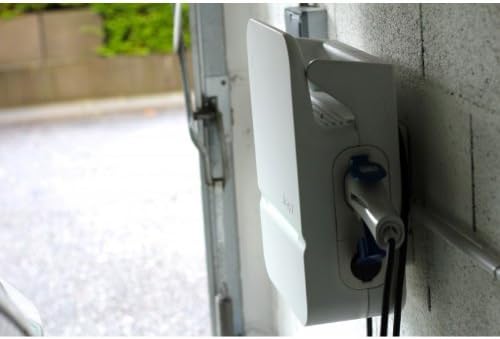
Figure 2 : Côté view of the Hager WITTY charging station, illustrating the cable connection point and the unit's profile.
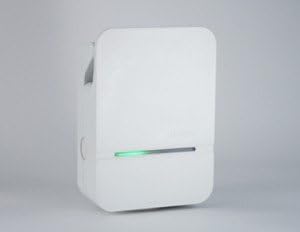
Figure 3 : façade détaillée view of the Hager WITTY charging station, emphasizing the integrated green status light.
3. Installation
3.1. Emplacement d'installation
Choose a suitable location that is protected from direct impact, excessive moisture, and extreme temperatures. Ensure adequate ventilation and accessibility for maintenance.
3.2. Montage
- Mark the drilling points on the wall using the provided template (if applicable) or by measuring the mounting holes on the unit.
- Percez des trous et insérez les chevilles appropriées.
- Secure the charging station to the wall using the provided screws.
3.3. Connexion électrique
AVERTISSEMENT: L'installation électrique doit être effectuée par un électricien qualifié.
- Ensure the main power supply is disconnected before beginning any electrical work.
- Connect the 3-phase + Neutral (3Ph+N) 32A power supply to the designated terminals inside the charging station.
- Assurez-vous qu’une mise à la terre appropriée est établie.
- Verify all connections are secure and correctly wired according to the wiring diagram provided with the unit (refer to the separate installation guide for detailed diagrams).
- Close the charging station cover securely.
4. Fonctionnement
4.1. Démarrage d'une charge
- Ensure the charging station is powered on and the status indicator light is green (ready).
- Branchez le câble de charge au port de charge de votre véhicule électrique.
- Connect the other end of the charging cable to the charging station's outlet (Type 3 or Mode 2 socket).
- The charging station will automatically initiate the charging process. The status indicator light may change to blue or flashing green, depending on the charging status.
4.2. Arrêt d'une charge
- Disconnect the charging cable from your electric vehicle first.
- Disconnect the charging cable from the charging station.
- The charging station will return to a ready state (green indicator light).
4.3. Indicateurs d'état
- Feu vert: Prêt à être chargé.
- Blue Light (or flashing green): Charge en cours.
- Red Light (or flashing red): Error or fault detected. Refer to the Troubleshooting section.
- Pas de lumière : Power off or system fault.
5. Entretien
5.1. Nettoyage
Nettoyez l'extérieur de la station de recharge avec un chiffon doux et sec.amp Utilisez un chiffon. N’utilisez pas de nettoyants abrasifs, de solvants ni de produits chimiques agressifs. Assurez-vous que l’appareil est éteint avant de le nettoyer.
5.2. Inspection
Periodically inspect the charging station for any signs of damage, wear, or loose connections. Check the charging cable for fraying or damage. If any damage is found, discontinue use and contact a qualified technician.
6. Dépannage
| Problème | Cause possible | Solution |
|---|---|---|
| No power/No light | Power supply disconnected; Circuit breaker tripped. | Check power supply; Reset circuit breaker. If problem persists, contact a qualified electrician. |
| Voyant rouge | Internal fault; Overcurrent; Ground fault. | Disconnect and reconnect the vehicle. If the error persists, power cycle the unit. If still red, contact service. |
| La charge ne démarre pas | Cable not properly connected; Vehicle not ready to charge; Charging station fault. | Ensure cable is securely connected to both vehicle and station. Check vehicle's charging status. Power cycle the charging station. |
7. Spécifications
| Fonctionnalité | Détail |
|---|---|
| Modèle | XEV103 |
| Mode de charge | Mode 3 (IEC 61851-1), Mode 2 |
| Type de connecteur | Type 3 / Standard Socket |
| Vol d'entréetage | 3-phase + Neutral |
| Max actuel | 32A |
| Puissance de sortie | 4 kW à 22 kW |
| Accéder | Accès libre |
| ASIN | B00CSJUVKA |
8. Garantie et assistance
For warranty information and technical support, please refer to the official Hager website or contact your local Hager distributor. Keep your purchase receipt for warranty claims.
Spare parts availability: Information not available.