1. Introduction
This manual provides detailed instructions for the proper use and maintenance of your TFA 38.2028.02 Digital Timer and Stopwatch. This device is designed for precise timekeeping in various applications, featuring a reversible display, touch-sensitive buttons, and magnetic mounting options. Please read this manual thoroughly before operating the device.
2. caractéristiques du produit
- Reversible Display: Permet de faciliter viewsous différents angles.
- Touch-Sensitive Buttons: For intuitive operation.
- Rétroéclairage : Offre une visibilité claire dans des conditions de faible luminosité.
- Montage magnétique : Securely attaches to metallic surfaces.
- Wall or Tabletop Mounting: Options de placement polyvalentes.
- Gamme de minuterie: Counts up to 99 minutes and 59 seconds.
- Conception compacte : Dimensions of 76 x 25 x 76 mm.
3. Contenu du colis
- TFA 38.2028.02 Digital Timer and Stopwatch Unit
- Manuel de l'utilisateur (ce document)
Note: 2 x 1.5V AAA batteries are required and not included in the package.
4. Installation
4.1 Installation de la batterie
- Repérez le couvercle du compartiment à piles à l'arrière de l'appareil.
- Faites glisser ou soulevez délicatement le couvercle pour ouvrir le compartiment.
- Insérez deux (2) piles AAA de 1.5 V, en veillant à respecter la polarité (+/-) comme indiqué à l'intérieur du compartiment.
- Remettez le couvercle du compartiment à piles en vous assurant qu'il s'enclenche correctement.
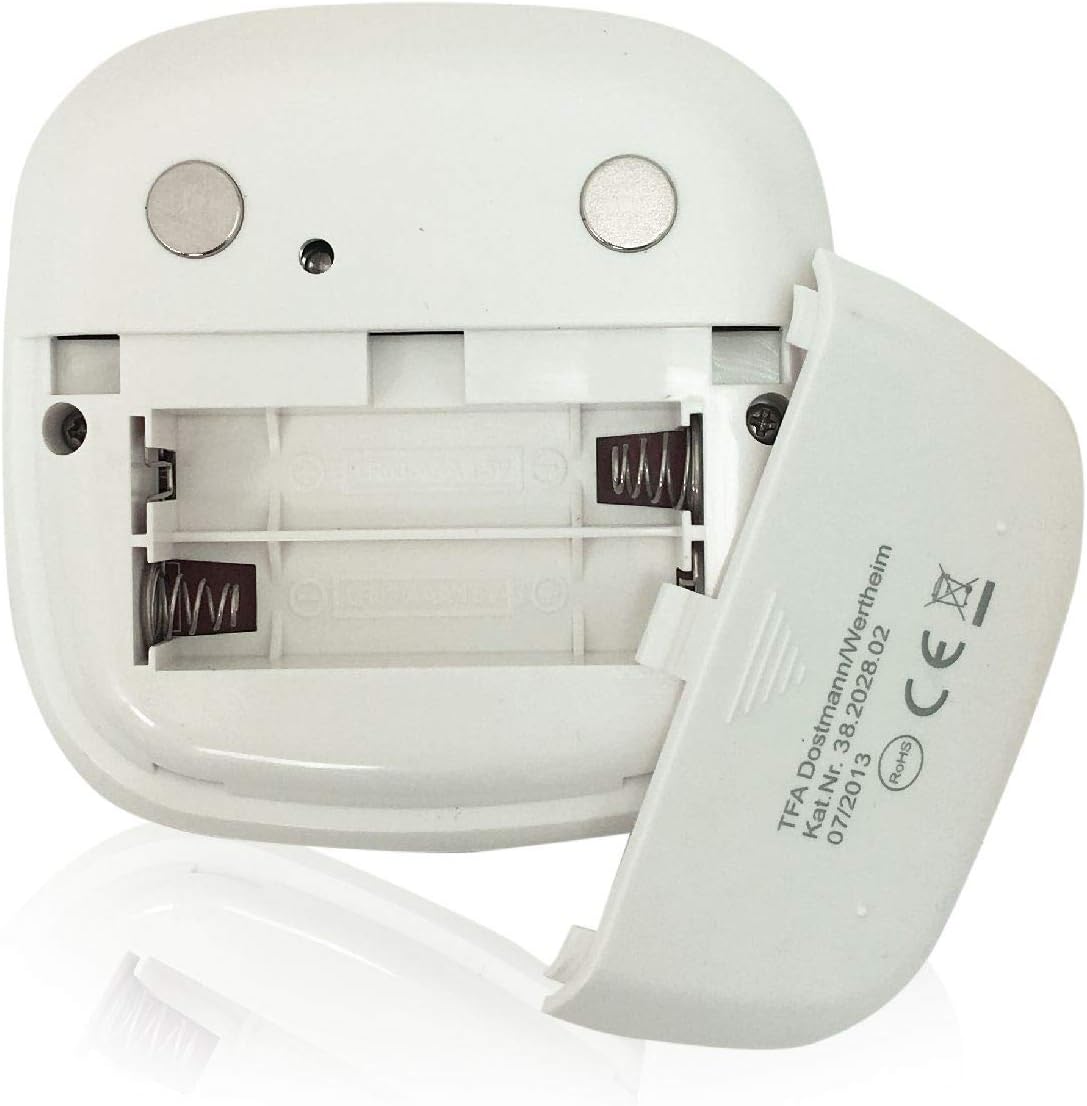
Image : Arrière view of the timer with the battery compartment open, illustrating where to insert the two AAA batteries.
4.2 Mise sous tension initiale
Once batteries are installed, the display will illuminate, and the device will be ready for use. The default display shows "00:00".
5. Mode d'emploi

Image : Avant view of the TFA 38.2028.02 timer, highlighting the digital display and the three touch-sensitive buttons: 'M' for minutes, 'S' for seconds, and 'S/S' for Start/Stop.
5.1 Fonctions des boutons
- M (Minutes) : Press to increase minutes. Hold to rapidly increase minutes.
- S (Secondes) : Press to increase seconds. Hold to rapidly increase seconds.
- S/S (Start/Stop): Press to start or stop the timer/stopwatch.
5.2 Réglage du minuteur (compte à rebours)
- Ensure the display shows "00:00". If not, press M et S simultaneously to reset.
- Appuyez sur le M button to set the desired minutes (up to 99 minutes).
- Appuyez sur le S button to set the desired seconds (up to 59 seconds).
- Une fois l'heure souhaitée réglée, appuyez sur S/S bouton pour démarrer le compte à rebours.
- Pour mettre le compte à rebours en pause, appuyez sur S/S encore. Presse S/S pour reprendre.
- When the timer reaches "00:00", an alarm will sound. Press any button to stop the alarm.
5.3 Using the Stopwatch (Count-up)
- Ensure the display shows "00:00". If not, press M et S simultaneously to reset.
- Appuyez sur le S/S button to start the count-up. The display will begin counting from "00:00".
- Pour mettre le chronomètre en pause, appuyez sur S/S encore. Presse S/S pour reprendre.
- To reset the stopwatch to "00:00", pause the stopwatch, then press M et S simultanément.
5.4 Fonction de rétroéclairage
The display features a backlight for improved visibility. The backlight activates automatically when buttons are pressed and typically remains on for approximately 30-40 seconds before dimming to conserve battery life.
6. Options de montage
The TFA 38.2028.02 timer offers flexible mounting solutions:
- Fixation magnétique : The back of the timer is equipped with magnets, allowing it to be securely attached to refrigerators, oven hoods, or any other metallic surface.
- Placement sur table : The timer's design allows it to stand upright on a flat surface, such as a kitchen counter or desk.
- Montage mural : The unit can also be mounted on a wall using a small hook or screw (not included) through the designated hole on the back.

Image : Arrière view of the timer, showing the integrated magnets for secure attachment to metallic surfaces and the model number.
7. Entretien
7.1 Nettoyage
To clean the timer, wipe it with a soft, damp cloth. Do not use abrasive cleaners or immerse the device in water. Avoid getting moisture into the battery compartment or display area.
7.2 Remplacement de la batterie
When the display becomes dim or the device stops responding, it is time to replace the batteries. Follow the battery installation steps in Section 4.1. Always use fresh 1.5V AAA batteries and dispose of old batteries responsibly.
8. Dépannage
| Problème | Cause possible | Solution |
|---|---|---|
| L'appareil ne s'allume pas. | Les piles sont mortes ou mal installées. | Vérifiez la polarité des piles ou remplacez-les par des piles AAA neuves. |
| L'écran est faiblement lumineux ou clignote. | Batterie faible. | Remplacer les piles. |
| Les boutons ne répondent pas. | Low battery power or temporary software glitch. | Replace batteries. If problem persists, remove batteries for 1 minute and reinsert. |
| Timer alarm is too quiet. | Alarm volume is fixed and cannot be adjusted. | Ensure the timer is placed in a location where the alarm can be heard. |
9. Spécifications
| Fonctionnalité | Détail |
|---|---|
| Numéro de modèle | 38.2028.02 |
| Marque | TFA |
| Dimensions (L x l x H) | 76 x 25 x 76 mm (approximately 2.5P x 7.6l x 7.6H cm) |
| Poids | 92 grammes |
| Matériel | Plastic with integrated magnets |
| Alimentation électrique | 2 piles AAA 1.5 V (non incluses) |
| Plage de minuterie | Up to 99 minutes, 59 seconds |
| Afficher | Numérique avec rétroéclairage |
| Options de montage | Magnetic, Tabletop, Wall-mountable |

Image: The timer held in a hand, visually demonstrating its compact size and indicating its dimensions (7.6 cm x 7.6 cm x 2.5 cm).
10. Garantie et assistance
TFA products are manufactured with quality and precision. For specific warranty information, please refer to the documentation provided with your purchase or visit the official TFA website. For technical support or inquiries, please contact TFA customer service through their official channels.
Conservez ce manuel pour référence ultérieure.