1. Produit terminéview
The AC Infinity AXIAL S1225 is a 120mm muffin fan designed for various air circulation projects. It is UL-certified and features a speed controller, allowing for optimized airflow and noise levels. This fan is suitable for applications such as improving air circulation in doorways, between rooms, near wood stoves, or fireplaces.

Image: The AC Infinity AXIAL S1225 120mm Muffin Fan with its speed controller.

Image: An AC Infinity AXIAL fan installed, illustrating its use for air circulation in various projects like wood stoves, doorways, and room-to-room ventilation.
Key features include a durable construction with dual-ball bearings, rated for a lifespan of 67,000 hours, and the ability to be mounted in any direction. The included speed controller provides flexibility to adjust the fan's performance to your specific needs.
2. Ce qui est inclus
Your AC Infinity AXIAL S1225 package contains the following components:
- One (1) Heavy-Duty Aluminum Fan (120 x 120 x 25 mm)
- One (1) Speed Control Plug Cord - 6 Ft
- Two (2) Spiral Fan Guards - 120mm
- Four (4) Mounting Screws
- Four (4) Nuts and Washers
- One (1) Mounting Hinge

Image: All components of the AC Infinity AXIAL S1225 kit laid out, including the fan, speed controller, fan guards, mounting screws, nuts, washers, and a mounting hinge.
3. Configuration et installation
Follow these steps to set up and install your AC Infinity AXIAL S1225 fan:
- Déterminez l’emplacement de montage : Choose a suitable location for the fan, considering airflow direction and proximity to a power outlet. The fan can be mounted in any orientation.
- Attach Fan Guards: Secure the spiral fan guards to both sides of the fan using the provided mounting screws, nuts, and washers. This protects the fan blades and prevents accidental contact.
- Monter le ventilateur : Use the mounting screws and hinge (if applicable) to securely attach the fan to your desired surface. Ensure the fan is stable and vibration-free.
- Connect Speed Controller: Plug the fan's power connector into the speed control plug cord.
- Connexion à l'alimentation : Plug the speed control plug cord into a standard 100 to 120V AC power outlet.
Ensure all connections are secure before operating the fan.
4. Mode d'emploi
The AC Infinity AXIAL S1225 features a convenient speed controller to adjust the fan's performance.

Image: Close-up of the speed controller, showing the dial for speed adjustment and the on/off switch.
- Marche/Arrêt : The speed controller includes a switch to turn the fan on or off.
- Réglage de la vitesse: Rotate the dial on the speed controller to select your desired fan speed:
- L (basse vitesse) : Pour un minimum de bruit et une circulation d'air douce.
- M (Vitesse moyenne) : Suitable for most general applications, balancing airflow and noise.
- H (Haute vitesse) : Provides maximum airflow for demanding applications.
Adjust the speed as needed to achieve optimal air circulation and comfort for your specific environment.
5. Entretien
To ensure the longevity and optimal performance of your AC Infinity AXIAL S1225 fan, follow these maintenance guidelines:
- Nettoyage régulier : Periodically clean the fan blades and guards to prevent dust buildup, which can reduce airflow and increase noise. Use a soft, dry cloth or a can of compressed air.
- Inspecter les obstructions : Ensure no objects are obstructing the fan blades or airflow path.
- Vérifier les connexions : Occasionally verify that all electrical connections are secure.
- Évitez tout contact avec des liquides : Do not immerse the fan or speed controller in water or other liquids.
No lubrication is required for the dual-ball bearings.
6. Dépannage
If you encounter issues with your AC Infinity AXIAL S1225 fan, refer to the following troubleshooting tips:
- Ventilateur non rotatif :
- Ensure the speed controller is switched to the 'On' position.
- Verify that the power cord is securely plugged into both the fan and a working electrical outlet.
- Vérifiez si la prise est alimentée en y branchant un autre appareil.
- Bruit excessif :
- Reduce the fan speed using the speed controller.
- Check for any loose components or obstructions around the fan blades.
- Ensure the fan is mounted securely and not vibrating against other surfaces.
- Débit d'air réduit :
- Clean any dust or debris from the fan blades and guards.
- Assurez-vous que le ventilateur est réglé sur une vitesse plus élevée.
- Verify that the fan's intake and exhaust paths are clear and unobstructed.
Si les problèmes persistent, contactez le support client pour obtenir de l'aide.
7. Spécifications
Detailed specifications for the AC Infinity AXIAL S1225 fan:
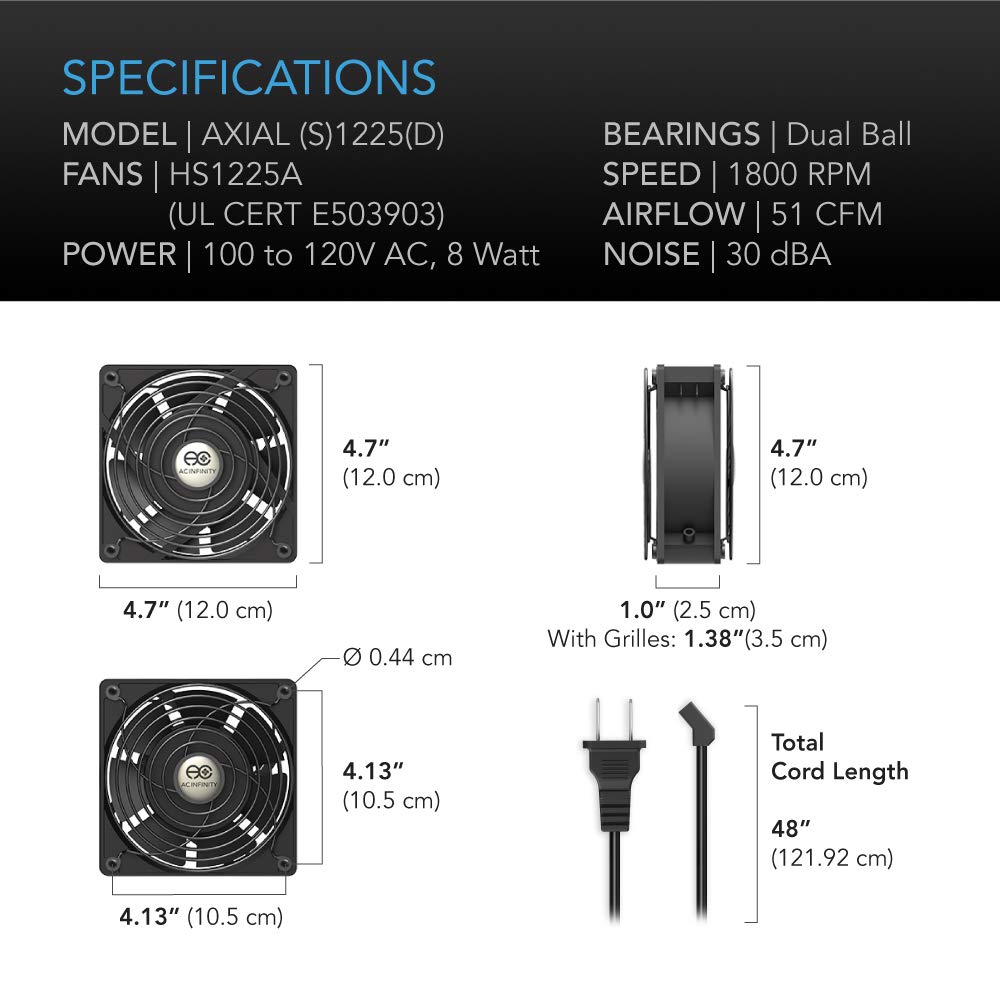
Image: Diagram illustrating the dimensions and key specifications of the AC Infinity AXIAL S1225 fan.
| Modèle | AXIAL (S)1225(D) |
| Numéro de modèle de l'article | AI-120SCX |
| Taille du ventilateur | 120 x 120 x 25 mm (4.7 x 4.7 x 1 pouces) |
| Roulements | Double balle |
| Durée de vie nominale | 67,000 heures |
| Pouvoir | 100 to 120V AC, 8 Watt |
| Voltage | 12 volts |
| Flux d'air | 51 piXNUMX / min (pieds cubes par minute) |
| Niveau de bruit | 16 à 38 dBA |
| Matériel | Métal |
| Longueur totale du cordon | 48 pouces (121.92 cm) |
| Certifications | UL-Certified (E503903), CE, RoHS |
8. Informations sur la garantie
The AC Infinity AXIAL S1225 fan is backed by a garantie constructeur de deux ansCette garantie couvre les défauts de matériaux et de fabrication dans des conditions normales d'utilisation. Veuillez conserver votre preuve d'achat pour toute réclamation au titre de la garantie.
For detailed warranty terms and conditions, please refer to the official AC Infinity website ou contactez leur support client.
9. Assistance clientèle
For technical assistance, troubleshooting beyond this manual, or warranty inquiries, please contact AC Infinity customer support.
- Website: Visit the official AC Infinity webSite regroupant les ressources d'assistance, la FAQ et les informations de contact.
- Courriel/Téléphone : Refer to the product packaging or the AC Infinity website pour les adresses e-mail ou les numéros de téléphone spécifiques au service client.
When contacting support, please have your product model number (AI-120SCX) and purchase date available.