Introduction
This manual provides comprehensive instructions for the safe and efficient use of your Marmitek BoomBoom 560 Bluetooth Over-Ear Headphones. These headphones offer excellent digital sound quality with clear mid-tones and deep bass, along with passive noise reduction for an immersive audio experience. Please read this manual thoroughly before operating the device.

Image: Marmitek BoomBoom 560 Bluetooth Over-Ear Headphones, black, shown from a slight angle.
Contenu du colis
Veuillez vérifier que tous les éléments énumérés ci-dessous sont présents dans votre colis :
- 1x Marmitek BoomBoom 560 Bluetooth Over-Ear Headphones
- 1x Micro USB to USB charging cable
- 1x 3.5mm Mini-jack audio cable (160 cm)
- 1x Manuel d'utilisation (ce document)

Image: Visual representation of the Marmitek BoomBoom 560 package contents, including the headphones, charging cable, audio cable, and user manual.
Produit terminéviewCommandes et ports
Familiarize yourself with the controls and ports on your BoomBoom 560 headphones:
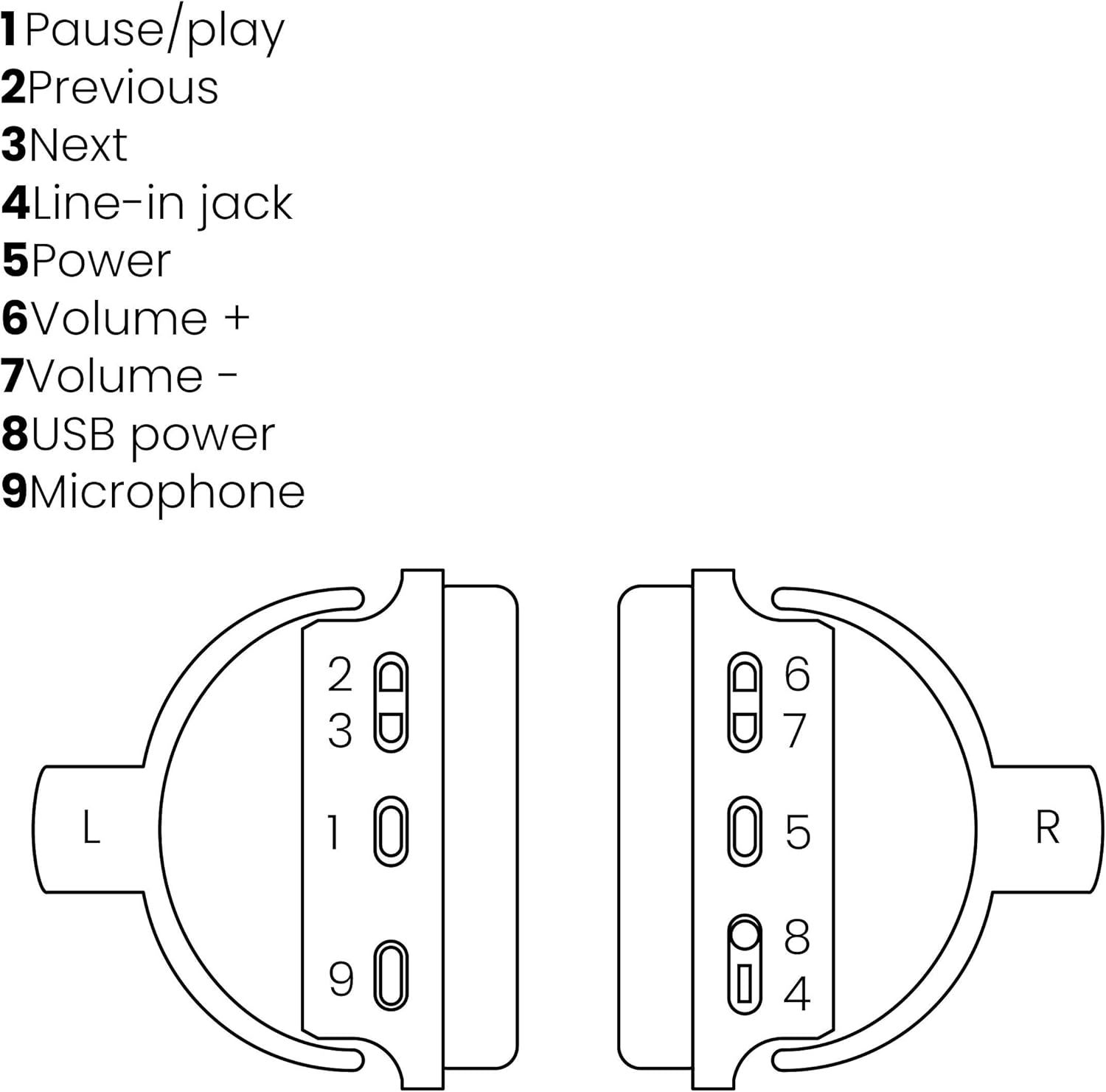
Image: A line drawing illustrating the left and right ear cup controls and ports, numbered for identification.
- Bouton Pause/Lecture : Contrôle la lecture de la musique.
- Bouton de piste précédente : Passe à la chanson précédente.
- Bouton de piste suivante : Passe à la chanson suivante.
- Prise d'entrée : Pour une connexion audio filaire utilisant le câble 3.5 mm.
- Bouton d'alimentation : Turns the headphones on/off and initiates Bluetooth pairing.
- Volume + Bouton : Augmente le volume.
- Bouton Volume : Diminue le volume.
- Port d'alimentation USB : For charging the headphones using the Micro USB cable.
- Microphone: Microphone intégré pour les appels mains libres.
Installation
1. Charger les écouteurs
Before first use, fully charge your headphones. Connect the Micro USB end of the charging cable to the USB Power Port (8) on the headphones and the standard USB end to a USB power adapter (not included) or a computer's USB port. The LED indicator will show charging status. A full charge provides over 8 hours of playback time.
2. Couplage Bluetooth
To connect your headphones wirelessly to a Bluetooth-enabled device:
- Assurez-vous que les écouteurs sont éteints.
- Appuyez et maintenez enfoncé le Bouton d'alimentation (5) until the LED indicator flashes blue and red, indicating pairing mode.
- Sur votre smartphone, tablette ou autre appareil Bluetooth, activez le Bluetooth et recherchez les appareils disponibles.
- Select "BoomBoom 560" from the list of found devices.
- Une fois connecté, l'indicateur LED clignotera lentement en bleu.

Image: Illustration depicting various Bluetooth-enabled devices (laptop, smartphone, tablet) wirelessly transmitting audio to the headphones.
3. Connexion filaire
If Bluetooth is not available or the battery is depleted, you can use the included 3.5mm audio cable. Connect one end of the cable to the Line-in Jack (4) on the headphones and the other end to the audio output of your device.
Mode d'emploi
Marche/Arrêt
- Pour allumer : Appuyez et maintenez enfoncé le Bouton d'alimentation (5) pendant environ 3 secondes, jusqu'à ce que le voyant LED clignote en bleu.
- Pour éteindre : Appuyez et maintenez enfoncé le Bouton d'alimentation (5) pendant environ 3 secondes, jusqu'à ce que le voyant LED s'éteigne.
Lecture de musique
- Lecture/Pause : Appuyez sur le Pause/Play Button (1) une fois.
- Piste suivante : Appuyez sur le Next Track Button (3) une fois.
- Piste précédente: Appuyez sur le Previous Track Button (2) une fois.
Gestion des appels
When connected via Bluetooth, you can manage phone calls using the built-in microphone (9):
- Répondre/Terminer l'appel : Appuyez sur le Pause/Play Button (1) une fois.
- Rejeter l'appel : Appuyez et maintenez enfoncé le Pause/Play Button (1) pendant environ 2 secondes.
Contrôle du volume
- Augmenter le volume : Appuyez sur le Volume + Button (6).
- Diminuer le volume : Appuyez sur le Volume - Button (7).

Image: A user enjoying music or media with the Marmitek BoomBoom 560 headphones while relaxing at home.
Entretien
Pour garantir la longévité et les performances optimales de vos écouteurs :
- Nettoyez les écouteurs avec un chiffon doux et sec. N'utilisez pas de produits nettoyants abrasifs ni de solvants.
- Évitez d'exposer les écouteurs à des températures extrêmes, à l'humidité ou à la lumière directe du soleil.
- Rangez le casque dans un endroit frais et sec lorsqu'il n'est pas utilisé.
- N’essayez pas de démonter ou de réparer vous-même le casque, car cela annulera la garantie.
Dépannage
If you encounter issues with your BoomBoom 560 headphones, refer to the following common solutions:
- Pas d'alimentation : Assurez-vous que les écouteurs sont complètement chargés. Branchez-les à une source d'alimentation à l'aide du câble de chargement USB.
- Impossible de coupler via Bluetooth :
- Assurez-vous que les écouteurs sont en mode appairage (LED clignotante bleue et rouge).
- Ensure your Bluetooth device's Bluetooth function is enabled and within range (typically 10 meters).
- Try turning off and on both the headphones and your Bluetooth device.
- Delete "BoomBoom 560" from your device's Bluetooth list and attempt to pair again.
- Pas de son :
- Vérifiez le niveau sonore à la fois sur les écouteurs et sur votre appareil connecté.
- Assurez-vous que les écouteurs sont correctement appariés ou que le câble audio 3.5 mm est bien connecté.
- Si vous utilisez le Bluetooth, essayez de vous déconnecter puis de vous reconnecter.
- Mauvaise qualité sonore :
- Rapprochez-vous de votre appareil Bluetooth pour réduire les interférences.
- Assurez-vous qu'aucun obstacle ne se trouve entre les écouteurs et l'appareil.
- Vérifiez la qualité de la source audio.
- Loose Earcup Bracket: If the earcup bracket feels loose, handle the headphones with care. Avoid excessive force when adjusting or folding. If the issue persists and affects functionality, contact customer support.
Caractéristiques
| Nom du modèle | Boum Boum 560 |
| Numéro de modèle | 8122 |
| Marque | Marmitek |
| Technologie de connectivité | Wireless (Bluetooth), Wired (3.5mm jack) |
| Compatibilité Bluetooth | Oui |
| Facteur de forme | Sur l'oreille |
| Matériel | Cuir (coussinets d'oreille) |
| Caractéristiques spéciales | Réduction du bruit |
| Technologie du microphone | Omni (Built-in) |
| Description de la batterie | Lithium-Ion (Li-Ion) |
| Autonomie de la batterie | Plus de 8 heures (environ) |
| Rapport signal sur bruit (SNR) | 82 dB |
| Dimensions du produit | 23 x 5 x 18 cm; 100 g |
Garantie et assistance
Marmitek products are designed and manufactured to high quality standards. For information regarding warranty terms and conditions, please refer to the documentation provided with your purchase or visit the official Marmitek website.
Pour obtenir de l'aide ou un soutien technique supplémentaire, veuillez consulter le site web suivant : Marmitek Store on Amazon or the official Marmitek support channels.

Image: Logo indicating "Dutch Quality" and compliance with "EU European Standards".


