Introduction
The Intermatic TN111RM40 is a mechanical 24-hour timer designed for controlling lamps and small appliances. This timer allows for up to two ON and two OFF events per day, making it suitable for automating various electrical devices, including landscape lighting systems. It features a 2-prong polarized outlet and a manual override function. The timer is housed in a 3R enclosure, indicating its suitability for outdoor use.
This manual provides instructions for the safe and effective operation of your Intermatic TN111RM40 timer.
Consignes de sécurité
- Lisez toutes les instructions avant utilisation.
- Ne pas immerger dans l'eau.
- Ensure the timer is unplugged before making any adjustments or cleaning.
- Ne pas dépasser les valeurs nominales électriques de la minuterie.
- This timer is designed for use with 2-prong polarized plugs only.
Produit terminéview
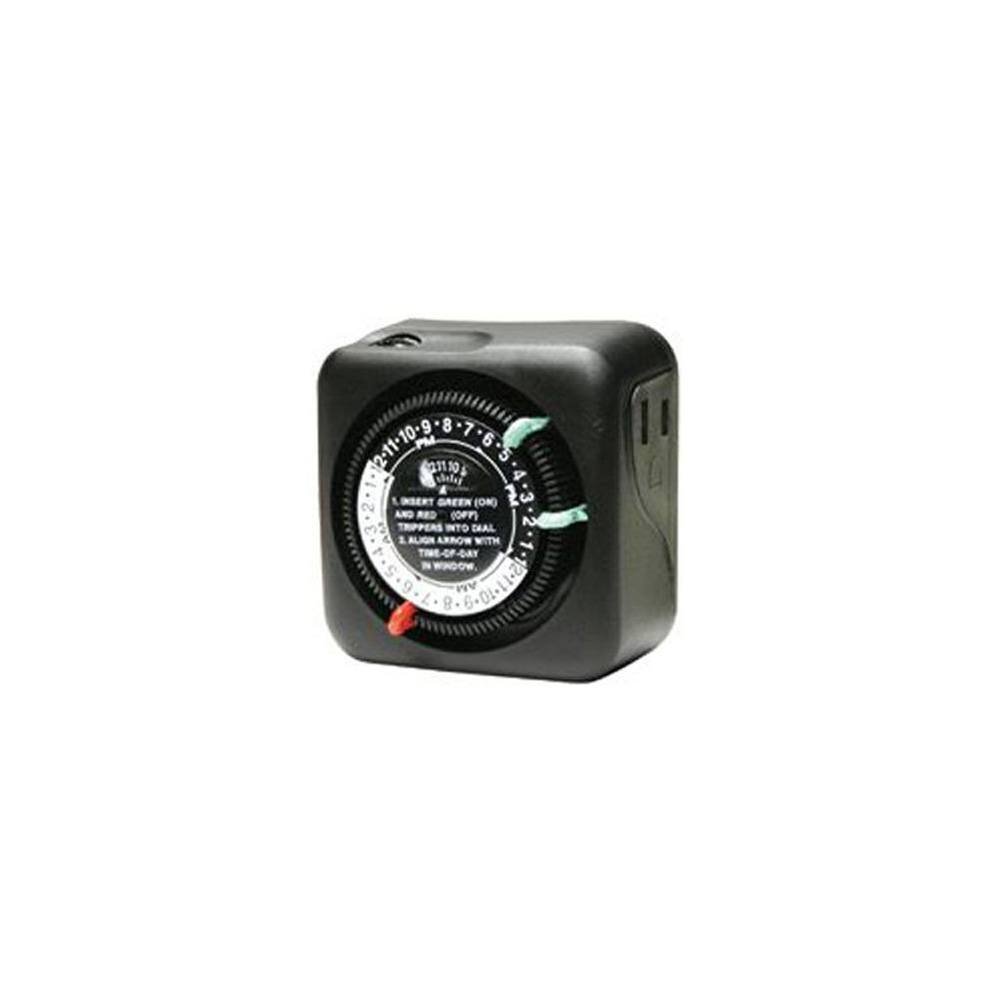
Figure 1 : Face avant view of the Intermatic TN111RM40 timer, highlighting the 24-hour dial, green (ON) and red (OFF) trippers, and the time-of-day window. The image also shows the product dimensions: 3 inches deep, 4 inches wide, and 3 inches high.
The Intermatic TN111RM40 timer features a rotating 24-hour dial with markings for AM and PM. It includes removable trippers (pins) for setting ON and OFF times, a manual override switch, and a single 2-prong polarized outlet.
Installation
- Déballez le minuteur : Retirez délicatement le minuteur de son emballage. Vérifiez qu'il n'est pas endommagé.
- Identifier les composants : Locate the green (ON) trippers and red (OFF) trippers. These are small pins that insert into the dial.
- Définir l'heure actuelle :
- Rotate the entire dial clockwise until the current time aligns with the "TIME-OF-DAY" arrow in the window. Ensure to distinguish between AM and PM hours.
- Insert ON/OFF Trippers:
- Insert the green (ON) trippers into the dial at the desired times you want the connected appliance to turn ON.
- Insert the red (OFF) trippers into the dial at the desired times you want the connected appliance to turn OFF.
- The timer supports up to two ON and two OFF settings per 24-hour period.
- Branchez le minuteur : Plug the timer into a standard 2-prong wall outlet.
- Connecter l'appareil : Branchez le lamp or small appliance into the 2-prong polarized outlet on the side of the timer. Ensure the appliance is switched to the ON position if it has its own power switch.
Mode d'emploi
Once set up, the timer will automatically turn your connected appliance ON and OFF according to the programmed times. The dial will continuously rotate clockwise, indicating the passage of time.
Commande manuelle
The Intermatic TN111RM40 includes a manual override feature. This allows you to temporarily turn the connected appliance ON or OFF without disturbing the programmed schedule.
- To manually turn the appliance ON or OFF, locate the manual override switch (often a small lever or button) on the timer.
- Toggle the switch to the desired position. The timer will resume its programmed schedule at the next ON or OFF event.
Entretien
- Nettoyage: Débranchez la minuterie de la prise de courant avant de la nettoyer. Essuyez l'extérieur avec un chiffon doux et sec.amp chiffon. N'utilisez pas de nettoyants abrasifs ou de solvants.
- Stockage: Si vous rangez le minuteur pendant une période prolongée, assurez-vous qu'il soit propre et sec. Rangez-le dans un endroit frais et sec, à l'abri de la lumière directe du soleil.
- Inspection: Periodically inspect the timer and its cord for any signs of wear or damage. If damage is found, discontinue use and replace the unit.
Dépannage
| Problème | Cause possible | Solution |
|---|---|---|
| L'appareil ne s'allume/ne s'éteint pas aux heures programmées. |
|
|
| Le cadran de la minuterie ne tourne pas. |
|
|
Caractéristiques
- Modèle: TN111RM40
- Marque: Intermatique
- Taper: Minuterie mécanique 24 heures
- Paramètres: Up to 2 ON/OFF events per day
- Type de sortie: 2-Prong Polarized
- Enceinte: 3R (Suitable for outdoor use)
- Couleur: Noir
- Matériel: Plastique
- Dimensions du produit : 3 po (profondeur) x 4 po (largeur) x 3 po (hauteur)
- Poids de l'article : 5.3 onces
- Code à barres : 702811361973
Garantie et assistance
For warranty information or technical support, please refer to the official Intermatic webConsultez leur site web ou contactez leur service client. Conservez votre reçu d'achat pour toute réclamation au titre de la garantie.
Assistance clientèle Intermatic : www.intermatic.com/support


