Introduction
This manual provides essential information for the safe and efficient operation of your Panasonic NE-1054F Light Duty Commercial Microwave Oven. Please read it thoroughly before using the appliance and retain it for future reference.
The Panasonic NE-1054F is a robust 1000-watt commercial microwave oven designed for light-duty applications. It features a durable stainless steel exterior and interior, a single shelf, and a user-friendly Braille touch-control keypad. Key functionalities include 10 programmable memory pads, a double quantity pad, and 6 distinct power levels, all managed via a clear digital display. Its compact cavity measures 13 inches W x 13 inches D x 8-1/16 inches H, making it suitable for various countertop installations.
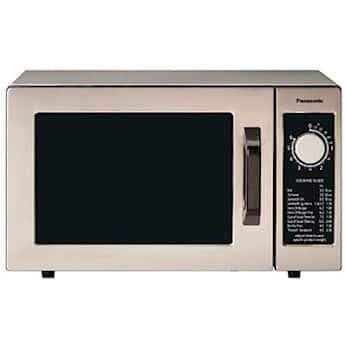
Devant view of the Panasonic NE-1054F Light Duty Commercial Microwave Oven, showcasing son extérieur et son panneau de commande en acier inoxydable.
Consignes de sécurité importantes
Lors de l'utilisation d'appareils électriques, des précautions de sécurité de base doivent être respectées, notamment les suivantes :
- Lisez toutes les instructions avant d’utiliser l’appareil.
- N’utilisez pas le four si la porte ou les joints de porte sont endommagés.
- Ne chauffez pas de liquides ou d'autres aliments dans des récipients scellés car ils risquent d'exploser.
- Autorisez les enfants à utiliser le four sans surveillance uniquement si des instructions adéquates ont été données afin que l'enfant soit capable d'utiliser le four de manière sûre et comprenne les dangers d'une mauvaise utilisation.
- N'utilisez pas de produits chimiques ou de vapeurs corrosifs dans cet appareil.
- Do not use metal utensils or foil in the microwave oven.
- Assurez une bonne ventilation autour de l’appareil.
- Always supervise food being heated to prevent overheating or fire.
Configuration et installation
Déballage
Carefully remove the microwave oven from its packaging. Inspect the oven for any damage. If the oven is damaged, do not operate it and contact your dealer immediately.
Placement
Place the microwave oven on a flat, stable, heat-resistant surface. Ensure there is adequate space for ventilation around the unit. Maintain at least 4 inches (10 cm) of clearance on the top, rear, and sides for proper airflow. Do not block any ventilation openings.
The product dimensions are approximately 13 inches D x 13 inches W x 8.13 inches H.
Connexion électrique
Connect the microwave oven to a dedicated 120V, 60Hz, single-phase grounded electrical outlet. The appliance requires 13.4 amps. Do not use extension cords or adapters.
Opération
Panneau de configuration terminéview
The control panel features a digital display, a Braille touch-control keypad, and dedicated buttons for power levels, programming, double quantity, start, and stop/reset functions.
Réglage des niveaux de puissance
Le four propose 6 niveaux de puissance pour s'adapter à différents besoins de cuisson :
- SALUT: High power for fast cooking.
- M.HI: Puissance moyenne à élevée.
- MED : Puissance moyenne pour la cuisson en général.
- FAIBLE: Low power for delicate items.
- DÉF: Defrost setting.
- TENIR: Fonction maintien au chaud.
Appuyez sur le POUVOIR button repeatedly to cycle through the available power levels until the desired level is displayed.
Using Preset Menu Pads
The microwave oven includes 10 programmable memory pads for quick access to frequently used cooking times:
- 10 SEC
- 20 SEC
- 30 SEC
- 45 SEC
- 60 SEC
- 1:30 MIN SEC
- 2h00 MIN
- 2h30 MIN
- 3h00 MIN
- 3h30 MIN
Simply place the food in the oven, close the door, and press the desired preset button. The oven will start automatically.
Programming Custom Settings
To program a custom cooking time and power level:
- Appuyez sur le PROGRAMME bouton.
- Saisissez le temps de cuisson souhaité à l'aide du pavé numérique.
- Appuyez sur le POUVOIR button to select the power level (if different from default).
- Presse COMMENCER pour commencer à cuisiner.
Double Quantity Function
For heating two portions of the same item, use the DOUBLE QUANTITY (x2) button. After selecting a preset or programming a time, press this button before pressing COMMENCER. The oven will automatically adjust the cooking time.
Start and Stop/Reset
- Presse COMMENCER to begin any cooking cycle.
- Presse ARRÊT/RÉINITIALISATION to pause or cancel a cooking cycle. Pressing it twice will clear the current settings.
Entretien et nettoyage
Nettoyage extérieur
Wipe the exterior surfaces, including the stainless steel door, with a soft, damp cloth. For stubborn stains, use a mild, non-abrasive cleaner specifically designed for stainless steel. Avoid harsh chemicals or abrasive pads that could scratch the finish.
Nettoyage intérieur
Clean the oven cavity regularly. Wipe spills immediately with a damp cloth. For dried-on food, place a bowl of water with a few lemon slices inside and heat for a few minutes on high power. The steam will loosen the food, making it easier to wipe away. Ensure the oven is unplugged before cleaning.
Door and Seal Care
Keep the door seals and adjacent parts clean. Use a soft cloth and mild soap. Never use abrasive cleaners or scouring pads on the door or seals, as this can damage them and affect the oven's performance.
Dépannage
Si vous rencontrez des problèmes avec votre four à micro-ondes, consultez les solutions courantes suivantes :
| Problème | Cause possible | Solution |
|---|---|---|
| Le four ne démarre pas | Porte mal fermée ; cordon d'alimentation débranché ; fusible grillé/disjoncteur déclenché. | Assurez-vous que la porte est bien fermée ; vérifiez le branchement du cordon d’alimentation ; vérifiez le fusible/disjoncteur de l’installation électrique. |
| Les aliments ne chauffent pas | Niveau de puissance incorrect sélectionné ; temps de cuisson trop court. | Adjust power level; Increase cooking time. |
| L'écran affiche le code d'erreur | Dysfonctionnement interne. | Débranchez le four pendant 30 secondes, puis rebranchez-le. Si l'erreur persiste, contactez le service client. |
| Bruit inhabituel pendant le fonctionnement | Loose components; Foreign object inside. | Ensure no foreign objects are inside. If noise persists, discontinue use and contact customer service. |
If the problem persists after attempting these solutions, please contact Panasonic customer support for assistance.
Caractéristiques
| Fonctionnalité | Détail |
|---|---|
| Marque | Panasonic |
| Numéro de modèle | NE-1054F |
| Puissance de sortie | 1000 watts |
| Niveaux de puissance | 6 (HI, M.HI, MED, LOW, DEF, HOLD) |
| Capacité | 0.8 pieds cubes |
| Dimensions de la cavité (L x P x H) | 13 po x 13 po x 8-1/16 po |
| Dimensions du produit (P x L x H) | 13" x 13" x 8.13" |
| Matériel | Stainless Steel (Exterior & Interior) |
| Type de contrôleur | Touch (Braille Keypad) |
| Voltage | 120 volts |
| Fréquence | 60 Hz |
| Amprage | 13.4 Amps |
| Caractéristiques spéciales | 10 Programmable Memory Pads, Double Quantity Pad, Digital Display |
| Type d'installation | Comptoir |
| Composants inclus | Platine |
Garantie et assistance
Pour obtenir des informations sur la garantie ou une assistance technique, veuillez consulter la carte de garantie fournie avec votre produit ou visiter le site officiel de Panasonic. website. You may also contact Panasonic customer service directly for assistance with any product-related inquiries or service needs.