1. Produit terminéview
The Mitel MiVoice 5304 IP Phone is a compact and cost-effective entry-level display phone designed for various environments such as hotel rooms, university dorms, classrooms, and retail spaces. It provides essential communication features and integrates seamlessly with Mitel IP-based communication platforms.
This phone supports both MiNet and SIP protocols, offering flexibility in deployment. It features a backlit display, two lines with LED indication, and programmable keys for enhanced functionality.
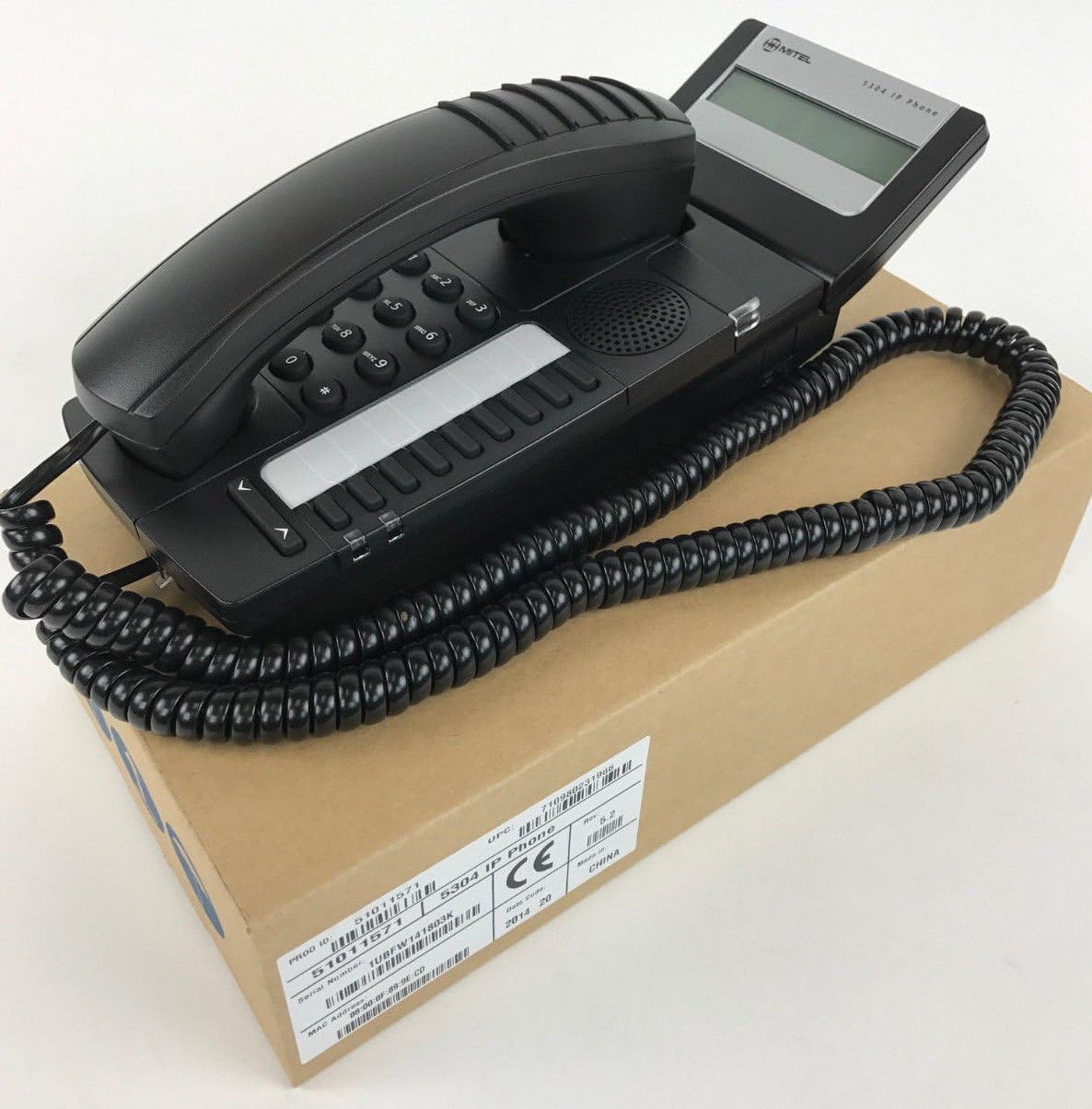
Figure 1: Mitel MiVoice 5304 IP Phone. This image shows the black IP phone with its coiled handset cord, resting on a brown cardboard box. The phone features a numeric keypad, several function buttons, and a small display screen.
2. Principales caractéristiques
- Afficher: Two x 20 character backlit display with auto-dimming.
- Lignes: Two lines with LED indication (one prime line, one programmable key).
- Touches programmables: Eight programmable keys for speed dials, feature access codes, paging, conferencing, voicemail access, etc.
- Pagination: Paging and page receive capability, including direct page and group page support.
- Prise en charge du mode double : Compatible with both MiNet and SIP protocols.
- Indicateurs visuels : Incoming call visual indication and message waiting indication.
- Commandes audio : Adjustable volume and ringing controls.
- Montage: Wall-mountable (optional accessory may be required).
- Alimentation : Multiple powering options, including 802.3af compliant Power over Ethernet (PoE).
- Accessibilité: ADA-compliant (HAC handset).
- Conception compacte : Small footprint (approximately 26.5 cm x 10 cm or 10.5 x 4 inches).
- Efficacité énergétique : Designed for power conservation to reduce overall energy consumption.
3. Configuration et installation
3.1 Contenu du paquet
Avant de commencer, assurez-vous que tous les composants sont présents :
- Mitel MiVoice 5304 IP Phone unit
- Combiné
- Cordon enroulé du combiné
- Câble Ethernet
- (Optional) Power adapter if PoE is not used
3.2 Connexion du téléphone
- Connectez le combiné : Branchez une extrémité du cordon spiralé du combiné au combiné et l'autre extrémité au port du combiné sur la base du téléphone.
- Se connecter au réseau : Connect one end of the Ethernet cable to the LAN port on the back of the phone and the other end to an active network port (e.g., a wall jack or network switch). If using Power over Ethernet (PoE), the phone will power on automatically.
- Branchez l'alimentation (si vous n'utilisez pas le PoE) : If your network does not provide PoE, connect an optional Mitel-approved power adapter to the power port on the phone and then to a standard electrical outlet.
- Démarrage initial : The phone will power on and begin its boot-up sequence. This may take a few moments as it obtains an IP address and registers with your communication system.
3.3 Montage mural (en option)
The Mitel 5304 IP Phone can be wall-mounted. An optional wall-mount kit (sold separately) may be required. Follow the instructions provided with the wall-mount kit for proper installation.
4. Mode d'emploi
4.1 Passer des appels et y répondre
- Faire un appel:
- Décrochez le combiné ou appuyez sur la Conférencier bouton.
- Composez le numéro souhaité à l'aide du clavier.
- Appuyez sur le Cadran or Envoyer button (if available) or wait for the call to connect automatically.
- Pour répondre à un appel :
- Soulevez le combiné ou appuyez sur le bouton de ligne clignotante ou sur Conférencier bouton.
- Pour terminer un appel :
- Remplacez le combiné ou appuyez sur Fin d'appel or Conférencier bouton.
4.2 Using Programmable Keys
The Mitel 5304 features eight programmable keys. Their functions are typically configured by your system administrator and can include:
- Speed Dial numbers
- Access to specific features (e.g., Call Forward, Do Not Disturb)
- Paging functions
- Voicemail access
- Conférence
To use a programmable key, simply press the button corresponding to the desired function.
4.3 Réglage du volume
Use the volume control buttons (usually located below the keypad or on the side of the phone) to adjust the handset, speakerphone, or ringer volume. Press the + bouton pour augmenter le volume et le - bouton pour diminuer le volume.
4.4 Message Waiting Indication
A flashing LED indicator on the phone signifies that you have new voicemail messages. To retrieve messages, press the dedicated Message button (if configured) or dial your voicemail access code.
5. Maintenance et entretien
- Nettoyage: Utilisez un chiffon doux et légèrement sec.amp cloth to clean the phone's surface. Do not use abrasive cleaners, solvents, or strong chemicals, as these can damage the finish.
- Poussière: Regularly dust the phone, especially around the keypad and display, to prevent accumulation that could affect performance.
- Environnement: Keep the phone away from excessive heat, direct sunlight, and moisture. Ensure proper ventilation if placed in an enclosed space.
- câbles: Assurez-vous que tous les câbles sont bien connectés et qu'ils ne sont ni pincés ni endommagés.
6. Dépannage
| Problème | Cause possible | Solution |
|---|---|---|
| Le téléphone ne s'allume pas. | Aucune alimentation via Ethernet (PoE) ou adaptateur secteur non connecté/défectueux. |
|
| Pas de tonalité ou impossible de passer des appels. | Network connectivity issue, phone not registered, or system configuration problem. |
|
| L'écran est vide ou illisible. | Power issue or display fault. |
|
| Je n'entends pas mon interlocuteur ou mon interlocuteur ne m'entend pas. | Volume settings, handset/speaker issue, or network audio problem. |
|
7. Spécifications
| Attribut | Détail |
|---|---|
| Numéro de modèle | 51011571 |
| Dimensions du produit (L x l x H) | 10 x 10 x 6 pouces (25.4 x 25.4 x 15.24 cm) |
| Poids de l'article | 1.9 livres (0.86 kg) |
| Couleur | Noir |
| Type de téléphone | Téléphone IP filaire |
| Source d'énergie | Corded Electric (PoE 802.3af compliant or optional power adapter) |
| Type de composeur | Clavier unique |
| Afficher | Two x 20 character backlit display |
| Prise en charge de la ligne | 2 Lines with LED indication |
| Protocoles pris en charge | MiNet, SIP |
| Appareils compatibles | VoIP services, IP-based communication systems, Mitel 3300, Mitel SX-200 IP Communications Platforms |
| Capacité de conférence téléphonique | 2 voies |
8. Garantie et assistance
For information regarding product warranty, please refer to the warranty card included with your purchase or visit the official Mitel website. For technical support, service, or further inquiries, please contact your Mitel authorized dealer or system administrator.
You can also find additional resources and contact information on the official Mitel website: www.mitel.com


