1. Introduction
The Linksys SE1500 is a 5-Port Fast Ethernet Switch designed to expand your wired network. It allows you to connect up to five devices, such as computers, printers, storage devices, and gaming consoles, at speeds up to 100 Mbps. This device provides a simple and efficient way to add more wired connections to your existing network without complex configuration.

Figure 1 : Face avant view of the Linksys SE1500 5-Port Fast Ethernet Switch.
2. Contenu du colis
Vérifiez que votre colis contient les éléments suivants :
- Linksys SE1500 5-Port 10/100 Switch
- Adaptateur secteur
- Guide de démarrage rapide (non inclus dans ce manuel)
3. caractéristiques du produit
The Linksys SE1500 switch offers the following key features:
- 5 Fast Ethernet Ports: Provides five 10/100 Mbps ports for connecting wired devices.
- Auto-Sensing Ports: Automatically detects and optimizes the speed for each connected device.
- Qualité de service (QoS) : Prioritizes traffic for smooth performance of bandwidth-intensive applications.
- Fonctions d'économie d'énergie : Includes auto power-down for unused ports and a port status switch to disable LED indicators, reducing energy consumption.
- Brancher et utiliser: Requires no software configuration for basic operation.
4. Instructions de configuration
Follow these steps to set up your Linksys SE1500 switch:
- Position the Switch: Placez l'interrupteur sur une surface plane et stable ou fixez-le à un endroit approprié. Assurez une ventilation adéquate autour de l'appareil.
- Connectez l'adaptateur secteur : Plug the included power adapter into the 12V DC port on the back of the switch. Then, plug the other end of the power adapter into a standard electrical outlet. The power LED on the front of the switch should illuminate.
- Connectez-vous à votre réseau : Connect an Ethernet cable from your router or modem to any of the five numbered Ethernet ports on the back of the SE1500 switch.
- Connecter des appareils : Connect your wired devices (e.g., computer, printer, gaming console) to the remaining Ethernet ports on the switch using Ethernet cables. The switch's auto-sensing ports will automatically detect the connection speed.
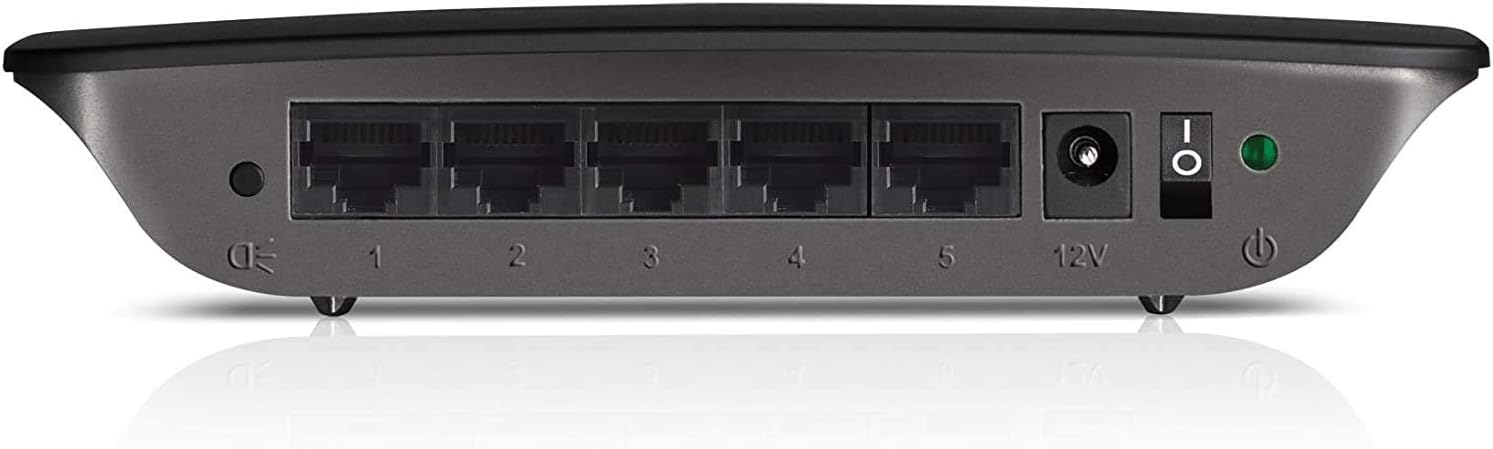
Figure 2: Rear panel of the Linksys SE1500, showing Ethernet ports, power input, and power switch.
5. Mode d'emploi
The Linksys SE1500 is a plug-and-play device, meaning it typically requires no software configuration. Once connected, it operates automatically.
Indicateurs LED
Le panneau avant de l'interrupteur comporte des indicateurs LED fournissant des informations d'état :
- Voyant d'alimentation : S'illumine lorsque l'interrupteur est allumé.
- Voyants LED des ports (1-5) : Each numbered port has an associated LED.
- Vert uni : Indicates a successful link connection at 100 Mbps.
- Ambre massif : Indicates a successful link connection at 10 Mbps.
- Clignotant : Indique l'activité du réseau (transmission de données).
- Désactivé: No link detected or port is inactive.
Mode d'économie d'énergie
The SE1500 automatically enters a power-saving mode when a connected device is turned off or when a port is unused. This feature helps reduce energy consumption. You can also use the port status switch on the rear panel to turn off the port LEDs if desired.
6. Entretien
To ensure optimal performance and longevity of your Linksys SE1500 switch, consider the following maintenance tips:
- Garder propre: Regularly wipe the exterior of the switch with a soft, dry cloth. Avoid using liquid cleaners or aerosols.
- Assurer la ventilation : Do not block the ventilation openings on the switch. Ensure it is placed in an area with good airflow to prevent overheating.
- Gestion des câbles: Rangez soigneusement vos câbles Ethernet pour éviter les déconnexions accidentelles ou les dommages.
- Power Cycle (if needed): If the switch becomes unresponsive, disconnect the power adapter, wait 10 seconds, and then reconnect it.
7. Dépannage
If you encounter issues with your Linksys SE1500 switch, try the following troubleshooting steps:
- Pas d'alimentation :
- Assurez-vous que l'adaptateur secteur est correctement branché à l'interrupteur et à une prise électrique fonctionnelle.
- Verify the power switch on the rear panel is in the "On" position.
- Pas de voyant de liaison :
- Vérifiez que le câble Ethernet est correctement connecté à la fois au port du commutateur et au périphérique connecté.
- Essayez un autre câble Ethernet.
- Vérifiez que l'appareil connecté est allumé et fonctionne correctement.
- If the port status switch is off, toggle it to enable the LEDs.
- Vitesse du réseau lente :
- Ensure all connected devices and cables support Fast Ethernet (100 Mbps) for optimal performance.
- Check for excessive network traffic or issues with your internet service provider (ISP) or router.
- Connexion intermittente :
- Vérifiez l'état des câbles Ethernet.
- Try connecting devices to different ports on the switch.
- Power cycle the switch, router, and connected devices.
8. Spécifications
| Modèle | SE1500 |
| Marque | Linksys |
| Nombre de ports | 5 |
| Type d'interface | RJ45 |
| Taux de transfert de données | 10/100 Mbps (Ethernet rapide) |
| Dimensions du produit | 4.29 x 6.06 x 1.14 pouces |
| Poids de l'article | 5.4 onces (0.34 livre) |
| Couleur | Noir |
| Appareils compatibles | Desktop, Gaming Console, Laptop, Printer |
| Composants inclus | 5-port 10/100 Switch, Power Adapter |
9. Garantie et assistance
For detailed warranty information and technical support, please refer to the documentation included with your purchase or visit the official Linksys support webLes conditions de garantie peuvent varier selon la région.
Assistance Linksys Website: www.linksys.com/support


