Introduction
This manual provides comprehensive instructions for the setup, operation, and maintenance of your Sonic Alert SBJ525SS Digital Alarm Clock. Please read this manual thoroughly before using the device to ensure proper function and longevity. This alarm clock is designed to provide reliable timekeeping and alarm functions, including a powerful vibrating bed shaker, loud audible alarm, and visual alert features.
Consignes de sécurité
- Ensure the power adapter is connected to a standard electrical outlet.
- N’exposez pas l’appareil à l’eau ou à une humidité excessive.
- Évitez de placer l’appareil à proximité de sources de chaleur ou en plein soleil.
- Tenir hors de portée des enfants.
- Use only the provided power adapter and bed shaker.
Contenu du colis
Vérifiez que tous les éléments sont présents dans votre colis :
- Sonic Alert SBJ525SS Digital Alarm Clock Unit
- 12-Volt Vibrating Bed Shaker
- Adaptateur secteur
- Manuel d'instructions
Produit terminéview
Familiarisez-vous avec les différentes parties et commandes de votre réveil.
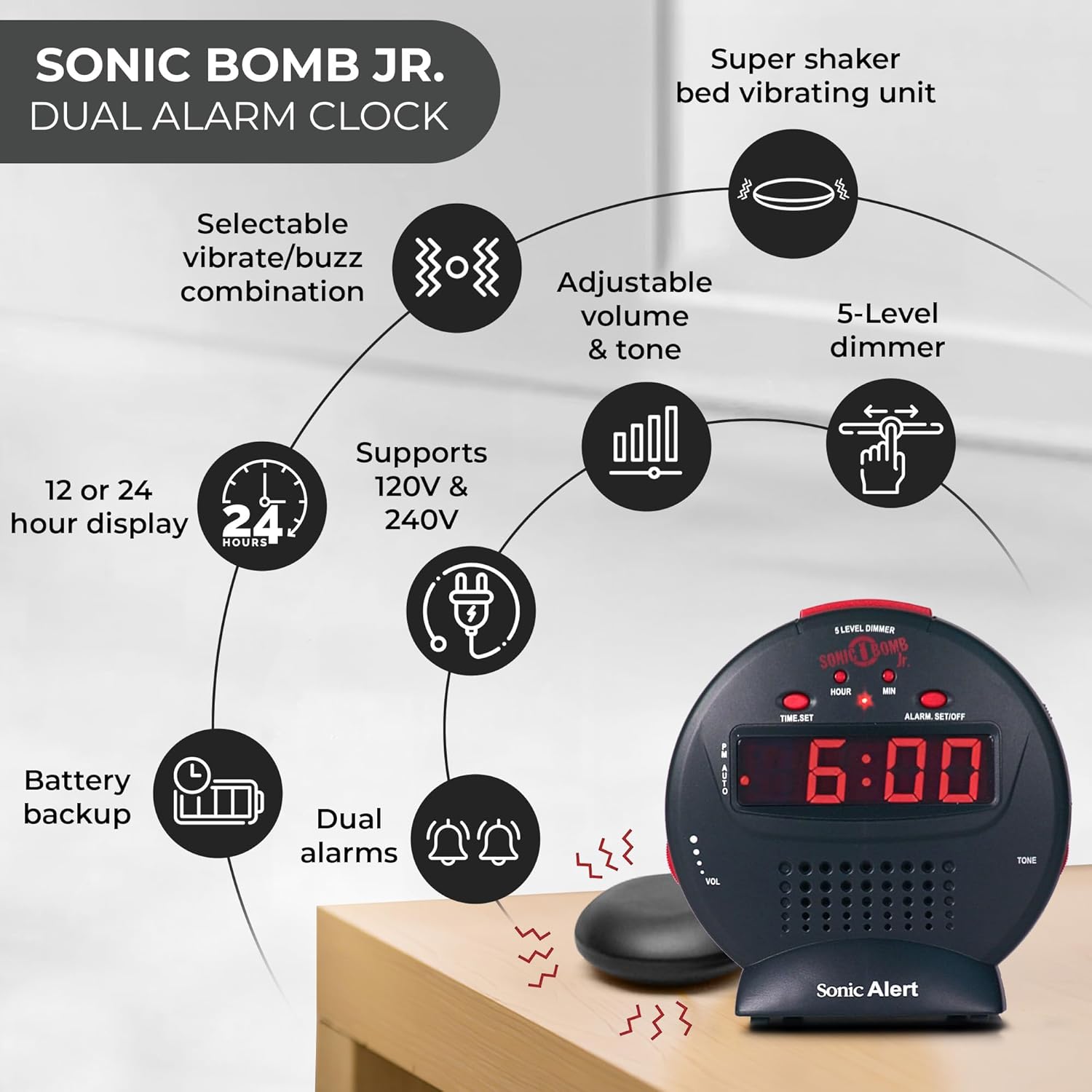
Description de l'image : A diagram illustrating the Sonic Alert SBJ525SS Digital Alarm Clock. Key features highlighted include the 12 or 24-hour display, battery backup, dual alarms, selectable vibrate/buzz combination, adjustable volume and tone, 5-level dimmer, and the super shaker bed vibrating unit. The clock supports 120V & 240V power.
The clock features a large digital display, control buttons for time and alarm settings, and adjustment knobs for volume and tone. A dedicated port is available for the bed shaker connection.
Installation
1. Connexion électrique
- Connect the power adapter to the DC IN jack on the back of the alarm clock.
- Plug the power adapter into a standard electrical wall outlet. The display will illuminate.
2. Installation de la batterie de secours
The alarm clock requires 2 AA batteries (not included) for battery backup functionality. This ensures your time and alarm settings are retained during a power outage.
- Repérez le compartiment à piles sur la partie inférieure de l'appareil.
- Ouvrez le couvercle du compartiment à piles.
- Insérez 2 piles AA en respectant la polarité (+/-).
- Remettez le couvercle du compartiment à piles.

Description de l'image : A graphic illustrating the battery backup feature of the alarm clock. It shows the clock on a nightstand with a small circular battery icon (CR2032, 3V) next to it, indicating the type of battery used for backup. The text emphasizes that batteries are not included and are for retaining settings during power outaget.
3. Réglage de l'heure
- Appuyez et maintenez enfoncé le RÉGLAGE DE L'HEURE Appuyez sur le bouton. Les chiffres de l'heure se mettront à clignoter.
- Appuyez sur le HEURE Appuyez plusieurs fois sur le bouton pour régler l'heure. Vérifiez l'indicateur PM pour un réglage AM/PM correct.
- Appuyez sur le MIN Appuyez plusieurs fois sur le bouton pour régler les minutes.
- Presse RÉGLAGE DE L'HEURE à nouveau pour confirmer l'heure.
- Pour basculer entre le format 12 heures et le format 24 heures, appuyez sur la touche correspondante. 12/24H button (if available, otherwise it might be part of time set cycle).
4. Bed Shaker Connection
The vibrating bed shaker is an integral part of the Sonic Alert system, designed for heavy sleepers or individuals with hearing impairments.
- Locate the jack labeled SHAKER on the back of the alarm clock.
- Insert the plug of the bed shaker into this jack.
- Place the bed shaker under your pillow, between your mattress and box spring, or under a fitted sheet for optimal vibration.

Description de l'image : A composite image showing three different methods for placing the super bed shaker: under a pillow, under a fitted sheet, and under a mattress. The image also highlights the 6ft long cable of the shaker.
Mode d'emploi
1. Réglage des alarmes (double alarme)
The SBJ525SS features dual alarms, allowing you to set two independent wake-up times.
- Appuyez et maintenez enfoncé le ALARME RÉGLÉE/DÉSACTIVÉE button once for Alarm 1. The hour digits for Alarm 1 will flash.
- Utilisez le HEURE et MIN boutons pour régler l'heure de l'alarme souhaitée.
- Presse ALARME RÉGLÉE/DÉSACTIVÉE again to confirm Alarm 1 and proceed to Alarm 2. The hour digits for Alarm 2 will flash.
- Utilisez le HEURE et MIN buttons to set the desired time for Alarm 2.
- Presse ALARME RÉGLÉE/DÉSACTIVÉE a third time to confirm Alarm 2 and exit alarm setting mode.
- Pour activer ou désactiver une alarme, appuyez sur le bouton. ALARME RÉGLÉE/DÉSACTIVÉE button briefly (not held). Each press cycles through Alarm 1 ON, Alarm 2 ON, Both Alarms ON, Both Alarms OFF. An indicator light on the display will show which alarm(s) are active.

Description de l'image : A bedroom scene with a couple sleeping, and the Sonic Alert alarm clock prominently displayed on a nightstand. The text overlay emphasizes the "Dual Alarm Clock" feature, allowing two different alarms to be set for reliable wake-up times.
2. Alarm Modes (Vibrate, Sound, Both)
The alarm clock offers various alert modes:
- Vibrate Only: The bed shaker will activate without an audible alarm.
- Son uniquement : The audible alarm will sound without bed shaker activation.
- Les deux: Both the bed shaker and audible alarm will activate simultaneously.
To select the alarm mode, use the MODE D'ALARME switch located on the side or back of the unit. Cycle through the options until your desired mode is selected.

Description de l'image : A woman sleeping in bed with the Sonic Alert alarm clock and its bed shaker visible on the adjacent nightstand. The image highlights the clock's features: a powerful 6-volt bed shaker, 102dB loud alarm with adjustable tone and volume, alarm and bed shaker test mode, and built-in red flashing lights.
3. Fonction Snooze
Lorsque l'alarme sonne, appuyez sur le grand bouton. ROUPILLON button on top of the unit to temporarily silence the alarm. The alarm will sound again after the set snooze duration.
- The snooze duration is adjustable from 1 to 30 minutes. Refer to the full instruction manual for specific steps on adjusting the snooze time.
Description de l'image : A man sleeping in bed with the Sonic Alert alarm clock on his bedside table. An overlay graphic shows a slider indicating the adjustable snooze duration from 1 to 30 minutes.
4. Brightness Dimmer
Adjust the display brightness to your preference using the 5-level dimmer function.
- Localisez le VARIATEUR control (often a slider or button) on the unit.
- Adjust the control to cycle through the 5 brightness levels, from brightest (5) to dimmest (1).

Description de l'image : A woman sleeping in a bedroom with the Sonic Alert alarm clock on her nightstand. Below, a series of five clock images illustrate the different brightness levels of the display, from level 5 (brightest) to level 1 (dimmest), demonstrating the five-level dimmer feature.
5. Réglage du volume et de la tonalité
Customize the audible alarm sound to your preference.
- Utilisez le VOL (Volume) knob/slider to increase or decrease the alarm's loudness.
- Utilisez le TONIFIER knob/slider to adjust the pitch of the alarm sound.
Description de l'image : Un gros plan view of the Sonic Alert alarm clock, specifically highlighting the volume control slider on its side. The accompanying text explains how to adjust the sound with ease using the knobs for volume and tone.

Description de l'image : The Sonic Alert alarm clock on a white surface, with a graphic overlay demonstrating the adjustable tone feature. Sound waves emanate from the clock, and a slider indicates the range of tone adjustments available.
6. USB Charging Port Usage
The alarm clock includes a built-in USB port for charging compatible handheld devices.
- Locate the USB charging port on the side or back of the unit.
- Connectez le câble de chargement USB de votre appareil au port.
- Ensure your device begins charging. Note that charging speed may vary depending on the device and cable.

Description de l'image : A woman reaching for her smartphone, which is connected and charging via the built-in USB port on the Sonic Alert alarm clock, placed on a nightstand next to her bed.
Entretien
- Nettoyage: Essuyez l'appareil avec un chiffon doux et sec. N'utilisez pas de nettoyants liquides ni de produits abrasifs.
- Remplacement de la batterie : Replace backup batteries annually or when the battery low indicator appears to ensure continuous backup functionality.
- Stockage: Si vous stockez l'appareil pendant une période prolongée, retirez les piles de secours pour éviter les fuites.
Dépannage
| Problème | Cause possible | Solution |
|---|---|---|
| L'affichage de l'horloge est éteint ou clignote. | Adaptateur secteur non connecté ou défectueux ; coupure de couranttage. | Ensure power adapter is securely plugged in. Check wall outlet. If power outage, battery backup should maintain time (display will be off). |
| L'alarme ne sonne pas/ne vibre pas. | Alarm not activated; incorrect alarm mode selected; volume too low; bed shaker not connected. | Verify alarm is ON (indicator light). Check alarm mode switch. Increase volume. Ensure bed shaker is securely plugged in. |
| Les réglages de l'heure et de l'alarme sont perdus après une coupure de courant.tage. | Les batteries de secours sont déchargées ou non installées. | Install fresh AA batteries in the battery compartment. |
| La charge USB est lente ou ne fonctionne pas. | Device incompatibility; faulty USB cable; device requires higher power output. | Try a different USB cable. Ensure your device is compatible with standard USB charging. The clock's USB port provides standard charging output. |
Caractéristiques
| Marque | Alerte sonore |
| Numéro de modèle | SBJ525SS |
| Type d'affichage | Numérique |
| Caractéristiques spéciales | Alarm, Auto Dimmable, Snooze, Vibrating Bed Shaker, USB Charging Port, Red Flashing Alert Lights |
| Source d'énergie | Corded Electric with Battery Backup (2 AA batteries required, not included) |
| Dimensions du produit | 5 po L x 5 po H |
| Matériel | Plastique |
| Volume de l'alarme | Up to 102dB (with bed shaker) |
Garantie et assistance
The Sonic Alert SBJ525SS Digital Alarm Clock comes with a Limited Warranty. For specific warranty terms and conditions, please refer to the warranty card included with your product or visit the official Sonic Alert website.
For technical support, troubleshooting assistance, or to inquire about replacement parts, please contact Sonic Alert customer service:
- Website: www.sonicert.com
- Coordonnées: Référez-vous à l'officiel webPour obtenir les coordonnées les plus récentes, veuillez consulter le site web ou l'emballage du produit.
Description de l'image : An open instruction manual for the Sonic Bomb Jr. alarm clock, showing detailed operational instructions and diagrams. This image signifies that a manual is included with the product for user guidance.


