Introduction
The Casio SA-76 44-Key Mini Personal Keyboard is designed for beginners, offering an intuitive and engaging musical experience. Its compact size and user-friendly interface make it suitable for young musicians and those new to keyboard playing. This manual provides essential information for setting up, operating, and maintaining your SA-76 keyboard.
The keyboard features an easy-to-read LCD display that shows important data such as tone, rhythm, song number, metronome, tempo, and the note being played. With dedicated buttons for Piano and Organ sounds, switching between instrument voices is quick and simple. The 44 mini keys and 5 percussion pads are designed for comfortable play, especially for smaller hands, making it an excellent introduction to the world of keyboard music.
Caractéristiques principales
- 44 mini-sized keys for comfortable play.
- 5 percussion pads for rhythmic exploration.
- 100 built-in tones to explore various instrument sounds.
- 50 rhythm patterns to accompany your playing.
- Simple tone selection with dedicated PIANO and ORGAN buttons.
- Melody on/off lesson function for practice.
- Easy-to-read LCD display for clear information.
- Built-in speakers with 1.6 Watts output.
- Headphones jack (3.5mm) for private practice.
- Portable design, can be powered by batteries (6 AA, not included) or an optional AC adapter.
Installation
1. Alimentation de l'unité
The Casio SA-76 can be powered by either an optional AC adapter or batteries.
- Adaptateur secteur (en option) : Connect a compatible 9V DC AC adapter (not included) to the DC 9V jack on the rear panel of the keyboard. Plug the adapter into a standard wall outlet.
- Piles : The keyboard requires 6 AA-size batteries (not included).
2. Installation de la batterie
- Ensure the keyboard is turned off.
- Locate the battery compartment cover on the bottom of the keyboard.
- Slide the cover to open it.
- Insert 6 AA-size batteries, ensuring correct polarity (+/-) as indicated inside the compartment.
- Replacez soigneusement le couvercle du compartiment à piles.
3. Fixation du pupitre
The included music stand can be inserted into the slots on the top panel of the keyboard to hold sheet music or a tablet.
Mode d'emploi
1. Marche/Arrêt
- To turn on the keyboard, press and hold the POUVOIR maintenir le bouton enfoncé jusqu'à ce que l'écran LCD s'allume.
- To turn off the keyboard, press and hold the POUVOIR Appuyez à nouveau sur le bouton jusqu'à ce que l'écran s'éteigne.
2. Réglage du volume
Utilisez le VOLUME + et LE VOLUME - buttons located next to the power button to increase or decrease the overall sound volume.
3. Sélection des tonalités
The SA-76 offers 100 different tones. You can select them using the dedicated buttons or the rotary dial.
- Appuyez sur le PIANO or ORGANE button for quick access to these common sounds.
- To select other tones, rotate the TONIFIER dial to browse through the available options displayed on the LCD.
4. Jouer des rythmes
The keyboard includes 50 rhythm patterns.
- Faites pivoter le RYTHME dial to select a desired rhythm pattern.
- Appuyez sur le DÉMARRER/ARRÊTER bouton pour démarrer ou arrêter la lecture du rythme.
- Ajustez le tempo à l'aide du TEMPS + et TEMPO - boutons.
5. Playing Built-in Songs
The SA-76 features 10 built-in songs for listening or practicing with the melody on/off function.
- Faites pivoter le BANQUE DE CHANSON dial to select a song.
- Appuyez sur le LECTURE/PAUSE bouton pour démarrer ou mettre en pause la chanson.
- Utilisez le MELODY ON/OFF button to mute or unmute the melody part of the song, allowing you to play along.
6. Fonction de maintien
Activer le SOUTENIR function to make notes linger longer after the key is released, similar to a piano's sustain pedal.
- Appuyez sur le SOUTENIR button to toggle the effect on or off.
7. Percussion Pads
The 5 percussion pads allow you to add drum sounds to your performance. Simply press a pad to trigger a percussion sound.
8. Utiliser des écouteurs
For private practice, connect 3.5mm stereo headphones to the TÉLÉPHONES / SORTIE jack on the rear panel. This will mute the built-in speakers.
Produit terminéview
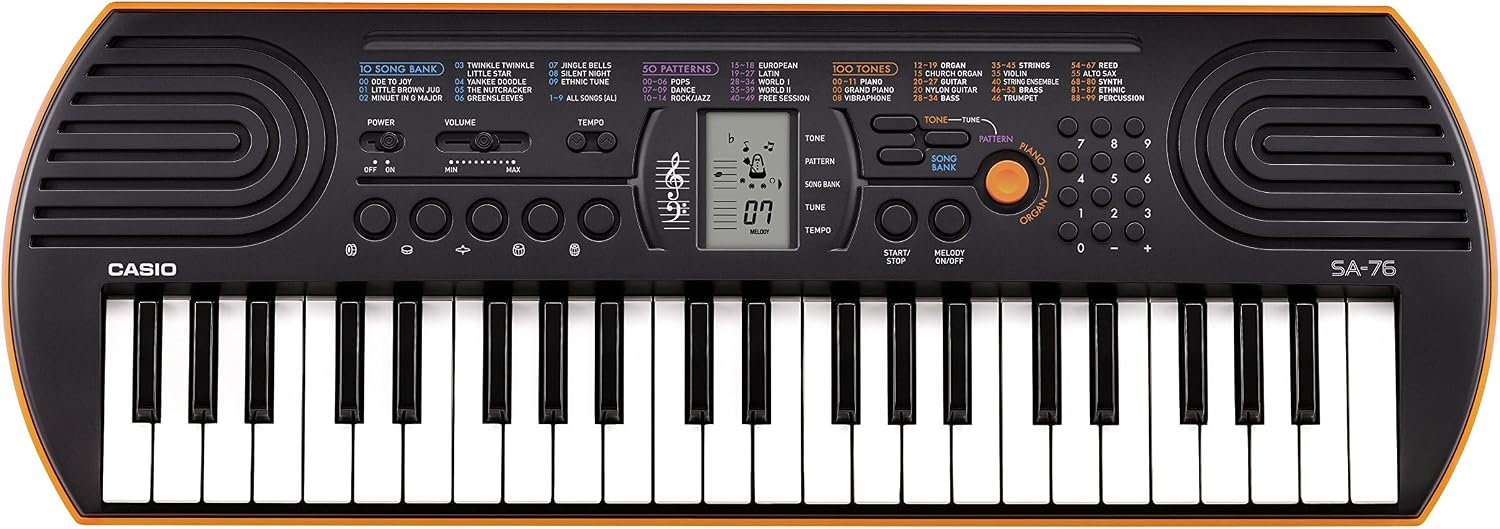
Figure 1: Casio SA-76 44-Key Mini Personal Keyboard. This image shows the overall design of the orange Casio SA-76 keyboard with its 44 mini keys and control panel.

Figure 2: Close-up of the control panel. This image provides a detailed view of the LCD display, tone/rhythm/song dials, volume buttons, and other function buttons on the Casio SA-76.

Figure 3: Diagram highlighting key features. This image illustrates various components of the Casio SA-76, including the 44 mini keys, drum pads, built-in speakers, and easy-to-use controls.

Figure 4: Casio SA-76 product dimensions. This image shows the physical measurements of the keyboard: 23.8 inches (W) x 8.3 inches (D) x 2.24 inches (H).
Entretien
- Nettoyage: Wipe the keyboard with a soft, dry cloth. Avoid using abrasive cleaners, waxes, or solvents, as these can damage the finish.
- Stockage: Rangez le clavier dans un endroit frais et sec, à l'abri de la lumière directe du soleil, des températures extrêmes et d'une forte humidité. En cas de stockage prolongé, retirez les piles pour éviter les fuites.
- Manutention: Évitez de faire tomber le clavier ou de le soumettre à des chocs violents. Ne placez pas d'objets lourds dessus.
Dépannage
| Problème | Cause possible | Solution |
|---|---|---|
| Pas de courant | Batteries are dead or incorrectly installed; AC adapter not connected or faulty. | Replace batteries or check polarity. Ensure AC adapter is securely connected and functional. |
| Pas de son | Volume is too low; headphones are connected; speakers are muted. | Increase volume. Disconnect headphones. Check if any mute function is active. |
| Les touches ne répondent pas | Keyboard may be in a specific mode (e.g., lesson mode with melody off) or requires a reset. | Check current mode settings. Turn the keyboard off and on again to reset. |
Caractéristiques
| Fonctionnalité | Détail |
|---|---|
| Nombre de clés | 44 mini-sized keys |
| Les tons | 100 |
| Rythmes | 50 |
| Chansons | 10 |
| Pads pour percussions | 5 |
| Intervenants | 2 x 1.2 W (Amp Output: 1.6 Watts) |
| Prise casque | Mini-prise stéréo 3.5 mm |
| Source d'énergie | 6 AA batteries or optional AC adapter (DC 9V) |
| Dimensions (L x P x H) | 23.8" x 8.3" x 2.24" (60.45 cm x 21.08 cm x 5.69 cm) |
| Poids de l'article | 3.08 livres (1.4 kg) |
Garantie et assistance
For warranty information or technical support, please refer to the documentation included with your product or visit the official Casio webConsultez le site. Conservez votre reçu d'achat comme preuve d'achat pour toute réclamation au titre de la garantie.


