Introduction
Merci pour votre achatasing the Optimus F-1760 16-inch Wave Oscillating Stand Fan. This manual provides important information regarding the safe operation, assembly, maintenance, and troubleshooting of your fan. Please read these instructions thoroughly before use and retain them for future reference.

Image: The Optimus F-1760 stand fan positioned in a bedroom, showcasing its design and size relative to furniture.
Consignes de sécurité importantes
Lors de l'utilisation d'appareils électriques, des précautions de base doivent toujours être respectées pour réduire les risques d'incendie, de choc électrique et de blessures corporelles, notamment les suivantes :
- Lisez toutes les instructions avant d'utiliser ce ventilateur.
- Utilisez ce ventilateur uniquement comme décrit dans ce manuel. Toute autre utilisation non recommandée peut provoquer un incendie, une électrocution ou des blessures.
- Pour éviter tout risque d'électrocution, ne placez pas le ventilateur près d'une fenêtre, n'immergez pas l'appareil, la prise ou le cordon dans l'eau et ne le vaporisez pas de liquides.
- Une surveillance étroite est nécessaire lorsqu’un appareil est utilisé par ou à proximité d’enfants.
- Débranchez le ventilateur de la prise de courant lorsqu'il n'est pas utilisé, lorsque vous le déplacez d'un endroit à un autre et avant de le nettoyer.
- Do not operate fan in the presence of explosive and/or flammable fumes.
- Ne placez pas le ventilateur ou toute autre pièce près d'une flamme nue, d'un appareil de cuisson ou d'un autre appareil de chauffage.
- Do not operate fan with a damaged cord or plug, or after the fan malfunctions or has been dropped or damaged in any manner.
- Évitez tout contact avec les pièces mobiles.
- Pour débrancher l'appareil, saisissez la fiche et retirez-la de la prise murale. Ne tirez jamais sur le cordon.
- Toujours utiliser sur une surface sèche et plane.
- Ne pas accrocher ou monter le ventilateur sur un mur ou un plafond.
- Ne pas faire fonctionner sans que les grilles du ventilateur soient correctement en place.
- This product employs overload protection (fuse). A blown fuse indicates an overload or short-circuit situation. If the fuse blows, unplug the product from the outlet. Replace the fuse as per the servicing instructions (follow product marking for proper fuse rating) and check the product. If the replacement fuse blows, a short-circuit may be present and the product should be discarded or returned to an authorized service facility for examination and/or repair.
Configuration et assemblage
The Optimus F-1760 fan requires minimal assembly. Ensure all components are present and undamaged before proceeding.
- Assemblage de base : Attach the weighted base legs to the main pole. Ensure they are securely fastened to provide stability. The base is designed to be sturdy, with weights at the ends of the feet.
- Réglage de la hauteur : The fan's height can be adjusted. Loosen the height adjustment knob on the pole, extend or retract the pole to the desired height, and then securely tighten the knob.
- Fixation de la tête du ventilateur : Ensure the fan head is securely attached to the top of the pole. The motor housing and fan blade are plastic, while the grill is metal.
- Placement: Place the fan on a dry, level surface. Ensure there is adequate space around the fan for proper air circulation and oscillation.
Mode d'emploi
The Optimus F-1760 fan offers multiple control options and features for customized comfort.
Panneau de contrôle
The fan features a 4-position push-button switch on the pole for basic operation.
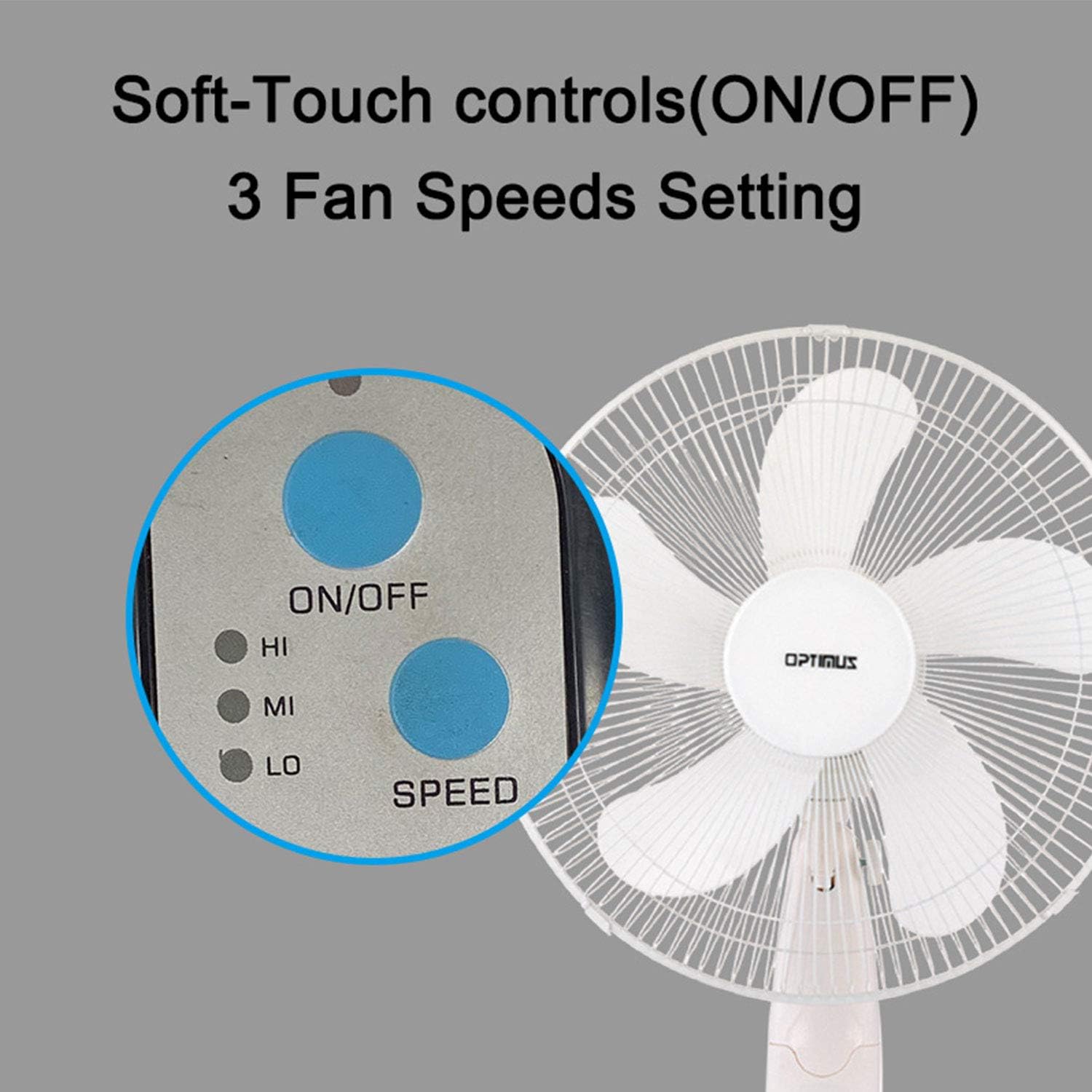
Image: The fan's soft-touch control panel, showing buttons for ON/OFF and SPEED, with indicators for High (HI), Medium (MI), and Low (LO) fan speeds.
- MARCHE/ARRÊT : Appuyez pour allumer ou éteindre le ventilateur.
- Paramètres de vitesse : Select from Low, Medium, or High speeds. The 3-speed, energy-saving, whisper-quiet operation motor provides efficient airflow.
Télécommande
The fan comes with a remote control for convenient operation from a distance. (Batteries not included).

Image: The remote control for the fan, featuring buttons for Mode, Time, Speed, and ON/OFF functions.
- MARCHE/ARRÊT : Allume ou éteint le ventilateur.
- VITESSE: Cycles through the three fan speeds (Low, Medium, High).
- MODE: Selects between different wind modes.
- TEMPS: Activates and sets the shut-off timer.
Modes de vent
The fan offers three distinct wind modes to suit your preference:

Image: The fan's control panel highlighting the MODE button and indicators for Normal, Natural, and Sleep wind modes.
- Mode normal : The fan blows at a constant speed based on your selected setting.
- Mode naturel : The fan speed fluctuates to mimic a natural breeze.
- Mode veille: The fan operates at a lower, quieter speed, ideal for sleeping, with gentle speed variations.
Oscillation
The F-1760 features unique wave oscillation for comprehensive air distribution.

Image: A diagram illustrating the fan's capability for both vertical (up/down) and horizontal (left/right) wave oscillation, providing wider air coverage.
- Up/Down & Left/Right Wave Oscillating: Activates a unique oscillation pattern that moves the fan head both horizontally and vertically, distributing air throughout the room.
- To stop oscillation, press the oscillation button again.
Fonction de minuterie
Programmez le ventilateur pour qu'il s'éteigne automatiquement après une période déterminée.

Image: The fan's control panel showing the TIME button and indicators for 1 hour (1H), 2 hours (2H), and 4 hours (4H) timer settings. The fan can be programmed for up to 7 hours.
- The timer can be set for 1, 2, 4, or up to 7 hours. Press the TIME button repeatedly to cycle through the desired duration.
Entretien et nettoyage
Un nettoyage régulier permet de maintenir les performances du ventilateur et d'allonger sa durée de vie.
- Avant le nettoyage : Débranchez toujours le ventilateur de la prise électrique avant de le nettoyer.
- Nettoyage extérieur : Utilisez un chiffon doux et sec.amp Utilisez un chiffon pour essuyer les surfaces extérieures du ventilateur. N’utilisez pas de nettoyants abrasifs ni de solvants.
- Grill Cleaning: The metal grill can be cleaned with a soft brush or vacuum cleaner to remove dust. For thorough cleaning, the grill may need to be carefully removed.
- Nettoyage de la lame : If necessary, the fan blades can be cleaned. Ensure the fan is completely off and unplugged. The care instructions specify "Hand Wash" for components.
- Stockage: Lorsqu'il n'est pas utilisé pendant une période prolongée, rangez le ventilateur dans un endroit frais et sec, de préférence dans son emballage d'origine.
Dépannage
| Problème | Cause possible | Solution |
|---|---|---|
| Le ventilateur ne s'allume pas. | No power supply. Blown fuse. | Ensure the fan is plugged into a working outlet. Check the fuse in the plug and replace if necessary (refer to safety instructions for fuse replacement). |
| Fan operates but air movement is weak. | Low speed setting. Dust accumulation on blades/grill. | Increase the fan speed. Clean the fan blades and grills as per maintenance instructions. |
| La télécommande ne fonctionne pas. | Dead batteries. Obstruction between remote and fan. | Replace batteries in the remote control. Ensure a clear line of sight between the remote and the fan's receiver. |
| Fan changes speed automatically or unexpectedly. | Interference from other remote controls (e.g., TV remote). | This fan may respond to frequencies from other remote controls. Try operating the fan manually or repositioning the fan/other devices to minimize interference. |
| Fan makes clicking noises during oscillation. | Normal operation of oscillation gears. | A slight clicking noise from the oscillation gears can occur during normal operation. If the noise is excessive or new, ensure the fan head is securely attached. |
| Fan feels unstable. | Base not properly assembled or tightened. Uneven surface. | Ensure all base components are securely fastened and the fan is placed on a firm, level surface. |
Caractéristiques
- Nom du modèle : F-1760
- Marque: Optimus
- Diamètre du ventilateur : 16 pouces
- Conception du ventilateur électrique : Ventilateur de plancher
- Source d'alimentation : Électrique avec fil
- Quoitage: 60 watts
- Voltage: 6 volts
- Nombre de lames: 3
- Paramètres de vitesse : 3 tr/min (Faible, Moyen, Élevé)
- Méthode de contrôle : Télécommande, bouton poussoir
- Caractéristiques spéciales : Up/Down & Left/Right Wave Oscillating, Adjustable Height, Timer Function (up to 7 hours), Wind Modes (Normal, Natural, Sleep)
- Utilisation intérieure/extérieure : Intérieur
- Poids de l'article : 9.9 livres
- Composants inclus : Produit, Manuel
Informations sur la garantie
This Optimus F-1760 fan comes with a Garantie limitée de 1 ans À compter de la date d'achat, cette garantie couvre les défauts de matériaux et de fabrication dans des conditions normales d'utilisation. Elle ne couvre pas les dommages résultant d'une mauvaise utilisation, d'un accident, d'une modification ou d'une réparation non autorisée. Veuillez conserver votre preuve d'achat pour toute réclamation au titre de la garantie.
Assistance clientèle
For technical assistance, warranty claims, or questions regarding your Optimus F-1760 fan, please contact Optimus customer service. Refer to the product packaging or the official Optimus website pour les informations de contact les plus récentes.


