Introduction
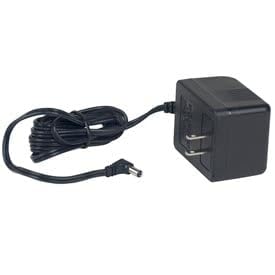
This manual provides essential information for the safe and effective use of your Detecto 8529-B217-08 AC Adapter. This adapter is designed to provide power to specific Detecto devices, including models PC10, PC20, and PC30. Please read these instructions carefully before installation and operation, and retain them for future reference.
Consignes de sécurité
- Utilisation en intérieur uniquement : This AC adapter is designed for indoor use in dry locations. Do not expose it to rain, moisture, or extreme temperatures.
- Vol appropriétage: Assurez-vous que la prise de courant voltage matches the adapter's specifications (240 Volts).
- Évitez la surcharge : Ne surchargez pas les prises électriques ni les rallonges, car cela peut entraîner un risque d'incendie ou d'électrocution.
- Entretien des câbles : Protect the power cord from being walked on or pinched, particularly at plugs, convenience receptacles, and the point where they exit from the adapter.
- Débrancher lorsque l'appareil n'est pas utilisé : Disconnect the adapter from the power outlet when not in use for extended periods or before cleaning.
- Aucune pièce réparable par l'utilisateur : Do not attempt to open or repair the adapter. Refer all servicing to qualified service personnel.
Installation
Follow these steps to properly set up your Detecto 8529-B217-08 AC Adapter:
- Inspectez l'adaptateur : Before connecting, visually inspect the AC adapter and its cable for any signs of damage. Do not use if damaged.
- Connectez-vous à l'appareil : Locate the power input port on your Detecto PC10, PC20, or PC30 device. Insert the adapter's output connector firmly into this port.
- Connectez-vous à une prise de courant : Plug the AC adapter's power plug into a standard, grounded electrical outlet. Ensure the outlet provides the correct voltage (240 Volts).
- Vérifiez la connexion : Confirm that both connections are secure. Your Detecto device should now receive power.
Mode d'emploi
The Detecto 8529-B217-08 AC Adapter functions as a power supply for your compatible Detecto device. Once properly connected as described in the Setup section, the adapter continuously supplies power to the device when plugged into an active electrical outlet.
- Marche/Arrêt : The adapter itself does not have an on/off switch. Power to your Detecto device is controlled by plugging or unplugging the adapter from the wall outlet, or by using the power switch on the Detecto device itself, if available.
- Puissance continue : For continuous operation of your device, ensure the adapter remains securely plugged into both the device and the power outlet.
Entretien
Proper maintenance ensures the longevity and reliable performance of your AC adapter.
- Nettoyage: Débranchez l'adaptateur de la prise secteur et de l'appareil avant de le nettoyer. Utilisez un chiffon doux et sec pour essuyer l'extérieur. N'utilisez pas de nettoyants liquides, d'aérosols ni de solvants.
- Stockage: Lorsqu'il n'est pas utilisé, rangez l'adaptateur dans un endroit frais et sec, à l'abri de la lumière directe du soleil et de l'humidité. Évitez d'enrouler le câble trop serré afin de prévenir tout dommage.
- Inspection des câbles : Periodically inspect the power cable and connectors for any signs of wear, cuts, or damage. Replace the adapter if any damage is observed.
Dépannage
If you encounter issues with your Detecto 8529-B217-08 AC Adapter, refer to the following common problems and solutions:
| Problème | Cause possible | Solution |
|---|---|---|
| L'appareil ne s'allume pas. | Adaptateur mal connecté. | Ensure the adapter is securely plugged into both the device and the wall outlet. |
| L'appareil ne s'allume pas. | Aucune alimentation électrique ne sort de la prise. | Test the outlet with another device or check the circuit breaker. |
| L'appareil ne s'allume pas. | Adaptateur ou câble endommagé. | Vérifiez que l'adaptateur et le câble ne présentent aucun dommage visible. Si c'est le cas, cessez de les utiliser et remplacez-les. |
| L'adaptateur est anormalement chaud. | Surcharge ou mauvaise ventilation. | Ensure the adapter is not covered and has adequate airflow. If overheating persists, discontinue use. |
Caractéristiques
- Numéro de modèle : 8529-B217-08
- Marque: Détecter
- Appareils compatibles : Detecto PC10, PC20, PC30
- Vol d'entréetage: 240 volts
- Quoitage: 5 watts
- Spécification respectée : UL
- Source d'alimentation : AC
- Type de connecteur d'alimentation principal : 2 broche
- Dimensions du produit : 8 x 5 x 4 pouces
- Poids de l'article : 0.01 onces
Informations sur la garantie
Specific warranty terms for the Detecto 8529-B217-08 AC Adapter are provided by the manufacturer, Detecto. For detailed information regarding warranty coverage, duration, and claims procedures, please refer to the documentation included with your original purchase or visit the official Detecto webConsultez le site. Conservez votre preuve d'achat pour faire valoir la garantie.
Soutien
If you require further assistance or have questions not covered in this manual, please contact Detecto customer support. You can typically find contact information, including phone numbers and email addresses, on the official Detecto website ou à l'intérieur de l'emballage du produit.


