Introduction
This manual provides essential instructions for the safe and effective operation of your Microlife WS100 Digital Body Fat Analyzer Weight Scale. Please read this manual thoroughly before using the device and retain it for future reference. The Microlife WS100 is designed to measure body weight, body fat percentage, et la masse musculaire.
Consignes de sécurité
- Do not use this device if you have a pacemaker or other electronic medical implant.
- Les femmes enceintes doivent consulter leur médecin avant d'utiliser cet appareil.
- Ensure the scale is placed on a hard, flat surface for accurate measurements. Avoid carpets or uneven floors.
- N’utilisez pas la balance sur des surfaces mouillées ou glissantes afin d’éviter les chutes.
- Gardez l’appareil hors de portée des enfants.
- Ne démontez pas l'appareil et n'essayez pas de le réparer vous-même. Contactez le service client en cas de problème.
Installation
1. Déballage et inspection initiale
Carefully remove the Microlife WS100 scale from its packaging. Inspect the device for any signs of damage. If any damage is observed, do not use the scale and contact your retailer.
2. Installation de la batterie
The Microlife WS100 scale comes with batteries included. Locate the battery compartment on the underside of the scale. Open the compartment cover and ensure the batteries are correctly inserted according to the polarity indicators (+/-). Close the battery compartment securely.
3. Étalonnage initial
Before first use or after moving the scale, it is recommended to perform an initial calibration. Place the scale on a hard, flat surface. Briefly step onto the scale, then step off. The display will show "0.0" or a similar indication, confirming calibration.
4. Utilisateur Profile Configuration (pour l'analyse de la masse grasse)
To utilize the body fat and muscle mass analysis features, you must set up a user profile. Refer to the detailed instructions in the "Operating Instructions" section for setting up user profiles, including age, gender, and height.
Mode d'emploi
1. Basic Weight Measurement
- Placez la balance sur une surface plane et stable.
- Montez pieds nus sur la balance et restez immobile.
- Your weight will be displayed on the screen. The scale will automatically turn off after a few seconds.
2. Body Fat and Muscle Mass Measurement
For body composition analysis, ensure your user profile est mis en place.
- Press the "SET" button to enter user selection mode.
- Use the arrow buttons to select your user number (P1, P2, etc.).
- Montez pieds nus sur la balance, en veillant à ce que vos pieds soient positionnés sur les électrodes métalliques.
- Stand still until the measurements (weight, body fat percentage, pourcentage de masse musculairetage) are displayed sequentially.
- The scale will automatically store the data and turn off.
3. Changement d'unité de mesure
The unit switch button (usually located on the underside of the scale) allows you to toggle between kilograms (kg) and pounds (lb). Press this button to select your preferred unit before taking a measurement.
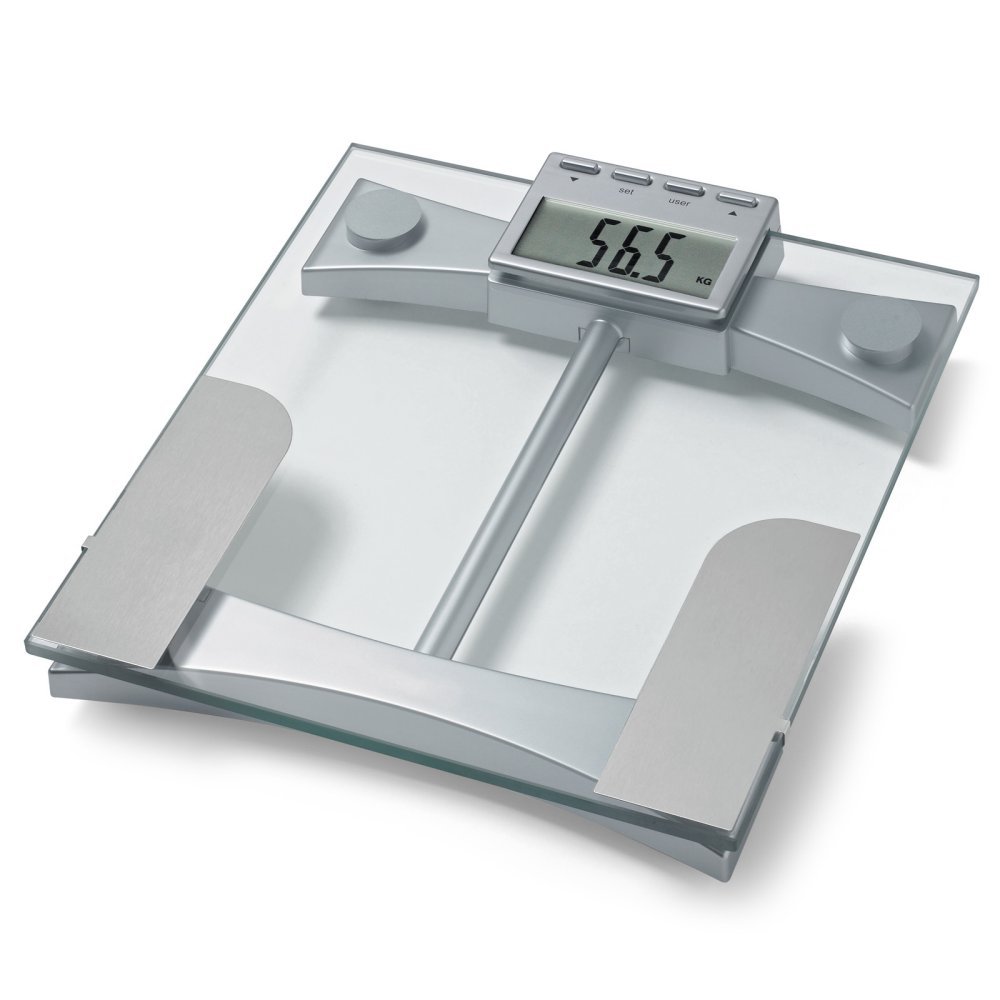
Figure 1 : Haut view of the Microlife WS100 scale. Note the display area and the metallic electrodes for body composition analysis. Ensure feet are placed correctly on these electrodes for accurate readings.
Entretien
1. Nettoyage de la calamine
Essuyez la surface de la balance avec un chiffon doux et sec.amp cloth. Do not use abrasive cleaners or immerse the scale in water. Avoid harsh chemicals that may damage the surface or electronic components.
2. Stockage
Rangez la balance dans un endroit frais et sec, à l'abri de la lumière directe du soleil et des températures extrêmes. Évitez de poser des objets lourds dessus lorsqu'elle n'est pas utilisée.
3. Remplacement de la batterie
When the display shows a "Lo" indicator, it is time to replace the batteries. Open the battery compartment on the underside of the scale, remove the old batteries, and insert new ones of the same type, observing correct polarity. Dispose of old batteries responsibly.
Dépannage
| Problème | Cause possible | Solution |
|---|---|---|
| "Lo" affiché | Batterie faible. | Remplacez les piles par des neuves. |
| "Err" affiché | Surcharge ou erreur de mesure. | Ensure the scale is not overloaded. Step off and then back on the scale. Ensure stable footing. |
| Lectures inexactes | Scale on uneven surface, not calibrated, or user profile incorrect. | Place scale on a hard, flat surface. Perform initial calibration. Verify user profile settings (age, height, gender). |
| Pas d'affichage | Batteries incorrectly installed or completely drained. | Vérifiez la polarité des piles. Remplacez-les si nécessaire. |
Caractéristiques
- Modèle: WS100
- Marque: Microlife
- Type d'affichage : Numérique
- Caractéristiques spéciales : Body Fat, Bodyweight, Muscle Mass
- Matériel: Plastique
- Couleur: Noir
- Source d'alimentation : Batteries incluses)
- Dimensions du produit : 31.75 x 7.62 x 37.47 cm (12.5 x 3 x 14.75 pouces)
- Poids de l'article : 2.99 kg (6.59 lb)
- GTIN/UPC : 642632841233
Garantie et assistance
For warranty information or technical support, please refer to the warranty card included with your product or visit the official Microlife website. N'essayez pas de réparer l'appareil vous-même, car cela pourrait annuler la garantie.


