1. Introduction
This manual provides comprehensive instructions for the safe and efficient use of your Logisys PS480D 480W ATX Power Supply. Please read this manual thoroughly before installation and operation to ensure proper functionality and to prevent damage to the unit or other components.

Figure 1: Logisys PS480D 480W ATX Power Supply, front view with cables bundled.
2. Consignes de sécurité
AVERTISSEMENT: Les alimentations contiennent des tensions élevéestagcomposants. Ne pas ouvrir le bloc d'alimentation casing. Il n'y a aucune pièce réparable par l'utilisateur à l'intérieur.
- Assurez-vous que l'alimentation électrique est débranchée de la prise secteur avant toute installation ou maintenance.
- Always ground yourself to prevent electrostatic discharge (ESD) when handling internal computer components.
- Ne pas utiliser l'alimentation électrique dans des environnements humides ou dilatés.amp conditions.
- Assurez une ventilation adéquate autour du bloc d’alimentation pour éviter toute surchauffe.
- Use only the provided power cables and connectors.
3. caractéristiques du produit
The Logisys PS480D is a 480W ATX power supply designed for personal computers. Key features include:
- Haute efficacité
- Low Noise & Ripple
- Plus de voltaget protection
- Protection contre les courts-circuits
- Built-in EMI Filter
- Insulation Resistance 100MΩ min.
- Complies with FCC part 15J class B 115VAC operation and CISPR 22 230 VAC operation.
- Meets UL 1950, CSA 22.2 LEVEL 3 Requirement.
- 100% Burn-in test / Vibration test / Hi-pot test / Leakage current test.
- MTBF above 100,000 hours at 25 °C.

Figure 2: Rear panel of the power supply with fan, AC inlet, and power switch.
4. Configuration et installation
Follow these steps to install the Logisys PS480D power supply into your computer system.
- Préparation: Ensure your computer is completely powered off and unplugged from the wall outlet. Open your computer case according to its manufacturer's instructions.
- Retirez l'ancien bloc d'alimentation (le cas échéant) : Disconnect all cables from the old power supply to the motherboard, drives, and other components. Unscrew and remove the old power supply from the case.
- Installer une nouvelle alimentation électrique : Carefully place the Logisys PS480D into the power supply bay of your computer case. Secure it with screws.
- Brancher l'alimentation principale : Connect the 20+4 pin ATX mainboard connector to your motherboard. If your motherboard uses a 20-pin connector, detach the 4-pin section. If it uses a 24-pin connector, connect both sections.
- Alimentation du processeur : Connect the 4-pin +12V power connector to the corresponding port on your motherboard.
- Alimentation périphérique :
- Use the 4-pin standard drive connectors for HDDs and CD/DVD-ROM drives.
- Use the 4-pin 3.5" FDD or ZIP connectors for floppy disk drives or similar devices.
- Use the Serial ATA (SATA) connectors for SATA hard drives and SSDs.
- Gestion des câbles: Disposez les câbles proprement afin d'assurer une bonne circulation de l'air à l'intérieur du boîtier.
- Affaire close : Une fois toutes les connexions sécurisées, refermez le boîtier de votre ordinateur.
- Branchez l'alimentation CA : Plug the AC power cord into the power supply's AC inlet and then into a wall outlet.
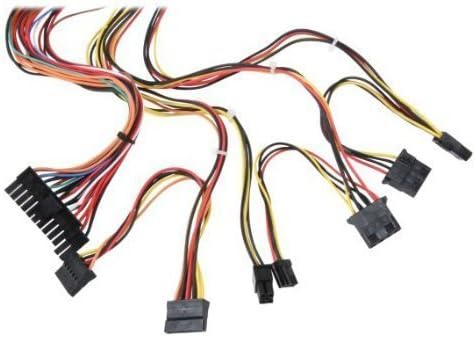
Figure 3 : Plusview of power supply connectors.

Figure 4: Power supply dimensions and included AC power cord.
5. Mode d'emploi
After successful installation, you can power on your computer.
- Ensure the power switch on the rear of the power supply (Figure 2) is in the "ON" (I) position.
- Appuyez sur le bouton d'alimentation de votre ordinateur.
- The power supply will provide stable power to your system components.
- To power off, shut down your operating system normally. For complete power disconnection, switch the power supply to the "OFF" (O) position and unplug the AC cord.
6. Entretien
Un entretien régulier contribue à assurer la longévité et les performances optimales de votre alimentation.
- Nettoyage: Periodically clean dust from the power supply's fan and vents using compressed air. Ensure the power supply is unplugged before cleaning.
- Débit d'air : Ensure that the computer case has adequate airflow and that the power supply's fan is not obstructed.
- Intégrité du câble : Periodically check all power cables for secure connections and signs of wear or damage.
7. Dépannage
Si vous rencontrez des problèmes avec votre alimentation, reportez-vous aux étapes de dépannage courantes suivantes :
- Pas d'alimentation :
- Vérifiez que le cordon d'alimentation secteur est bien branché à la fois à la prise de courant et à la prise murale.
- Ensure the power switch on the rear of the power supply is in the "ON" (I) position.
- Vérifiez que la prise murale est fonctionnelle en y branchant un autre appareil.
- Check all internal power connections (20/24-pin ATX, 4-pin +12V, peripheral connectors) are firmly seated.
- Instabilité du système/Arrêts aléatoires :
- This could indicate an overloaded or failing power supply. Ensure your system's power requirements do not exceed the PS480D's 480W capacity.
- Check for proper ventilation and ensure the power supply fan is spinning. Overheating can cause instability.
- Bruit inhabituel :
- A loud fan noise might indicate dust buildup or a failing fan bearing. Clean the fan as described in the Maintenance section.
If problems persist after attempting these steps, contact Logisys customer support or a qualified technician.
8. Spécifications
| Fonctionnalité | Spécification |
|---|---|
| Marque | Logisys |
| Numéro de modèle | PS480D |
| Puissance de sortietage | 480 watts |
| Facteur de forme | ATX |
| Dimensions (L x l x H) | 6" L x 5.5" l x 3.25" H (15.24 x 13.97 x 8.25 cm) |
| Poids de l'article | 2.06 livres (0.93 kg) |
| Connecteur de carte mère | 1x 20+4 Pin ATX |
| Connecteur d'alimentation du processeur | 1x 4 Pin +12V |
| Standard Drive Connectors | 4x 4 Pin (Molex) |
| FDD/ZIP Connectors | 1x 4 Pin 3.5" |
| Connecteurs série ATA | 1x SATA |
| Méthode de refroidissement | Air |
| Protections | Plus de voltagProtection électronique, Protection contre les courts-circuits |
| Certifications | FCC part 15J class B, CISPR 22, UL 1950, CSA 22.2 LEVEL 3 |
9. Garantie et assistance
For warranty information, technical support, or service inquiries, please refer to the official Logisys webConsultez leur site web ou contactez leur service client. Conservez votre reçu d'achat comme preuve d'achat.

