1. Introduction
Merci pour votre achatasing the Pentax Optio W10 Digital Camera. This manual provides essential information for the safe and effective use of your camera. The Optio W10 is a compact 6.0-megapixel digital camera featuring a 3x optical zoom lens, designed for capturing high-quality still images and video. Its robust design makes it suitable for various environments.
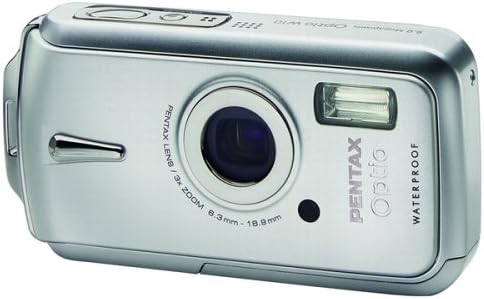
Figure 1.1 : Face avant view of the Pentax Optio W10 Digital Camera, showcasinl'objectif, le flash et la marque.
2. Consignes de sécurité
Please read and understand all safety precautions before using the camera. Failure to do so may result in injury or damage to the product.
- Ne tentez pas de démonter ou de modifier l'appareil photo.
- Keep the camera away from extreme temperatures, direct sunlight, and high humidity.
- Ensure all compartment covers (battery, memory card) are securely closed and locked before exposing the camera to water or dust.
- Use only the specified battery type (Lithium-ion DL-I8) and charger.
- Tenir hors de portée des enfants.
3. Contenu du colis
Vérifiez que tous les éléments sont présents dans l'emballage de votre appareil photo :
- Appareil photo numérique Pentax Optio W10
- Lithium-ion Battery DL-I8
- Chargeur de batterie
- Cordon d'alimentation secteur
- USB Cable (for computer connection)
- Sangle
- CD-ROM du logiciel
- Manuel d'instructions (ce document)
4. Installation
4.1. Installation de la batterie
- Repérez le couvercle du compartiment de la batterie/carte mémoire sur la partie inférieure de l'appareil photo.
- Slide the lock switch to the 'OPEN' position and open the cover.
- Insert the Lithium-ion battery DL-I8 into the compartment, ensuring the correct orientation as indicated inside the compartment.
- Close the cover and slide the lock switch to the 'LOCK' position until it clicks securely.

Figure 4.1 : Bas view of the camera, illustrating the battery and SD card compartment with the lock switch.
4.2. Installation de la carte mémoire
The Pentax Optio W10 uses SD memory cards.
- Open the battery/memory card compartment cover as described in Section 4.1.
- Insert the SD memory card into the designated slot with the label facing the correct direction, pushing gently until it clicks into place.
- Close the cover and slide the lock switch to the 'LOCK' position.
4.3. Mise sous tension initiale et réglage de la date et de l'heure
- Appuyez sur le MARCHE/ARRÊT bouton situé sur le dessus de l'appareil photo.
- Upon first power-on, the camera will prompt you to set the date and time. Use the directional buttons on the back of the camera to navigate and the OK bouton pour confirmer.
- Suivez les instructions à l'écran pour terminer la configuration initiale.

Figure 4.2 : Haut view of the camera, highlighting the ON/OFF button and 6.0 Megapixels branding.
5. Utilisation de l'appareil photo
5.1. Photographie de base
To take a still picture:
- Allumez l'appareil photo en appuyant sur le MARCHE/ARRÊT bouton.
- Cadrez votre prise de vue à l'aide de l'écran LCD de 2.5 pouces.
- Appuyez à mi-course sur le déclencheur pour effectuer la mise au point. Le cadre de mise au point deviendra vert une fois la mise au point effectuée.
- Appuyez à fond sur le déclencheur pour prendre la photo.

Figure 5.1 : Arrière view de l'appareil photo, affichant l'écran LCD et divers boutons de commande pour la navigation et les réglages.
5.2. Modes de prise de vue
The Optio W10 offers various shooting modes accessible via the MODE button. Refer to the on-screen menu for specific options such as Program Auto, Scene Modes, and Movie Mode.
5.3. Enregistrement vidéo
Pour enregistrer une vidéo :
- Switch to Movie Mode using the MODE bouton.
- Press the shutter button to start recording. The camera can capture QuickTime motion JPEG videos at 640 x 480 resolution at 30 frames per second.
- Appuyez à nouveau sur le déclencheur pour arrêter l'enregistrement.
5.4. Lecture
À view Images et vidéos capturées :
- Appuyez sur le Lecture bouton (généralement indiqué par une icône triangulaire).
- Use the directional buttons to scroll through your photos and videos.
- Appuyez sur le OK bouton pour view a video or zoom into a photo.
5.5. Connexion à un ordinateur
To transfer images and videos to a computer:
- Assurez-vous que la caméra est éteinte.
- Connectez l'appareil photo à votre ordinateur à l'aide du câble USB fourni.
- Turn on the camera. It should be recognized as a removable disk or a PTP device.
- Follow your computer's operating system instructions to access and transfer files.
6. Entretien
6.1. Nettoyage
- Corps de la caméra : Essuyez avec un chiffon doux et sec. Pour les saletés tenaces, utilisez un chiffon légèrement plus dur.amp chiffon puis séchez soigneusement.
- Lentille: Use a lens brush or a soft, clean lens cloth. Avoid touching the lens surface with your fingers.
- Écran LCD: Essuyez délicatement avec un chiffon doux et sec. Évitez d'appuyer fortement sur l'écran.
- Joints étanches : Regularly inspect the rubber seals around the battery/memory card compartment for dirt, sand, or damage. Clean gently with a soft cloth. Do not use sharp objects.
6.2. Stockage
When not in use for extended periods, store the camera in a cool, dry, and well-ventilated place. Remove the battery to prevent leakage. Avoid storing in areas with high humidity or extreme temperature fluctuations.
7. Dépannage
If you encounter issues with your Pentax Optio W10, refer to the following common solutions:
| Problème | Cause/solution possible |
|---|---|
| La caméra ne s'allume pas | Battery is depleted or incorrectly inserted. Recharge the battery or reinsert it correctly. |
| Impossible de prendre des photos | Memory card is full, locked, or not inserted. Delete unnecessary files, déverrouillez la carte ou insérez-la correctement. |
| Les images sont floues | Lens is dirty, camera shake, or incorrect focus. Clean the lens, hold the camera steady, or ensure proper focus. |
| Water inside compartment | Compartment cover not securely closed or seal is damaged. Ensure cover is locked. If seal is damaged, contact service. |
For further assistance, please refer to the official Pentax support website ou contacter le service client.
8. Spécifications
Key technical specifications for the Pentax Optio W10 Digital Camera:
- Résolution fixe efficace : 6.0 mégapixels
- Technologie de capteur photo : CCD (1/2.5 pouce)
- Zoom optique : 3x
- Zoom numérique : 4x
- Distance focale maximale : 114 mm
- Distance focale minimale : 38 mm
- Taille de l'écran LCD : 2.5 pouces
- Stabilisation d'image : Numérique, Optique
- Résolution vidéo : 640 x 480, 30/15 fps (QuickTime Motion JPEG)
- Soutenu File Format: JPEG (Still Images), MJPEG (Video)
- Support de stockage : SD/MMC card, Internal Memory
- Type de batterie : Lithium-ion (DL-I8)
- Dossier spécial : Waterproof (Note: Ensure all seals are properly closed before water exposure)
- Vitesse d'obturation minimale : 4 secondes
- Vitesse d'obturation maximale : 1/2000 secondes
- Gamme ISO: Auto, 64, 100, 200, 400, 800
- Poids de l'article : 5.6 onces
- Numéro de modèle : 19033
9. Garantie et assistance
For information regarding warranty coverage, service, or technical support for your Pentax Optio W10 camera, please refer to the warranty card included with your product or visit the official Pentax webConsultez le site. Conservez votre preuve d'achat pour toute réclamation au titre de la garantie.
Support en ligne: Ricoh Imaging Global Support (Pentax is a brand of Ricoh Imaging)


