Introduction
Merci pour votre achatasing the Nyko AirFlo EX Controller for PlayStation 2. This controller is designed to enhance your gaming experience with its unique airflow feature, providing comfort during extended gameplay sessions. Please read this manual thoroughly before use to ensure proper setup and operation.
Contenu du colis
- Nyko AirFlo EX Controller for PlayStation 2
- Manuel de l'utilisateur (ce document)
Caractéristiques du contrôleur
The Nyko AirFlo EX Controller integrates several features for an optimized gaming experience:
- AirFlo Cooling System: An integrated fan provides airflow to help keep hands dry and comfortable during intense gaming.
- Conception ergonomique : Shaped for comfortable grip and extended play.
- Standard PlayStation 2 Controls: Includes directional pad, action buttons (Triangle, Circle, Cross, Square), L1/R1/L2/R2 shoulder buttons, START, SELECT, and analog sticks (L3/R3 functionality).
- Retour de vibrations: Supports in-game vibration effects for enhanced immersion.
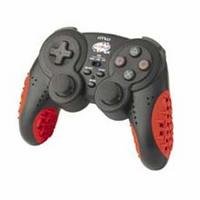
Image: Nyko AirFlo EX Controller for PlayStation 2. This image displays the front view of the controller, highlighting its button layout and ergonomic shape.
Installation
- Se connecter à la PlayStation 2 : Locate an available controller port on your PlayStation 2 console.
- Insérer le connecteur : Firmly insert the controller's connector cable into the chosen port. Ensure it is fully seated.
- Console sous tension : Allumez votre console PlayStation 2. La manette devrait être automatiquement reconnue.
- Fonctionnalité de test : Navigate the PlayStation 2 menu or start a game to confirm all buttons and analog sticks are responsive.
Mode d'emploi
The Nyko AirFlo EX Controller operates similarly to standard PlayStation 2 controllers, with the added AirFlo feature.
- Contrôles de base : Use the directional pad or left analog stick for movement, and the action buttons (Triangle, Circle, Cross, Square) for in-game actions.
- Fonctionnalités du joystick analogique : Pressing the analog sticks down activates L3 and R3 functions, if supported by the game.
- AirFlo Fan Activation: The AirFlo fan is typically activated by a switch or button on the controller itself. Refer to the controller's physical layout for the exact location of the fan control. Toggle this control to turn the fan on or off.
- Retour de vibrations: Vibration effects will automatically engage during gameplay when supported by the software.
Entretien
- Nettoyage: Utilisez un chiffon doux et sec pour nettoyer la surface de la manette. Pour les saletés tenaces, un chiffon légèrement plus sec peut être utile.amp cloth can be used, ensuring no moisture enters openings. Do not use harsh chemicals or abrasive cleaners.
- Stockage: Rangez la manette dans un endroit frais et sec, à l'abri de la lumière directe du soleil et des températures extrêmes. Évitez d'enrouler le câble trop serré autour de la manette afin de prévenir tout dommage.
- Évitez les chutes : Protégez la manette des chutes et des chocs, qui peuvent endommager ses composants internes.
Dépannage
| Problème | Solution possible |
|---|---|
| La manette ne répond pas. |
|
| AirFlo fan not working. |
|
| Buttons or analog sticks are unresponsive or stiff. |
|
Caractéristiques
- Modèle: AirFlo EX
- Compatibilité: PlayStation 2
- Poids de l'article : 9.6 onces (environ 272 grammes)
- Dimensions du colis : 6 x 4.8 x 2.7 pouces (environ 15.2 x 12.2 x 6.9 cm)
- Connectivité : Câblé
- Caractéristiques spéciales : Integrated AirFlo cooling fan
Garantie et assistance
For warranty information, technical support, or service inquiries regarding your Nyko AirFlo EX Controller, please contact Nyko customer support directly. Details can typically be found on the official Nyko website ou emballage du produit.
Nyko Official Website: www.nyko.com (Remarque : Ceci est un espace réservé URL. Please refer to your product packaging or official Nyko documentation for the most current support information.)