
1. Produit terminéview
The Soundcore Liberty 5 Pro Max are advanced wireless earbuds designed for superior audio experiences, crystal-clear communication, and smart productivity features. They integrate cutting-edge AI technology for noise cancellation, voice recording, and personalized sound.
Caractéristiques principales :
- Guinness World Records Certified Call Quality: The Liberty 5 Pro Max offers exceptional call performance, certified by Guinness World Records for its speech quality.
- AI Voice Recorder & Transcription: The smart charging case features an integrated microphone to record in-person meetings and interviews, providing AI-generated transcriptions and summaries. (Note: Does not record online meetings or calls.)
- Intuitive AMOLED Smart Case: A 1.78" AMOLED display on the charging case allows direct control over AI recording, ANC settings, and earbud configurations, with customizable wallpapers.
- Appels d'une clarté cristalline : Equipped with 10 sensors and a Thus AI Chip, ensuring your voice is heard clearly in any environment, even in noisy conditions exceeding 100 dB.
- Instant Absolute Silence (ANC): Features 100% more effective Active Noise Cancellation than previous models, utilizing 8 sensors and a Thus AI Chip to process over 384K noise signals per second for immediate quiet.
- Personalized Audio with HearID 5.0: Tailor your sound experience with custom EQ and an AI audio optimizer, ensuring optimal sound quality.
- Lag-Free Voice Control: Access 20 integrated commands for music playback and volume adjustment with zero delay, thanks to offline processing.
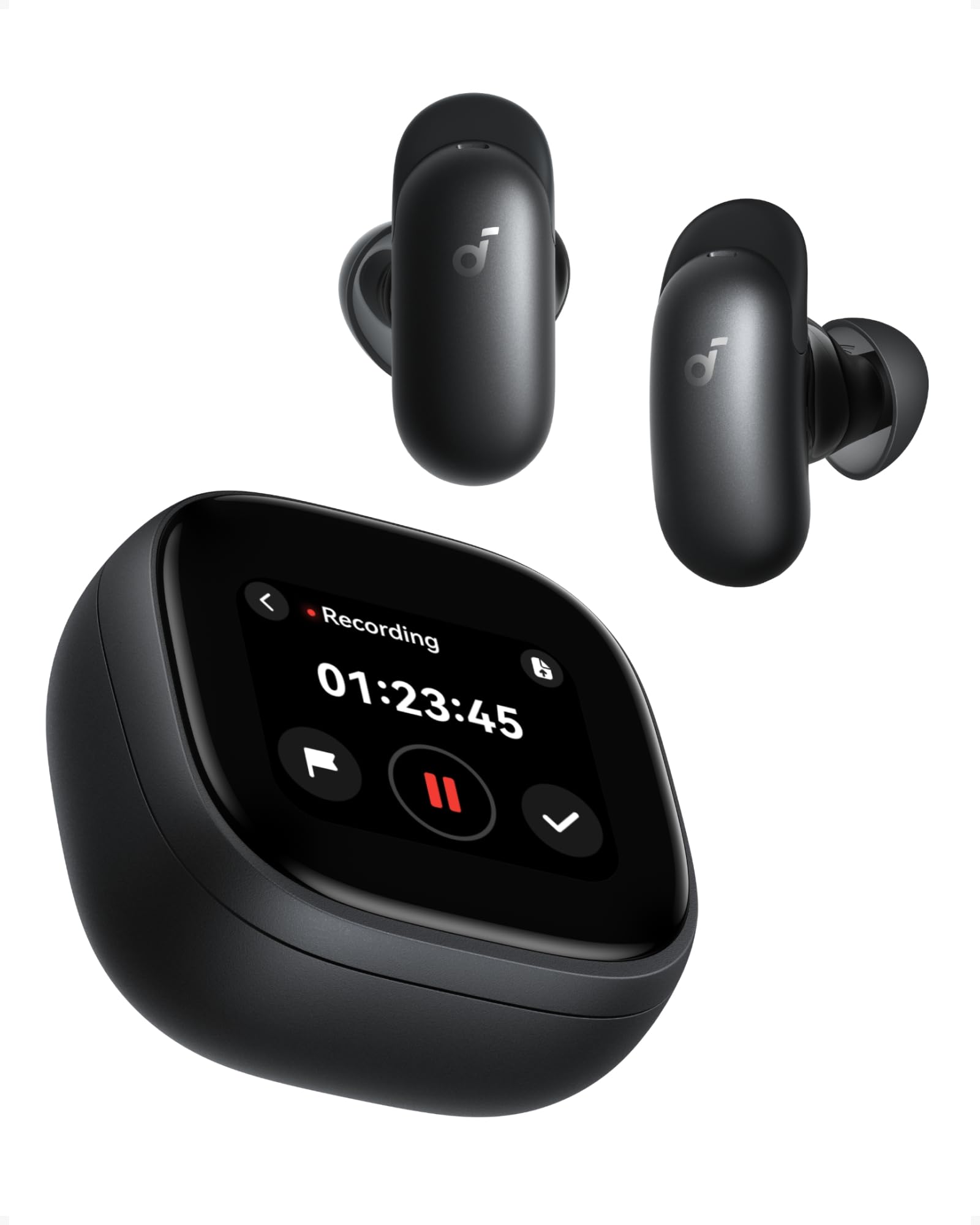
Image: Soundcore Liberty 5 Pro Max earbuds in their smart charging case.
2. Contenu du colis
Vérifiez que tous les articles sont présents dans la boîte :
- Soundcore Liberty 5 Pro Max Earbuds
- Étui de charge intelligent
- Ear Tips: XXS, XS, S, M, L (Medium pre-installed)
- Ear Wings: 0, 1, 2 (Size 1 pre-installed)
- Câble de chargement USB-C

Image: All components included in the Soundcore Liberty 5 Pro Max package.
3. Installation et première utilisation
3.1 Chargement des écouteurs et de l'étui
- Placez les écouteurs dans l’étui de chargement.
- Connect the charging case to a power source using the provided USB-C cable. The LED indicators on the case will show charging status.
- Pour la recharge sans fil, placez l'étui sur un chargeur sans fil compatible.
- A full charge for the earbuds takes approximately 50 minutes. The case provides multiple charges for extended use.
3.2 Installation des écouteurs
For optimal sound quality and noise cancellation, it is crucial to choose the correct ear tips and ear wings that provide a secure and comfortable seal.
- Experiment with different sizes of ear tips (XXS, XS, S, M, L) and ear wings (0, 1, 2).
- Insert the earbuds into your ears and rotate them until they fit snugly and comfortably.
- Use the Soundcore app's "Tip Fit Test" feature to verify the seal.

Image: Earbud correctly positioned in the ear for a secure fit.
3.3 Appairage avec votre appareil
- Open the charging case. The earbuds will automatically enter Bluetooth pairing mode (LEDs will flash).
- On your device (smartphone, tablet, PC), go to Bluetooth settings and select "Soundcore Liberty 5 Pro Max" from the list of available devices.
- Une fois connectés, les écouteurs se reconnecteront automatiquement au dernier appareil apparié lorsqu'ils seront retirés de leur étui.
- The Liberty 5 Pro Max supports simultaneous connection to up to 3 devices. Manage connections via the Soundcore app or the smart case display.

Image: Illustration of connecting the earbuds to multiple devices simultaneously.
3.4 Soundcore App Installation
Download the Soundcore app from the App Store (iOS) or Google Play Store (Android) to unlock full features, customize settings, and manage your earbuds.
4. Mode d'emploi
4.1 Earbud Controls (Touch/Slide)
The earbuds feature touch and slide controls. Customize these controls via the Soundcore app.
- Lecture/Pause : Appuyez une fois sur l'un des écouteurs.
- Piste suivante : Appuyez deux fois sur l'écouteur droit.
- Piste précédente: Appuyez deux fois sur l'écouteur gauche.
- Monter le son: Slide up on right earbud.
- Baisser le volume: Slide down on left earbud.
- Répondre/Terminer l'appel : Appuyez une fois sur l'un des écouteurs.
- Rejeter l'appel : Appuyez et maintenez l'un ou l'autre des écouteurs pendant 2 secondes.
- Changer les modes ANC : Press and hold left earbud for 2 seconds (cycles through ANC, Transparency, Normal).
4.2 Smart Charging Case Display
The 1.78" AMOLED display on the charging case provides direct access to various functions:
- AI Voice Recorder: Start, pause, and stop recordings. View temps d'enregistrement.
- Contrôle ANC : Adjust Active Noise Cancellation modes (ANC, Transparency, Normal).
- Earbud Settings: Manage equalizer presets, customize controls, and perform firmware updates.
- État de la batterie : View battery levels for both earbuds and the charging case.
- Fonds d'écran personnalisés : Personalize the display background.

Image: Hand interacting with the smart charging case display, showing various control options.
4.3 Réduction active du bruit (ANC) et mode Transparence
The Liberty 5 Pro Max offers advanced noise control:
- Mode ANC : Réduit le bruit ambiant pour une expérience d'écoute immersive. Idéal pour les voyages ou les environnements bruyants.
- Mode de transparence : Allows you to hear your surroundings while listening to audio. Useful for awareness in urban areas or conversations.
- Mode normal : Lecture audio standard sans contrôle actif du bruit.

Image: A man on a boat, illustrating the effectiveness of instant absolute silence with ANC.
4.4 AI Voice Recorder
Utilize the AI Voice Recorder for in-person meetings and interviews:
- Access the recorder via the smart case display or the Soundcore app.
- Start recording. The integrated microphone in the case will capture audio.
- After recording, the system will transcribe and generate AI summaries.
- Manage recordings, transcriptions, and summaries through the Soundcore app or the "Ask Anka" web portail.

Image: Individuals in a meeting, demonstrating the use of the AI voice recorder.
4.5 Personalized Audio Settings
The Soundcore app allows you to customize your audio experience:
- HearID 5.0 : Perform a hearing test to create a personalized EQ profile adapté à votre audition unique.
- Égaliseur personnalisé : Manually adjust equalizer settings to your preference.
- AI Audio Optimizer: Enhances sound quality based on AI analysis.

Image: A woman relaxing, enjoying personalized audio settings.
5. Entretien
- Nettoyage: Regularly clean the earbuds, ear tips, and charging case with a soft, dry, lint-free cloth. Avoid using harsh chemicals.
- Résistance à l'eau : The earbuds have an IPX4 water resistance rating, meaning they are resistant to splashes and sweat. Do not submerge them in water. Ensure earbuds are dry before placing them back in the charging case.
- Stockage: Rangez les écouteurs dans leur étui de chargement lorsqu'ils ne sont pas utilisés pour les protéger et les maintenir chargés.
6. Dépannage
| Problème | Solution |
|---|---|
| Les écouteurs ne s'appairent pas |
|
| Pas de son ou volume faible |
|
| CPN inefficace |
|
| Problèmes de charge |
|
7. Spécifications
| Fonctionnalité | Détail |
|---|---|
| Marque | Noyau sonore |
| Nom du modèle | Liberty 5 Pro Max |
| Numéro de modèle | D1204 |
| Couleur | Noir |
| Facteur de forme | Dans l'oreille |
| Contrôle du bruit | Annulation de bruit active (ANC) |
| Impédance | 17 ohms |
| Réponse en fréquence | 20 kHz |
| Sensibilité | 123 dB |
| Technologie de connectivité | Sans fil |
| Technologie sans fil | Bluetooth |
| Version Bluetooth | 6.1 |
| Type de contrôle | Touch and Slide Control |
| Méthode de contrôle | Application, Voix |
| Casing Matériau | Plastique |
| Niveau de résistance à l'eau | IPX4 (Résistant aux éclaboussures et à la transpiration) |
| Autonomie moyenne de la batterie (écouteurs) | 12 heures |
| Temps de charge de la batterie | 50 minutes |
| Caractéristiques spéciales | AI Note-Taker, AI Noise Cancellation, AMOLED Smart Case |
| Appareils compatibles | iPhone, Android, PC, Mac |
| GTIN (UPC) | 194644331047 |
8. Garantie et assistance
The Soundcore Liberty 5 Pro Max comes with a Garantie de 24 mois À compter de la date d'achat. Veuillez conserver votre preuve d'achat pour toute réclamation au titre de la garantie.
For technical support, troubleshooting assistance, or warranty inquiries, please visit the official Soundcore support webVous pouvez trouver plus d'informations sur le site ou contacter leur service client. Boutique Soundcore sur Amazon or the Soundcore app.
9. Informations importantes sur la sécurité
- Ne pas exposer à des températures extrêmes.
- Évitez de laisser tomber ou de soumettre l'appareil à des impacts violents.
- Tenir hors de portée des enfants et des animaux domestiques.
- Ne démontez pas et n'essayez pas de réparer l'appareil vous-même.
- Utilisez uniquement des câbles et adaptateurs de charge d'origine ou certifiés.
- Avoid using earbuds at high volume for extended periods to prevent hearing damage.
10. Ressources vidéo
Aucune vidéo officielle du produit URLs were provided in the product data. Please refer to the official Soundcore website or YouTube channel for video tutorials and demonstrations.


