
1. Introduction
Thank you for choosing the ATK Horizon Gaming In-Ear Earphones. This manual provides essential information for the proper setup, operation, and maintenance of your 3.5mm audio earphones. Please read this manual thoroughly before use to ensure optimal performance and longevity of your product.
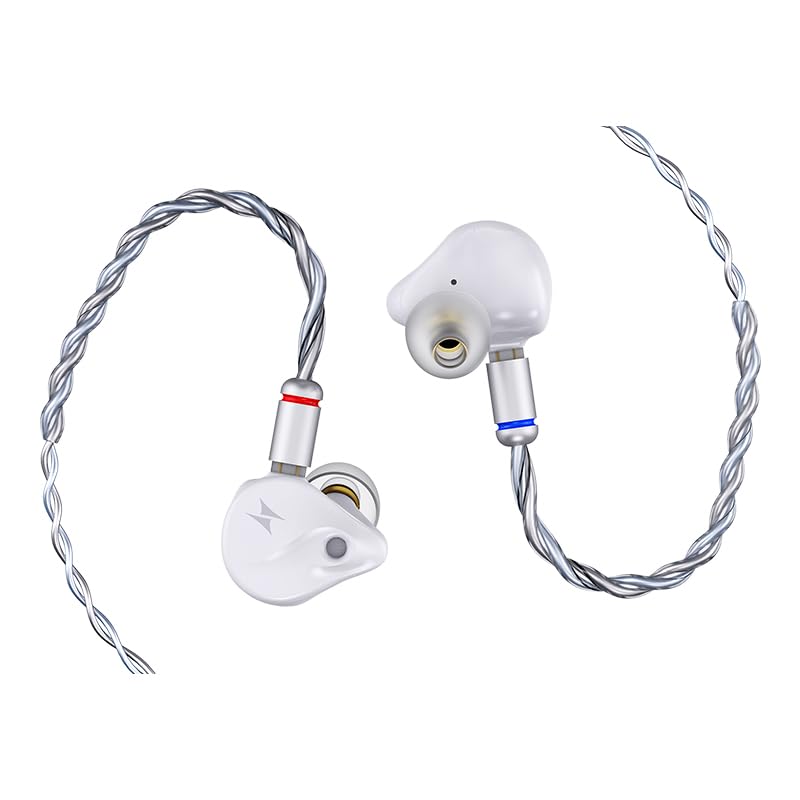
Image 1.1: ATK Horizon Gaming In-Ear Earphones (White, 3.5mm Audio). This image displays the white in-ear earphones with their attached 3.5mm audio cable.
2. Contenu du colis
Veuillez vérifier que le colis contient les éléments suivants :
- ATK Horizon Gaming In-Ear Earphones (White, 3.5mm Audio)
- Câble audio détachable de 3.5 mm
- Manuel de l'utilisateur (ce document)
3. Installation
Setting up your ATK Horizon earphones is a simple process:
- Connectez le câble : Ensure the detachable 3.5mm audio cable is securely connected to the earphones. The earphones typically use a 0.78-2pin connector. Align the pins and gently push until fully seated.
- Insert into Audio Device: Plug the 3.5mm jack of the cable into the corresponding audio port on your gaming console, PC, smartphone, or other compatible device.
- Wear the Earphones: Gently insert the earphones into your ears. Adjust them for a comfortable and secure fit to ensure optimal sound isolation and audio quality. The ear placement is designed for an in-ear fit.
4. Mode d'emploi
The ATK Horizon earphones are designed for straightforward use:
- Lecture audio : Once connected, audio from your device will be routed through the earphones. Adjust the volume directly on your connected device.
- Utilisation du microphone : The integrated AI Noise-Cancelling Microphone is designed for clear voice communication. Ensure your device's audio settings are configured to use the earphone's microphone for input.
- Contrôle des boutons : If your cable includes an inline remote with button controls, refer to your device's manual for specific functions (e.g., play/pause, answer call).
5. Caractéristiques
The ATK Horizon earphones incorporate several design elements for an enhanced audio experience:
5.1. Next-generation Composite Dynamic Driver

Image 5.1: Components of the 10mm Dynamic Driver. This image shows the internal structure of the 10mm dynamic driver, highlighting its composite diaphragm and magnetic components.
Equipped with a 10mm dynamic driver featuring a PU + PEEK composite surround and a DLC-like diaphragm. This design provides a balance of rigidity and flexibility, contributing to responsive performance, punchy bass, well-defined mids, and smooth highs with low distortion.
5.2. Precision CNC-machined Faceplate
The earphones feature a precision CNC-machined faceplate, crafted for both aesthetic appeal and structural integrity.
5.3. Esports-level Sound Positioning
Designed to deliver precise sound positioning, allowing users to discern subtle audio cues such as footsteps and gunshots in gaming environments. The audio profile aims for powerful yet non-piercing sound reproduction.
5.4. Microphone à réduction de bruit par IA
An integrated AI Noise-Cancelling Microphone ensures clear voice capture by reducing background noise, essential for effective communication during gaming or calls.
5.5. Balanced Tuning
The earphones are tuned to provide a balanced audio experience suitable for both high-fidelity music listening and gaming applications.
5.6. Dual Magnetic Circuit Design

Image 5.2 : Interne view of an earphone showcasing the dual magnetic circuit design. This transparent view highlights the dual neodymium magnets within the earphone's housing.
The ATK Horizon features dual neodymium magnets that optimize magnetic flux density, contributing to the performance required for demanding audio scenarios.
5.7. Rear Chamber Design for Improved Sound Diffusion

Image 5.3 : Vue en coupe view of an earphone illustrating the rear chamber design. This image shows how the internal acoustic structure enhances sound diffusion.
A unique acoustic rear chamber design enhances low-frequency diffusion and reduces standing waves. This minimizes bass muddiness and masking effects, resulting in tight, controlled bass and clear in-game audio for enhanced precision.
5.8. High-quality Brass Nozzle

Image 5.4: Close-up of the high-quality brass nozzle. This image highlights the metallic construction of the earphone's sound output component.
The brass nozzle reduces unwanted resonance, delivering rich, well-defined mids with enhanced imaging and precise spatial positioning.
5.9. OFC Four-strand Braided Cable
The earphones come with a four-strand braided cable made of high-purity Oxygen-Free Copper (OFC), designed for durability and optimal signal transmission.
5.10. Note on DSP and Integrated Sound Card Features

Image 5.5: USB Type-C connector featuring an integrated DSP chip. This image illustrates the digital signal processing capabilities available with the USB-C variant of the ATK Horizon earphones.
Please note that features such as the HIFI-level DSP Wired Integrated Sound Card, high-performance 384kHz/32-bit DAC chip, DSP with Intuitive Visual Controls (supported by ATK Hub Dual-driver), and associated EQ/Sensitivity adjustments are exclusive to the USB Type-C variant of the ATK Horizon earphones. This 3.5mm audio model utilizes a standard analog connection and does not include these integrated digital processing features.
6. Entretien
To ensure the longevity and performance of your earphones, follow these maintenance guidelines:
- Nettoyage: Regularly wipe the earphones and cable with a soft, dry cloth. For ear tips, you may use a slightly damp Nettoyez les pièces avec un chiffon doux savonneux et assurez-vous qu'elles soient parfaitement sèches avant de les remettre en place. N'utilisez pas de produits chimiques agressifs ni de matériaux abrasifs.
- Stockage: Lorsqu'ils ne sont pas utilisés, rangez les écouteurs dans un endroit propre et sec, de préférence dans un étui de protection, afin d'éviter qu'ils ne s'emmêlent et ne s'abîment.
- Entretien des câbles : Avoid sharp bends or excessive pulling on the cable. Always grasp the plug, not the cable, when disconnecting from a device.
- Humidité: Ces écouteurs ne sont pas résistants à l'eau. Évitez tout contact avec l'eau, la transpiration ou une forte humidité.
7. Dépannage
If you encounter issues with your ATK Horizon earphones, refer to the following common solutions:
| Problème | Cause possible | Solution |
|---|---|---|
| Pas de son ou volume faible |
|
|
| Le microphone ne fonctionne pas |
|
|
| Son déformé |
|
|
8. Spécifications
Detailed specifications for the ATK Horizon Gaming In-Ear Earphones (3.5mm Audio variant):

Image 8.1: Specifications table for ATK Horizon Series Gaming In-ear Earphones. This table outlines key technical details for both Type-C and 3.5mm variants.
| Fonctionnalité | Detail (3.5mm Audio Variant) |
|---|---|
| Nom du modèle | ATK Horizon |
| Couleur | Blanc |
| Connecteur | Prise audio 3.5mm |
| DSP (Integrated Sound Card) | Not applicable for 3.5mm variant |
| Unité de commande | 10mm PU+PEEK composite surround DLC-like diaphragm unit |
| Impédance | 16.0Ω±15% (@1kHz) |
| Sensibilité | 110±3dB/Vrm(@1kHz) |
| Microphone | Microphone antibruit IA |
| Câble pour écouteurs | 0.78-2pin detachable |
| Mode de connexion | Câblé |
| Longueur du câble | 1.2 m |
| Spécifications du câble | Four-Strand Braided High-Purity Oxygen-Free Copper |
| Réponse en fréquence | 20 KHz (Partial data, typical range is 20Hz-20kHz) |
| Contrôle du bruit | Active Noise Cancellation (as per product specifications, though typically passive for in-ear) |
| Appareils compatibles | Desktops and other devices with 3.5mm audio jack |
| Niveau de résistance à l'eau | Non résistant à l'eau |
9. Garantie et assistance
Your ATK Horizon Gaming In-Ear Earphones are covered by a Garantie de 6 mois À compter de la date d'achat, cette garantie couvre les défauts de fabrication et de main-d'œuvre dans des conditions normales d'utilisation.
For warranty claims, technical support, or any inquiries, please contact ATK customer service through the retailer where the product was purchased or visit the official ATK website pour obtenir les coordonnées de l'assistance.
Veuillez conserver votre preuve d'achat pour la validation de la garantie.