
1. Avis important
Please carefully check the store name and ensure you are purchasing products sold by "LUZHAN." We have received customer feedback stating that products received did not match the description and were of poor quality. Upon investigation, we found that these customers did not purchase the products from us. To prevent such incidents from happening again in the future and to avoid unnecessary misunderstandings, please carefully verify the store name LUZHAN.

Image: Important notice to verify seller name LUZHAN for authentic products.
2. Plus deview
The XIAOMI POCO X8 Pro Max 5G is a high-performance smartphone designed for advanced users. It features a powerful Mediatek Dimensity 9500s processor, a vibrant 1.5K 120Hz AMOLED display, a large 8500mAh battery with 100W HyperCharge, and a 50 MP Light Fusion 600 camera system with OIS. This manual provides essential information for setting up and operating your device.
Image : recto et verso view of the POCO X8 Pro Max 5G smartphone.
Vidéo : Un overview of the POCO X8 Pro Series, highlighting key features and design.
3. Installation
3.1 Contenu de la boîte
- XIAOMI POCO X8 Pro Max 5G Smartphone
- Chargeur
- Protection d'écran (pré-appliquée ou incluse)
3.2 Configuration initiale de l'appareil
- Mise sous tension : Press and hold the power button located on the side of the device until the XIAOMI logo appears.
- Langue et région : Suivez les instructions à l'écran pour sélectionner votre langue et votre région préférées.
- Se connecter au Wi-Fi : Select your Wi-Fi network and enter the password to connect to the internet. This is necessary for initial setup and software updates.
- Compte google: Connectez-vous avec votre compte Google ou créez-en un. Ceci est indispensable pour accéder au Google Play Store et aux autres services Google.
- Transfert de données : If you are upgrading from another device, you may have the option to transfer your data (apps, photos, contacts) during this stage.
- Configuration de la sécurité : Set up your preferred security method, such as a PIN, pattern, password, or fingerprint. The device supports an ultrasonic fingerprint sensor.
- Configuration complète : Suivez les instructions restantes pour finaliser le processus d'installation.
3.3 SIM Card and eSIM Setup
The POCO X8 Pro Max 5G supports physical SIM cards and eSIM functionality.
- Physical SIM: Use the provided SIM ejector tool to open the SIM tray. Insert your Nano-SIM card(s) into the tray, ensuring proper orientation. Close the tray securely.
- eSIM: Pour activer votre eSIM, rendez-vous sur Paramètres > Réseau et Internet > Cartes SIM et suivez les instructions pour ajouter une eSIM Profile provided by your carrier.
4. Mode d'emploi
4.1 Fonctions d'affichage
Your device features a 6.83-inch 1.5K ultra-bright AMOLED display with a 120Hz refresh rate for smooth visuals and a 24x super resolution touch for enhanced responsiveness. It also includes eye protection features and Corning Gorilla Glass 7i for durability.
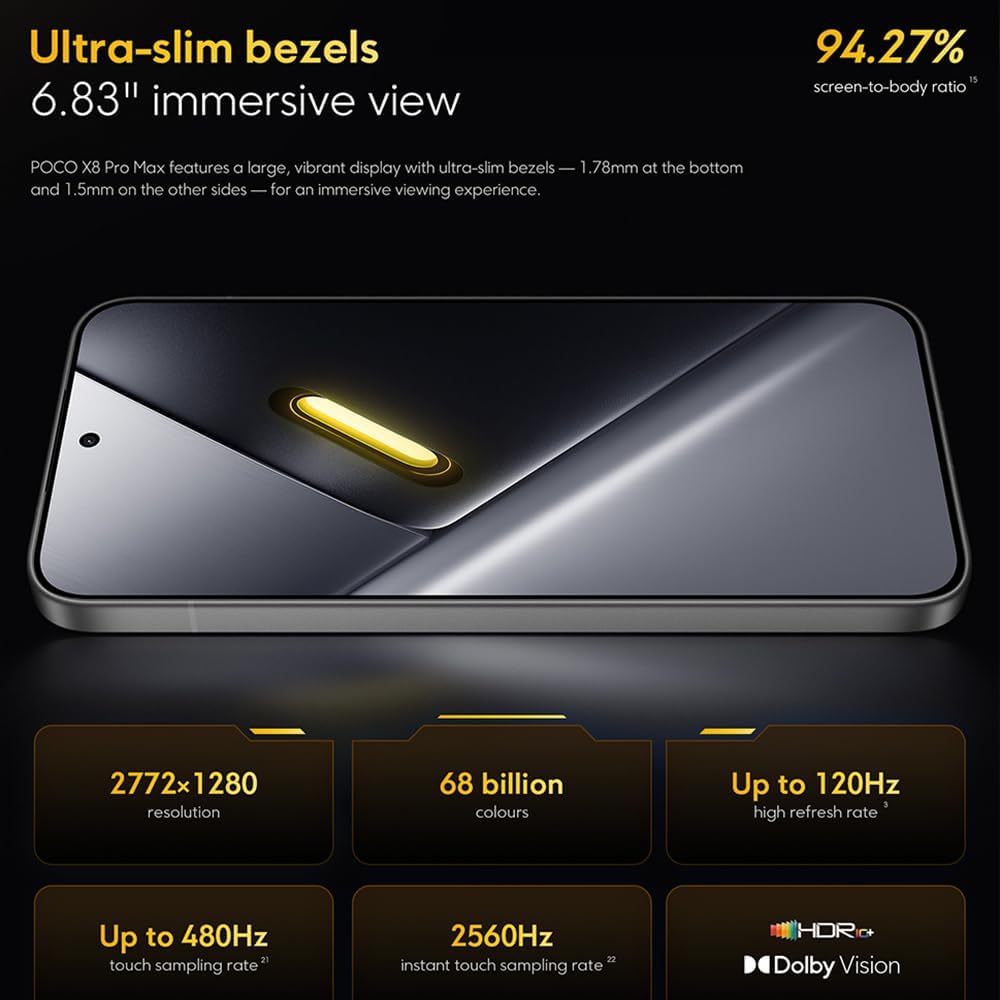
Image: The 6.83-inch 1.5K ultra-bright AMOLED display with minimal bezels.
4.2 Performance
Powered by the Mediatek Dimensity 9500s chipset (3nm, 4+4 All Big Core architecture, NPU890 AI processor), the POCO X8 Pro Max 5G delivers high performance. The POCO 3D IceLoop cooling system ensures efficient heat dissipation, maintaining optimal performance during intensive tasks like gaming.

Image: Diagram illustrating the Mediatek Dimensity 9500s flagship platform.

Image: Illustration of the 5800mm² ultra-large LHP area for cooling.
Système à 4.3 caméras
The device features a 50 MP Light Fusion 600 main camera with OIS (Optical Image Stabilization) and an 8 MP ultra-wide camera. It supports portrait mode with bokeh + HDR and dynamic video-to-still conversion.

Image: Close-up of the 50 MP main camera and 8 MP ultra-wide camera system.
4.4 Batterie et charge
Equipped with a massive 8500 mAh (typical) battery, the POCO X8 Pro Max 5G offers extended usage. It supports 100W HyperCharge, allowing for rapid recharging. A 16% ultra-high carbon-silicon content contributes to its high energy density.

Image: Illustration highlighting the massive 8500mAh battery capacity.

Image: Visual representation of the 100W HyperCharge technology.
4.5 Audio
The device features symmetrical dual stereo speakers (1115F) for a balanced and immersive audio experience.
4.6 Software
The POCO X8 Pro Max 5G comes with Xiaomi HyperOS 3 installed, offering an optimized and user-friendly interface based on Android 16.
5. Entretien
5.1 Nettoyage de votre appareil
- Utilisez un chiffon doux non pelucheux pour essuyer l'écran et le panneau arrière.
- Évitez d'utiliser des produits chimiques agressifs, des matériaux abrasifs ou des aérosols.
- Pour les taches tenaces, légèrement dampnettoyez le chiffon avec de l'eau ou un nettoyant pour écrans conçu pour les appareils électroniques.
5.2 Résistance à la poussière et à l'eau
The device is certified for IP68 dust and water resistance. This means it can withstand immersion in up to 2 meters of water for 30 minutes under specific laboratory conditions. However, water and dust resistance may deteriorate over time with normal wear and tear. The warranty does not cover liquid damage. Avoid exposing the device to hot water, saltwater, or other liquids.

Image: Visual representation of the IP68 dust and water resistance.
5.3 Mises à jour logicielles
Vérifiez et installez régulièrement les mises à jour logicielles pour que votre appareil bénéficie des dernières fonctionnalités, correctifs de sécurité et améliorations de performances. Cette option se trouve généralement dans les paramètres. Paramètres > À propos du téléphone > Mise à jour du système.
6. Dépannage
6.1 Problèmes courants et solutions
- L'appareil ne s'allume pas : Assurez-vous que la batterie est chargée. Branchez l'appareil au chargeur et attendez quelques minutes avant de tenter de le rallumer.
- Écran non réactif : Essayez de redémarrer l'appareil en maintenant le bouton d'alimentation enfoncé pendant une période prolongée (par exemple, 10 à 15 secondes) jusqu'à ce qu'il redémarre.
- Plantages d'applications : Videz le cache de l'application problématique (Paramètres > Applications > [Nom de l'application] > Stockage > Vider le cache) ou réinstallez l'application. Assurez-vous que le logiciel de votre appareil est à jour.
- Mauvaise autonomie de la batterie : Check background app usage, reduce screen brightness, disable unnecessary features like GPS or Bluetooth when not in use, and ensure your software is updated.
- Problèmes de connectivité réseau : Restart your device. Check if your SIM card is properly inserted. Toggle Airplane Mode on and off. Reset network settings (Paramètres > Système > Options de réinitialisation > Réinitialiser le Wi-Fi, les données mobiles et le Bluetooth).
6.2 Réinitialisation d'usine
Si vous rencontrez des problèmes persistants, une réinitialisation d'usine peut être nécessaire. Avertissement: Cette opération effacera toutes les données de votre appareil. Sauvegardez vos données importantes avant de continuer. Accédez à Paramètres > Système > Options de réinitialisation > Effacer toutes les données (réinitialisation d'usine) et suivez les instructions à l'écran.
7. Spécifications
| Fonctionnalité | Spécification |
|---|---|
| Marque | XIAOMI |
| Nom du modèle | POCO X8 Pro Max 5G |
| Système opérateur | Android 16 (with Xiaomi HyperOS 3) |
| Capacité de stockage de la mémoire | 512 Go |
| Taille de l'écran | 6.83 pouces |
| Type d'affichage | AMOLED, 1.5K, 120Hz refresh rate |
| Technologie cellulaire | 5G |
| Couleur | Noir (Noir) |
| Type de connecteur | USB Type C |
| Sécurité biométrique | Fingerprint Recognition (Ultrasonic) |
| Capacité de la batterie | 13 000 mAh (Lithium-polymère) |
| Chargement | HyperCharge 100 W |
| Caméra principale | 50 MP Light Fusion 600 with OIS |
| Caméra ultra grand-angle | 8 MP |
| Processeur | Mediatek Dimensity 9500s |
| Résistance à la poussière et à l'eau | IP68 |
| Année du modèle | 2025 |
| Pays d'origine | Chine |
8. Garantie et assistance
For detailed warranty information and customer support, please refer to the warranty card included with your product or visit the official XIAOMI webConsultez le site. Conservez votre preuve d'achat pour toute réclamation au titre de la garantie.
Online resources and FAQs may also be available on the XIAOMI support portal.