
1. Introduction
The EcoVolt OUKITEL P2001E Pro is a high-capacity portable power station designed to provide reliable electricity for various applications, including home backup, outdoor adventures, and professional use. Featuring a 2048Wh LiFePO₄ battery and a 3200W AC output (6400W peak), it can power a wide range of devices and appliances. This manual provides essential information for safe and efficient operation, setup, maintenance, and troubleshooting.

Image: The OUKITEL P2001E Pro providing power in an outdoor campréglage.
2. Consignes de sécurité
Please read and understand all safety instructions before operating the OUKITEL P2001E Pro. Failure to follow these instructions may result in electric shock, fire, or serious injury.
- Ne démontez pas, ne réparez pas ou ne modifiez pas l'unité.
- Tenez l'appareil éloigné des sources de chaleur, de la lumière directe du soleil et des matériaux inflammables.
- N'exposez pas l'appareil à l'eau ou à d'autres liquides.
- Assurez une ventilation adéquate pendant l'utilisation et la charge.
- Tenir hors de portée des enfants et des animaux domestiques.
- Utilisez uniquement des câbles et accessoires de charge d'origine ou certifiés.
- En cas d'incendie, utilisez un extincteur à poudre sèche.
3. Contenu du colis
Veuillez vérifier que tous les articles listés ci-dessous sont inclus dans votre colis. Si un article est manquant ou endommagé, veuillez contacter le service client.
- OUKITEL P2001E Pro Portable Power Station
- 1 x câble de charge CA
- 1 x câble de charge solaire (MC4 à XT90)
- 1 x Manuel d'utilisation
Note: The solar panel (if purchased) and the power station are shipped separately. Please await the arrival of both packages.

Image: OUKITEL P2001E Pro and its accessories.
4. Produit terminéview
The OUKITEL P2001E Pro features a comprehensive array of input and output ports to meet diverse power needs. Familiarize yourself with the layout and functions of each component.

Image : Terminéview of the 13 output ports.
Panneau avant
- Écran LCD : Affiche le niveau de la batterie, la puissance d'entrée/sortie et les indicateurs d'état.
- Bouton d'alimentation : Allume/éteint l'unité.
- Ports de sortie CC : 12V/10A car port, 12V/3A DC5521 ports.
- Ports de sortie USB : USB-A (QC3.0 18W), USB-C (PD 100W, PD 20W).
- Ports de sortie CA : 4 x 220-240V AC outlets (Pure Sine Wave).
Panneau arrière
- Port d'entrée CA : For charging via grid power.
- Port d'entrée XT60 : For solar panel charging.
- Bouton de protection contre les surcharges : Réinitialise le système en cas de surcharge.
Video: An unboxing and initial demonstration of the OUKITEL P2001E Pro, showing its components and basic operation.
5. Installation
Before first use, ensure the power station is fully charged. Place the unit on a stable, flat surface with adequate ventilation.
- Déballer: Retirez soigneusement la station d'alimentation et tous les accessoires de leur emballage.
- Charge initiale: Connect the power station to an AC outlet using the provided AC charging cable. Allow it to charge completely before first use.
- Mise sous tension : Press and hold the main Power Button for a few seconds until the LCD display illuminates.
6. Recharge de la centrale électrique
The OUKITEL P2001E Pro offers multiple charging options for flexibility.
Recharge CA
- Connect the AC charging cable to the AC input port on the rear of the unit and then to a wall outlet.
- The unit can charge to 80% in approximately 55 minutes and fully charge in about 2 hours.
- The charging speed can be adjusted via the knob on the front panel (400W/800W/1200W/1800W) or through the mobile app.

Image: Super-fast AC charging capability.
Recharge solaire
- Connect compatible solar panels (up to 500W) to the XT60 input port using the provided solar charging cable.
- Charging time varies depending on sunlight intensity and solar panel wattage.
Recharge de voiture
- Connect the car charging cable (not included, but compatible with the DC input) to your vehicle's 12V/24V outlet.
Dual Charging (AC + Solar)
- Combine AC (1800W) and solar (500W) inputs for the fastest charging, achieving a full charge in approximately 1.2 hours.

Image: Multiple fast charging options.
7. Exploitation de la centrale électrique
The OUKITEL P2001E Pro can power up to 13 devices simultaneously through its various output ports.
Utilisation des sorties CA
- Press the AC Power Button to activate the AC outlets.
- Plug your devices into the AC outlets. The unit provides a rated output of 3200W (6400W peak).
- The LCD display will show the current AC output wattage.

Image: High power output for various appliances.
Utilisation des sorties CC et USB
- Press the DC Power Button to activate the DC and USB ports.
- Connectez vos appareils alimentés par USB aux ports USB-A ou USB-C.
- Connect 12V devices to the car port or DC5521 ports.
Fonction UPS (Alimentation sans interruption)
- When connected to AC power, the P2001E Pro can act as an UPS. In the event of a power outage, it automatically switches to battery power within 0.01 seconds.
- This feature ensures continuous operation for sensitive electronics like computers, preventing data loss.

Image: UPS protection for continuous power.
8. Contrôle par application intelligente
Manage and monitor your OUKITEL P2001E Pro remotely using the dedicated mobile app.
- Téléchargez l'application : Rechercher the "OUKITEL Power" app on your smartphone's app store.
- Connecter: Enable Bluetooth or Wi-Fi on your phone and follow the in-app instructions to connect to your power station.
- Caractéristiques: The app allows you to monitor battery status, adjust charging speed (AC and solar input), and control power output settings.

Image: Smart app for complete power control.
9. Entretien
Un entretien adéquat garantit la longévité et les performances optimales de votre centrale électrique.
- Nettoyage: Essuyez l'appareil avec un chiffon doux et sec. N'utilisez pas de nettoyants abrasifs ni de solvants.
- Stockage: Store the unit in a cool, dry place, away from direct sunlight and extreme temperatures. For long-term storage, charge the battery to 50-80% every 3-6 months.
- Entretien de la batterie: The LiFePO₄ battery is designed for over 3500 charge cycles, offering a lifespan of over 15 years. An integrated BMS (Battery Management System) protects against overvoltage et surintensité.

Image: Long-lasting LiFePO₄ battery with BMS protection.
10. Dépannage
If you encounter issues with your OUKITEL P2001E Pro, refer to the following common problems and solutions:
- L'appareil ne s'allume pas : Ensure the battery is charged. Press and hold the Power Button for a few seconds.
- No Output from AC/DC/USB Ports: Ensure the respective output buttons (AC/DC) are pressed to activate the ports. Check if the device connected is within the power station's output limits.
- Indication de surcharge : If an overload warning appears, disconnect some devices and press the Overload Protection Button on the rear panel to reset.
- Chargement lent : Verify that the charging speed adjustment knob is set to the desired wattage. Ensure solar panels are clean and receiving direct sunlight.
- Problèmes de connectivité des applications : Ensure Bluetooth/Wi-Fi is enabled on your phone and the power station. Restart both devices and try reconnecting.
Pour tout problème persistant, veuillez contacter le service client.
11. Spécifications
| Fonctionnalité | Spécification |
|---|---|
| Marque | ÉcoVolt |
| Nom du modèle | P2001E Pro |
| Type de batterie | LiFePO₄ (phosphate de fer et de lithium) |
| Capacité | 2048 Wh |
| Puissance de sortie CA | 3200 W (nominal), 6400 W (crête) |
| Voltage | 230 volts |
| Puissance d'entrée CA | 1800 W (maximum) |
| Apport solaire (PV) | 12-60V, 1000W maximum |
| Temps de charge (CA) | Environ 2 heures (charge complète) |
| Temps de charge (secteur + solaire) | Environ 1.2 heures (charge complète) |
| Niveau de bruit | 30 dB |
| Nombre de prises CA | 4 |
| Ports USB-C | 4 (PD 100W, PD 20W) |
| Ports USB-A | 2 (QC3.0 18W) |
| Ports de sortie CC | 2 x DC5521 (12V/3A), 1 x Car Port (12V/10A) |
| Temps de commutation UPS | < 0.01 secondes |
| Dimensions (L x l x H) | 39.9L x 28.6L x 32H cm |
| Poids | 22 kilogrammes |
| Caractéristiques spéciales | Extra-long autonomy, Digital display, Portable, Overload protection, Super quiet |
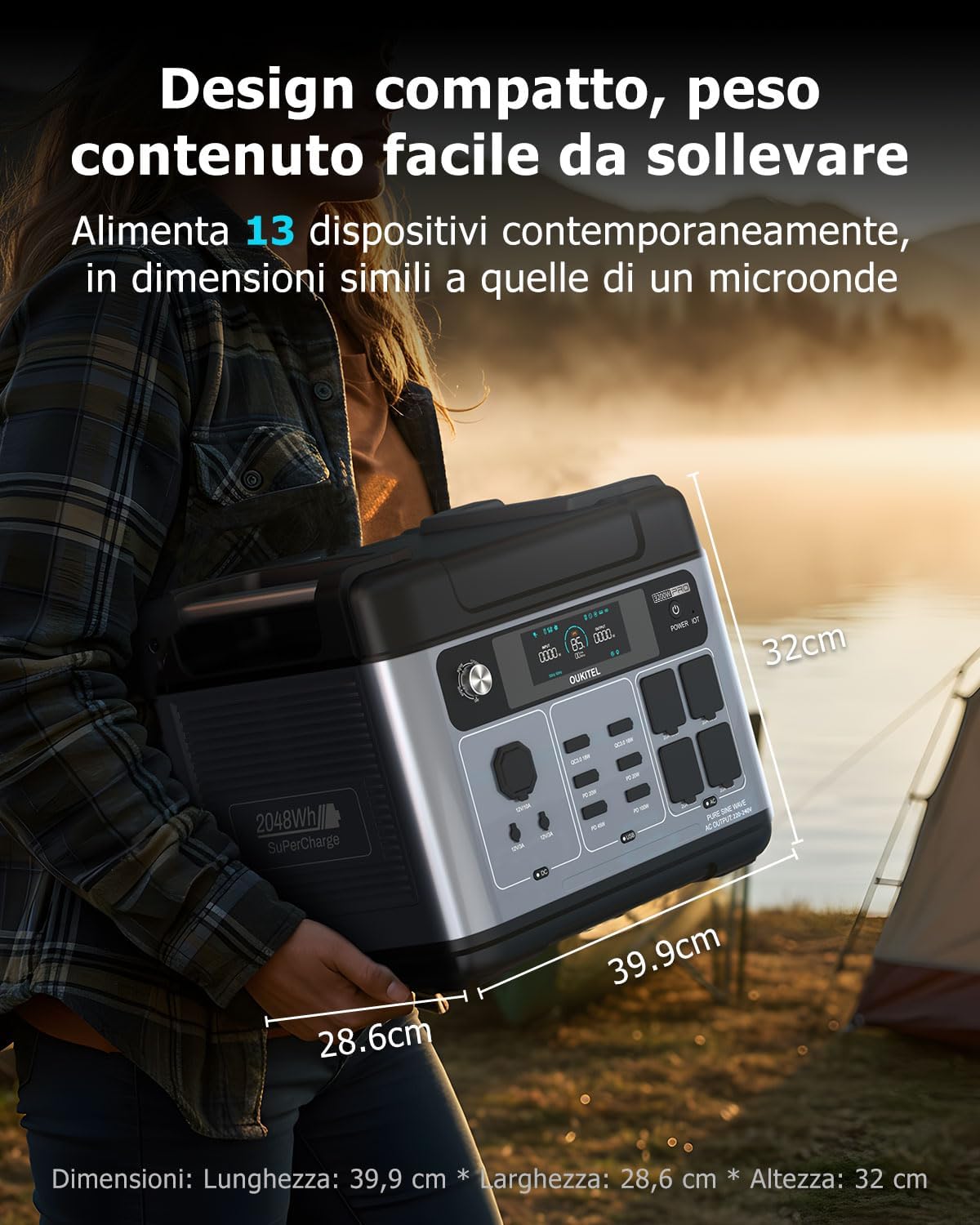
Image : Dimensions du produit.
12. Garantie et assistance
The OUKITEL P2001E Pro is built for durability and comes with comprehensive support.
- Garantie: The product includes a 5-year manufacturer's warranty.
- Durée de vie de la batterie: The integrated LiFePO₄ battery is designed for over 3500 charge cycles, providing an estimated lifespan of over 15 years.
- Assistance clientèle : A local service center is available in Germany. Our support team aims to respond within 8 hours, offering fast, professional, and reliable assistance.
For warranty claims or technical assistance, please refer to the contact information provided in your warranty card or visit the official EcoVolt website.