
1. Introduction
Thank you for choosing the Cillso GTR3 Fitness Smart Watch. This manual provides essential information for the proper setup, operation, and maintenance of your device. Please read it thoroughly to ensure optimal performance and a complete understanding of all features.
2. Contenu du colis
Vérifiez que tous les éléments sont présents dans votre colis :
- 1 x Cillso GTR3 Smart Watch
- 1 x Câble de charge magnétique
- 1 x Detailed User Manual (this document)
3. Guide de configuration
3.1 Recharge de la montre connectée
Before first use, fully charge your Cillso GTR3 Smart Watch. Connect the magnetic charging cable to the charging points on the back of the watch and plug the USB end into a standard USB power adapter (not included).

Image: The Cillso GTR3 Smart Watch connected to its magnetic charging cable, indicating a 350 mAh battery and 3ATM waterproof rating.
A full charge typically takes approximately 2 hours. The watch has a standby time of up to 45 days and can last up to 10 days with heavy usage.
3.2 Téléchargement et appairage de l'application
To unlock the full functionality of your smart watch, download the "Runmefit" application on your smartphone.
- Téléchargez l'application : Rechercher "Runmefit" in your smartphone's app store (compatible with iOS 12.0+ and Android 7.0+).
- Activer Bluetooth : Activez le Bluetooth sur votre smartphone.
- Open Runmefit App: Launch the app and follow the on-screen instructions to search for your device. Select "GTR3" from the list of available devices.
- Confirmer l'association : Confirmez la demande de jumelage sur votre téléphone et sur votre montre connectée.

Image: Visual guide demonstrating the steps to download the "Runmefit" app, enable Bluetooth, and connect the GTR3 smart watch.
3.3 Activation de la fonction d'appel Bluetooth
For Bluetooth calling functionality, an additional connection is required:
- Ensure the watch is successfully bound to the "Runmefit" app.
- Accédez aux paramètres Bluetooth de votre smartphone.
- Find and select "GTR3" (or a similar identifier) in the list of available devices and click to bind. This creates a separate audio connection.
- Une fois connectée, vous pouvez utiliser la montre pour répondre aux appels et en passer.
4. Mode d'emploi
4.1 Navigation de base
The Cillso GTR3 features a 1.46-inch AMOLED Ultra-HD full touchscreen display. Swipe across the screen to navigate through menus and functions. Use the physical buttons for quick access or to return to the home screen.

Image: The 1.46-inch AMOLED display of the GTR3 Smart Watch showcasing différents cadrans de montre personnalisables.
4.2 Surveillance de la santé
La montre surveille en permanence différents indicateurs de santé :
- Fréquence cardiaque : Surveille votre fréquence cardiaque 24h/24 et 7j/7. View real-time data and historical trends in the Runmefit app.
- Oxygène sanguin (SpO2) : Monitors blood oxygen levels to help ensure vital signs stay within a healthy range.
- Surveillance du sommeil : Automatically tracks sleep patterns, including deep sleep, light sleep, and awake times, providing insights into sleep quality.
- Surveillance du stress : Analyzes stress levels throughout the day.
- Rappel Cycle Physiologique : Provides reminders for women's health tracking when configured in the app.

Image : Terminéview of the GTR3's 24/7 health tracking capabilities, including heart rate, SpO2, body energy, and sleep monitoring.

Image : détaillée view of the heart rate monitoring feature on the GTR3 Smart Watch and its companion app.

Image: The GTR3 Smart Watch showing continuous blood oxygen monitoring, with data also visible in the app.

Image: The GTR3 Smart Watch's sleep monitoring interface, showing duration of deep sleep, light sleep, and awake periods.
4.3 modes sportifs
The GTR3 supports over 110 sports modes, including walking, running, cycling, soccer, and hiking. Select your desired activity to track specific metrics such as steps, distance, calories burned, and exercise duration.

Image: The GTR3 Smart Watch highlighting its 110+ sports modes and detailed tracking of steps, calories, heart rate, blood oxygen, and stress.
4.4 Appels et notifications Bluetooth
Once the Bluetooth call function is enabled (see Section 3.3), you can answer, reject, or make calls directly from your watch. The watch also displays notifications from your smartphone, including messages and app alerts.
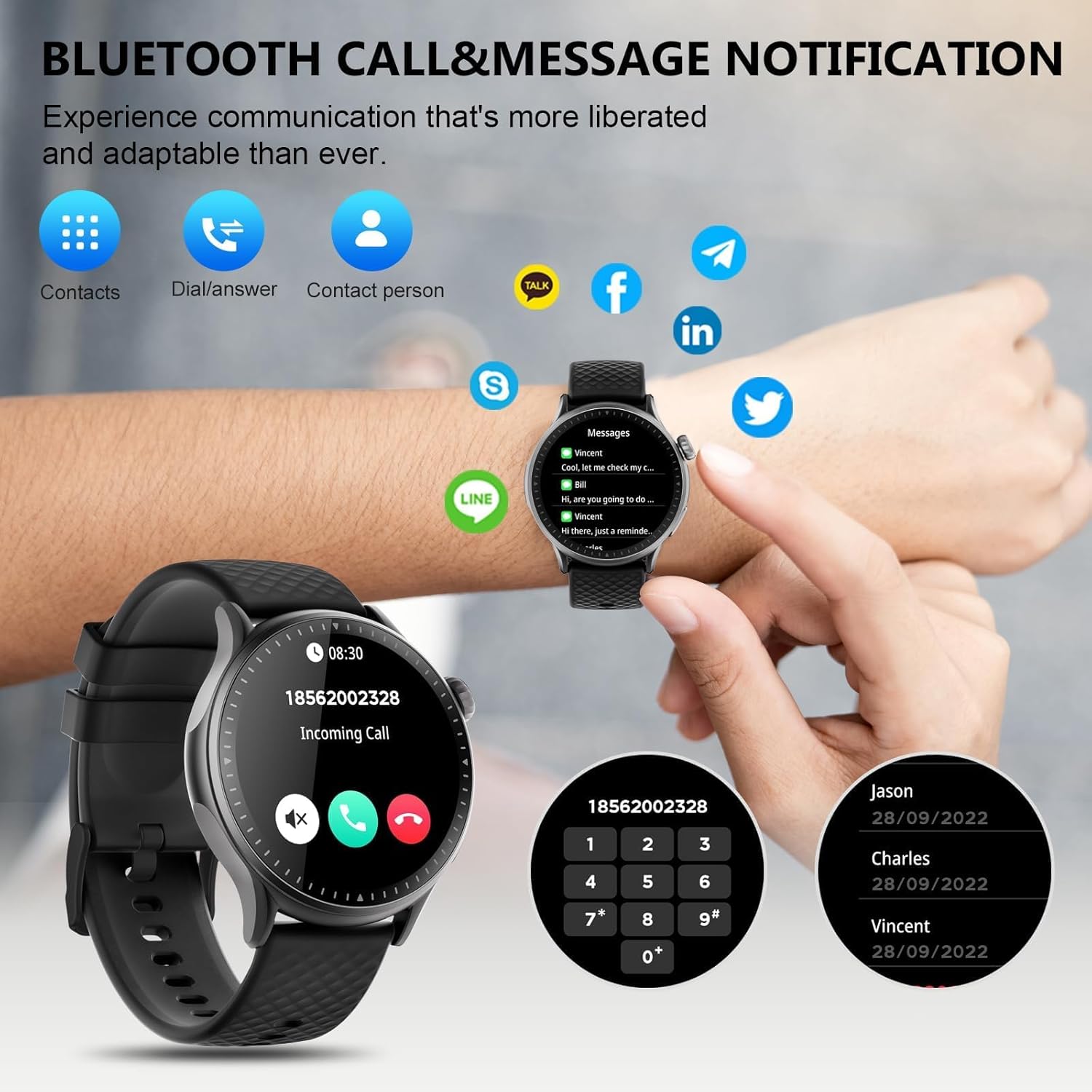
Image: The GTR3 Smart Watch displaying an incoming call and various message notification icons from social media and communication apps.
4.5 Assistant vocal IA
The built-in AI assistant allows for hands-free control. Use voice commands to check the weather, control music playback on your phone, set alarms, and more.

Image: The GTR3 Smart Watch's AI Voice Assistant interface, illustrating how to use voice commands for tasks like checking weather or setting alarms.
4.6 fonctions supplémentaires
The Cillso GTR3 offers a range of other useful features:
- Prévisions météorologiques
- Trouver téléphone
- Chronomètre et minuteur
- Calculatrice
- Réveil
- Contrôle de la caméra à distance
- Music Control (for your phone's music player)
- Exercices de respiration

Image: The GTR3 Smart Watch's app menu, showcasing icons for various functions including Find Phone, Weather, Calculator, Remote Camera Shutter, Breathing Exercises, Women's Health, and Alarm Clock.
4.7 Personnalisation des cadrans de montre
Personalize your watch with a variety of watch faces. The "Runmefit" app offers over 200 watch faces to choose from. You can also upload your favorite photos to create custom watch faces.
5. Entretien
5.1 Imperméabilisation
The Cillso GTR3 has a 3ATM waterproof rating, meaning it is resistant to splashes, rain, and sweat. It is suitable for daily use and can withstand brief immersion in water. However, it is pas recommended for hot showers, saunas, diving, or high-speed water sports, as steam or high water pressure can compromise the seals.
5.2 Nettoyage et entretien
Pour préserver l'apparence et le fonctionnement de votre montre :
- Essuyez régulièrement l'écran et le bracelet avec un chiffon doux et sec.amp tissu.
- Évitez d’utiliser des produits chimiques agressifs, des nettoyants abrasifs ou des solvants.
- Avant de procéder à la charge, assurez-vous que les contacts de charge sont propres et secs.
- Évitez d'exposer la montre à des températures extrêmes ou à la lumière directe du soleil pendant des périodes prolongées.
5.3 Durée de vie de la batterie
To maximize battery life, avoid fully discharging the watch frequently. Charge it when the battery level is low, and disconnect it once fully charged.
6. Dépannage
If you encounter issues with your Cillso GTR3 Smart Watch, refer to the following common problems and solutions:
| Problème | Solution possible |
|---|---|
| Watch not connecting to phone via Bluetooth. | Ensure Bluetooth is enabled on your phone. Restart both the watch and phone. Make sure the "Runmefit" app is open and running in the background. Check if the watch is already paired with another device. |
| Bluetooth call function not working. | Verify that the watch is connected via Bluetooth in les deux the "Runmefit" app and your phone's native Bluetooth settings (as a separate audio device). |
| Notifications or calls only vibrate, no sound. | Check the sound settings on your watch and in the "Runmefit" app. Ensure the watch's speaker volume is not muted or set too low. Note that the speaker volume may be limited in noisy environments. |
| Nombre de pas ou données de santé inexacts. | Ensure the watch is worn snugly on your wrist. Calibrate the watch in the "Runmefit" app if available. Keep the app connected to sync data regularly. |
| Les informations météorologiques ne sont pas mises à jour. | Ensure your phone's location services are enabled and the "Runmefit" app has permission to access your location. The app must be connected and running in the background to sync weather data. |
| Watch disconnects frequently. | Maintain close proximity between your watch and smartphone. Avoid obstacles that may interfere with the Bluetooth signal. Ensure the "Runmefit" app is not being closed by your phone's power-saving features. |
| Cannot customize watch faces. | Ensure the watch is connected to the "Runmefit" app. Follow the app's instructions for selecting or uploading watch faces. Some watches may have limitations on the number of custom faces stored simultaneously. |
7. Spécifications
| Fonctionnalité | Détail |
|---|---|
| Nom du modèle | GTR3 |
| Marque | Cillso |
| Type d'affichage | Écran AMOLED |
| Taille de l'écran | 1.46 pouces |
| Résolution | 1.46" AMOLED Ultra-HD |
| Système opérateur | iOS 12.0+ et Android 7.0+ |
| Capacité de stockage de la mémoire | 128 Mo |
| Technologie de connectivité | Bluetooth |
| Norme de communication sans fil | Bluetooth |
| Capacité de la batterie | 350 mAh (approximate, based on image) |
| Durée de vie moyenne de la batterie | Up to 10 days (heavy usage), 45 days (standby) |
| Niveau de résistance à l'eau | 3 ATM (30 mètres) |
| Mesures mesurées | Heart Rate, Sleep Duration, Blood Oxygen Monitor |
| Caractéristiques spéciales | 24/7 Activity Tracker, Heart Rate Monitor, Sleep Monitor, AI Voice Control, Message Notifications, Answer/Make Call, AMOLED Touchscreen, Cycle Tracking, Alarm Clock, Blood Oxygen Monitor, 110+ Sport Modes, Music Control, Distance Record/Pedometer/Calories, Distance Tracker |
| Type de matériau de la bande | Silicone, Rubber, or Fluoroelastomer |
| GPS | GPS via smartphone |
| Public cible | Adultes unisexes |
8. Informations sur la garantie
The Cillso GTR3 Smart Watch comes with a Garantie standard de 1 ans À compter de la date d'achat, cette garantie couvre les défauts de fabrication et les dysfonctionnements survenant dans des conditions normales d'utilisation. Elle ne couvre pas les dommages causés par une mauvaise utilisation, un accident, des modifications non autorisées ou le non-respect des instructions de ce manuel.
Veuillez conserver votre preuve d'achat pour les réclamations au titre de la garantie.
9. Assistance clientèle
For further assistance, technical support, or warranty inquiries, please refer to the contact information provided with your purchase or visit the official Cillso website. Ensure you have your product model (GTR3) and proof of purchase ready when contacting support.