
1. Introduction
Thank you for choosing the Sharp 40HF2265E Full HD Google TV. This manual provides essential information for setting up, operating, and maintaining your television. Featuring integrated Google TV, HDR10 support, Dolby Digital audio, and Bluetooth connectivity, your new TV offers a rich entertainment experience. Please read this manual thoroughly before use to ensure proper operation and to maximize your viewplaisir inouï.

Illustration 1.1 : Avant view of the Sharp 40HF2265E Full HD Google TV.
2. Contenu de la boîte
Déballez soigneusement votre téléviseur et vérifiez que tous les éléments suivants sont inclus :
- Sharp 40HF2265E Television
- Câble d'alimentation
- Télécommande (nécessite 2 piles AAA, non toujours incluses)
- Manuel de l'utilisateur (ce document)
- Carte de garantie
If any items are missing or damaged, please contact your retailer or Sharp customer support immediately.
3. Installation
3.1 Installation du support
To install the TV stand, place the TV screen-down on a soft, flat surface to prevent scratches. Align the stand feet with the corresponding slots on the bottom of the TV and secure them with the provided screws. Ensure the stand is firmly attached before placing the TV upright.

Illustration 3.1 : Avant view of the TV with stand feet attached.
3.2 Montage mural
If you prefer to wall-mount your TV, you will need a VESA-compatible wall mount (not included). The Sharp 40HF2265E supports a VESA mounting standard of 200 x 200 mm. Refer to the wall mount's instructions for installation. Always ensure the wall can support the weight of the TV and the mount.

Image 3.2 : Arrière view of the TV, highlighting VESA mounting points and ports.
3.3 Connexion de périphériques
Connect your external devices to the appropriate ports on the back and side of the TV. The TV features multiple HDMI, USB, and other connectivity options.
- Ports HDMI : Pour connecter des lecteurs Blu-ray, des consoles de jeux, des décodeurs, etc.
- Ports USB : Pour connecter des périphériques de stockage USB afin de lire des fichiers multimédias ou d'effectuer des mises à jour logicielles.
- Port Ethernet: Pour une connexion internet filaire.
- Entrée antenne/câble : Pour connecter une antenne ou un signal de télévision par câble.
- Sortie audio : Pour connecter des systèmes audio externes.
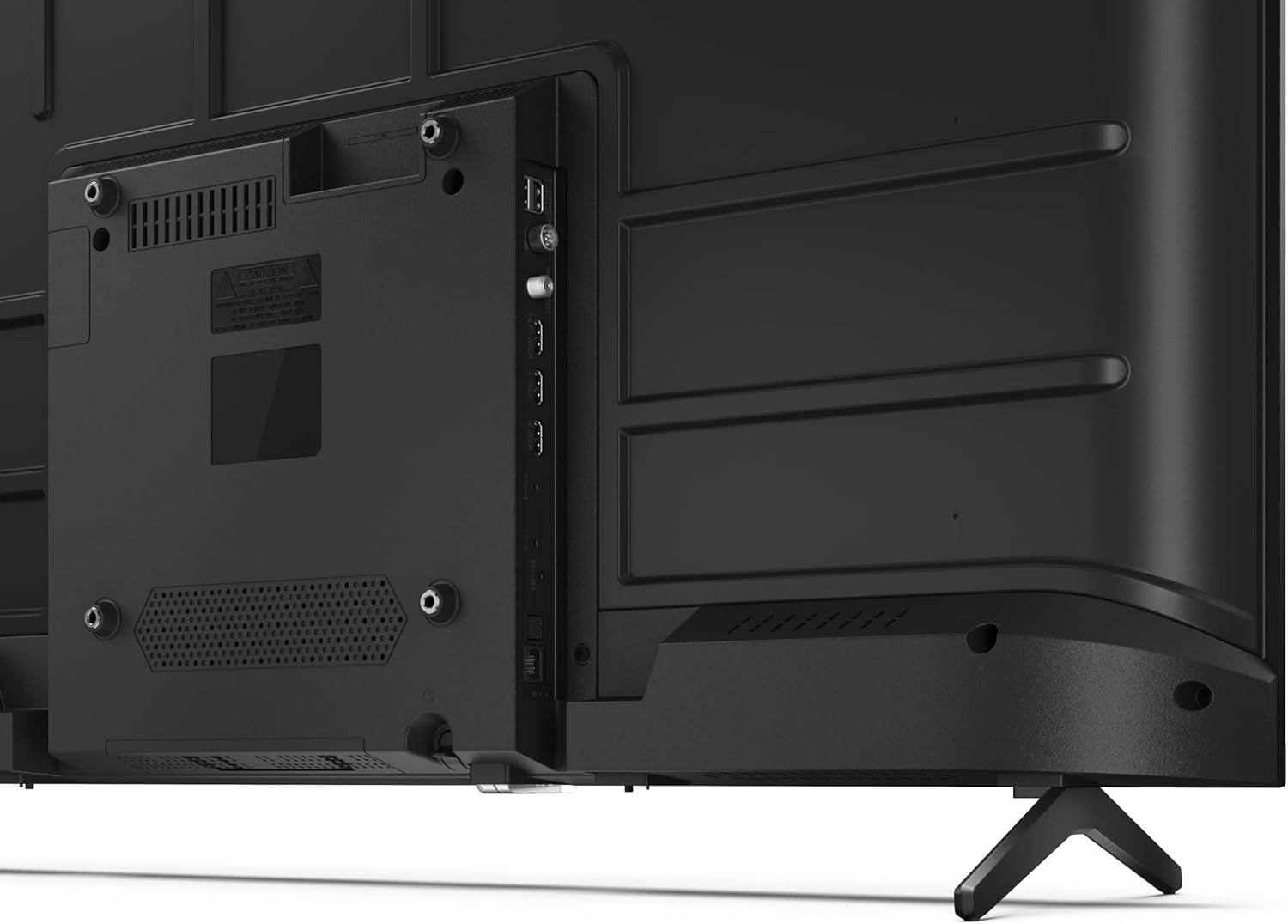
Image 3.3 : Détail view des ports de connectivité du téléviseur.
3.4 Mise sous tension initiale et configuration de Google TV
After connecting all necessary cables, plug the power cable into an electrical outlet. Press the power button on the remote control or on the TV. Follow the on-screen instructions to complete the initial setup, including network connection, Google account login, and channel scanning.
4. Fonctionnement
4.1 Fonctions de la télécommande
The remote control allows you to navigate the TV's features. Common buttons include Power, Volume Up/Down, Channel Up/Down, Input Source, Home (Google TV), Navigation (directional arrows, OK), Back, and Google Assistant.
4.2 Interface Google TV
Your Sharp TV runs on Google TV, providing a personalized home screen with content recommendations from your subscriptions. Use the remote's navigation buttons to browse movies, shows, apps, and your library.

Image 4.1: The Google TV home screen on the Sharp 40HF2265E.
4.3 Sélection d'entrée
To switch between connected devices (e.g., HDMI 1, HDMI 2, TV tuner), press the 'Input' or 'Source' button on your remote control and select the desired input from the on-screen menu.
4.4 Paramètres d'image et de son
Access the TV's settings menu to adjust picture modes (Standard, Vivid, Cinema, Game), brightness, contrast, color, and sound modes (Standard, Music, Movie, Speech). The TV supports HDR10 for enhanced contrast and color, and Dolby Digital for rich audio.

Image 4.2: Visual representation of HDR (High Dynamic Range) technology.
4.5 Assistant Google et Chromecast
Use the built-in Google Assistant for voice control. Press the Google Assistant button on your remote and speak your commands, such as searching for content, controlling smart home devices, or getting information. Chromecast allows you to cast content directly from compatible devices like smartphones or tablets to your TV.

Image 4.3: Google Assistant integration for voice commands.
4.6 Connectivité Bluetooth
Pair Bluetooth-enabled devices such as headphones or soundbars with your TV for a wireless audio experience. Navigate to the TV's settings menu, select 'Remotes & Accessories', and then 'Pair new device' to connect.
5. Entretien
5.1 Nettoyage du téléviseur
Débranchez toujours le téléviseur avant de le nettoyer. Utilisez un chiffon doux et sec pour essuyer l'écran et le boîtier. Pour les taches tenaces, frottez légèrement avec un chiffon doux.ampNettoyez le chiffon avec de l'eau ou un nettoyant spécial écrans. N'utilisez jamais de nettoyants abrasifs, de cires ou de solvants.
5.2 Mises à jour logicielles
Votre Google TV peut recevoir des mises à jour logicielles automatiques. Assurez-vous qu'elle est connectée à Internet pour recevoir ces mises à jour, qui peuvent améliorer ses performances et ajouter de nouvelles fonctionnalités. Vous pouvez également rechercher manuellement les mises à jour dans le menu Paramètres.
6. Dépannage
Si vous rencontrez des problèmes avec votre téléviseur, reportez-vous aux solutions courantes suivantes :
- Pas d'alimentation : Vérifiez que le câble d'alimentation est bien branché à la fois au téléviseur et à la prise murale. Assurez-vous que la prise fonctionne correctement.
- Pas d'image/de son : Verify that the correct input source is selected. Check all cable connections (HDMI, antenna). Try restarting the TV.
- La télécommande ne fonctionne pas : Remplacez les piles (2 AAA). Assurez-vous qu'aucun obstacle ne se trouve entre la télécommande et le capteur infrarouge du téléviseur.
- Problèmes de connexion réseau : For Wi-Fi, check your router and ensure the TV is within range. For wired connections, check the Ethernet cable. Try restarting your router and the TV.
- Problèmes de qualité d'image : Ajustez les paramètres d'image (luminosité, contraste, netteté). Assurez-vous que la source d'entrée fournit un signal de haute qualité.
For more complex issues, consult the comprehensive troubleshooting section in the full digital manual or contact Sharp customer support.
7. Spécifications
Below are the technical specifications for the Sharp 40HF2265E Full HD Google TV:

Image 7.1: Dimensions of the Sharp 40HF2265E TV.
| Fonctionnalité | Spécification |
|---|---|
| Marque | Pointu |
| Numéro de modèle | 40HF2265E |
| Nom du modèle | Série HF |
| Année modèle | 2025 |
| Taille de l'écran | 40 pouces (81 centimètres) |
| Technologie d'affichage | DIRIGÉ |
| Résolution | 1080p (Full HD) |
| Taux de rafraîchissement | 60 Hz |
| Rapport hauteur/largeur | 16:9 |
| Rapport de contraste | 100000:1 |
| Screen Finish | Mat |
| Temps de réponse | 8 millisecondes |
| Technologie de rétroéclairage | DIRIGÉ |
| Supported HDR Format | HDR10, HLG |
| Amélioration de la qualité de l'image | Dynamic Contrast, HDR10, HLG |
| Motion Enhancement Technology | Interpolation de mouvement |
| Système opérateur | Google TV |
| Internet Applications | Apple TV, Google TV, Hulu, Prime Video, YouTube |
| Caractéristiques spéciales | Bluetooth, Chromecast, Dolby Digital, HD Tuner |
| Technologie de connectivité | Ethernet, USB, Wi-Fi |
| Technologie sans fil | Bluetooth |
| Version Bluetooth | 5.0 |
| Screen Mirroring Technology | Chromecast, Google Cast |
| Nombre total de ports HDMI | 3 |
| Total USB 2.0 Ports | 2 |
| Number of Composite Video Inputs | 1 |
| Entrée audio | Mini composite/CVBS + audio input |
| Total Audio Output Ports | 2 |
| Mode de sortie audio | Stéréo |
| Encodage audio | DD |
| Integrated Surround Sound Format | Dolby AC-4, Dolby Digital, Dolby Digital Plus |
| Puissance de sortie maximale des haut-parleurs | 16 watts (2 x 8 W) |
| Nombre de canaux audio | 2.0 |
| Système de diffusion | DVB-T2/C/S/S2 |
| Encodage vidéo | MKV |
| Dimensions du produit (PxLxH) | 8.4 cm (P) x 89.2 cm (L) x 50.9 cm (H) |
| Poids de l'article | 5.4 kilogrammes |
| Poids sans support | 5.4 kilogrammes |
| Largeur de la base | 765 millimètres |
| Norme de montage VESA | 200 x 200 mm |
| Consommation d'énergie | 37 watts |
| Voltage | 230 volts |
| Remote Control Battery Size | AAA |
| Remote Control Battery Quantity | 2 |
| Parental Control Technology | Kindersicherung Über Google Tv |
| Disponibilité des pièces détachées dans l'UE | 7 années |
8. Garantie et assistance
8.1 Garantie du produit
The Sharp 40HF2265E television comes with a 2-year manufacturer's warranty. Please refer to the included Warranty Card for detailed terms and conditions regarding coverage and service. Keep your proof of purchase for warranty claims.
8.2 Assistance clientèle
If you require further assistance, have questions not covered in this manual, or need technical support, please contact Sharp customer service. Contact information can typically be found on the Warranty Card or the official Sharp website.