
1. Introduction
This manual provides detailed instructions for the installation, operation, and maintenance of your Zebronics DMS200 Monitor Desk Stand. Please read this manual thoroughly before installation and use to ensure proper function and safety. The DMS200 is designed to support monitors from 17 to 32 inches, with a maximum load capacity of 7 kg, offering ergonomic adjustments for an optimized viewexpérience de travail.

Image 1.1: Zebronics DMS200 Monitor Desk Stand overview.
2. Consignes de sécurité
Veuillez respecter les consignes de sécurité suivantes afin d'éviter toute blessure ou tout dommage au produit :
- Ne pas dépasser la capacité de poids maximale de 7 kg (15.4 lbs).
- Ensure the desk surface is stable and strong enough to support the combined weight of the stand and monitor.
- Always follow the installation instructions carefully. Improper installation can lead to equipment damage or personal injury.
- Tenir les enfants et les animaux domestiques à l'écart pendant l'installation. Les petites pièces peuvent présenter un risque d'étouffement.
- Ne serrez pas trop les vis, car cela pourrait les endommager.
- Vérifiez régulièrement toutes les connexions pour vous assurer qu'elles restent sécurisées.
3. Contenu du colis
Vérifiez que tous les composants sont présents avant de commencer l'installation :
- Assemblage du bras du moniteur
- Bureau Clamp (C-clamp)
- Base de montage à œillet
- Plaque VESA
- Kit de visserie (vis, rondelles, clés Allen)
- Manuel d'instructions
4. Configuration et installation
The Zebronics DMS200 offers two installation methods: C-clamp and Grommet mount. Choose the method best suited for your desk.
4.1. Choix d'une méthode de montage
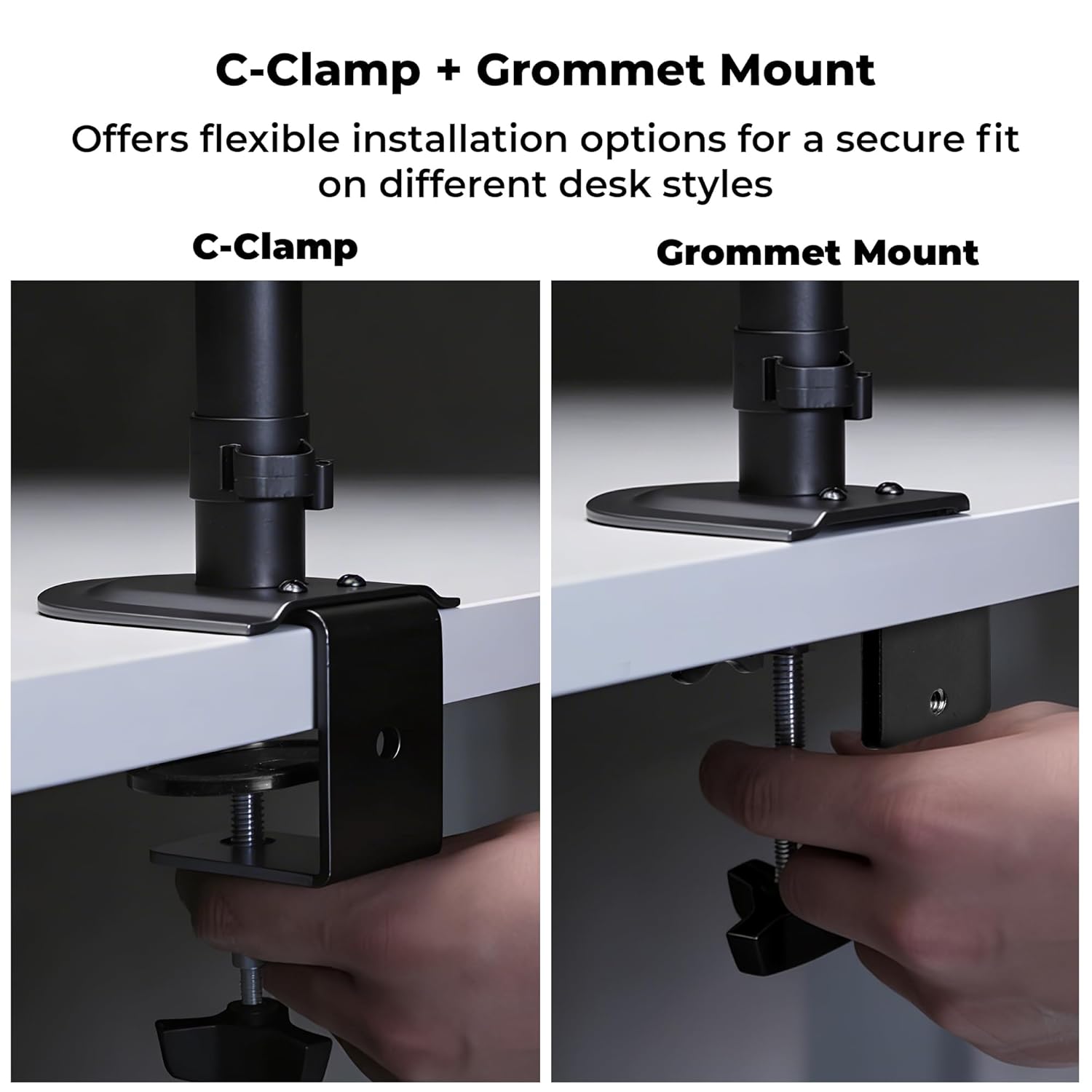
Image 4.1: C-Clamp and Grommet Mount options.
- Cl-Camp: Ideal for desks without pre-drilled holes. Clamps to the edge of the desk.
- Montage par œillet : Requires a pre-drilled hole (or drilling one) in the desk. Provides a more flush installation.
4.2. C-Clamp Installation
- Attachez le C-clamp jusqu'au pied du poteau principal.
- Placez le support sur le bord de votre bureau.
- Serrer le C-clamp screw until the stand is securely fastened to the desk. Ensure it is stable and does not wobble.
4.3. Installation du support à œillet
- Démontez le C-clamp from the main pole if it was pre-attached.
- Insérez le poteau principal dans le trou passe-câble de votre bureau.
- Secure the grommet base plate and tighten the nut from underneath the desk until the stand is firm.
4.4. Ensuring Stability
After mounting the stand, verify its stability on the desk. The anti-slip base and robust construction ensure reliable support for monitors up to 7 kg.

Image 4.4: Stand stability and maximum load capacity.
4.5. Fixation du moniteur
The DMS200 supports VESA patterns of 75x75mm and 100x100mm.

Image 4.5: VESA mount plate for monitor attachment.
- Attach the VESA plate to the back of your monitor using the appropriate screws from the hardware kit. Ensure the screws are not overtightened.
- Carefully slide the monitor (with the VESA plate attached) onto the monitor arm's mounting head.
- Secure the monitor to the arm by tightening the locking screw or mechanism on the mounting head.
4.6. Gestion des câbles
Utilize the integrated cable management clips to keep your workspace tidy.

Image 4.6: Integrated cable management.
- Route your monitor's power and display cables through the clips located along the arm and pole.
- Ensure cables have enough slack for full range of motion without being strained.
5. Mode d'emploi
The DMS200 monitor arm provides various adjustments for optimal ergonomic positioning.

Image 5.1: Monitor arm adjustment capabilities.
- Réglage de la hauteur : Loosen the collar on the main pole, adjust the arm to the desired height, and then re-tighten the collar.
- Réglage de l'inclinaison : The monitor can be tilted up to ±5°. Adjust the tilt angle by gently pushing or pulling the top or bottom of the monitor. If the monitor does not hold its position, tighten the tilt mechanism screw with an Allen key.
- Ajustement pivotant : The arm allows for ±90° swivel. Gently rotate the monitor left or right to achieve the desired viewangle de vue.
- Rotation: The VESA plate allows for 360° rotation, enabling portrait or landscape orientation. Rotate the monitor gently to switch orientations.
- Extension du bras : The mechanical arm can extend up to 42 cm. Adjust the arm's position by gently pulling or pushing it to bring the monitor closer or further away.
6. Entretien
To ensure the longevity and proper function of your monitor stand:
- Nettoyage: Essuyez le support avec un chiffon doux et sec.amp Chiffon. Évitez les nettoyants abrasifs ou les solvants qui pourraient endommager la finition.
- Contrôles périodiques : Vérifiez régulièrement le serrage et la fixation de toutes les vis et connexions. Resserrer si nécessaire.
- Capacité de charge: Do not place items on the monitor arm or exceed the maximum weight capacity.
7. Dépannage
| Problème | Cause possible | Solution |
|---|---|---|
| Monitor sags or does not hold tilt position. | Tilt mechanism screw is loose. | Tighten the tilt adjustment screw on the VESA head using the provided Allen key. |
| Stand wobbles or is unstable. | Bureau clampLe support à œillet n'est pas suffisamment serré. | Resserrer le C-clamp or grommet mount screw/nut. Ensure the desk surface is stable. |
| Monitor cannot be rotated or swiveled smoothly. | Les articulations peuvent être trop serrées ou nécessiter une lubrification. | Check for any obstructions. If joints are too stiff, apply a small amount of silicone-based lubricant (avoid oil-based). |
| Cables are strained during adjustment. | Insufficient slack in cable management. | Re-route cables, ensuring enough slack is provided for the full range of arm movement. |
8. Spécifications
| Fonctionnalité | Détail |
|---|---|
| Modèle | DMS200 |
| Taille d'écran prise en charge | 17 à 32 pouces |
| Capacité de charge maximale | 7 kg (15.4 lb) |
| Compatibilité VESA | 75x75mm, 100x100mm |
| Type de montage | Cl-Camp, Montage sur œillet |
| Ajustements | Hauteur, Inclinaison (±5°), Pivotement (±90°), Rotation (360°) |
| Extension du bras | Jusqu'à 42 cm |
| Matériel | Metal (Rust-Proof) |
| Couleur | Noir |
| Poids de l'article | 1670 gramme |
9. Garantie et assistance
Garantie: The Zebronics DMS200 Monitor Desk Stand comes with a 1-year carry-in warranty to the service center from the date of purchase.
Soutien: For technical assistance, troubleshooting, or warranty claims, please contact Zebronics customer support. Refer to the official Zebronics webPour obtenir nos coordonnées, veuillez consulter le site ou votre documentation d'achat.
Manufacturer: Zebronics India Private Limited, 13/7 Smith Road, Royapettah, Chennai, Tamil Nadu - 600 002, India.