
1. Introduction
This manual provides essential instructions for the safe and efficient operation, maintenance, and troubleshooting of your AIPER Scuba V3 Robotic Pool Cleaner. Please read this manual thoroughly before using the device and retain it for future reference.

Figure 1: AIPER Scuba V3 Robotic Pool Cleaner
2. Consignes de sécurité
Respectez toujours les consignes de sécurité de base afin de réduire les risques d'incendie, d'électrocution et de blessures.
- Lisez toutes les instructions avant d'utiliser l'appareil.
- Do not operate the cleaner if the power cord or charging station is damaged.
- Ensure the charging station is placed in a dry, shaded area, away from direct sunlight and water.
- Keep children and pets away from the pool area when the cleaner is in operation or charging.
- Only use accessories and parts recommended or sold by the manufacturer.
- Do not attempt to repair the cleaner yourself. Contact authorized service personnel for assistance.
3. Composants du produit
The AIPER Scuba V3 package includes the following components:
- AIPER Scuba V3 Robotic Pool Cleaner
- Station de charge sans fil
- Adaptateur secteur
- Manuel d'utilisation
- Panier-filtre (préinstallé)
- MicroMesh Filter (optional, for fine debris)
4. Installation
4.1 Charge initiale
Before first use, fully charge the Scuba V3.
- Place the wireless charging station on a flat, dry surface near a power outlet.
- Connect the power adapter to the charging station and plug it into the outlet.
- Place the Scuba V3 onto the charging station. Ensure the charging contacts align. The indicator light on the cleaner will show charging status.
- Prévoyez environ 4 heures pour une charge complète. Le voyant lumineux changera de couleur une fois la charge terminée.
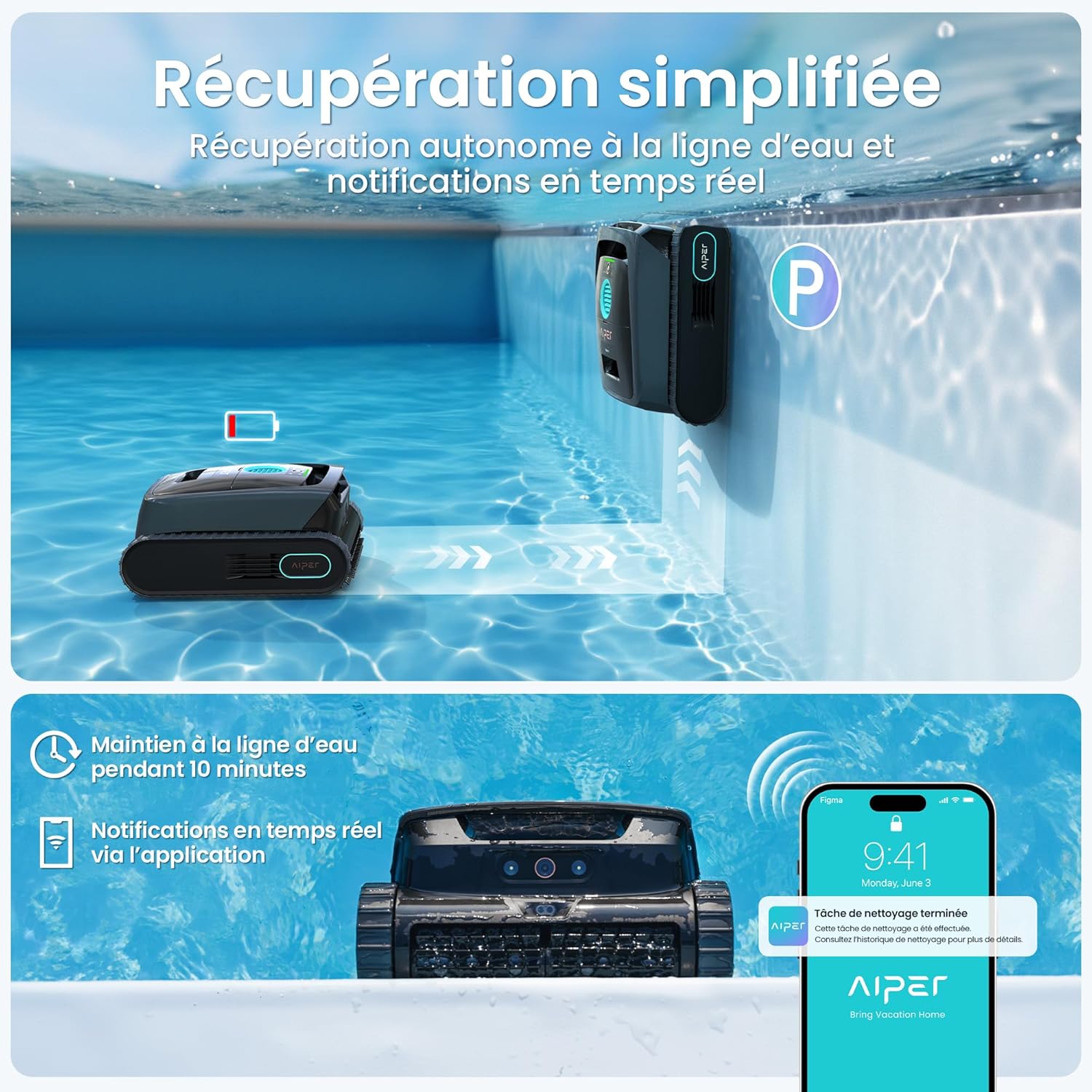
Figure 2: Placing the Scuba V3 on its wireless charging station.
4.2 Installation et appairage de l'application
Download the AIPER app from your smartphone's app store (iOS or Android). Follow the in-app instructions to pair your Scuba V3. This enables advanced features like Cognitive AI Navium mode and scheduled cleanings.
5. Mode d'emploi
5.1 Placer le nettoyeur dans la piscine
Gently lower the Scuba V3 into the pool. Ensure it sinks to the bottom. The cleaner will automatically activate once submerged.

Figure 3: Scuba V3 in operation, detecting debris with AI vision.
5.2 modes de nettoyage
The Scuba V3 offers various cleaning modes, accessible via the AIPER app:
- Nettoyage standard : For general pool cleaning, covering floor and walls.
- Cognitive AI Navium Mode: Plans weekly cleanings based on weather and pool conditions for 24/7 autonomy.
- Nettoyage des taches : For targeted cleaning of specific areas.
- Wall-only Cleaning: Focuses on scrubbing pool walls and waterline.

Figure 4: Cognitive AI Navium mode for automated cleaning schedules.
5.3 Récupération du nettoyeur
Upon completion of a cleaning cycle or when the battery is low, the Scuba V3 will automatically return to the waterline. You will receive an alert via the app.
- Gently pull the cleaner out of the water using its handle.
- Allow excess water to drain before placing it on the charging station or storing it.

Figure 5: Automatic waterline retrieval and app notification.
6. Entretien
6.1 Nettoyage du panier filtrant
Regularly clean the filter basket after each use to maintain optimal cleaning performance.
- Ouvrez le couvercle supérieur du nettoyeur.
- Retirez le panier-filtre.
- Empty debris from the basket.
- Rinse the basket thoroughly with a garden hose.
- If using the MicroMesh filter, carefully rinse it to remove fine particles.
- Réinsérez le panier-filtre propre et refermez bien le couvercle.

Figure 6: MicroMesh filtration system for capturing fine debris.
6.2 Entretien des brosses
Inspect the cleaning brushes periodically for wear and tear. Replace them if they become excessively worn to ensure effective scrubbing.

Figure 7: Dual brush system for deep cleaning.
6.3 Manipulation et stockage
The Scuba V3 is designed to be lightweight (8.2 kg) for easy handling. When not in use for extended periods, store the cleaner in a cool, dry place, away from direct sunlight. Ensure the battery is partially charged (around 50%) before storage.

Figure 8: The Scuba V3's lightweight design allows for easy one-handed handling.
7. Dépannage
| Problème | Cause possible | Solution |
|---|---|---|
| L'appareil de nettoyage ne s'allume pas. | Batterie faible ; interrupteur d'alimentation éteint. | Charge the cleaner; ensure power switch is on. |
| Mauvaise performance de nettoyage. | Clogged filter basket; worn brushes. | Clean the filter basket; inspect and replace brushes if necessary. |
| Cleaner stuck or moving erratically. | Obstruction; low battery; pool shape complexity. | Remove obstructions; charge the cleaner; try a different cleaning mode or manual intervention for complex areas. |
| Problèmes de connexion à l'application. | Bluetooth/Wi-Fi interference; app not updated. | Ensure cleaner is within range; restart app/device; update app to latest version. |
For further assistance, refer to the LED indicator lights on the device for error codes or contact customer support.

Figure 9: Smart LED indicator lights for status and troubleshooting.
8. Spécifications
| Fonctionnalité | Détail |
|---|---|
| Modèle | Scuba V3 (PRN31-FR) |
| Dimensions (L x l x H) | 44.4 x 38 x 21.8 cm |
| Poids | 8.2 kg |
| Type de batterie | Lithium-ion (inclus) |
| Source d'énergie | DC |
| Finesse du filtre | 3 µm (MicroMesh) |
| Zone de piscine maximale | Jusqu'à 200 m² |
| Temps de charge | Environ 4 heures |
| Durée d'exécution | Jusqu'à 180 minutes (3 heures) |
9. Garantie et assistance
The AIPER Scuba V3 comes with a Garantie de 2 ans. For any product inquiries, technical support, or warranty claims, please contact AIPER customer service.
- Assistance mondiale : AIPER offers 24/7 support through its network of 20 global service centers.
- Coordonnées: Refer to the AIPER official webPour obtenir les informations d'assistance les plus récentes, veuillez consulter le site web ou les coordonnées fournies dans l'emballage de votre produit.

Figure 10: TÜV certified data privacy ensures local processing of all images.